1. 서론
This manual provides essential information for the safe and efficient operation of your Bietrun 2000W Pure Sine Wave Inverter. Please read it thoroughly before installation and use, and retain it for future reference.
패키지 내용
패키지에 모든 품목이 들어 있는지 확인하세요.
- 1 x Bietrun 2000W Pure Sine Wave Inverter
- 2 x 10AWG 3-foot Battery Cables (Red and Black)
- 1 x Ground Cable
- 1 x 원격 제어
- 4 x 퓨즈
- 소형 렌치 1개
- 장착 나사

Image 1.1: The Bietrun 2000W Pure Sine Wave Inverter with its remote control, battery cables, ground cable, fuses, and wrench.
2. 안전 지침
Observe the following safety precautions to prevent injury and damage to the inverter or connected devices:
- 인버터 c를 열지 마십시오.asing. 내부에는 사용자가 수리할 수 있는 부품이 없습니다.
- 인버터 주변의 통풍이 원활하도록 하세요. 냉각 통풍구를 막지 마세요.
- 인버터를 물, 습기, 가연성 물질 및 직사광선으로부터 멀리 두십시오.
- 인버터는 12V DC 전원에만 연결하세요. 다른 볼륨에 연결하는 경우tag손상을 일으킬 수 있습니다.
- Ensure correct polarity when connecting battery cables (Red to Positive, Black to Negative). Reverse polarity will cause damage.
- Always connect the ground cable to a proper earth ground.
- Do not exceed the inverter's rated continuous power output (2000W) or peak surge power (4000W).
- Disconnect the inverter from the battery before performing any maintenance or cleaning.
통합 보호 기능
The inverter includes multiple protection mechanisms:
- 과부하 보호
- 낮은 볼륨tage 보호
- GFCI 보호
- 오버볼tage 보호
- 과열 보호
- 단락 보호
- 역접속 보호
- 과전류 보호

Image 2.1: Visual representation of the inverter's comprehensive safety protection system.
3. 제품 특징
The Bietrun 2000W Pure Sine Wave Inverter is designed for reliable power conversion with advanced features:
- 순수 사인파 출력: Provides high-quality AC power (THD < 3%) suitable for sensitive electronics, ensuring stable operation and minimizing damage risk.
- 고효율성: Conversion efficiency exceeding 90% reduces energy loss.
- 지속적인 힘: Delivers 2000W continuous power with a 4000W peak surge capacity.
- 다양한 출력: Features 4 AC outlets, 1 AC wiring terminal, 2 USB ports (5V/2.1A), and 1 Type-C port (5V/2.1A).
- HD LED 디스플레이: Provides real-time status updates including input/output voltage, charging status, battery status, current power, and fault codes.
- 원격 제어: Allows for convenient power management from a distance.
- 조용한 작동: High-efficiency cooling system with a low-noise fan maintains optimal operating temperature.
- 컴팩트하고 내구성 있는 디자인: Encased in rugged Aluminum Alloy, with dimensions of 19 x 10 x 7 inches and a weight of 12.5 lbs.

Image 3.1: Key features of the Bietrun 2000W Pure Sine Wave Inverter.
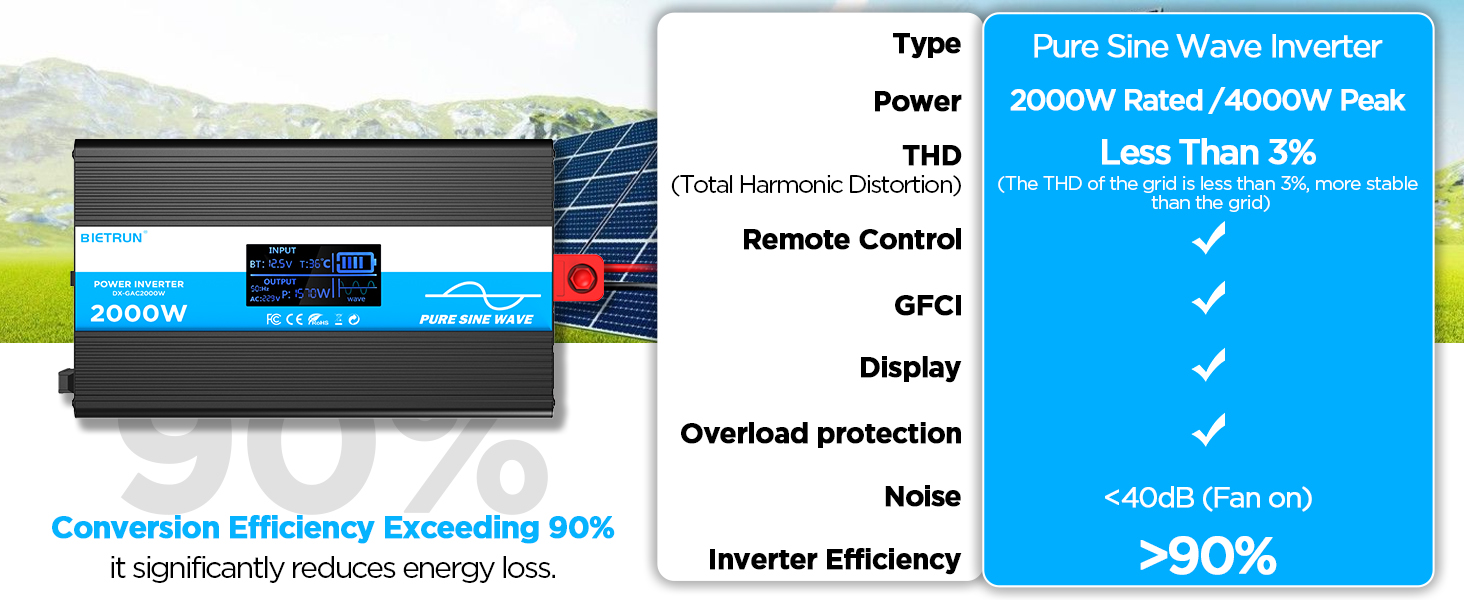
Image 3.2: Illustrates the stable, grid-like output of a pure sine wave inverter compared to unstable power from other types.
4. 설정 및 설치
위치 및 장착
Choose a dry, well-ventilated location away from direct sunlight, heat sources, and flammable materials. The inverter can be wall-mounted using the provided screws.
배터리 호환성
The inverter is compatible with various 12V battery types, including LiFePO4, LI, SLD, GEL, FLD, and AGM batteries.

Image 4.1: The inverter supports multiple 12V battery chemistries.
연결 단계
- 케이블 준비: Use the provided 10AWG 3-foot cables. Ensure all connections are secure.
- 접지 케이블을 연결하세요: Attach the green/yellow ground cable to the inverter's ground terminal and to a reliable earth ground point.
- 배터리 케이블을 연결하세요:
- 연결하다 빨간색 battery cable to the inverter's 양수(+) 단말기.
- 연결하다 검은색 battery cable to the inverter's 음수 (-) 단말기.
- 다른쪽 끝을 연결하세요 빨간색 cable to the battery's 양수(+) 단말기.
- 다른쪽 끝을 연결하세요 검은색 cable to the battery's 음수 (-) 단말기.
중요한: Ensure correct polarity. A spark may occur during the final connection, which is normal due to capacitor charging.
- 보안 연결: Double-check all connections for tightness to prevent loose contacts and overheating.
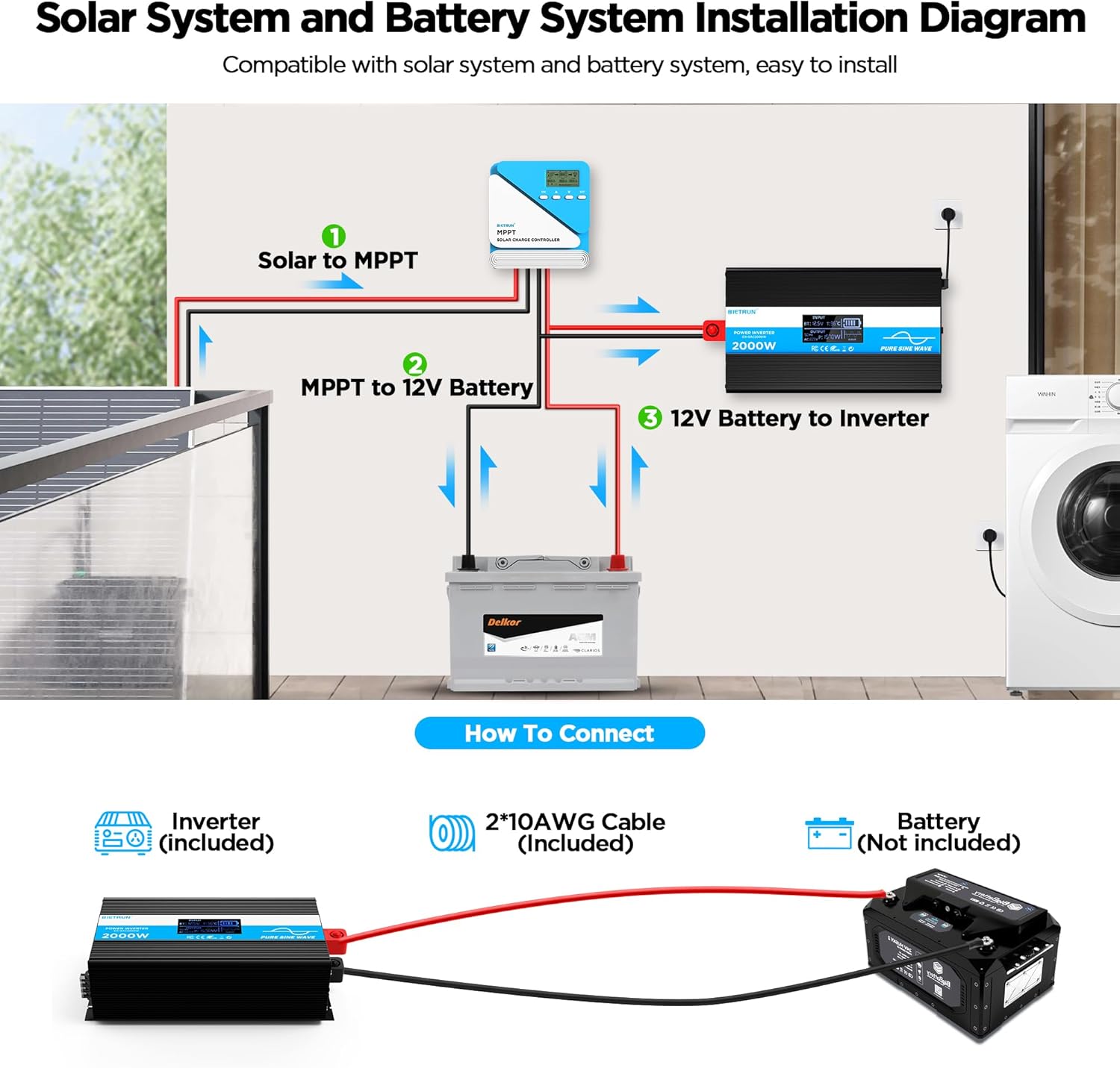
Image 4.2: Basic wiring diagram for connecting the inverter to a 12V battery.
Inverter Interface Overview

Image 4.3: Front panel layout with output interfaces and controls.

Image 4.4: Rear panel layout with battery input terminals and cooling fans.
5. 운영
전원 켜기/끄기
- 수동 조작: Flip the ON/OFF switch on the inverter to the 'ON' position to power on. Flip to 'OFF' to power off.
- 원격 제어 작동: Ensure the inverter's 'REMOTE' switch is in the 'ON' position. Use the ON/OFF buttons on the remote control to operate the inverter.
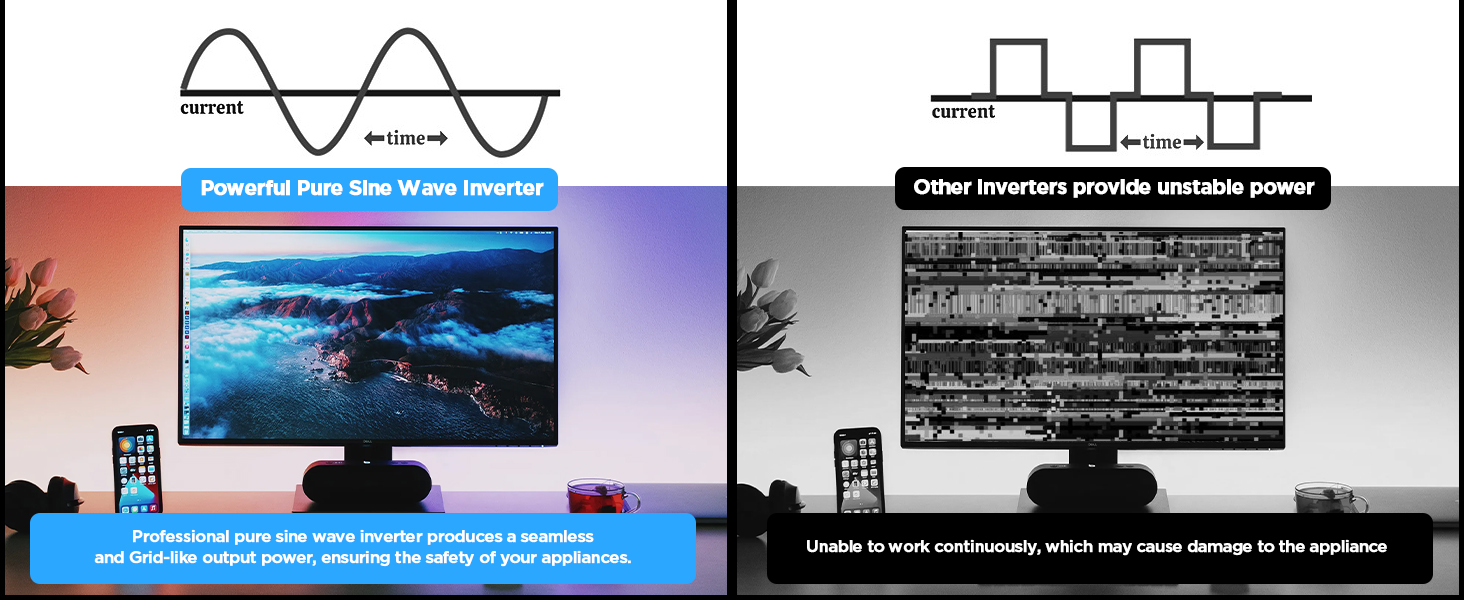
Image 5.1: The remote control allows for convenient operation.
장치 연결
Once the inverter is powered on, plug your AC devices into the AC outlets or connect to the AC wiring terminal. USB devices can be connected to the USB or Type-C ports.
Ensure the total power consumption of all connected devices does not exceed 2000W continuously.
6. HD Display Information
The integrated HD display provides real-time operational data and fault indications:
- 입력: 배터리 용량 표시tage (BT) and internal temperature (T).
- 산출: Shows output frequency (Hz), AC voltage (AC), and current power consumption (P).
- 배터리 상태: Visual indicator of battery charge level.
- 파형 : Indicates pure sine wave output.
- 오류 코드: Numeric codes appear for specific issues, aiding in troubleshooting.

Image 6.1: The HD display provides comprehensive status updates and fault codes.
오류 코드 설명
- 2: 낮은 볼륨tage 경고
- 3: 오버볼tage 보호
- 4: 낮은 볼륨tage 보호
- 5: 과부하 경고
- 6: 과부하 보호
- 7: 과열 보호
- 8: 출력 단락 보호
7. 문제 해결
If the inverter is not functioning correctly, refer to the display for fault codes and consult the table below:
| 문제 | 가능한 원인 | 해결책 |
|---|---|---|
| 인버터가 켜지지 않습니다 | 배터리 연결이 느슨함, 배터리 볼륨이 낮음tag예, 퓨즈 불량. | Check battery cable connections. Recharge or replace battery. Check and replace fuses if blown. |
| No AC output (Fault Code 8) | 출력 단락. | Disconnect all AC loads. Check for short circuits in connected devices or wiring. Reconnect one by one. |
| Overload warning/protection (Fault Code 5/6) | 연결된 부하가 인버터 용량을 초과했습니다. | Reduce the total power of connected devices. Disconnect high-power appliances. |
| 낮은 볼륨tage warning/protection (Fault Code 2/4) | 배터리 용량tage가 너무 낮습니다. | Recharge the battery. Check battery health. |
| 오버볼tage protection (Fault Code 3) | 입력 볼륨tage가 너무 높아요. | 배터리 용량 확인tage is within the 12V range. Disconnect from charging source if overcharging. |
| Overtemperature protection (Fault Code 7) | Inverter is overheating. | Ensure adequate ventilation. Reduce load. Allow inverter to cool down. Clean fan vents if obstructed. |
If the fault persists after attempting the solutions, contact customer support.
8. 사양
| 특징 | 사양 |
|---|---|
| 모델 번호 | DX-GAC2000W |
| 연속 전력 | 2000와트 |
| 피크 서지 전력 | 4000와트 |
| 입력 Voltage | 직류 12V |
| 출력 볼륨tage | 교류 110V-120V |
| 출력파형 | 순수한 사인 웨이브 |
| 총 고조파 왜곡률(THD) | < 3% |
| 변환 효율성 | > 90% |
| AC 콘센트 | 4 |
| USB 포트 | 2(5V/2.1A) |
| Type-C 포트 | 1(5V/2.1A) |
| 치수(길이 x 너비 x 높이) | 19 x 10 x 7 인치 |
| 품목 무게 | 11.13파운드 |
| 냉각 시스템 | 듀얼 쿨링 팬 |
9. 유지관리
정기적인 유지보수는 인버터의 최적 성능과 수명 연장을 보장합니다.
- 청소: Periodically clean the exterior of the inverter with a dry, soft cloth. Ensure cooling vents are free from dust and debris. Do not use liquid cleaners.
- 연결 확인: 배터리 케이블 연결부가 단단히 고정되었는지, 부식이 있는지 정기적으로 점검하십시오. 부식된 부분은 와이어 브러시와 베이킹 소다 용액으로 닦아내십시오.
- 통풍: Ensure the inverter always has adequate airflow. Do not operate in enclosed spaces without ventilation.
- 퓨즈 교체: If a fuse blows, replace it only with a fuse of the same type and rating as specified in the package contents.
10. 보증 및 지원
For warranty information or technical support, please refer to the contact details provided with your purchase or visit the official Bietrun web사이트. 구매 증빙 자료로 구매 영수증을 보관하세요.


