1. 서론
The ATTACK SHARK X68 HE is a high-performance 60% mechanical gaming keyboard designed for speed, precision, and customization. Featuring magnetic switches with Hall Effect triggering technology, it offers an 8000Hz polling rate for ultra-low latency and adjustable actuation points from 0.1mm to 3.4mm. Its robust design includes PBT keycaps and full RGB backlighting, making it suitable for both intense gaming and efficient typing across Windows and Mac systems.

Figure 1: Key features of the ATTACK SHARK X68 HE keyboard.
2. 패키지 내용
패키지에 모든 품목이 들어 있는지 확인하세요.
- 어택 샤크 X68 HE 게이밍 키보드
- USB-C 코일형 케이블
- 사용자 설명서
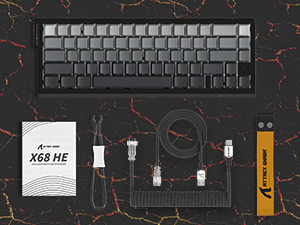
그림 2: 제품 패키지에 포함된 품목.
3. 설정
To set up your ATTACK SHARK X68 HE keyboard, follow these simple steps:
- USB-C 케이블을 연결합니다. Locate the USB-C port on the back of the keyboard. Insert the smaller end of the provided coiled USB-C cable into this port.
- 컴퓨터에 연결: Insert the standard USB-A end of the cable into an available USB port on your computer (PC or Mac).
- 드라이버 설치: The keyboard is plug-and-play for basic functionality. For advanced customization, including DKS, macros, and RGB settings, download the dedicated web driver software from the official ATTACK SHARK web대지.
- 놓기: Place the keyboard on a stable, flat surface. Consider using a wrist rest for ergonomic comfort during extended use.
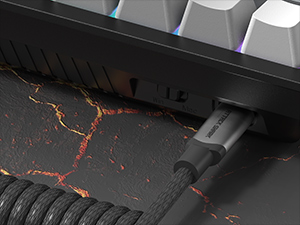
Figure 3: Connecting the USB-C cable to the keyboard.
4. 사용 설명서
The ATTACK SHARK X68 HE is a 60% layout keyboard, meaning some functions are accessed via a function (Fn) layer. Familiarize yourself with the key legends and the Fn key combinations for full functionality.
기본 주요 기능
- 표준 타이핑: All alphanumeric keys, symbols, and modifiers (Shift, Ctrl, Alt, Win/Cmd) function as standard.
- 기능(Fn) 키: Press and hold the Fn key to access secondary functions printed on the front or side of certain keycaps. For example, arrow keys, F-keys, and multimedia controls are typically accessed this way.
폴링 속도 및 지연 시간
The keyboard operates at an 8000Hz polling rate, providing a rapid 0.125ms response time. This ensures minimal input lag for competitive gaming and fast-paced tasks.

Figure 4: 8000Hz Polling Rate for ultra-fast response.
5. 사용자 정의
The ATTACK SHARK X68 HE offers extensive customization options through its web driver software and on-board controls.
Adjustable Actuation Points & Rapid Trigger
Utilizing magnetic switches, the keyboard allows you to customize the actuation point of each key from 0.1mm to 3.4mm with 0.01mm precision. This feature, combined with Rapid Trigger technology, enables faster resets and re-presses, providing a significant advantage in gaming by allowing dynamic keystrokes (DKS), Snap Tap, and Mod-Tap functions.

Figure 5: Adjustable Actuation Point mechanism.
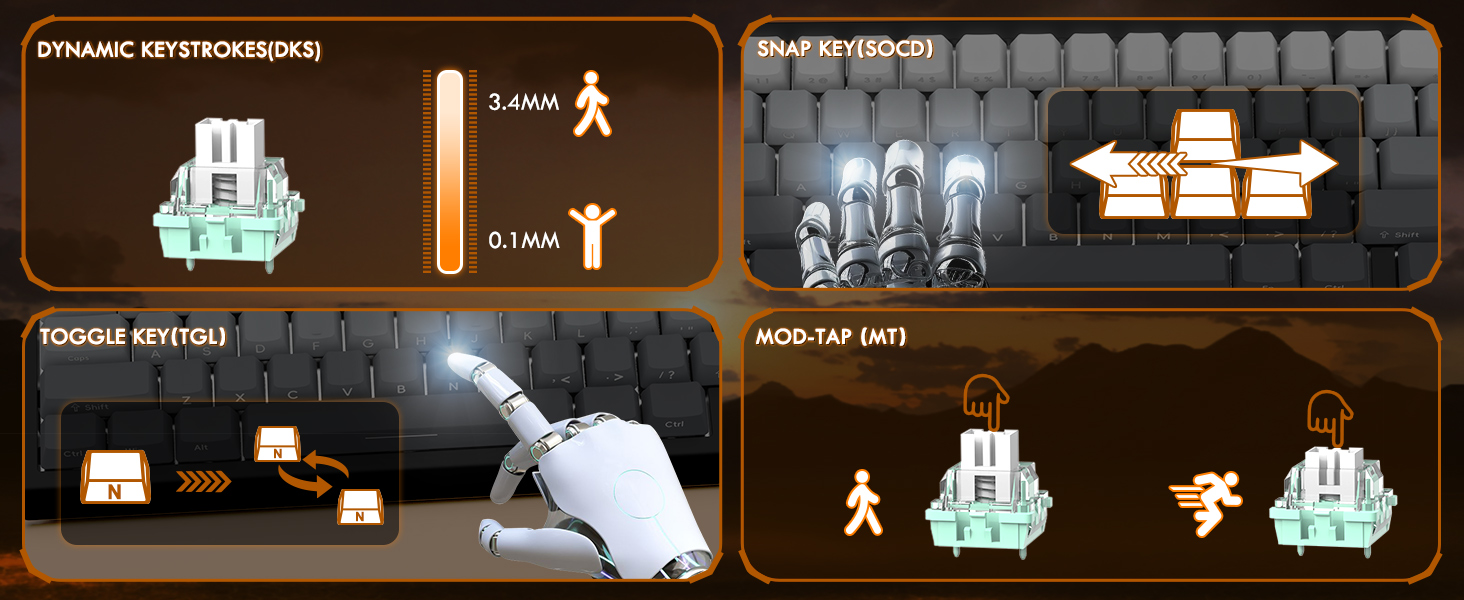
Figure 6: Explanation of DKS, Snap Tap, Toggle Key, and Mod-Tap features.
RGB 백라이트
The keyboard features 16 million-color RGB lighting with over 20 preset light effects and multiple dynamic modes. You can adjust backlight brightness, speed, and switch between different lighting modes and colors using Fn key combinations or the web 드라이버 소프트웨어.
- Fn + 위/아래 화살표: Adjust Backlit Brightness.
- Fn + 좌/우 화살표: Adjust Backlit Speed.
- Fn + \|: Switch Light Mode.
- Fn + Enter: Switch Light Color.
- Fn + 백스페이스: 조명 켜기/끄기.

Figure 7: Full RGB light effects.
Web 드라이버 소프트웨어
The professional customized web software allows for comprehensive customization on both Windows and Mac. You can easily configure DKS, key combinations, macros, key remapping, and detailed RGB lighting settings. This enables a truly personalized experience for various user needs and gaming styles.

그림 8: Web driver software interface for customization.
6. 유지관리
적절한 유지관리는 키보드의 수명과 최적의 성능을 보장합니다.
청소
- 일반 청소: 부드럽고 마른 천을 사용하여 키보드 표면을 정기적으로 닦으세요.
- 먼지 제거: 압축 공기를 사용하여 키캡 사이의 먼지와 이물질을 제거합니다.
- 딥 클리닝 : For deeper cleaning, you may carefully remove the PBT keycaps using a keycap puller (not included unless specified in package contents). Clean the keycaps with mild soap and water, ensuring they are completely dry before reattaching.
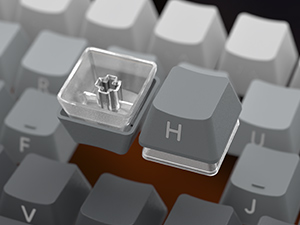
Figure 9: Keycap removal for cleaning.
저장
장시간 사용하지 않을 경우 키보드를 직사광선과 극한의 온도를 피해 서늘하고 건조한 곳에 보관하세요.
7. 문제 해결
ATTACK SHARK X68 HE 키보드 사용 중 문제가 발생하면 다음 일반적인 해결 방법을 참조하십시오.
- 키보드가 응답하지 않음:
- USB-C 케이블이 키보드와 컴퓨터에 모두 단단히 연결되어 있는지 확인하세요.
- 키보드를 컴퓨터의 다른 USB 포트에 연결해보세요.
- 시스템 특정 문제를 배제하기 위해 다른 컴퓨터에서 키보드를 테스트하세요.
- RGB 조명이 작동하지 않음:
- Check if the RGB lighting is turned off using the Fn + Backspace shortcut.
- 확인하십시오 web driver software is installed and updated, and check lighting settings within the software.
- 키보드가 USB 포트에서 충분한 전력을 공급받고 있는지 확인하십시오.
- 키가 등록되지 않거나 두 번 입력됨:
- 해당 키캡 아래를 청소하여 이물질을 제거하십시오.
- Adjust the actuation point settings in the web driver software. Sometimes, a very low actuation point can lead to unintended presses or misfires.
- 키보드 펌웨어가 최신 버전인지 확인하십시오. web 드라이버 소프트웨어.
- 소프트웨어 문제/사용자 지정 설정이 적용되지 않음:
- Ensure you are using the correct and latest version of the ATTACK SHARK web driver software for the X68 HE model.
- Run the software as an administrator (on Windows).
- Temporarily disable any antivirus or firewall software that might be interfering with the web 운전사.
If the problem persists after trying these steps, please contact ATTACK SHARK customer support for further assistance.
8. 사양
| 특징 | 설명 |
|---|---|
| 모델 | X68 HE |
| 상표 | 공격상어 |
| 연결 기술 | USB-C(유선) |
| 키보드 설명 | 기계식 게임 키보드 |
| 스위치 유형 | 자기 스위치(홀 효과) |
| 폴링 속도 | 8000Hz |
| 응답 시간 | 0.125ms |
| Actuation Point Range | 0.1mm to 3.4mm (0.01mm accuracy) |
| 키캡 | PBT Keycaps (Contour Line 3.0 version) |
| 백라이트 | Full RGB (16 million colors, 20+ preset effects) |
| 안티 고스팅 | 풀 키 안티고스팅 |
| 호환 장치 | Laptop, PC, Tablet (Windows/Mac) |
| 제품 치수 | 14.25 x 6.18 x 0.79 인치 |
| 품목 무게 | 2.01파운드 |
| 키의 개수 | 66 |
9. 보증 및 지원
ATTACK SHARK products are designed for durability and performance. For specific warranty information, please refer to the warranty card included with your product or visit the official ATTACK SHARK website. If you require technical support, have questions about product functionality, or need assistance with troubleshooting, please contact ATTACK SHARK customer service through their official channels.
온라인 지원: ATTACK SHARK 공식 웹사이트를 방문하세요. webFAQ, 드라이버 다운로드, 지원 연락처 정보를 제공하는 사이트입니다.
이메일 지원: 제품 포장이나 공식 문서를 참조하세요. web고객 지원 이메일 주소 사이트.


