소개
Thank you for choosing the Ensenior 52 Inch Ceiling Fan with Light and Remote. This manual provides detailed instructions for the safe and efficient installation, operation, and maintenance of your new ceiling fan. Please read all instructions carefully before beginning installation and retain this manual for future reference.
중요한 안전 정보
- 설치나 정비를 하기 전에 항상 회로 차단기의 전원을 끄세요.
- 모든 전기 연결이 해당 지역의 규정과 조례를 준수하는지 확인하세요.
- 배선에 대해 확신이 서지 않는다면 자격을 갖춘 전기 기술자에게 문의하십시오.
- Mount the fan to a ceiling joist or a securely supported outlet box capable of supporting the fan's weight.
- 선풍기 작동 중에는 날개에 손이 닿지 않도록 하십시오.
패키지 내용
Verify that all components are present and undamaged before proceeding with installation. Refer to the diagram below for a visual representation of the parts included.

이미지: 이상view of all Ensenior 52 Inch Ceiling Fan components.
- 팬 모터 어셈블리
- 5 Reversible Fan Blades (Walnut/Black)
- 블레이드 브래킷
- Downrod (6-inch and 10-inch options)
- Canopy and Decorative Yoke Cover
- LED 조명 키트
- 수신기가 포함된 리모컨
- 장착 브래킷 및 하드웨어
설정 및 설치
The Ensenior ceiling fan is designed for easy installation with many components pre-assembled. A detailed installation video is available to guide you through the process. Ensure the recommended installation height of 7.5 feet from the ground to the blades is met for optimal performance.
Video: Step-by-step guide on how to install the Ensenior 52 Inch Ceiling Fan.
설치 단계 종료view:
- 행거 브라켓을 설치하세요: Securely attach the hanger bracket to the ceiling outlet box.
- 다운로드와 모터를 조립하세요: Remove the downrod clip and pin, then assemble the downrod, decorative cap, and canopy onto the motor. Secure the downrod to the motor.
- 선풍기 날개를 부착하세요: Connect the fan blade brackets to the fan blades, then install the assembled blades onto the motor fixture.
- 배선 연결: Hang the fan assembly onto the hanger bracket. Connect the electrical wires from the ceiling to the receiver, and then the receiver to the fan motor and light kit wires.
- Attach LED Light Kit: Connect the LED light kit wires and attach the light kit to the bottom of the motor housing.
- 안전한 캐노피: Slide the canopy up and secure it to the hanger bracket with screws.

Image: Visual guide for the six-step installation process.
Product Dimensions and Room Suitability:
This 52-inch ceiling fan is suitable for rooms approximately 225-400 sq ft. The recommended installation height from the ground to the fan blades is 7.5 feet.

Image: Product size and recommended room dimensions.

Image: Ceiling compatibility for installation.
작동 지침
Your Ensenior ceiling fan is equipped with a convenient remote control for easy customization of fan and LED lighting settings. The fan and light can be operated independently.
Video: Demonstration of Ensenior Ceiling Fan features including light and remote control.
원격 제어 기능:
- 전원 켜기/끄기: 선풍기와 조명을 켜거나 끕니다.
- 팬 속도 제어: Select from 6 distinct wind speeds.
- 조명 제어: Turn the light on/off and adjust brightness.
- 색온도 조정: Cycle through 3 color temperatures (3000K, 4000K, 6000K).
- 가역 모터: Switch between downdraft (summer cooling) and updraft (winter warming) modes.
- 타이머 설정 : 팬이 1시간, 2시간 또는 4시간 후에 자동으로 꺼지도록 설정하세요.
- 음소거 기능: Silences remote control beeping sounds.
- 메모리 기능: The fan remembers the last light setting after being off for more than 10 seconds.
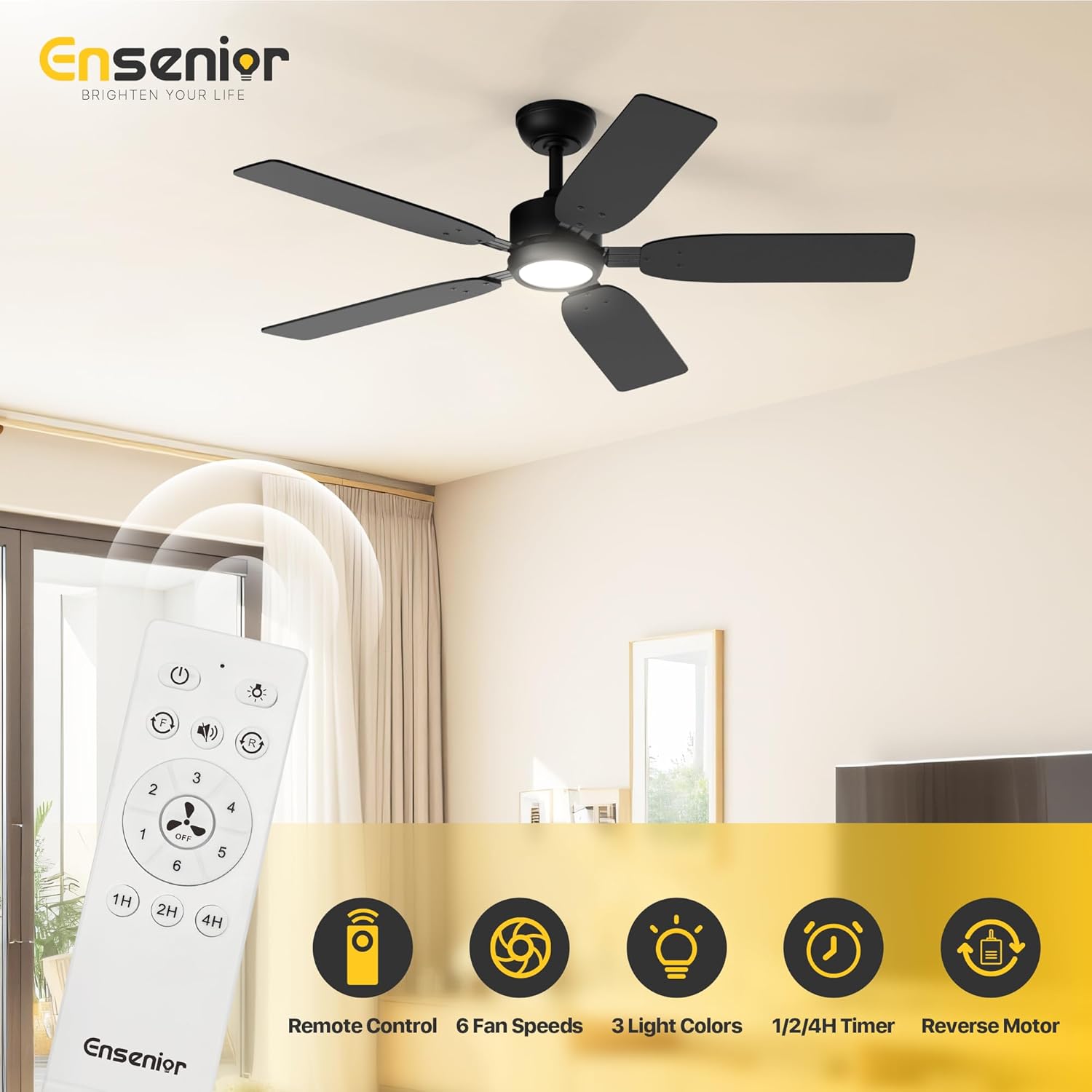
Image: Remote control functions.
Seasonal Operation (Reversible Motor):
The reversible DC motor allows for year-round comfort. In summer, set the fan to downdraft mode (blades rotate counter-clockwise) to create a cooling breeze. In winter, switch to updraft mode (blades rotate clockwise) to circulate warm air near the ceiling, helping to warm the room.

Image: Reversible function for summer and winter.

Image: Updraft mode for winter warmth.
조명 설정:
The integrated LED light offers 3 color temperatures (3000K Warm White, 4000K Natural White, 6000K Cool White) and is dimmable. The memory function ensures the light returns to its last setting after being turned off for more than 10 seconds.
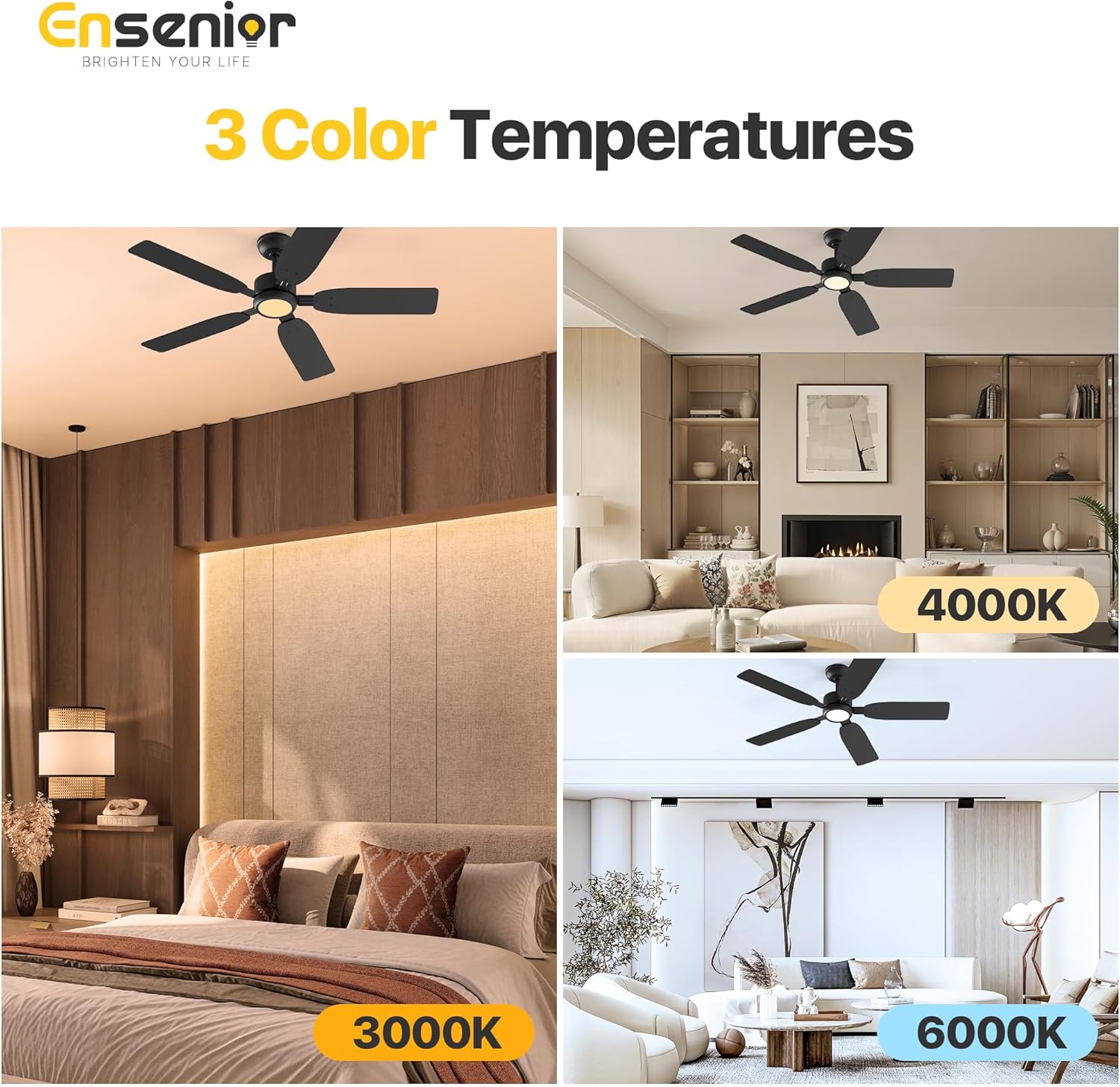
Image: Three adjustable color temperatures.

Image: Light memory function.
조용한 작동:
The fan operates at a low noise level of 35dB, comparable to falling leaves, ensuring a peaceful environment. The remote's mute function further eliminates beeping sounds.
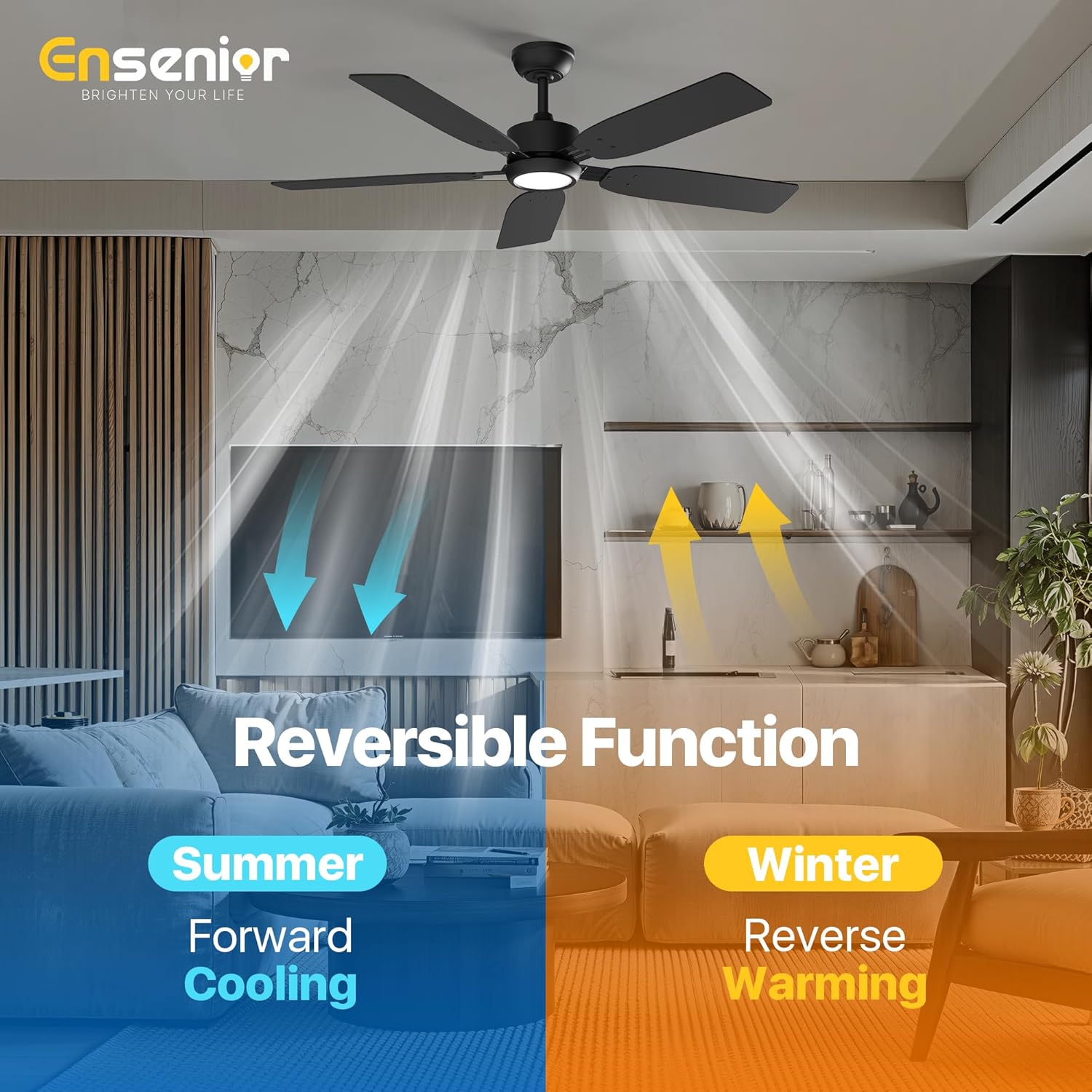
Image: Fan noise level comparison.
블레이드 옵션:
The fan features 5 double-sided wooden blades, with one side in a walnut finish and the other in black, allowing you to choose the best aesthetic for your room.

Image: Double-sided fan blades (Walnut and Black).
유지
정기적인 유지관리는 천장선풍기의 수명과 최적의 성능을 보장합니다.
- 청소: 부드러운 d를 사용하세요amp 팬 블레이드와 모터 하우징을 청소할 때는 천을 사용하십시오. 연마성 세제나 용제는 사용하지 마십시오.
- 블레이드 검사: 주기적으로 모든 날 나사의 조임 상태를 확인하십시오. 나사가 헐거우면 흔들림과 소음이 발생할 수 있습니다.
- 조명 키트: LED 조명 키트가 내장되어 있어 전구 교체가 필요 없습니다.
문제 해결
If you experience issues with your fan, refer to the common problems and solutions below. For further assistance, contact customer support.
| 문제 | 가능한 원인 | 해결책 |
|---|---|---|
| 팬이 시작되지 않음 | No power to the fan; loose wire connections; remote control not paired. | Check circuit breaker; ensure all wires are securely connected; re-pair remote control according to instructions. |
| 빛이 작동하지 않습니다 | Loose wire connection to light kit; faulty LED driver. | Check light kit wiring; contact customer support for LED driver replacement if necessary. |
| 팬이 흔들린다 | 느슨한 날 나사, 불균형한 날, 부적절한 장착. | Tighten all blade screws; use balancing kit (included) to balance blades; ensure mounting bracket is securely installed. |
| 리모콘이 응답하지 않음 | 배터리 방전; 리모컨 페어링 안 됨; 간섭 발생. | Replace remote batteries; re-pair remote control; ensure no obstructions between remote and receiver. |
명세서
| 특징 | 세부 사항 |
|---|---|
| 상표 | 엔시니어 |
| 모델명 | 조명이 있는 천장 선풍기 |
| 품목 모델 번호 | ZF1-52-5Y |
| 크기 | 52 인치 |
| 블레이드 수 | 5 |
| 블레이드 소재 | 목재 |
| 모터 유형 | 가역 DC 모터 |
| 팬 속도 | 6 |
| 광원 유형 | 주도의 |
| 왓tage(빛) | 33 와트 |
| 왓tag전자(팬) | 18 와트 |
| 색온도 | 3(3000K, 4000K, 6000K) |
| 제어 방법 | 원격 제어 |
| 특별 기능 | Adjustable Color Temperature, LED Light, Quiet Operation, Remote Controlled, Timer |
| 권tage | 120 볼트 |
| 품목 무게 | 13.4파운드 |
| 제품 치수 | 17.52 x 13.58 x 6.77 인치 |
| 기류 용량 | 분당 5000입방 피트 |
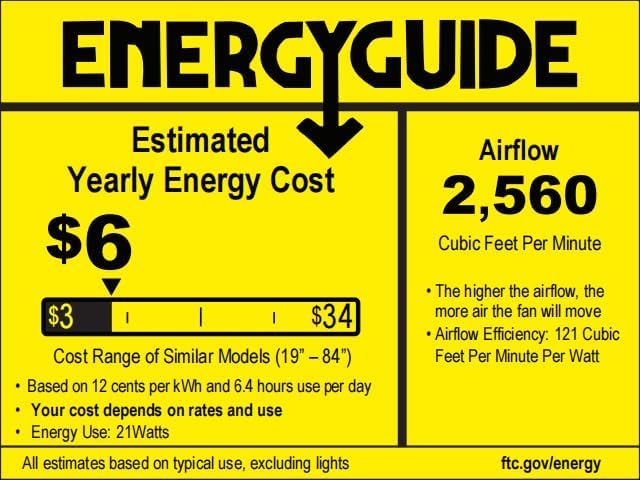
Image: EnergyGuide label.
보증 정보
Your Ensenior 52 Inch Ceiling Fan comes with a 3년 보증 구매일로부터. 본 보증은 정상적인 사용 중 발생하는 재료 및 제조상의 결함에 적용됩니다. 보증 청구를 위해 구매 증빙 자료를 보관해 주십시오.
고객 지원
For any questions, technical assistance, or warranty claims, please contact Ensenior customer support. Our professional after-sales team is available 24/7 to provide hassle-free support.
연락처 정보: Refer to the contact details provided on the product packaging or the official Ensenior web대지.


