소개
This manual provides detailed instructions for the installation, operation, and maintenance of your GIGABYTE B860M GAMING X WIFI6E Motherboard. Please read this manual thoroughly before installing or using the product to ensure correct operation and to prevent damage.
The GIGABYTE B860M GAMING X WIFI6E Motherboard is designed to support Intel Core Ultra Series CPUs, featuring a robust power delivery system, DDR5 memory support, and advanced connectivity options including PCIe 5.0, M.2, 2.5GbE LAN, WIFI 6E, and USB 4.
설치 가이드
1. 개봉 및 검사
Carefully remove the motherboard from its packaging. Inspect for any signs of damage during transit. Ensure all accessories listed in the package contents are present.
- GIGABYTE B860M GAMING X WIFI6E Motherboard
- SATA 케이블
- 와이파이 안테나
- 사용 설명서 (본 문서)
- 드라이버 CD/USB (포함된 경우)
2. 마더보드 레이아웃 개요view
메인보드의 주요 구성 요소와 커넥터를 숙지하십시오.
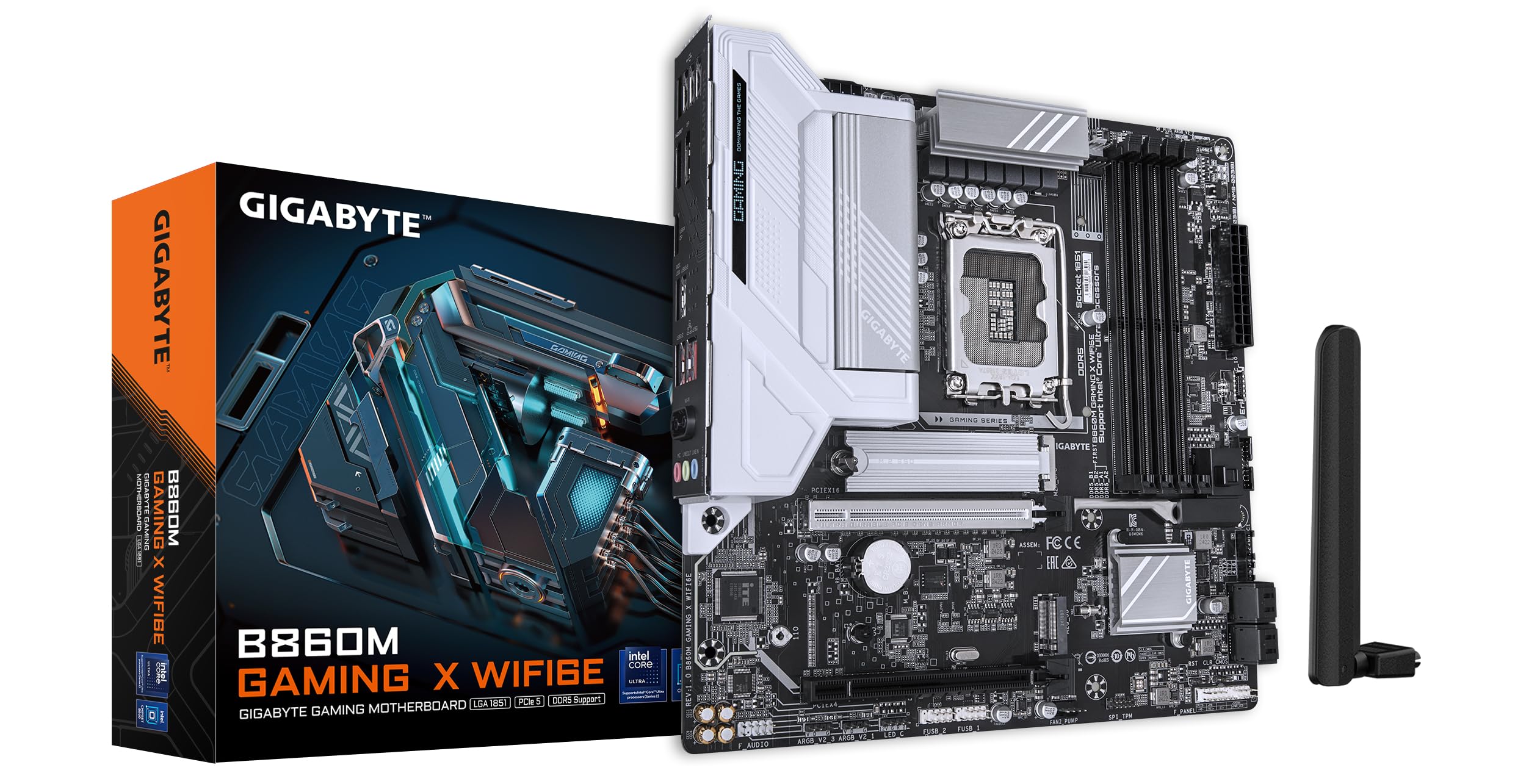
이미지: 위에서 아래로 view of the GIGABYTE B860M GAMING X WIFI6E Motherboard, highlighting the CPU socket, DDR5 DIMM slots, PCIe slots, and M.2 slots.

이미지: 각도 view of the GIGABYTE B860M GAMING X WIFI6E Motherboard, showing the heatsinks and overall board design.
3. CPU 설치 (LGA 1851)
- CPU 소켓 레버를 엽니다.
- CPU의 삼각형 표시와 소켓의 표시가 일치하는지 확인하여 CPU를 소켓에 맞춰 장착하십시오.
- CPU를 억지로 끼우지 말고 조심스럽게 소켓에 넣으세요.
- 소켓 레버를 닫아 CPU를 고정합니다.
4. 메모리(DDR5) 설치
- DIMM 슬롯의 양쪽 끝에 있는 클립을 엽니다.
- 메모리 모듈을 슬롯에 맞춰서 모듈의 홈이 슬롯의 키와 일치하는지 확인합니다.
- 클립이 제자리에 고정될 때까지 메모리 모듈의 양쪽 끝을 단단히 누릅니다.
- For dual-channel operation, install modules in the recommended slots (refer to motherboard diagram for specific slots).
5. 저장 장치 설치(M.2 SSD)
- 메인보드에서 M.2 슬롯을 찾으세요.
- M.2 방열판과 스탠드오프 나사를 제거합니다.
- M.2 SSD를 슬롯에 비스듬히 삽입합니다.
- SSD를 아래로 눌러 스탠드오프 나사로 고정하십시오.
- Reattach the M.2 heatsink for thermal protection.
6. 그래픽 카드(PCIe 5.0) 설치
- PCIe 5.0 x16 슬롯의 래치를 엽니다.
- 그래픽 카드를 슬롯에 맞춰 놓고 완전히 장착되고 잠금장치가 닫힐 때까지 세게 누르십시오.
- 그래픽 카드를 나사로 PC 케이스에 고정합니다.
7. 주변 장치 및 전원 연결
Connect the 24-pin ATX power connector and the 8-pin CPU power connector from your power supply to the motherboard. Connect front panel headers (power button, reset, USB, audio) according to the motherboard manual diagram. Install the Wi-Fi antenna to the rear I/O panel.

Image: Rear I/O panel of the GIGABYTE B860M GAMING X WIFI6E Motherboard, showing USB ports, HDMI, DisplayPort, 2.5GbE LAN, Wi-Fi antenna connectors, and audio jacks.
작동 지침
1. 첫 번째 부팅 및 BIOS 설정
시스템 조립 후 전원을 켜십시오. 버튼을 누르십시오. 델 key during startup to enter the BIOS/UEFI setup utility. Here you can configure boot order, system time, and other advanced settings.
2. 드라이버 설치
Once the operating system is installed, install the necessary drivers for the motherboard components (chipset, LAN, Wi-Fi, audio, etc.). These can be found on the included driver disk/USB or downloaded from the official GIGABYTE web대지.
3. Wi-Fi 6E 연결
Ensure the Wi-Fi antenna is securely connected. In your operating system's network settings, select the appropriate Wi-Fi 6E network and enter the password to connect.
4. Q-Flash Plus
The Q-Flash Plus feature allows you to update the BIOS without installing a CPU, memory, or graphics card. Download the latest BIOS file 기가바이트에서 website, rename it as instructed, and save it to a USB flash drive. Insert the USB drive into the designated Q-Flash Plus USB port on the rear I/O panel and press the Q-Flash Plus button.
유지
1. BIOS 업데이트
기가바이트를 정기적으로 확인하세요 website for the latest BIOS updates. BIOS updates can improve system stability, performance, and add support for new hardware. Follow the instructions provided by GIGABYTE carefully when performing a BIOS update.
2. 드라이버 업데이트
Keep your motherboard drivers updated to ensure optimal performance and compatibility. Download drivers only from the official GIGABYTE support page.
3. 청소
Periodically clean dust from the motherboard and components using compressed air. Ensure the system is powered off and unplugged before cleaning. Avoid using liquids or abrasive materials.
문제 해결
1. 시스템 전원이 켜지지 않음
- 모든 전원 연결부(24핀 ATX, 8핀 CPU)가 제대로 연결되어 있는지 확인하십시오.
- 전원 공급 장치가 정상적으로 작동하는지 확인하십시오.
- Ensure the front panel power button header is correctly connected.
2. 디스플레이 출력 없음
- Confirm the graphics card is properly seated in the PCIe slot and connected to the power supply (if required).
- Check that the monitor cable is securely connected to both the graphics card and the monitor.
- If using integrated graphics, ensure the monitor is connected to the motherboard's video output (HDMI/DisplayPort).
3. 시스템 불안정 또는 충돌
- Verify that all components (CPU, RAM, GPU) are correctly installed.
- Check for overheating issues; ensure CPU cooler and case fans are working.
- BIOS와 모든 드라이버를 최신 버전으로 업데이트하세요.
- RAM에 문제가 있다고 의심되는 경우 메모리 모듈을 개별적으로 테스트하십시오.
4. Wi-Fi 연결 문제
- Wi-Fi 안테나가 후면 I/O 패널에 제대로 고정되어 있는지 확인하십시오.
- Check if Wi-Fi drivers are installed correctly.
- Verify that the Wi-Fi module is enabled in the BIOS.
명세서
| 특징 | 세부 사항 |
|---|---|
| 모델명 | B860M 게이밍 X WIFI6E |
| CPU 소켓 | LGA 1851 |
| 호환 프로세서 | Intel Core Ultra Series CPUs |
| 칩셋 | Intel B860M |
| RAM 메모리 기술 | DDR5, Dual Channel (4 x DIMMs) |
| 최대 메모리 클럭 속도 | Up to 6400MHz (OC) |
| PCIe 슬롯 | 1x PCIe 5.0 x16, 1x PCIe 4.0 |
| M.2 슬롯 | Multiple M.2 slots with Thermal Protection |
| 랜 | 2.5GbE 랜 |
| 무선 연결 | Realtek 2x2 Wi-Fi 6E |
| USB 포트 | USB 4.0 Type-C, USB 3.2 Gen 2 Type-C, various USB 3.2/2.0 |
| VRM | Hybrid Digital 8+1+2+2 Phase 60A DrMOS |
| 치수 | 9.61 x 9.61 x 1.38 인치 |
| 품목 무게 | 2.65파운드 |
보증 및 지원
GIGABYTE motherboards come with a limited warranty. Please refer to the official GIGABYTE web해당 지역에 적용되는 구체적인 보증 약관은 웹사이트 또는 제품 포장을 참조하십시오.
기술 지원, 드라이버 다운로드, BIOS 업데이트 및 기타 제품 정보는 GIGABYTE 공식 지원 페이지를 방문하십시오. web대지:
https://www.gigabyte.com/support
When contacting support, please have your motherboard model name (B860M GAMING X WIFI6E) and serial number ready.