1. 서론
This manual provides detailed instructions for the proper setup, operation, and maintenance of your ChunHee Solar Motion Sensor Alarm Outdoor. Please read this manual thoroughly before using the product to ensure optimal performance and longevity. This device is designed to deter unwanted animals and intruders from your property using motion-activated sound and strobe lights.
2. 제품 오버view
2.1 주요 특징
- 동작 감지형 범죄 예방 시스템: Detects movement within a 125-degree arc and up to 8 meters (26 feet).
- Loud Alarm & Strobe Light: Emits a 129dB loud sound and a bright strobe LED light to scare away animals and intruders.
- 내구성 및 방수성: Constructed from sturdy ABS casing with an IP65 waterproof rating, suitable for various outdoor conditions including rain, snow, and fog.
- 다양한 작업 모드: Offers four distinct operating modes for day and night use, with options for sound, light, or light-only alerts.
- 유연한 전원 옵션: Features solar charging for continuous operation and a USB charging port for quick power replenishment.
2.2 패키지 내용
- ChunHee Solar Motion Sensor Alarm Outdoor (2 units)
- USB 충전 케이블
- 장착 나사
- 사용 설명서
2.3 제품 다이어그램

그림 1: Components of the Solar Motion Sensor Alarm. Key parts include the solar panel (top), loud siren, motion sensor (front), DC charging port (back), and ON/OFF switch (back).

그림 2: ChunHee Solar Motion Sensor Alarm Outdoor units with included USB cables.
3. 설정 및 설치
3.1 초기 충전
For first use, it is recommended to fully charge the alarm. You can do this via:
- 태양열 발전: Place the device in direct sunlight for 4-6 hours. Ensure the solar panel is unobstructed.
- USB 충전: Connect the included USB charging cable to the DC charging port on the back of the alarm and plug it into a 5V/1A USB power adapter (not included). Charging time is typically 2-4 hours.
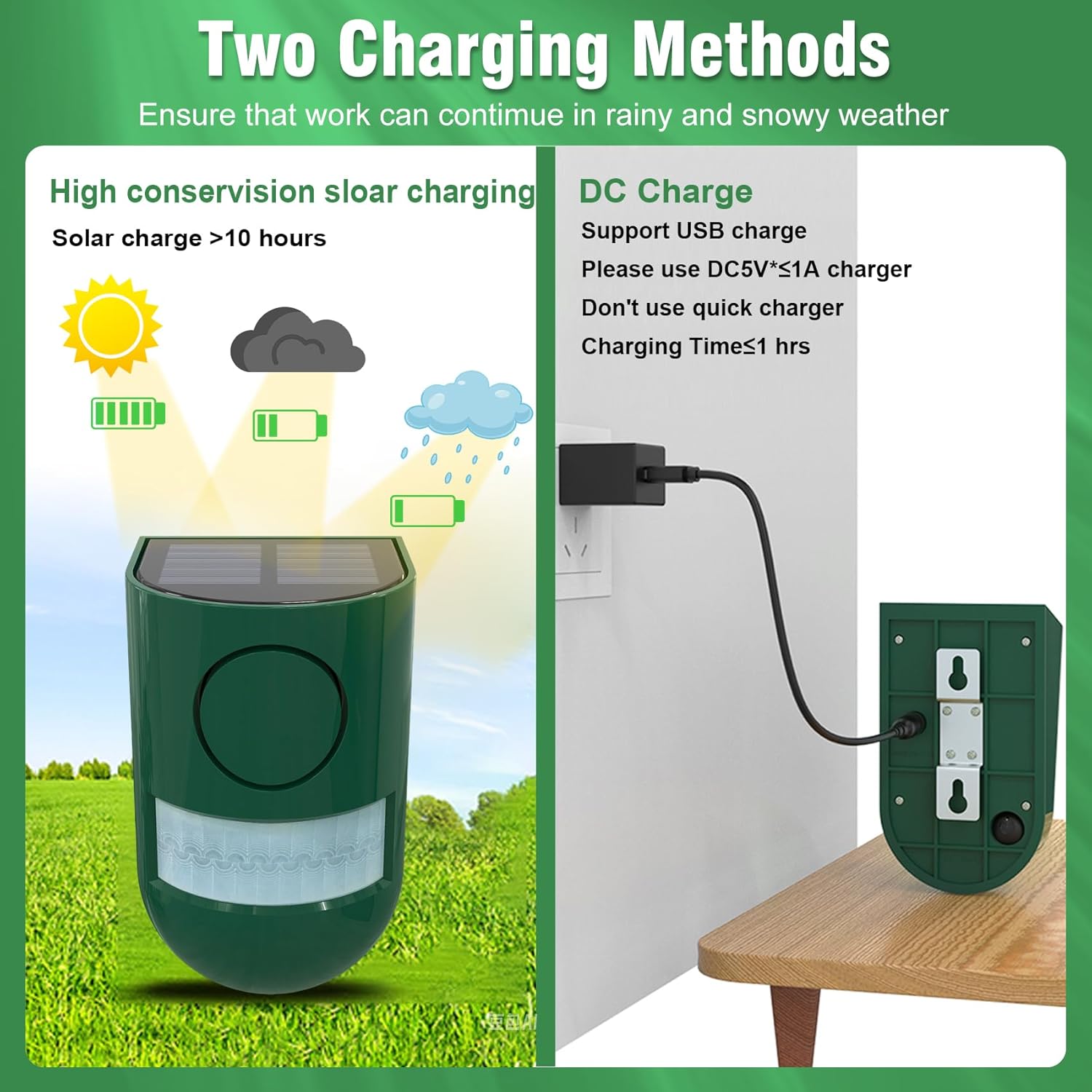
그림 3: Solar and USB charging methods for the alarm.
3.2 장착 지침
The alarm can be easily mounted on posts, fences, or trees using the provided screws. Consider the following for optimal performance:
- 권장 높이: Install the alarm between 6 to 8 feet from the ground for general use.
- Sensor Aiming: Ensure the motion sensor is aimed directly at the area you wish to monitor.
- 장애물을 피하십시오: Do not place objects directly in front of the sensor window, as this can interfere with detection.
- Unobstructed Environment: For best results, install the product in an open area without significant obstacles that could affect sound volume or motion detection.
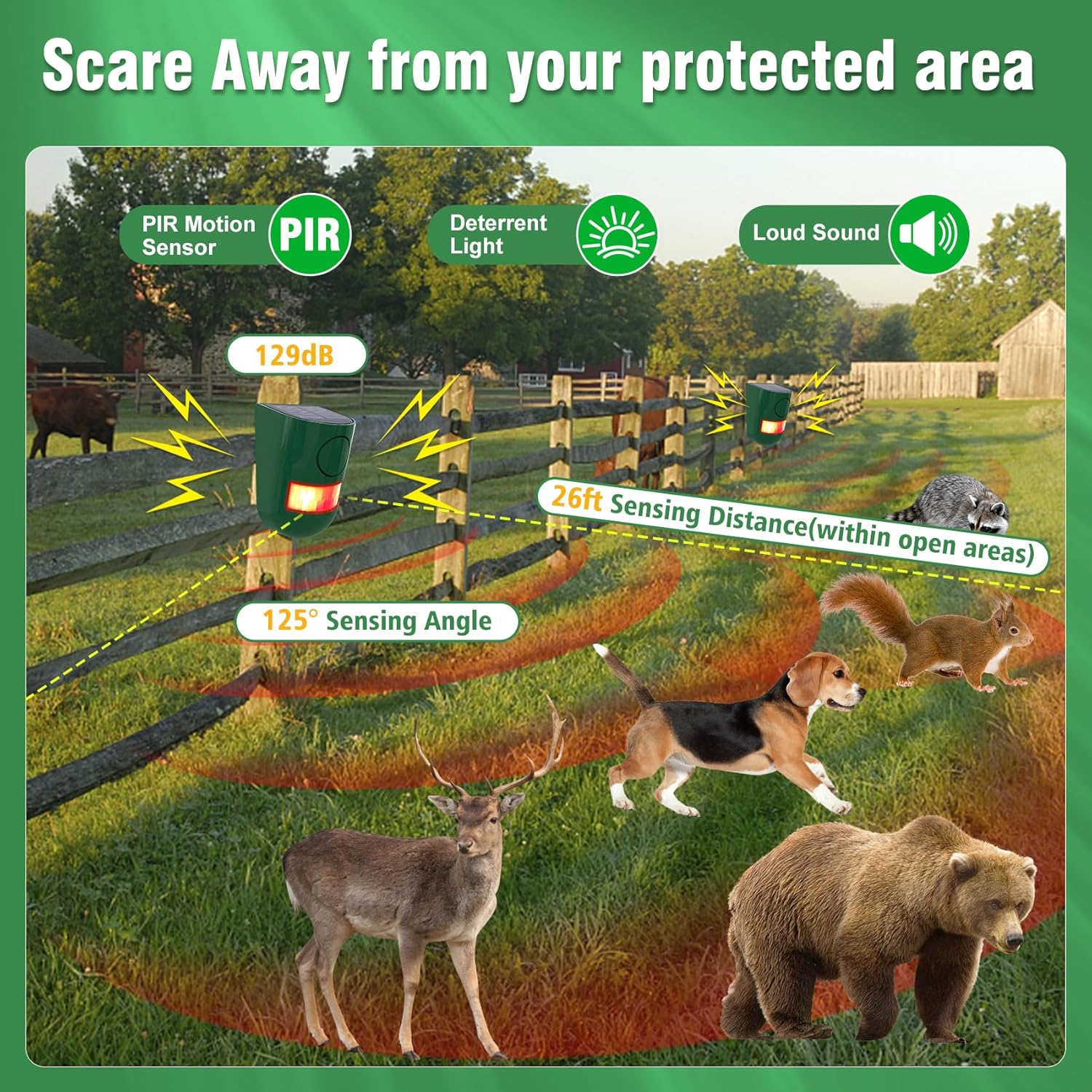
그림 4: Alarm mounted on a fence, illustrating 125° sensing angle and 26ft detection range.
3.3 Height Recommendations for Animal Deterrence
Different installation heights are suitable for deterring specific types of animals:
| 설치 높이 | 대상 동물 |
|---|---|
| 8 피트 | Owls & Hawks |
| 4 피트 | 사슴 |
| 24 인치 | Large Animals (e.g., Bears) |
| 12 인치 | Small Animals (e.g., Foxes, Raccoons) |
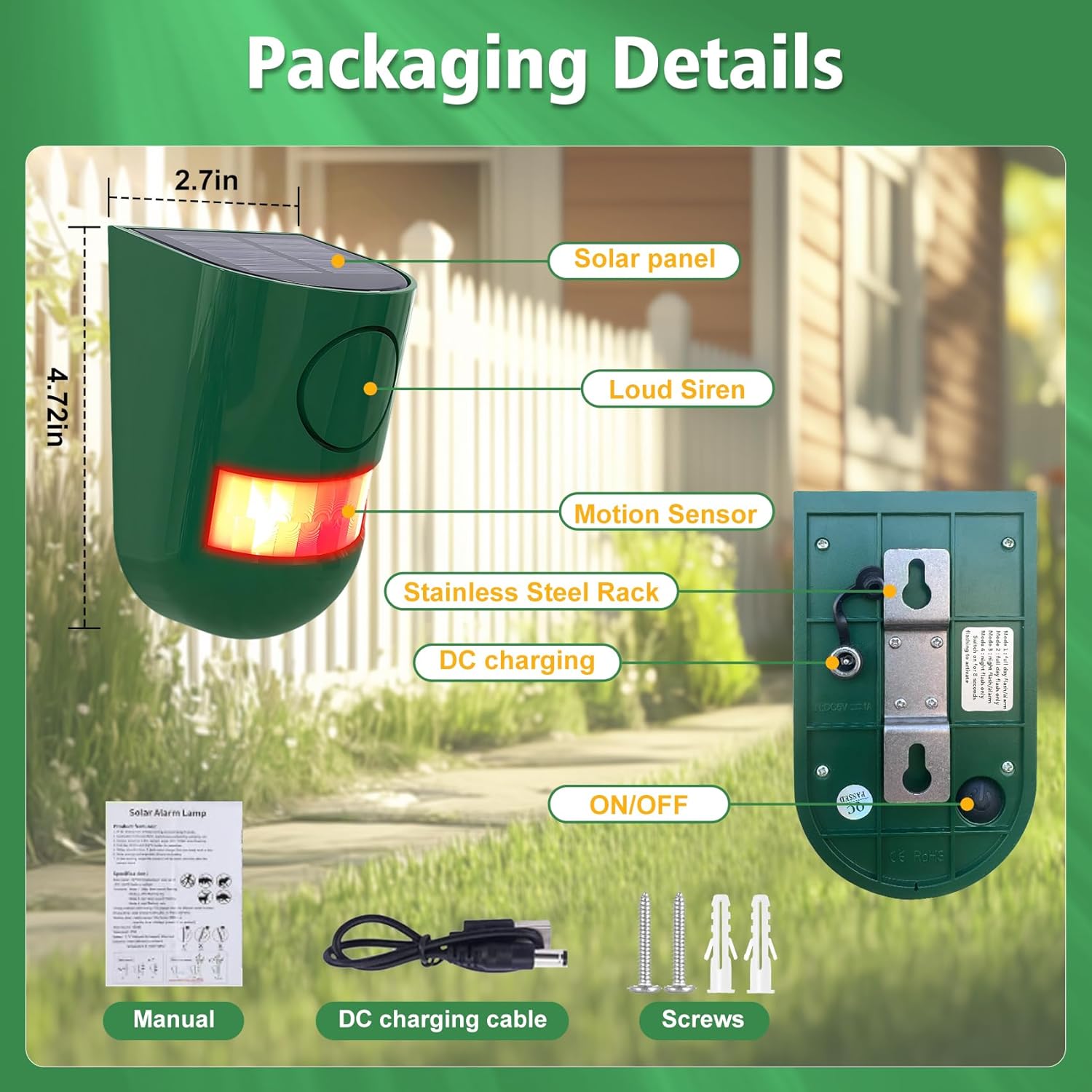
그림 5: Recommended mounting heights for various animals.
4. 작동 모드
The ChunHee Solar Motion Sensor Alarm features four working modes, which can be cycled by pressing the button on the back of the device. The alarm duration for each trigger is 30 seconds. Please note that the volume is not adjustable, and there is no timing function.
- Mode 1 (Day & Night - Siren and Flashing Lights): The alarm will activate with both a loud siren and flashing lights when motion is detected, regardless of ambient light conditions.
- Mode 2 (Day & Night - Flashing Lights Only): The alarm will activate with flashing lights only when motion is detected, without sound, regardless of ambient light conditions.
- Mode 3 (Night - Siren and Flashing Lights): The alarm will activate with both a loud siren and flashing lights when motion is detected only during nighttime hours.
- Mode 4 (Night - Flashing Lights Only): The alarm will activate with flashing lights only when motion is detected only during nighttime hours, without sound. This mode is recommended for residential areas at night to avoid noise disturbance.

그림 6: The alarm deterring an intruder with its 129dB sound and strobe light.
4.1 Mode Demonstration Video
동영상 1 : This video demonstrates the functionality and various applications of the ChunHee Solar Motion Sensor Alarm, including its use in gardens, yards, chicken coops, and farms to deter unwanted animals and intruders.
5. 유지관리
- 청소: Regularly wipe the solar panel and motion sensor window with a soft, damp 최적의 성능을 위해 천을 사용하십시오. 연마성 세척제 사용을 피하십시오.
- 배터리 관리 : If the alarm's performance diminishes (e.g., weaker sound or light), it may indicate a low battery. Recharge the device fully using either solar power or the USB cable. The device uses internal rechargeable Lithium-Ion batteries.
- 겨울 사용: While IP65 waterproof, prolonged periods of heavy snow or ice might reduce solar charging efficiency. Consider USB charging during such conditions if needed.
6. 문제 해결
| 문제 | 가능한 원인 | 해결책 |
|---|---|---|
| Alarm not activating (no sound/light) | 배터리 부족 센서가 방해됨 잘못된 모드가 선택되었습니다. | Recharge the device via solar or USB. Clear any obstructions from the sensor window. Ensure the ON/OFF switch is on and the correct operating mode is selected. |
| Alarm activates too frequently or for no apparent reason | Sensor too sensitive or improperly aimed Movement from small animals/foliage | Adjust the alarm's position or height. Ensure it's not aimed at moving branches or high-traffic areas for small, non-target animals. |
| 음량이 낮음 | 장애물 배터리 부족 | Ensure the alarm is in an unobstructed or open environment. 장치를 충전하십시오. |
7. 사양
| 특징 | 사양 |
|---|---|
| 모델 번호 | SL02-GN-2 |
| 제어 방법 | Touch (for mode selection) |
| 소음 수준 | 최대 129데시벨 |
| 장착 유형 | 벽걸이형 |
| 최대 감지 범위 | 8미터(약 26피트) |
| 감지 각도 | 125도 |
| 센서 기술 | 운동 |
| IP 등급 | IP65 방수 |
| 품목 무게 | 8.8 온스 |
| 제품 치수 | 5.12 x 5.15 x 5.91 인치 |
| 전원 | Solar Powered, USB Rechargeable |
| 배터리 유형 | Rechargeable Lithium-Ion (internal) |
| 평균 배터리 수명 | Up to 30 days (on a full charge, depending on usage and solar exposure) |
8. 안전 정보
- 이 제품은 장난감이 아닙니다. 어린이의 손이 닿지 않는 곳에 보관하세요.
- 기기를 열거나 개조하지 마십시오. 이는 보증을 무효화하고 안전상의 위험을 초래할 수 있습니다.
- Ensure proper installation to prevent the device from falling and causing injury or damage.
- Avoid direct exposure of the human ear to the siren at close range, as the high decibel level can cause discomfort.
9. 보증 및 지원
For warranty information or technical support, please refer to the product packaging or contact the seller directly through your purchase platform. Please have your model number (SL02-GN-2) and purchase details ready when contacting support.


