1. 소개 및 제품 끝view
Thank you for choosing the Winfita T703 Treadmill. This manual provides essential information for the safe and effective use of your new fitness equipment. The Winfita T703 is designed for home use, offering a comprehensive workout experience with its advanced features.
Key features include a powerful 4.0HP motor, 0-15% automatic incline, a spacious 18'' x 50'' running belt, and Bluetooth connectivity for app integration. It supports users up to 300 lbs and comes with 64 preset programs to diversify your workouts.
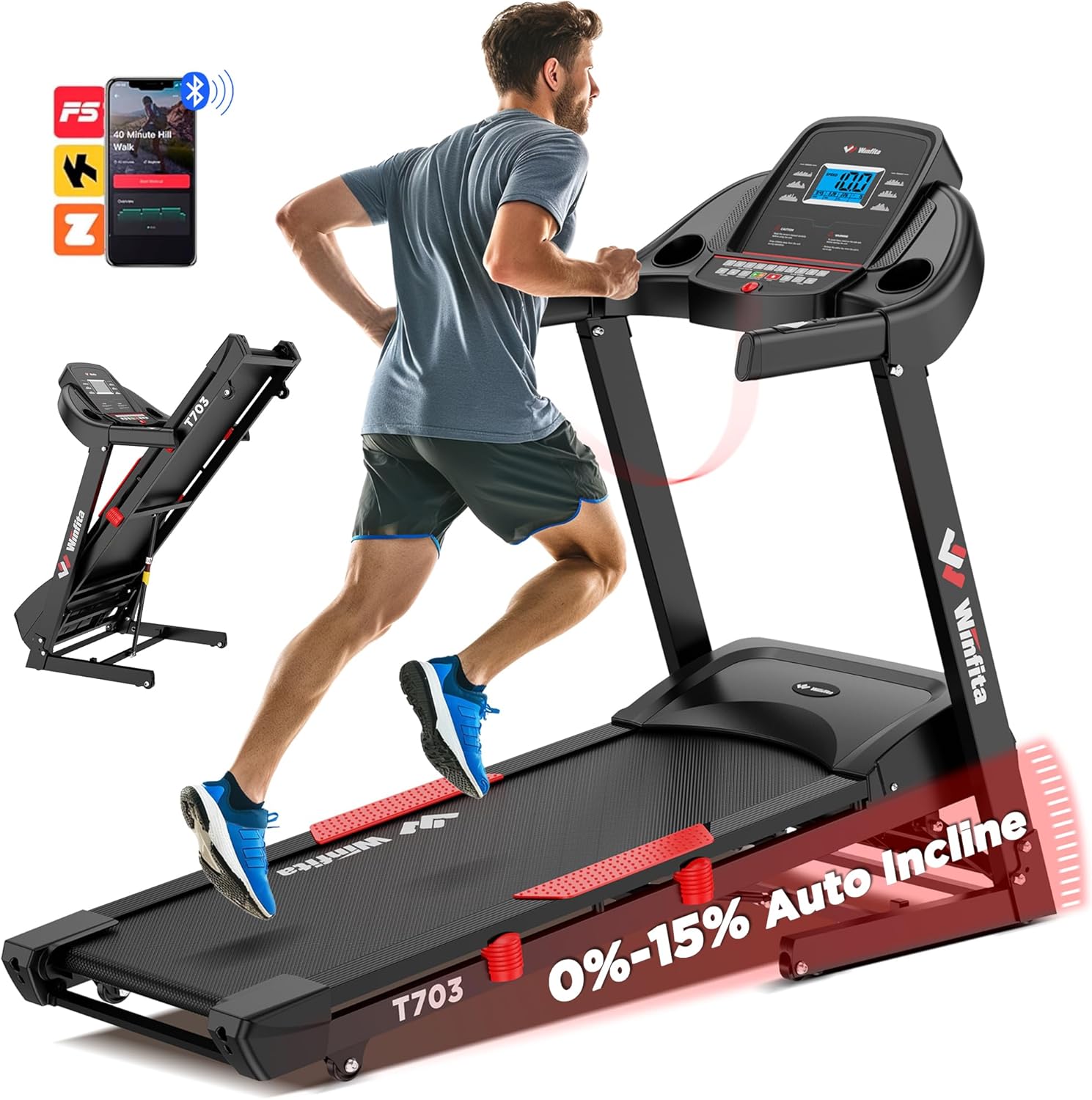
Figure 1.1: Winfita T703 Treadmill. This image shows the overall design of the treadmill, highlighting its robust frame and console.
Video 1.1: Winfita Folding Treadmill for Home with Auto Incline. This video provides a general overview of the treadmill's features and functionality.
2. 안전 정보
Before operating the Winfita T703 Treadmill, please read and understand all safety instructions. Failure to follow these instructions may result in injury or damage to the product.
- 놓기: Place the treadmill on a flat, stable surface. Ensure there is adequate clear space around the treadmill (at least 6 feet behind and 2 feet on each side).
- 힘: Connect the treadmill to a properly grounded outlet. Do not use extension cords or adapters.
- 사용자 무게: 최대 사용자 체중 제한인 300파운드를 초과하지 마십시오.
- 어린이와 애완동물: Keep children and pets away from the treadmill during operation. Always remove the safety key when the treadmill is not in use.
- 복장: 적절한 운동화와 운동복을 착용하십시오. 움직이는 부품에 걸릴 수 있는 헐렁한 옷은 피하십시오.
- 안전 열쇠: Always attach the safety key clip to your clothing before starting the treadmill. In case of an emergency, the safety key will detach, stopping the treadmill.
- 유지: Perform regular maintenance as described in this manual. Unplug the treadmill before cleaning or servicing.
- 건강 상태: 새로운 운동 프로그램을 시작하기 전에, 특히 기존 질환이 있는 경우 의사와 상담하세요.

Figure 2.1: Console with Safety Warnings. Note the warning labels on the console, reminding users to read the manual and remove the safety key when not in use.
3. 설치 및 조립
The Winfita T703 Treadmill arrives 99% pre-assembled, requiring minimal setup. Follow these steps to complete the assembly:
- 언박싱: Carefully remove the treadmill from its packaging. It is recommended to have two people for this step due to the weight of the unit.
- 위치: Place the main frame on a flat, stable surface where you intend to use it.
- 세로 기둥을 펼치세요: Gently lift the console and uprights into the upright position. Ensure they lock securely into place.
- 기둥을 단단히 고정하세요: Locate the pre-installed bolts and washers on the base of the uprights. Use the provided Allen wrench (5MM) to tighten these bolts. There are typically 6 screws in total that need tightening. Repeat this procedure on both sides of the treadmill.
- Attach Handrails (if separate): If the handrails are not already attached, align them with the designated slots on the uprights and secure them with the provided hardware.
- Connect Safety Key: Attach the red safety key to the designated slot on the console. The treadmill will not operate without the safety key in place.
- 전원 연결: 전원 코드를 접지된 콘센트에 꽂으세요.
- Lubrication (Initial): Before first use, apply a small amount of the provided silicone oil under the running belt. Lift the belt slightly and apply the oil evenly across the deck. This ensures smooth operation and prolongs belt life.

Figure 3.1: Pre-assembled Treadmill and Tools. This image illustrates the minimal assembly required, showing the main unit and the small tool kit.
Video 3.1: Unboxing video of the Winfita treadmill. This video demonstrates the unboxing process and initial setup steps.
Video 3.2: Just tighten 6 screws to install the treadmill. This video specifically shows the process of securing the uprights with the provided screws.
4. 사용 설명서
The Winfita T703 Treadmill offers various modes and programs to enhance your workout. Familiarize yourself with the console and its functions.
4.1 콘솔 종료view
The user-friendly console features a 5-inch LCD display that provides real-time data such as speed, incline, time, distance, calories burned, and heart rate. It also includes quick-access buttons for speed and incline adjustments.
Figure 4.1: Multi-Function Console. This image highlights the various buttons and the LCD display for tracking workout metrics.
4.2 운동 시작하기
- 안전 키가 콘솔과 옷에 제대로 부착되어 있는지 확인하십시오.
- 러닝머신의 측면 손잡이에 올라서세요.
- 를 누르세요 시작 버튼을 누르세요. 벨트가 저속으로 움직이기 시작합니다.
- 러닝 벨트 위로 조심스럽게 발을 디디고 걷기 시작하세요.
4.3 속도 및 경사 조절
- 속도: 사용하세요 속도 + 그리고 속도 - buttons on the console or handrails to adjust the speed from 0.6 MPH to 10 MPH. Quick speed buttons (e.g., 3, 6, 9, 12 MPH) are also available for rapid changes.
- 경사: 사용하세요 인클라인 + 그리고 경사로 - buttons on the console or handrails to adjust the automatic incline from 0% to 15% (8.5°). Quick incline buttons (e.g., 3, 6, 9, 12, 15%) are available.

Figure 4.2: Automatic Incline Feature. This image demonstrates the treadmill's ability to adjust incline automatically, ranging from 0% to 15%.

Figure 4.3: Speed Range. This image illustrates the treadmill's speed capabilities, from a slow walk to a brisk run.
4.4 Programs and Modes
The treadmill includes 64 preset programs, 5 user-defined programs, and 3 countdown modes (time, distance, calories) to vary your workouts.
- 사전 설정 프로그램: 를 누르세요 프로그램 button to cycle through the 64 built-in programs. Each program has varying speed and incline profiles.
- User-Defined Programs: Create and save your own custom workout routines. Refer to the detailed instructions in the included user manual for setting up user-defined programs.
- 카운트다운 모드: Select a countdown mode (Time, Distance, or Calories) and set your desired target. The treadmill will stop once the target is reached.
4.5 블루투스 연결 및 앱 통합
Connect your treadmill to compatible fitness apps via Bluetooth for enhanced tracking and interactive workouts.
- Download a compatible app (e.g., Kinomap, FitShow) from your device's app store.
- 모바일 기기에서 Bluetooth를 활성화하세요.
- Open the app and follow the on-screen instructions to connect to your Winfita T703 Treadmill.
- Enjoy music through the built-in stereo speakers by connecting your device via Bluetooth.

Figure 4.4: Bluetooth Connectivity. This image highlights the treadmill's compatibility with popular fitness applications for an interactive workout experience.
4.6 운동 중단
- 를 누르세요 멈추다 button to gradually bring the treadmill to a halt.
- Alternatively, pull the safety key from the console for an immediate stop.
5. 유지관리
Regular maintenance ensures the longevity and optimal performance of your Winfita T703 Treadmill.
- 청소: 러닝머신 표면을 광고로 닦으세요amp 사용 후에는 천으로 닦아 땀과 먼지를 제거하세요. 연마성 세제는 사용하지 마세요.
- 매끄럽게 하기: The running deck requires periodic lubrication with silicone oil. Apply oil every 3 months or after every 50 hours of use, whichever comes first. Lift the running belt and apply the oil evenly across the center of the deck.
- 벨트 장력 및 정렬: Check the running belt tension and alignment regularly. If the belt slips or drifts to one side, refer to the detailed instructions in the full user manual for adjustment procedures.
- 모터 커버: Periodically remove the motor cover (unplug the treadmill first) and vacuum any dust or debris that may have accumulated.
6. 문제 해결
이 섹션에서는 런닝머신 사용 중 발생할 수 있는 일반적인 문제에 대해 설명합니다. 더 복잡한 문제가 발생할 경우 고객 지원팀에 문의하십시오.
| 문제 | 가능한 원인 | 해결책 |
|---|---|---|
| 러닝머신이 시작되지 않습니다. | 전원 코드가 뽑혀 있고, 안전 키가 제자리에 없으며, 회로 차단기가 작동했습니다. | 전원 코드가 제대로 꽂혀 있는지 확인하십시오. 안전 키를 완전히 삽입하십시오. 가정용 회로 차단기를 확인하십시오. |
| 러닝 벨트 슬립. | 벨트 장력이 너무 느슨합니다. 벨트에 윤활유를 발라야 합니다. | Adjust belt tension (refer to manual). Apply silicone oil. |
| Loud squeaking sound during operation. | Belt needs lubrication, loose components. | Apply silicone oil. Check and tighten all visible bolts and screws. |
| E02 error code. | 모터 또는 컨트롤러 문제. | Unplug the treadmill for 5 minutes, then plug it back in. If the error persists, contact customer service. |
| 기울기가 조정되지 않습니다. | Incline motor issue, loose connection. | Check all connections. If the issue persists, contact customer service. |
Video 6.1: Update on repairs on incline. This video shows a customer's experience with an incline issue, which may be helpful for troubleshooting.
Video 6.2: Plugged in, looked fine. Tried to use and get E02 error. This video shows a customer encountering an E02 error, which can help in diagnosing similar issues.
Video 6.3: Loud squeaking sound. This video demonstrates a common squeaking issue, which may indicate a need for lubrication or tightening.
7. 사양
Detailed technical specifications for the Winfita T703 Treadmill:
| 특징 | 사양 |
|---|---|
| 모터 마력 | 4.0마력 |
| 속도 범위 | 0.6 - 10 MPH |
| 자동 인클라인 | 0 - 15% (8.5°) |
| 러닝 벨트 치수 | 18'' W x 50'' L |
| 최대 사용자 무게 | 300파운드 |
| 프로그램 | 64 Preset, 5 User-defined, 3 Countdown Modes |
| 연결성 | Bluetooth (Kinomap, FitShow compatible) |
| 디스플레이 유형 | 5인치 LCD |
| 접힌 치수(L x W x H) | 43인치 x 28인치 x 55인치 |
| 품목 무게 | 125 파운드 |
| 프레임 소재 | 합금강 |
| 특별 기능 | Built-In Speaker, Shock Absorbent, Wheeled, Foldable |

Figure 7.1: Compact Design and Dimensions. This image provides a visual representation of the treadmill's dimensions and its foldable nature for space-saving storage.
8. 보증 및 고객 지원
Winfita stands behind the quality of its products. Your Winfita T703 Treadmill comes with a 1년 보증.
For any questions, concerns, or technical support, please do not hesitate to contact our dedicated customer service team. We offer 7/24 Online Customer Service and Lifetime Technical Support.
You can typically find contact information, including email, in the warranty section of the physical user manual included with your product.

Figure 8.1: Customer Service Information. This image outlines the steps to contact customer service for support.


