1. 제품 오버view
The CHBMSS TC4M-N4N is a compact and reliable digital temperature controller designed for precise temperature management in various applications. It offers features such as temperature calibration, high-temperature alarm, and selectable cooling or heating modes, ensuring stable and safe operation.
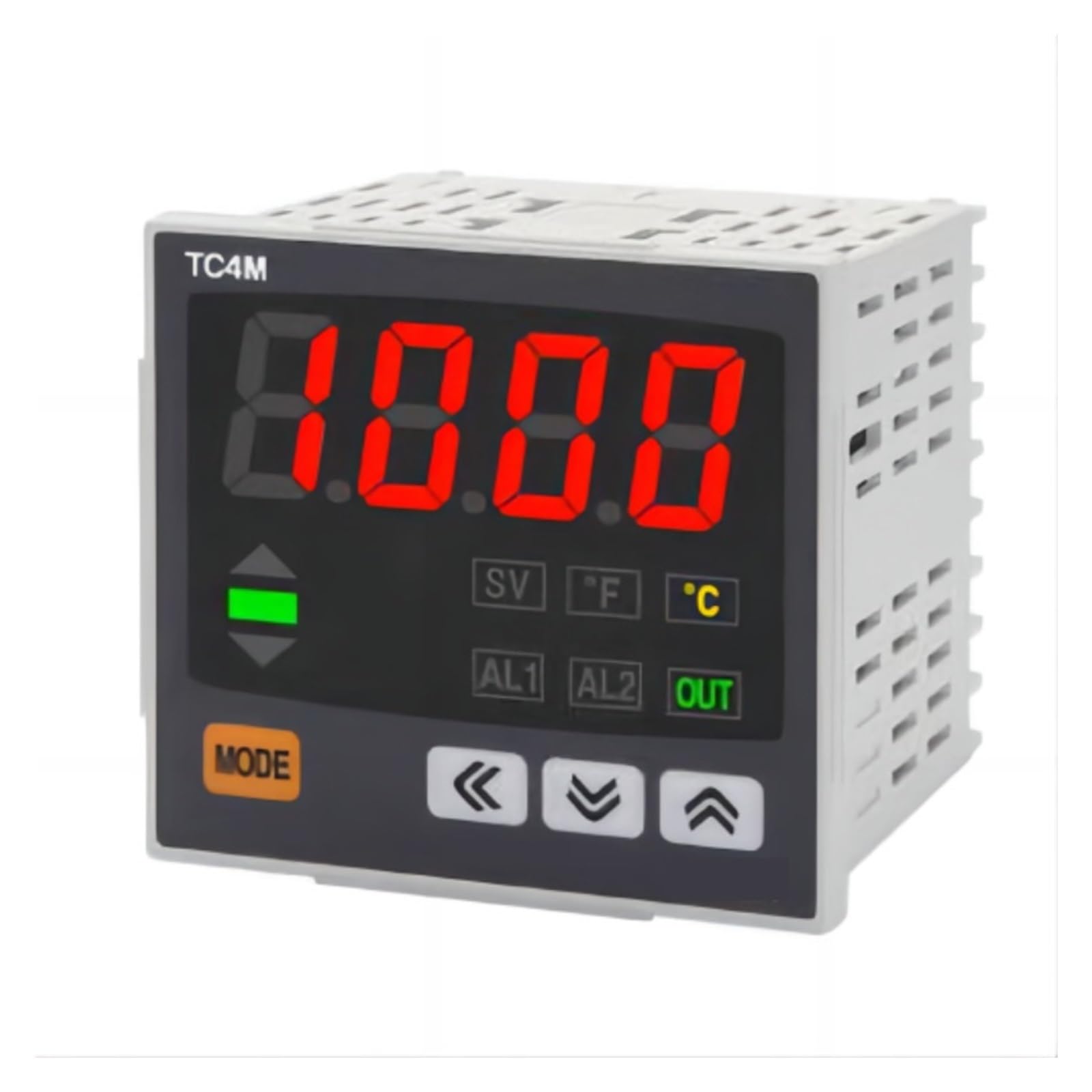
Figure 1: CHBMSS TC4M-N4N Temperature Controller Front Panel
주요 특징:
- 컴팩트하고 가벼운 디자인으로 손쉽게 통합할 수 있습니다.
- High reliability for consistent performance.
- Temperature calibration function for accurate readings.
- Audible alarm for high-temperature conditions.
- Selectable cooling or heating control modes.
- Adjustable maximum and minimum temperature limits for safety.
2. 안전 정보
Please read all instructions carefully before installation and operation. Failure to follow these instructions may result in equipment damage, personal injury, or improper operation.
- 전원 공급 장치 볼륨을 확인하십시오.tage matches the controller's specifications.
- 배선 작업이나 유지관리 작업을 하기 전에 전원을 분리하세요.
- Install the device in a dry, well-ventilated area, away from direct sunlight, high temperatures, and corrosive gases.
- 젖은 손으로 컨트롤러를 조작하지 마십시오.
- This device is not intended for life-support applications where malfunction could result in injury or death.
3. 설치 및 배선
3.1 풀기
Carefully remove the temperature controller from its packaging. Inspect the device for any signs of damage during transit. Report any damage to your supplier immediately.
3.2 장착
The controller is designed for panel mounting. Ensure adequate space for ventilation and wiring connections at the rear of the unit.
3.3 배선도
Refer to the wiring diagram provided on the side of the unit or in the included quick start guide for specific connection details. Ensure all connections are secure and correctly polarized.

Figure 2: CHBMSS TC4M-N4N Temperature Controller Side View 터미널 포함
- 전원 공급 장치: 적절한 vol 연결tage to the designated power terminals.
- 센서 입력: Connect your temperature sensor (e.g., thermocouple, RTD) to the sensor input terminals. Observe polarity if applicable.
- 출력 릴레이: Connect your heating or cooling device to the output relay terminals. Ensure the load current does not exceed the relay's rating.
4. 운영
4.1 초기 전원 켜기
Once wired, apply power to the controller. The display will illuminate, showing the current process value (PV) and set value (SV).

Figure 3: CHBMSS TC4M-N4N Display Example
4.2 온도 설정 (SV)
- 를 누르세요 방법 버튼을 짧게 누르면 설정값 조정 모드로 들어갑니다. SV 표시등이 깜빡입니다.
- 사용하세요 위로(▲) 그리고 아래로(▼) 화살표 버튼을 눌러 원하는 온도를 조절하세요.
- 사용하세요 Left (◀) arrow button to shift the cursor for faster adjustment of individual digits.
- 를 누르세요 방법 button again to confirm the setting and exit adjustment mode.
4.3 매개변수 설정(고급)
To access advanced parameters (e.g., control mode, alarm settings, calibration), press and hold the 방법 button for several seconds until the parameter menu appears. Navigate using the arrow buttons and confirm with 방법.
- 냉각/난방 모드: Select between cooling (output active when temperature is above SV) or heating (output active when temperature is below SV).
- 온도 교정: Adjust the sensor reading to match a known reference temperature.
- 알람 설정: Configure alarm thresholds (AL1, AL2) and alarm types.
- Max/Min Temperature Limits: Set upper and lower bounds for the adjustable temperature range to prevent accidental over/under-setting.
5. 유지관리
The CHBMSS TC4M-N4N Temperature Controller requires minimal maintenance to ensure long-term reliable operation.
- 청소: 주기적으로 디스플레이를 닦으십시오.asin부드럽고 마른 천으로 닦아주세요. 연마성 세제나 용제는 사용하지 마세요.
- 점검: 배선 연결부가 단단히 고정되었는지, 마모나 부식 흔적이 있는지 정기적으로 점검하십시오.
- 환경: 작동 환경이 지정된 온도 및 습도 범위 내에 유지되도록 하세요.
6. 문제 해결
온도 조절기에 문제가 발생하면 다음의 일반적인 문제 및 해결 방법을 참조하십시오.
| 문제 | 가능한 원인 | 해결책 |
|---|---|---|
| 디스플레이가 비어 있습니다. | 전원 공급이 없거나 배선이 잘못되었습니다. | 전원 연결을 확인하고 볼륨이 올바른지 확인하십시오.tage. |
| 온도 측정이 정확하지 않습니다 | Sensor faulty, incorrect sensor type selected, or calibration needed. | Verify sensor connection, check sensor type setting, perform temperature calibration. |
| 출력이 활성화되지 않습니다 | Wiring error, control mode incorrect, or temperature not reaching set point. | Check output wiring, verify cooling/heating mode, ensure SV is appropriately set. |
| 경보가 계속 작동 중입니다. | Alarm set point too close to PV, or sensor issue. | Adjust alarm thresholds, check sensor accuracy. |
If the problem persists after attempting these solutions, please contact CHBMSS customer support for further assistance.
7. 기술 사양
| 매개변수 | 값 |
|---|---|
| 모델 | TC4M-N4N |
| 상표 | CHBMSS |
| 패키지 크기 | 1.18 x 0.79 x 0.39 인치 |
| 품목 무게 | 1.1파운드(500그램) |
| 색상 | 한 가지 색상 |
| 조각 수 | 1 |
| ASIN | B0DPYS4XK7 |
| 제조업체 | CHBMSS |
8. 보증 및 지원
For warranty information or technical support, please refer to the documentation included with your purchase or contact CHBMSS customer service directly. Please have your product model number (TC4M-N4N) and purchase details ready when contacting support.


