1. 서론
Welcome to the user manual for your Nothing Phone (3a). This guide provides detailed instructions on setting up, operating, maintaining, and troubleshooting your device to ensure optimal performance and user experience.

Figure 1.1: The Nothing Phone (3a) showcasing its unique transparent back design and Glyph Interface.
2. 설정
2.1. 언박싱 및 초기 검사
Upon receiving your Nothing Phone (3a), carefully open the packaging and inspect the contents. Ensure all items listed in the "What's in the Box" section are present and undamaged.
- Nothing Phone (3a) device
- USB-C 케이블
- SIM 트레이 이젝터
- 사전 적용된 스크린 보호 필름
2.2. SIM 카드 삽입
- 휴대폰 측면에서 SIM 카드 트레이를 찾으세요.
- SIM 트레이 꺼내기 도구를 트레이 옆에 있는 작은 구멍에 넣고 트레이가 튀어나올 때까지 단단히 누릅니다.
- 나노 SIM 카드의 금색 접점이 아래를 향하도록 트레이에 놓으세요.
- SIM 트레이가 딸깍 소리가 나면서 제자리에 고정될 때까지 조심스럽게 휴대폰에 다시 삽입하십시오.
2.3. 초기 전원 켜기 및 설정 마법사
Press and hold the power button on the right side of the phone until the Nothing logo appears. Follow the on-screen instructions to complete the initial setup, including language selection, Wi-Fi connection, Google account sign-in, and data transfer.
3. Operating Your Nothing Phone (3a)
3.1. Nothing OS 3.1 Overview
The Nothing Phone (3a) runs on Nothing OS 3.1, an intuitive and customizable Android-based operating system. It features functional adaptations for an optimized user experience.

Figure 3.1: Visual representation of Nothing OS 3.1's customizable interface.
3.2. 카메라 시스템
The Nothing Phone (3a) is equipped with an advanced camera system designed to capture high-quality photos and videos.
- 메인 카메라: 50-MP OIS (Optical Image Stabilization) main camera for detailed and stable shots.
- 망원 카메라: 50-MP telephoto lens with up to 30x Ultra Zoom for capturing distant subjects.
- 초광각 카메라: 8-MP ultra-wide-angle lens for expansive landscape and group shots.
- 전면 카메라: 32-MP front camera for sharp selfies and video calls.

Figure 3.2: Detailed breakdown of the Phone (3a)'s Elite Camera System components.

Figure 3.3: Illustration of the telephoto zoom lens technology and its capability to capture distant scenes.
3.3. Essential Key and Essential Space
The Essential Key is a new physical button on the side of your device. A short press captures screen content, while a long press allows you to record voice notes, ideas, and inspirations. The Essential Space organizes your captures and provides personalized suggestions.

Figure 3.4: The Essential Key and its integration with the Essential Space for content organization.
3.4. 글리프 인터페이스
The Glyph Interface on the back of the phone provides unique LED light and sound notifications for calls, messages, and other alerts, offering a distinct visual and auditory experience.

Figure 3.5: The Glyph Interface on the rear of the Nothing Phone (3a), demonstrating its illuminated patterns.
4. 유지관리
4.1. 배터리 관리
The Nothing Phone (3a) features a 5,000 mAh battery with 50W fast charging. To maximize battery lifespan:
- 극한의 온도를 피하세요.
- 제공된 USB-C 케이블을 사용하여 충전하세요.
- 배터리를 자주 완전히 방전시키지 마세요.

Figure 4.1: Visual representation of the 5,000 mAh battery capacity.
4.2. 기기 청소
Use a soft, lint-free cloth to clean the screen and back of your phone. For stubborn smudges, slightly damp천에 물을 묻혀 닦으세요. 강한 화학 물질이나 연마재는 사용하지 마세요.
4.3. 소프트웨어 업데이트
기기에 최신 기능, 보안 패치 및 성능 향상 기능이 적용되었는지 확인하려면 소프트웨어 업데이트를 정기적으로 확인하고 설치하세요. 설정 > 시스템 > 소프트웨어 업데이트 업데이트를 확인하세요.
5. 문제 해결
5.1. 일반적인 문제 및 해결 방법
| 문제 | 가능한 원인 | 해결책 |
|---|---|---|
| 전화가 켜지지 않음 | 배터리 부족, 소프트웨어 충돌 | Charge the phone for at least 30 minutes. Perform a forced restart by holding the power button for 10-15 seconds. |
| 앱이 충돌하거나 정지됨 | App bug, insufficient RAM, outdated software | Clear app cache/data. Close background apps. Update the app or phone software. |
| 배터리 수명이 짧음 | High screen brightness, background apps, network issues | Adjust screen brightness. Close unused apps. Disable unnecessary features like GPS/Bluetooth. |
5.2. 공장 초기화
If issues persist, a factory reset may be necessary. This will erase all data on your phone, so ensure you have backed up important information. Navigate to 설정 > 시스템 > 옵션 재설정 > 모든 데이터 삭제(공장 초기화).
6. 사양
Key technical specifications for the Nothing Phone (3a) (Model: A059).
| 특징 | 세부 사항 |
|---|---|
| 모델명 | 아무것도 전화 (3a) |
| 모델 번호 | A059 |
| 운영 체제 | 안드로이드 15, Nothing OS 3.1 |
| 표시하다 | 6.77-inch Flexible FHD+ AMOLED, 120 Hz, 1.07 billion colors |
| 프로세서 | Snapdragon 7s Gen 3 (2.5 GHz, 8-core) |
| 숫양 | 12 GB (up to 20GB RAM Boost) |
| 저장 | 256GB (XNUMX기가바이트) |
| 메인 카메라 | 50-MP OIS |
| 망원 카메라 | 50-MP (30x Ultra Zoom) |
| 초광각 카메라 | 8-MP |
| 전면 카메라 | 32-MP |
| 배터리 | 5,000 mAh (50W Fast Charging) |
| 치수 | 7.75 x 0.83 x 16.35cm |
| 무게 | 201그램 |
| 방수/방진 | IP64 |
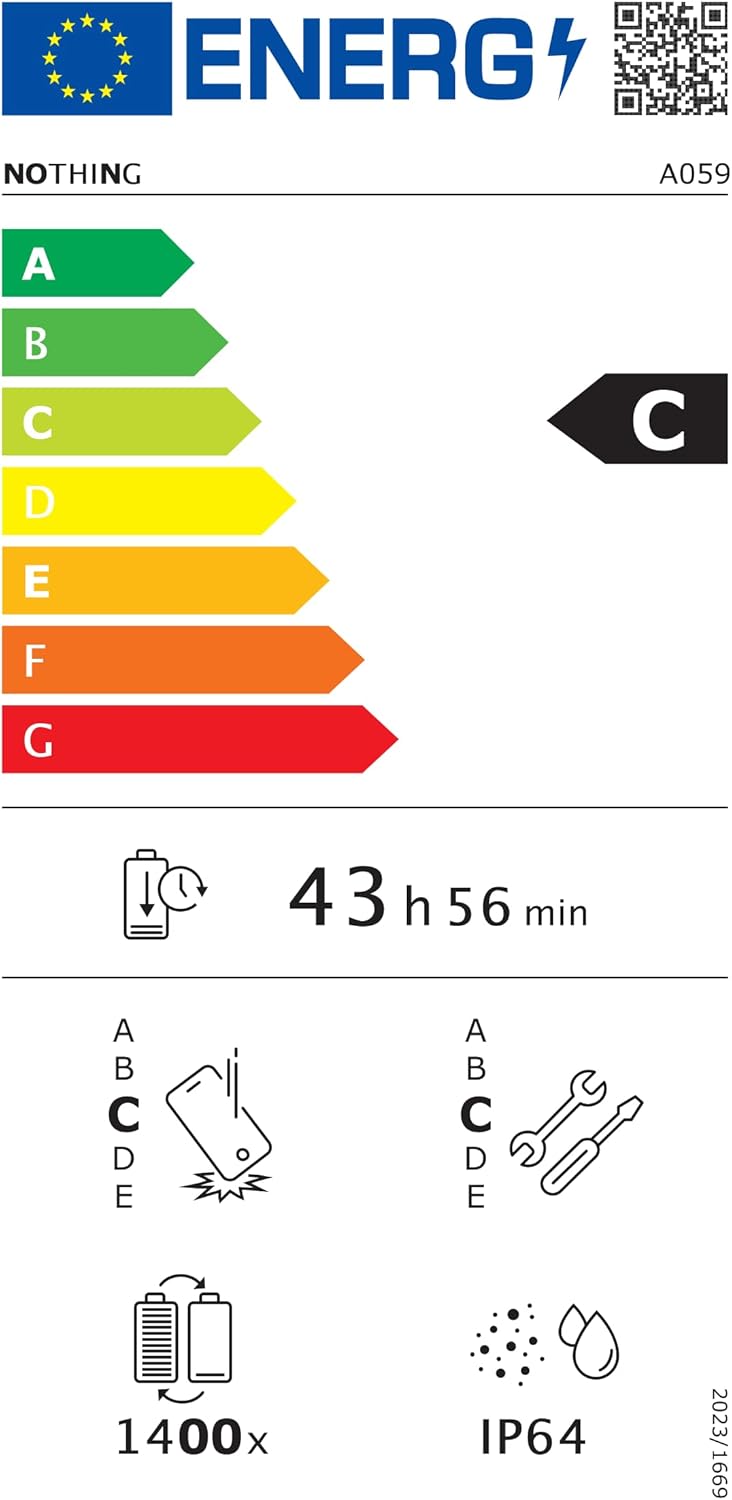
Figure 6.1: EU Energy Label for Nothing Phone (3a), indicating energy efficiency and IP64 rating. More details available at eprel.ec.europa.eu/qr/2179652.
7. 보증 및 지원
Your Nothing Phone (3a) comes with a manufacturer's warranty. Please refer to the warranty card included in your product packaging for specific terms and conditions.
For further assistance, technical support, or warranty claims, please visit the official Nothing support web사이트를 방문하거나 고객 서비스에 문의하세요. 자세한 내용은 다음에서 확인할 수 있습니다. 아마존의 Nothing Store.


