소개
Thank you for choosing the Ohniyou 60-inch Ceiling Fan with Lights and Remote. This modern ceiling fan is designed for both indoor and outdoor use, providing efficient air circulation and adjustable lighting. It features a quiet DC motor, 6 speed settings, 3 light color temperatures, a reversible function for year-round comfort, and a convenient remote control. This manual provides detailed instructions for safe installation, operation, and maintenance of your new ceiling fan.
안전 정보
Please read all safety instructions carefully before installing or using your ceiling fan. Failure to follow these instructions may result in electric shock, fire, or personal injury.
- 설치나 유지관리를 하기 전에 회로 차단기의 전원이 꺼져 있는지 확인하세요.
- 모든 배선은 국가 및 지역 전기 규정을 준수해야 합니다. 배선에 익숙하지 않은 경우 자격을 갖춘 전기 기술자에게 문의하십시오.
- 설치 구조물은 팬의 무게(약 22파운드)를 지탱할 수 있어야 합니다.
- 설치, 균형 조정 또는 청소 중에 날 고정 장치를 구부리지 마십시오.
- Keep hands, tools, and other objects away from the fan blades when the fan is operating.
- This fan is suitable for use in damp 물에 직접 노출되는 장소는 피하고, 다른 장소에 보관하는 것이 좋습니다.
패키지 내용
Verify that all components are present before beginning installation. If any parts are missing or damaged, contact Ohniyou customer service.
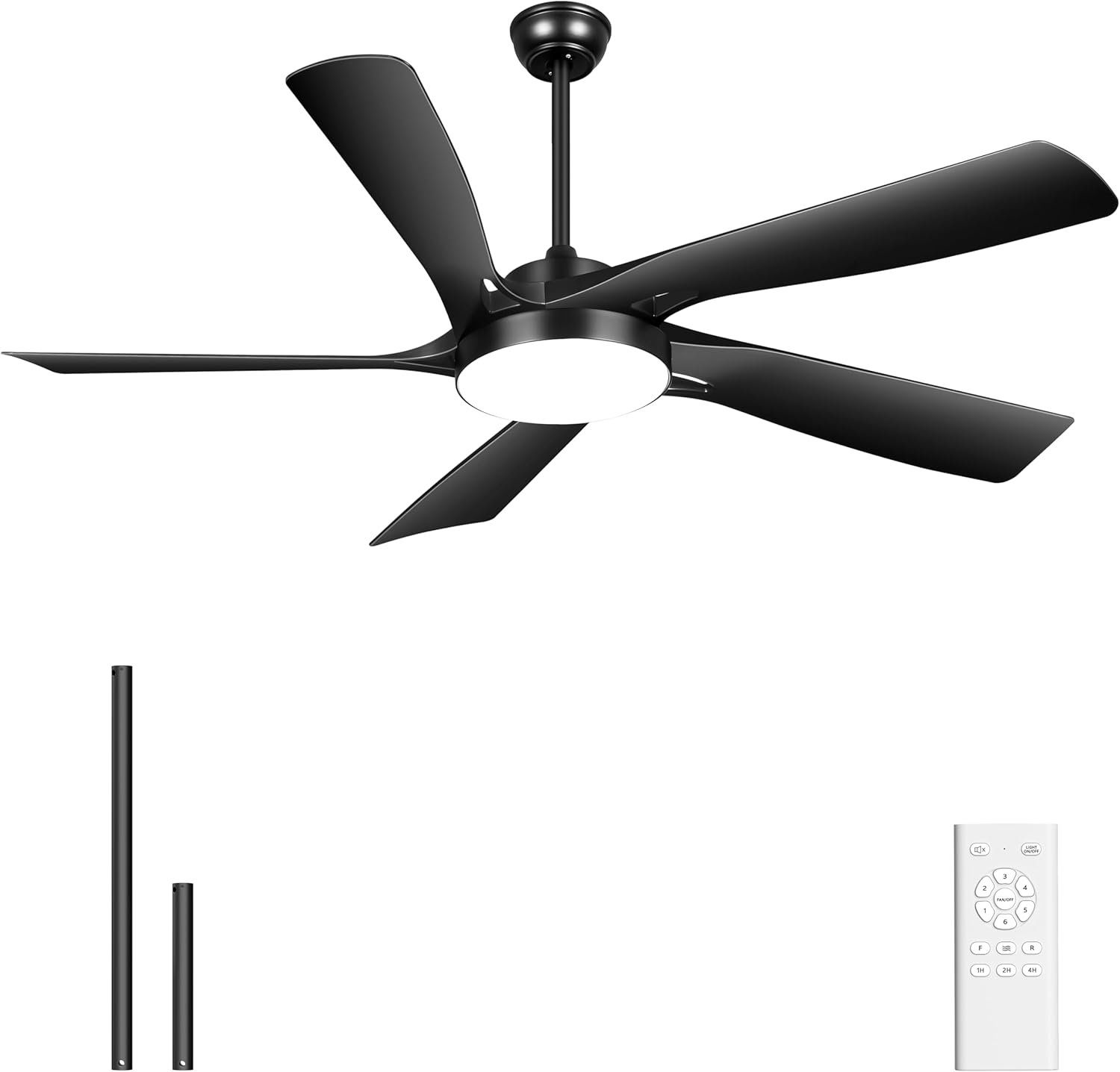
- Ceiling Fan Motor Assembly with Integrated Light
- 팬 블레이드 (5)
- 원격 제어
- 리모콘 홀더
- 다운로드(8인치 및 20인치)
- 장착 하드웨어 키트
- 사용 설명서
설정 및 설치
This section outlines the steps for installing your Ohniyou ceiling fan. For visual guidance, refer to the installation video provided by the manufacturer.
1. 사전 설치
- 주 회로 차단기의 전원을 끕니다.
- 천장 연결함이 단단히 고정되어 있고 팬의 무게를 지탱할 수 있는지 확인하십시오.
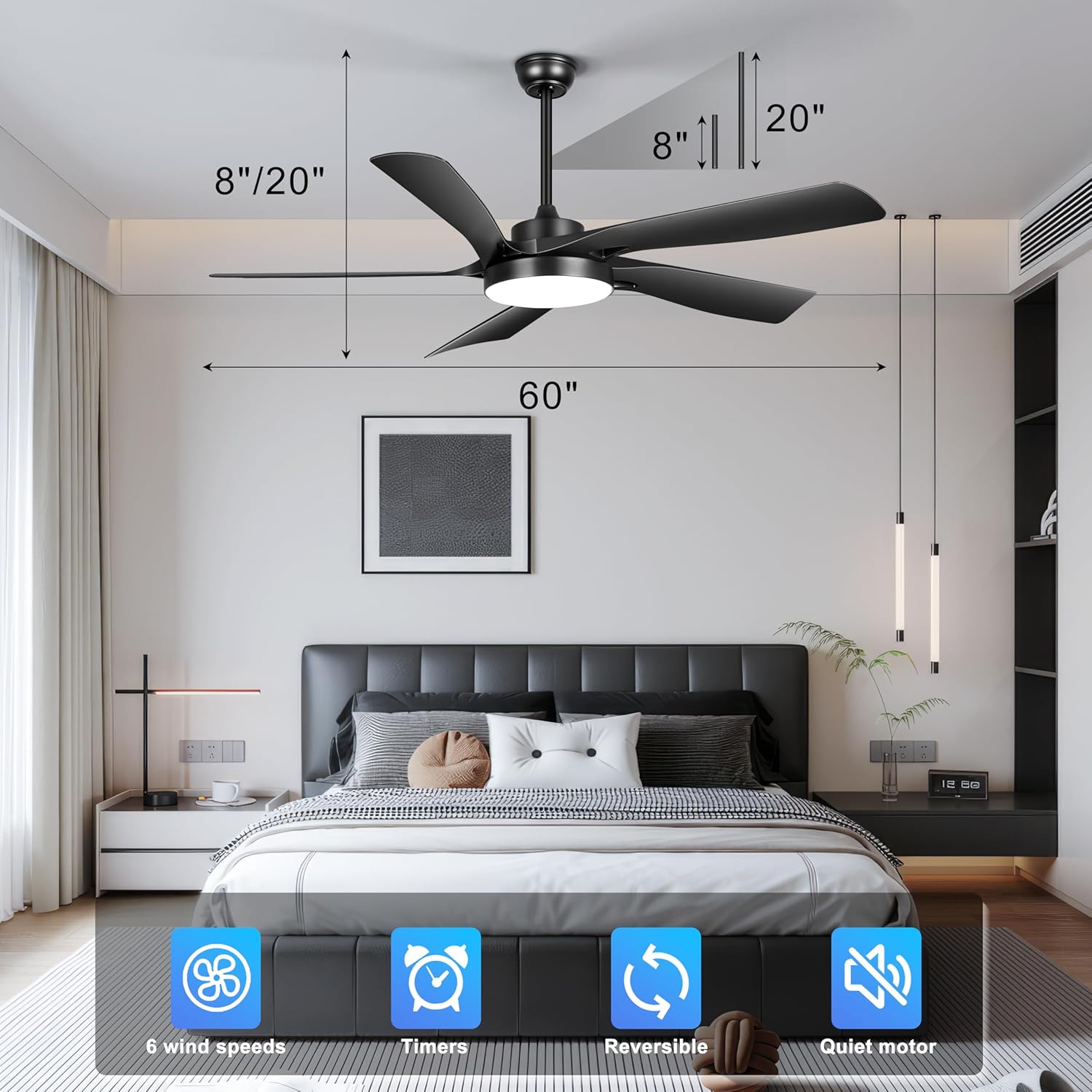
- Choose the appropriate downrod length (8-inch or 20-inch) based on your ceiling height. The fan is suitable for flat ceilings and sloped ceilings up to 15 degrees.
2. 브라켓 장착
Attach the mounting bracket to the ceiling junction box using the provided screws and washers. Ensure it is firmly secured.
3. 팬 조립
- 팬 모터에서 나오는 전선을 선택한 다운로드에 통과시키세요.
- 다운로드를 팬 모터 어셈블리에 고정하십시오.
- 팬 조립체를 조심스럽게 들어 올려 장착 브래킷에 걸어주세요.
4. 배선 연결
Connect the fan's electrical wires to the household wiring according to the wiring diagram in the full instruction manual. Typically, this involves connecting live, neutral, and ground wires. Ensure all connections are secure with wire nuts.
5. 블레이드 및 라이트 키트 부착
- 제공된 나사를 사용하여 5개의 팬 날개를 모터 하우징에 부착하십시오.
- Connect the light kit wiring to the fan motor assembly and secure the light kit to the fan.
6. 리모컨 페어링
After installation and restoring power, the remote control may need to be paired with the fan. Follow the specific pairing instructions in your detailed manual, usually involving pressing a button on the remote within a short time of turning on the power.
작동 지침
Your Ohniyou ceiling fan is operated using the included remote control. Familiarize yourself with the remote's functions for optimal use.

원격 제어 기능
- 전원 켜기/끄기: 선풍기와 조명을 켜거나 끕니다.
- 팬 속도: Select from 6 different fan speeds. Speeds 1-2 provide a low, gentle breeze; speeds 3-4 offer a mid-range natural wind; and speeds 5-6 deliver strong cooling airflow.
- 조명 켜기/끄기: 통합 LED 조명을 켜고 끕니다.
- 밝은 색온도: Cycle through 3 color temperatures: 3000K (warm light), 4500K (natural light), and 6000K (cool light). The fan features a memory function for the last selected light setting.
- 시간제 노동자: 팬이 1시간, 2시간 또는 4시간 후에 자동으로 꺼지도록 설정하세요.
- 가역 기능: 블레이드 회전 방향을 변경합니다.
가역 DC 모터
The fan's reversible DC motor allows for year-round use:
- 여름 모드(하향 기류): 날개가 시계 반대 방향으로 회전하여 아래쪽으로 바람을 일으켜 냉각 효과를 제공합니다.
- 겨울 모드(상승 기류): Blades rotate clockwise to draw cool air up towards the ceiling, circulating warm air downwards and optimizing heat distribution.

라이트 모드
The integrated LED light offers three distinct color temperatures to suit various preferences and room ambiances:
- 3000K 따뜻한 빛: Provides a cozy and inviting atmosphere.
- 4500K Natural Light: Offers a balanced and clear illumination, ideal for general tasks.
- 6000K Cool Light: Delivers bright, crisp lighting suitable for focused activities.

유지
정기적인 유지관리는 천장선풍기의 수명과 최적의 성능을 보장합니다.
청소
- 청소하기 전에 항상 회로 차단기의 전원을 끄세요.
- 부드러운 d를 사용하세요amp 팬 날개와 모터 하우징을 청소할 때는 천을 사용하십시오. 연마성 세제나 용제는 마감재를 손상시킬 수 있으므로 사용하지 마십시오.
- Periodically check for dust accumulation on the blades and light cover to maintain airflow and light output.
검사
- 팬과 장착 하드웨어의 모든 나사와 패스너가 안전하게 고정되어 있는지 주기적으로 점검하세요.
- Ensure the downrod is firmly seated and the canopy is properly secured against the ceiling.
문제 해결
If you encounter issues with your ceiling fan, refer to the following common problems and solutions. If the problem persists, contact Ohniyou customer service.
| 문제 | 가능한 원인 | 해결책 |
|---|---|---|
| 팬이 시작되지 않음 | No power to the fan; Loose wire connections; Remote not paired | Check circuit breaker; Verify all wiring connections are secure; Re-pair remote control with fan. |
| 빛이 작동하지 않습니다 | Loose wire connection; LED driver issue | 조명 키트 배선을 점검하십시오. LED 드라이버에 문제가 있는 것으로 의심되는 경우 고객 지원팀에 문의하십시오. |
| 팬이 흔들린다 | Loose blades or mounting hardware; Unbalanced blades | Ensure all blade screws and mounting screws are tight; Check for bent blades; Use a balancing kit if necessary. |
| 시끄러운 작동 | 나사 풀림; 모터 문제; 날개가 장애물에 부딪힘 | Tighten all screws; Ensure no obstructions are near blades; Contact support if motor noise persists. |
| 리모콘이 응답하지 않음 | Dead batteries; Remote not paired; Interference | Replace remote batteries; Re-pair remote; Ensure no strong interference sources are nearby. |
명세서
| 특징 | 세부 사항 |
|---|---|
| 상표 | Ohniyou |
| 모델명 | GLX111 |
| 색상 | 검은색 |
| 제품 치수 | 60인치 깊이 x 60인치 너비 x 8인치 높이 |
| 품목 무게 | 22파운드 |
| 전원 | DC |
| 권tage | 120 볼트 |
| 왓tage | 52 와트 |
| 블레이드 수 | 5 |
| 블레이드 길이 | 75 센티미터 |
| 전력 수준의 수 | 6단 속도 |
| 기류 용량 | 5000 분당 입방피트(CFM) |
| 소음 수준 | ≤30 dB |
| 조명 색온도 | 3000K(따뜻한색), 4500K(자연스러운색), 6000K(차가운색) |
| 다운로드 길이 | 8인치, 20인치 |
| 제어 방법 | 원격 제어 |
| 특별 기능 | Memory Function, Quiet Operation, Remote Controlled, Reversible, Timer |
| 실내/실외 사용 | Indoor, Outdoor (Patios, Garages) |
지원 및 보증
Ohniyou is dedicated to providing quality products and ensuring your satisfaction. If you have any questions or require assistance with installation, operation, or any other issues, please contact our professional online after-sales team.
All queries will be answered within 24 hours.

보증 정보
Specific warranty details are typically included with your product packaging. Please refer to the documentation provided with your purchase for comprehensive warranty terms and conditions.


