1. 서론
The JLab JBuds Mini Tones are true wireless Bluetooth earbuds designed for compact size and robust performance. These earbuds offer a range of features to enhance your audio experience, whether for music, podcasts, or calls.
주요 특징은 다음과 같습니다.
- 컴팩트한 디자인: Significantly smaller earbuds and charging case for enhanced portability.
- 연장된 플레이 시간: 이어버드 하나당 최대 5.5시간, 충전 케이스 사용 시 총 20시간 사용 가능합니다.
- 블루투스 멀티포인트: 두 기기를 동시에 끊김 없이 연결하고 전환하세요.
- IP55 등급: Sweat and dustproof for durability during active use.
- JLab 앱 맞춤 설정: Personalize sound settings, touch controls, and Be Aware Audio.
- 주의하세요 오디오: Allows ambient noise to be heard for situational awareness.
- 매우 깨끗한 통화: MEMS microphones in each earbud reduce background noise for clear communication.

Figure 1.1: JLab JBuds Mini Tones Earbuds and Charging Case.
2. 상자 안에 무엇이 들어있나요?
Your JLab JBuds Mini Tones package includes the following items:
- JBuds Mini Earbuds
- 무선 충전 케이스
- 3 Sets of Silicone Gel Tips (various sizes)
- 사용 설명서 (본 문서)
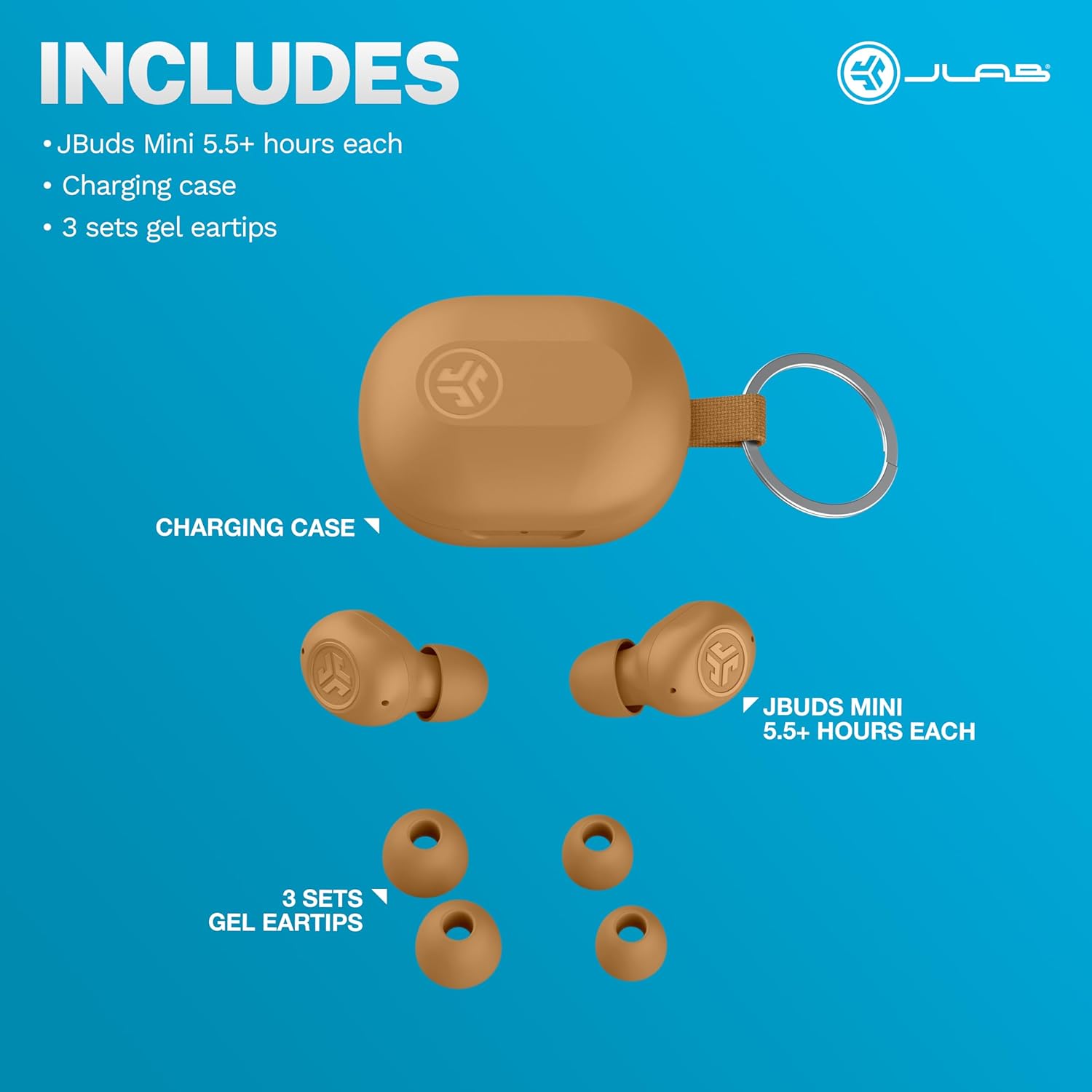
Figure 2.1: Included components: JBuds Mini earbuds, charging case, and three sets of silicone gel tips.
3. 설정
3.1 이어버드와 케이스 충전
Before first use, fully charge your JBuds Mini. The charging case provides additional power for on-the-go use.
- 이어버드를 충전 케이스에 넣으세요.
- Connect the charging case to a USB-C power source using the provided cable.
- The earbuds offer approximately 5.5 hours of playtime, with the charging case extending total playtime to 20 hours.
3.2 초기 페어링
JBuds Mini를 기기와 페어링하려면 다음 단계를 따르세요.
- 충전 케이스에서 양쪽 이어버드를 꺼내세요. 자동으로 페어링 모드로 진입합니다.
- On your device (smartphone, laptop, etc.), open Bluetooth settings.
- Select "JBuds Mini" from the list of available devices.
- 연결되면 페어링이 성공적으로 완료되었음을 알리는 오디오 메시지가 나옵니다.
3.3 블루투스 멀티포인트 연결
The JBuds Mini support Bluetooth Multipoint, allowing simultaneous connection to two devices.
- Pair with your first device as described in section 3.2.
- 첫 번째 기기에서 블루투스를 끄세요. 그러면 이어버드가 다시 페어링 모드로 들어갑니다.
- 두 번째 기기와 페어링하세요.
- Re-enable Bluetooth on the first device. The earbuds will now be connected to both devices.
- 오디오는 현재 재생 중인 기기에 따라 자동으로 기기 간 전환됩니다.
3.4 최적의 맞춤
Selecting the correct ear tip size is crucial for comfort and sound quality. Experiment with the three included silicone gel tip sizes to find the best fit for your ears.

Figure 3.1: The compact design of the JBuds Mini ensures a discreet and comfortable fit.
Video 3.1: A user demonstrates the unboxing and size comparison of JBuds Mini with other earbuds, highlighting their compact nature.
4. 사용 설명서
4.1 터치 컨트롤
The JBuds Mini feature intuitive touch controls on each earbud for managing playback, calls, and sound modes. Specific functions can be customized via the JLab App.
4.2 JLab App Customization
Download the JLab App to unlock the full potential of your JBuds Mini. The app allows you to:
- Adjust Be Aware Audio levels.
- 터치 컨트롤을 사용자 정의합니다.
- Select from preset EQ sound settings (JLab Signature, Balance, Bass Boost) or create custom profiles.
- 볼륨 제한을 통해 안전한 청취 옵션을 활성화하세요.
- 이어버드에 대한 소프트웨어 업데이트를 받으세요.

Figure 4.1: Customize your sound and controls using the JLab App.
4.3 Be Aware Audio
Activate Be Aware Audio to allow ambient sounds to pass through, keeping you connected to your surroundings. This feature is ideal for outdoor activities or when you need to hear conversations while listening to audio.

Figure 4.2: Be Aware Audio allows you to hear your surroundings for safe listening.
4.4 매우 선명한 통화
Each JBuds Mini earbud is equipped with a MEMS microphone designed to minimize background noise, ensuring your voice is transmitted clearly during calls. You can use either earbud independently for calls or both together.
5. 유지관리
5.1 청소
Regularly clean your earbuds and charging case to maintain optimal performance and hygiene. Use a soft, dry cloth to wipe down the surfaces. For ear tips, remove them and clean with mild soap and water, ensuring they are completely dry before reattaching.
5.2 방수 및 방진(IP55)
The JBuds Mini are rated IP55, meaning they are protected against dust ingress and low-pressure water jets from any direction. This makes them suitable for workouts and light rain. However, they are not designed for submersion in water.

Figure 5.1: The IP55 rating ensures durability against sweat and dust.
6. 문제 해결
If you encounter issues with your JBuds Mini, refer to the following common solutions:
6.1 Connectivity Issues (Sound Breaking Up)
If the audio connection is unstable or breaks up, ensure your earbuds are within close proximity to your connected device. Obstacles between the earbuds and the device can interfere with the Bluetooth signal. Try moving closer to your device or removing any potential obstructions.
6.2 Accidental Control Activation
If touch controls are accidentally triggered, particularly when lying down or adjusting the earbuds, ensure they are seated correctly in your ear. The JLab App allows for customization of touch controls, which may help mitigate unintended activations.
Video 6.1: A user highlights the comfort of JBuds Mini for side sleepers, indicating minimal pressure on the ear.
Video 6.2: A user demonstrates the comfortable fit of the JBuds Mini, suitable for various activities including lying down.
6.3 배터리 부족 경고
The earbuds provide subtle audio warnings when the battery is low, allowing ample time to place them back in the charging case before they power off.
7. 사양
| 특징 | 사양 |
|---|---|
| 모델명 | JBuds 미니 |
| 연결 기술 | 무선(블루투스) |
| 블루투스 버전 | 4.0 |
| 방수 레벨 | IP55(땀 및 먼지 방지) |
| 배터리 수명(이어버드) | 5.5시간 |
| 총 재생 시간(케이스 포함) | 20시간 |
| 충전 시간 | 5.5 Hours (for case, likely refers to total charge time for case + earbuds) |
| 제어 유형 | 터치, 볼륨 조절 |
| 소음 제어 기능 | Be Aware Audio, Sound Isolation |
| 호환 장치 | Mobile Phones, Laptops, Computers |
| 품목 무게 | 0.04킬로그램(1.44온스) |
| 재료 | 플라스틱 |
| 한국어: | 810119073532 |
8. 보증 및 지원
8.1 보증 정보
Your JLab JBuds Mini Tones True Wireless Bluetooth Earbuds come with a JLab Two Year Warranty. Please refer to the official JLab web전체 보증 약관은 해당 사이트나 구매 문서를 참조하세요.
8.2 고객 지원
For further assistance, technical support, or warranty claims, please visit the official JLab support page or contact their customer service directly.
방문하세요 Amazon의 JLab 스토어 자세한 내용은.