1. 서론
The UanTii All-in-One Smart Matter Plug is a versatile smart home device designed to integrate seamlessly with various smart home ecosystems, including Apple HomeKit, Amazon Alexa, Google Home, Samsung SmartThings, and Tuya/Smart Life. This smart plug allows you to control your home appliances remotely, set schedules, and use voice commands for a truly automated experience. Its Matter certification ensures enhanced compatibility and stability within your local network.

Figure 1: UanTii Smart Matter Plug and its multi-platform compatibility.
2. 안전 정보
본 제품을 사용하기 전에 모든 안전 지침을 읽고 이해하십시오. 지침을 따르지 않을 경우 감전, 화재 또는 기타 위험이 발생할 수 있습니다.
- 장치를 분해하거나 개조하지 마세요.
- 기기를 물이나 과도한 습기에 노출시키지 마세요.
- Do not use the device with appliances that exceed its maximum load capacity (16A, 3680W).
- 플러그가 벽면 콘센트에 완전히 꽂혀 있는지 확인하십시오.
- 어린이의 손이 닿지 않는 곳에 보관하세요.
- 건조한 실내 환경에서만 사용하세요.
3. 패키지 내용
Your UanTii Smart Matter Plug package should contain the following:
- 1 x UanTii All-in-One Smart Matter Plug
- 1 x 사용 설명서(이 문서)
4. 설정
Before setting up your UanTii Smart Matter Plug, ensure your smartphone's operating system is iOS 16.1 or later, or Android 8.1 or later. The plug requires a 2.4GHz Wi-Fi network for initial setup and operation.
4.1 Matter Hub Requirement
A Matter-enabled hub is required to add Matter devices to Apple HomeKit, Google Home, and Alexa apps. Ensure your hub and the plug are on the same local area network (LAN) and that Bluetooth is enabled on your phone during the initial pairing process.

그림 2: 예amples of Matter-compatible hubs required for integration.
4.2 장치 추가
- Plug the UanTii Smart Matter Plug into a standard wall outlet.
- 스마트폰의 블루투스가 켜져 있는지 확인하세요.
- Open your preferred smart home app (e.g., Apple Home, Google Home, Alexa, Tuya Smart, or Smart Life).
- Follow the app's instructions to add a new device. You will typically be prompted to scan the QR code located on the device or its packaging.
- Once scanned, the app will guide you through connecting the plug to your 2.4GHz Wi-Fi network.
- For Tuya/Smart Life App, no separate hub is needed, only a 2.4GHz Wi-Fi connection.

Figure 3: Scan the QR code on the device to add it to your smart home system. Example QR code: 0000-123-0000
4.3 Important Notes for Specific Apps:
- HomeKit/Google Home/Alexa APP: Primarily supports voice function and on/off control.
- 투야 앱: Offers timer function, on/off control, and voice function (when integrated with Alexa and Google Home).
5. 스마트 플러그 작동
5.1 앱 원격 제어
Once connected, you can control the smart plug from anywhere using the Tuya/Smart Life APP. Turn appliances on or off, and manage schedules directly from your smartphone.

Figure 4: Remote control of appliances via the Tuya Smart or Smart Life app.
5.2 음성 제어
The UanTii Smart Matter Plug supports voice commands through Siri, Amazon Alexa, and Google Assistant, providing a hands-free control experience.

Figure 5: Use voice commands with your preferred assistant to control the plug.
5.3 타이머 및 스케줄 기능
Automate your appliances by setting timers and schedules. This feature is exclusively available through the Tuya/Smart Life APP.

Figure 6: Set daily schedules for your appliances using the Tuya/Smart Life app.
5.4 Network Stability with Matter
Thanks to Matter certification, devices in your local network can operate smoothly even if your internet connection goes offline, ensuring reliable performance.

Figure 7: Enjoy stable control even without an internet connection. Learn more about Matter at 168150
5.5 High Power Capacity
The UanTii Smart Matter Plug supports a maximum current of 16A, making it suitable for a wide range of household appliances.
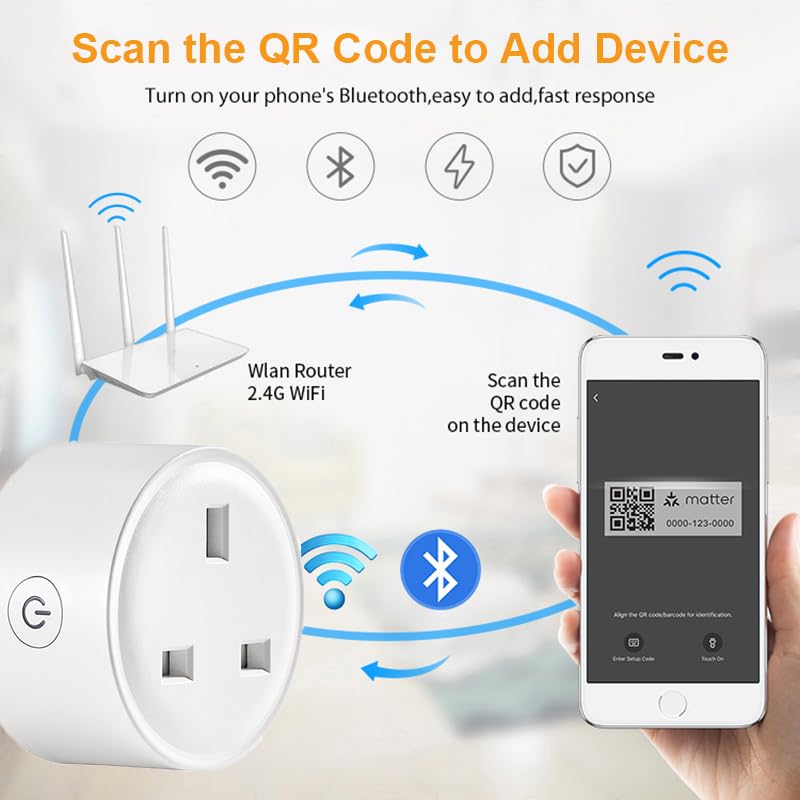
Figure 8: The 16A capacity allows connection to most electrical appliances.
6. 유지관리
To ensure the longevity and proper functioning of your UanTii Smart Matter Plug, follow these simple maintenance guidelines:
- 부드럽고 마른 천으로 기기를 닦으세요. 액체나 에어로졸 세척제는 사용하지 마세요.
- 직사광선이나 열원 근처에 장치를 두지 마십시오.
- 장치를 극단적인 온도나 습도에 노출시키지 마십시오.
- Ensure the plug pins are clean and free from debris before inserting into a socket.
7. 문제 해결
If you encounter issues with your UanTii Smart Matter Plug, refer to the following common solutions:
| 문제 | 가능한 원인 / 해결책 |
|---|---|
| 기기가 앱에 연결되지 않습니다. |
|
| 음성 제어가 작동하지 않습니다. |
|
| Timer/Schedule not working. |
|
| 플러그가 반응하지 않습니다. |
|
8. 사양
| 특징 | 사양 |
|---|---|
| 모델 번호 | UTMAPS012 |
| 정격 전력 | 교류 100~240V 50/60Hz |
| 정격 전류 | 16A |
| 최대 하중 용량 | 3680와트 |
| 대기 소비량 | 0.46와트 |
| 와이파이 종류 | 2.4GHz |
| 와이파이 표준 | IEEE 802.11b/g/n |
| 작동 습도 | 0% ~ 85%RH (Non-Condensing) |
| 작동 온도 | 0℃ ~ 50℃ (32°F ~ 122°F) |
| 재료 | 구리(접촉 재료) |
| 치수 | 7 x 7 x 6cm |
| 무게 | 80g |
| 원산지 | 중국 |
9. 보증 및 지원
For warranty information and technical support, please refer to the contact details provided with your purchase or visit the official UanTii web사이트. 보증 청구에 대비해 구매 증빙 자료로 구매 영수증을 보관하세요.