1. 서론
This user manual provides detailed instructions for the setup, operation, maintenance, and troubleshooting of your ATTACK SHARK X66 Wireless Mechanical Gaming Keyboard. Designed for versatility and performance, the X66 features tri-mode connectivity, hot-swappable switches, and customizable RGB lighting, making it suitable for various uses including gaming, work, and multimedia.
최적의 성능과 긴 수명을 보장하기 위해 키보드를 사용하기 전에 이 설명서를 꼼꼼히 읽어 주십시오.
2. 패키지 내용
제품 개봉 후, 다음 품목들이 모두 포함되어 있는지 확인해 주십시오.
- ATTACK SHARK X66 기계식 키보드 1개
- 1 x 2-in-1 키캡 및 스위치 풀러
- 2 x Extra Strawberry Switches
- 1 x USB-C 케이블
- 1 x 사용자 매뉴얼(이 문서)

Figure 2.1: Contents of the ATTACK SHARK X66 package, including the keyboard, USB-C cable, keycap/switch puller, and extra switches.
3. 제품 오버view 및 주요 특징
The ATTACK SHARK X66 is a compact 66-key mechanical gaming keyboard featuring a gasket-mounted design for a soft and responsive typing experience. It includes a versatile volume knob and supports three connectivity modes for maximum flexibility.

그림 3.1: 이상view of the ATTACK SHARK X66's main features, including 3 modes connection, hot-swappable design, gasket structure, 5-layer silencing filling, 66+1 keys, single key slotted PCB, RGB backlight, 3000mAh battery, and customized high-performance chip.

Figure 3.2: The ATTACK SHARK X66 keyboard in Moonlight color, showcasing its compact layout and integrated volume knob.
4. 설정 및 연결
4.1 초기 충전
Before first use, it is recommended to fully charge the keyboard. Connect the supplied USB-C cable to the keyboard's USB-C port and the other end to a powered USB port (e.g., computer, wall adapter). The charging indicator light will show the charging status.
4.2 연결 모드
The ATTACK SHARK X66 supports three connection modes: 2.4GHz Wireless, Bluetooth 5.0, and Wired (USB-C). A switch located on the side of the keyboard allows you to select the desired mode.
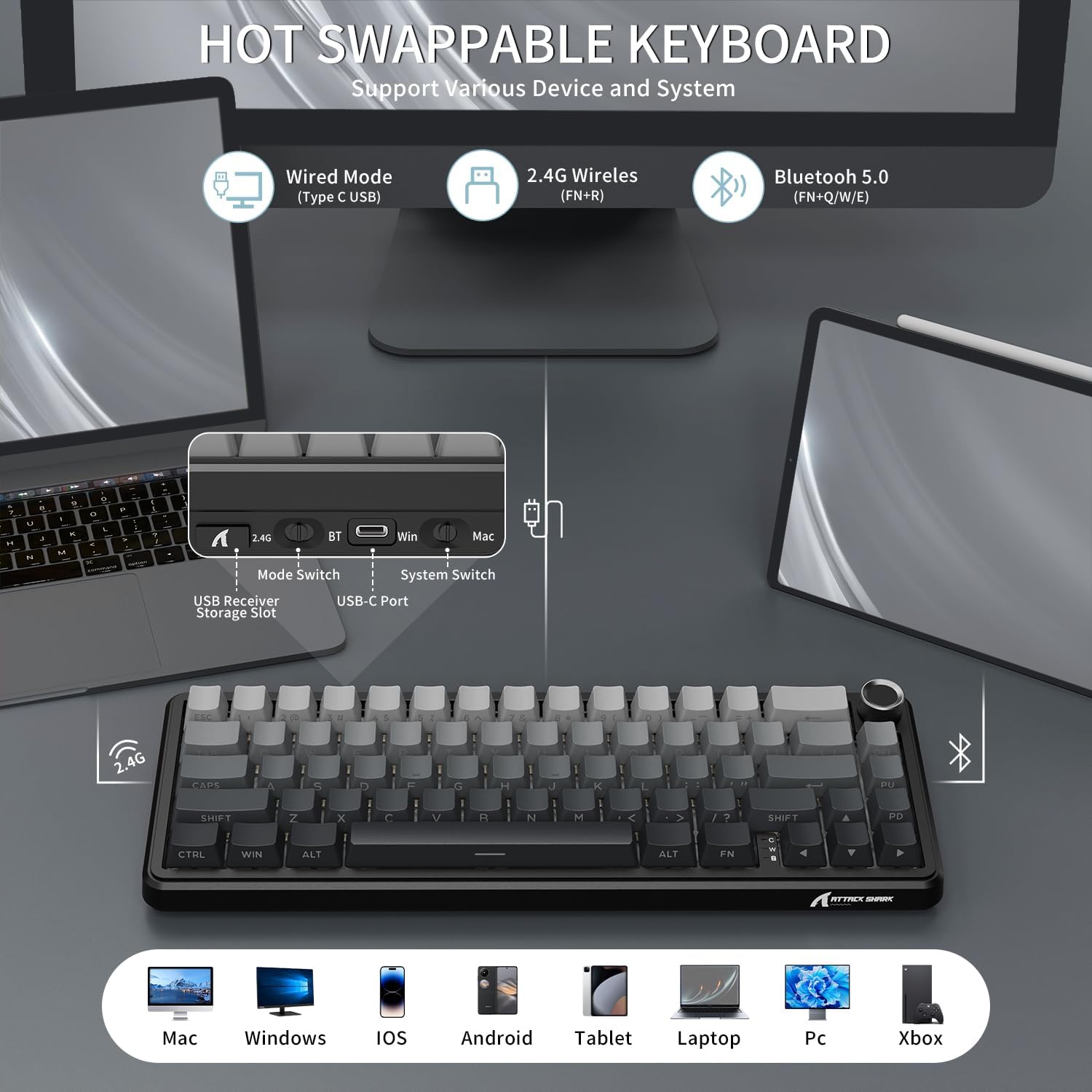
Figure 4.1: The keyboard's side panel illustrating the 2.4G, BT (Bluetooth), and USB-C ports, along with mode and system switches. The USB receiver storage slot is also visible.
- 2.4GHz 무선 모드:
Locate the 2.4G USB receiver stored in the keyboard's dedicated slot. Plug the receiver into an available USB port on your computer. Switch the keyboard to 2.4G mode. The keyboard should connect automatically.
- Bluetooth 5.0 모드:
Switch the keyboard to BT mode. On your device (PC, tablet, smartphone), enable Bluetooth and search for new devices. Select "ATTACK SHARK X66" from the list to pair. The keyboard can store up to 3 Bluetooth devices (FN+Q/W/E to switch between paired devices).
- Wired (USB-C) Mode:
Connect the USB-C cable from the keyboard to your computer's USB port. The keyboard will automatically switch to wired mode and begin charging.
비디오 4.1: 오버view of the ATTACK SHARK X66 TRI Mode Mechanical Gaming Keyboard, demonstrating its features and connectivity options.
5. 주요 기능 및 레이아웃
The X66 features a compact 66-key layout, optimizing space while retaining essential functionality. Many functions are accessed via the FN 키 조합.
5.1 볼륨 노브
The multi-functional aluminum alloy knob located in the top right corner controls audio volume and mute functions:
- 시계 방향으로 돌리면 소리가 커집니다.
- 시계 반대 방향으로 돌리면 소리가 줄어듭니다.
- 누르세요: 음소거/음소거 해제
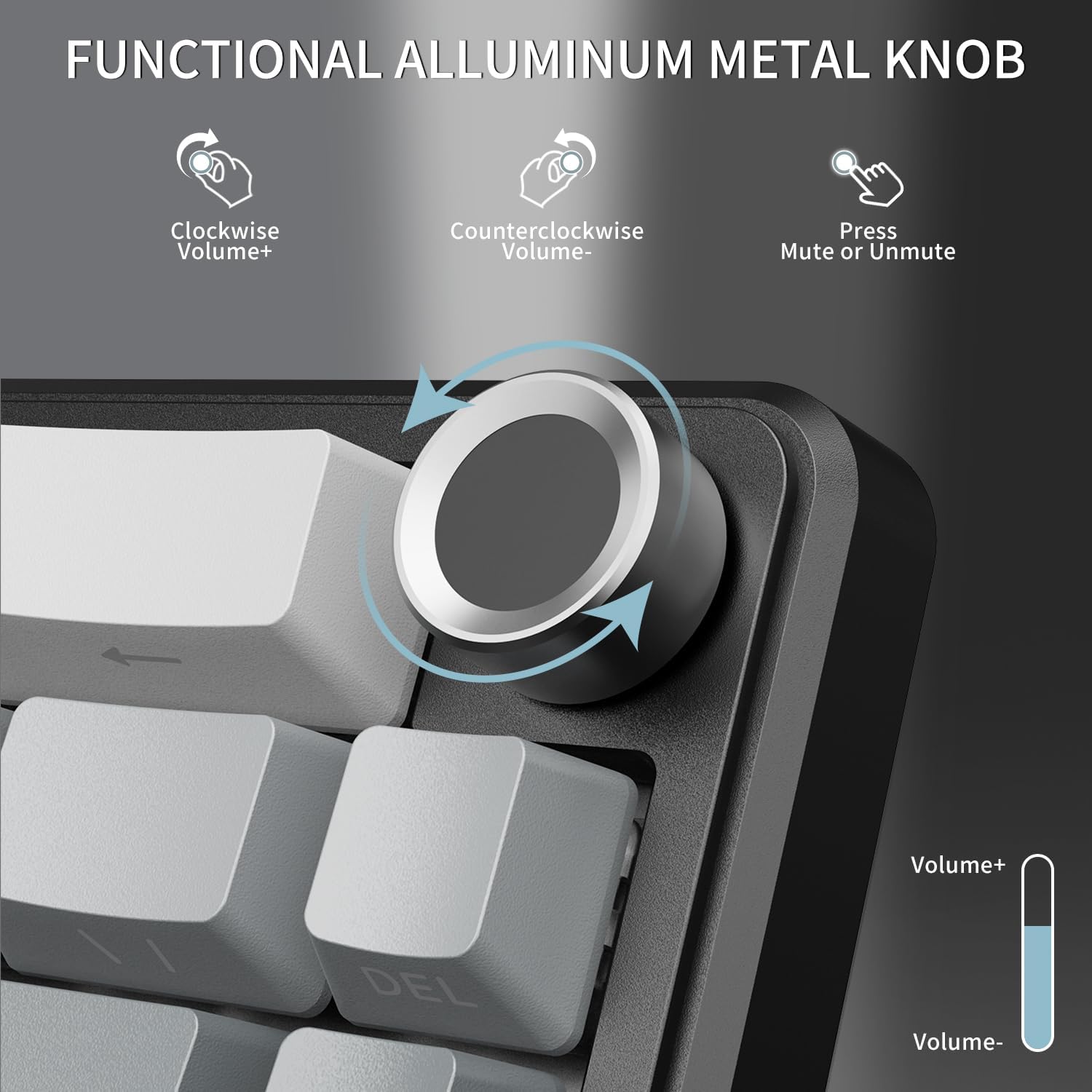
Figure 5.1: The volume knob, demonstrating its functions for increasing/감소asing volume and muting/unmuting audio.
5.2 시스템 호환성 스위치
The keyboard supports dual system compatibility (Windows/Mac). Use the dedicated switch next to the USB-C port to toggle between Win and Mac modes for optimized key mappings.
5.3개의 표시등
The keyboard features three indicator lights to provide quick status updates:
- Caps Lock 표시기: Caps Lock 키가 활성화되면 불이 켜집니다.
- Win 잠금 표시기: Illuminates when the Windows key is locked (to prevent accidental presses during gaming).
- 충전 상태 표시기: Shows the charging status of the keyboard's battery.

Figure 5.2: The indicator lights located near the bottom right of the keyboard, showing status for Caps Lock, Win Lock, and charging.
6. RGB 조명 제어
The ATTACK SHARK X66 features vibrant RGB backlighting with multiple customizable effects to enhance your gaming or work environment. The keyboard offers 18 dynamic chroma modes, 7 monochrome colors, and 1 rainbow color light.
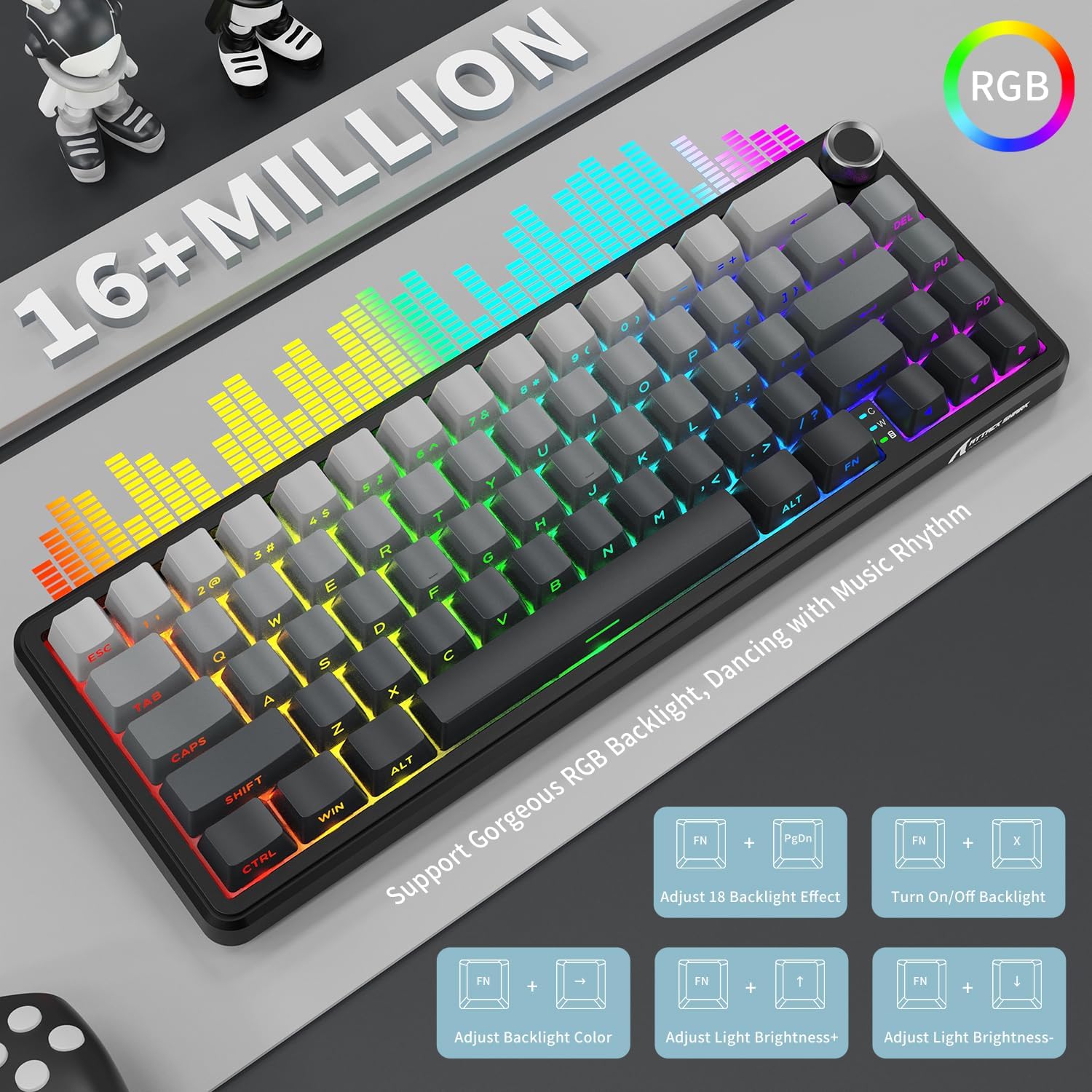
Figure 6.1: Visual representation of the RGB lighting capabilities and the FN key combinations for controlling them.
Use the following FN key combinations to control the RGB lighting:
- FN + 페이지 아래로: Adjust between 18 preset backlight effects.
- FN + X: Turn On/Off backlight.
- FN + 왼쪽/오른쪽 화살표: 백라이트 색상을 조정합니다.
- FN + 위쪽/아래쪽 화살표: 조명의 밝기를 조절합니다.
7. Hot-Swappable Switches and Gasket Structure
The X66 keyboard is designed with a hot-swappable socket, allowing users to easily change switches without soldering. This feature provides flexibility for customizing your typing feel and sound. It supports most 3-pin and 5-pin mechanical switches.

Figure 7.1: Illustration of the hot-swappable design, showing the custom linear strawberry switches, pre-lubed fine-tune stabilizer, and 1.2mm single key slotted PCB. The image also highlights the Cherry profile PBT 키캡.
The keyboard comes pre-installed with linear Strawberry Switches, known for their smooth and consistent keystrokes. The pre-lubed stabilizers ensure a stable and pleasant typing experience.
7.1 개스킷 장착 구조
The X66 utilizes a gasket-mounted structure, incorporating 5 layers of high-quality sound-absorbing material. This design effectively reduces hollow sound and provides a pure, stable keystroke feeling, contributing to a "creamy thocky" sound profile.

그림 7.2: 상세 분해도 view of the gasket-mounted structure, showing the various layers of sound-absorbing materials and components like the single key slotted PCB, shaft underpad, silica gel, PET singing pad, and PORON filled cotton.
7.2 PBT 키캡
The keyboard is equipped with durable PBT keycaps featuring side-printed characters. PBT material is known for its resistance to shine and wear over time, ensuring the legends remain clear. The Cherry profile provides an ergonomic typing feel.
8. 배터리 관리
The ATTACK SHARK X66 is powered by a 3000mAh large-capacity battery, providing extended usage time in wireless modes.
8.1 배터리 잔량 확인
To check the current battery level, long press the FN + 백스페이스 keys. The number keys (1-0) will illuminate to indicate the battery percentage, with 10 representing 100% and lower numbers indicating a lower charge.

Figure 8.1: Instructions for checking the visible battery level by pressing FN + Backspace, showing how the 1-0 keys indicate charge status.
8.2 충전 중
Connect the keyboard to a power source using the provided USB-C cable. The charging indicator light will confirm that the keyboard is charging. The keyboard can be used while charging in wired mode.
9. 유지관리
적절한 유지관리는 키보드의 수명과 최적의 성능을 보장합니다.
- 청소: Use a soft, dry cloth to wipe down the keyboard. For deeper cleaning, you may use a can of compressed air to remove dust and debris from between the keycaps.
- 키캡 및 스위치 교체: Use the included 2-in-1 keycap and switch puller to safely remove keycaps and switches. When replacing switches, ensure they are aligned correctly with the PCB pins to avoid bending.
- 저장: 장기간 사용하지 않을 경우 키보드를 직사광선과 극한 온도 변화를 피해 건조하고 서늘한 곳에 보관하십시오.

Figure 9.1: The adjustable double-layer bracket, which can be used to set the keyboard at an ergonomic angle for comfortable typing.
10. 문제 해결
If you encounter any issues with your ATTACK SHARK X66 keyboard, please refer to the following common solutions:
| 문제 | 가능한 원인 / 해결책 |
|---|---|
| 무선 모드에서 키보드가 응답하지 않습니다. |
|
| Specific keys not working or feeling stuck. |
|
| RGB lighting not working or behaving unexpectedly. |
|
| 키보드 연결이 자주 끊깁니다. |
|
11. 사양
| 특징 | 세부 사항 |
|---|---|
| 모델 | X66 |
| 키보드 설명 | 기계적 |
| 키의 개수 | 66 |
| 연결 기술 | Tri Mode (2.4Ghz Wireless, Bluetooth 5.0, Type C Wired) |
| 배터리 용량 | 3000mAh |
| 키캡 재질 | PBT (Side Printed Characters, Cherry Profile) |
| 스위치 유형 | Linear Strawberry Switch (Hot Swappable) |
| 장착 스타일 | Gasket Mount (5-layer sound-absorbing material) |
| 백라이트 | RGB (16+ Million Colors, Multiple Effects) |
| 호환 장치 | 노트북, PC, 태블릿, 스마트폰, 맥 |
| 품목 무게 | 1.98파운드 |
| 패키지 크기 | 13.98 x 6.57 x 2.05 인치 |
12. 보증 및 지원
ATTACK SHARK products are manufactured to the highest quality standards. For warranty information, technical support, or customer service inquiries, please refer to the contact details provided on the product packaging or visit the official ATTACK SHARK web대지.
보증 청구를 위해 구매 증명서를 보관하십시오.