1. 서론
This user manual provides detailed instructions for the Lepro Bundle, which includes two distinct smart outdoor lighting systems: the 50ft E1 RGB+IC AI Smart Permanent Outdoor Lights and the 100ft ZB1 RGB+IC AI Smart Outdoor String Lights. This guide will assist you with installation, operation, maintenance, and troubleshooting to ensure optimal performance and enjoyment of your new lighting solutions.

이미지 1.1: 이상view of the Lepro Bundle, showcasing both the permanent outdoor lights and the string lights.
2. 패키지 내용
Please verify that all components are present and in good condition upon unpacking.
- 1 x Lepro 50ft E1 RGB+IC AI Smart Permanent Outdoor Lights Kit (includes light strands, power adapter, mounting accessories)
- 1 x Lepro 100ft ZB1 RGB+IC AI Smart Outdoor String Lights Kit (includes light strand with bulbs, power adapter)
- 1 x 사용자 매뉴얼(이 문서)
3. 중요한 안전 정보
설치 및 사용 전에 모든 안전 지침을 읽으십시오. 이 지침을 따르지 않을 경우 감전, 화재 또는 기타 위험이 발생할 수 있습니다.
- 설치 또는 유지 관리 전에 전원 공급 장치가 분리되어 있는지 확인하십시오.
- 제공된 전원 어댑터만 사용하세요.
- Do not submerge the lights or power adapters in water.
- Avoid installing lights near heat sources or in extremely high-temperature environments.
- 어린이의 손이 닿지 않는 곳에 보관하세요.
- Do not attempt to repair or modify the lights yourself. Contact customer support for assistance.
4. 설정 및 설치
4.1. Lepro E1 Permanent Outdoor Lights Installation
These lights are designed for permanent installation on eaves, walls, or other outdoor structures.
- 레이아웃 계획: Determine the desired path for your lights. Ensure the power adapter can reach a suitable outdoor power outlet.
- 설치: Use the provided mounting clips and screws to secure the light strands. Ensure lights are evenly spaced and securely attached to prevent sagging.
- 전원 연결: Connect the light strand to the power adapter, then plug the adapter into a weather-protected outdoor outlet.
- 앱 페어링: Download the Lepro app from your device's app store. Follow the in-app instructions to add your E1 Permanent Outdoor Lights. Ensure your Wi-Fi network is 2.4GHz.

Image 4.1: The Lepro E1 Permanent Outdoor Lights packaging and a view of the mobile application interface for control.
4.2. Lepro ZB1 Outdoor String Lights Installation
These string lights are versatile and can be hung across patios, pergolas, or fences.
- 위치를 선택하십시오 : Select a suitable outdoor area for hanging the string lights. Consider the length and available hanging points.
- 안전한 걸기: Use hooks, zip ties, or guide wires (not included) to securely hang the string lights. Ensure the bulbs are not directly resting on surfaces that could cause damage.
- 전원 연결: Connect the string light strand to its power adapter, then plug the adapter into a weather-protected outdoor outlet.
- 앱 페어링: Open the Lepro app and follow the instructions to add your ZB1 Outdoor String Lights. Ensure your Wi-Fi network is 2.4GHz.

Image 4.2: The Lepro ZB1 Outdoor String Lights packaging and a view of the mobile application interface for control.
5. Operating Your Lepro Smart Lights
5.1. Lepro App Control
The Lepro app is the primary interface for controlling your lights. It allows for extensive customization and smart features.
- 전원 켜기/끄기: 앱에서 바로 조명을 켜거나 끌 수 있습니다.
- 색상 선택: Choose from a wide spectrum of RGB colors. For E1 Permanent Lights, you can also adjust white light from 2200K (warm) to 6500K (cool). ZB1 String Lights offer 2700K warm white in addition to RGB.
- 동적 효과: Select from pre-set scenes or create custom dynamic lighting effects, including chasing, fading, and flashing.
- Individual Bulb Control (E1 Only): The E1 Permanent Lights feature individually addressable LEDs, allowing you to assign unique colors to specific bulbs for intricate designs.
- 일정: Set timers and schedules for your lights to turn on/off or change modes automatically.
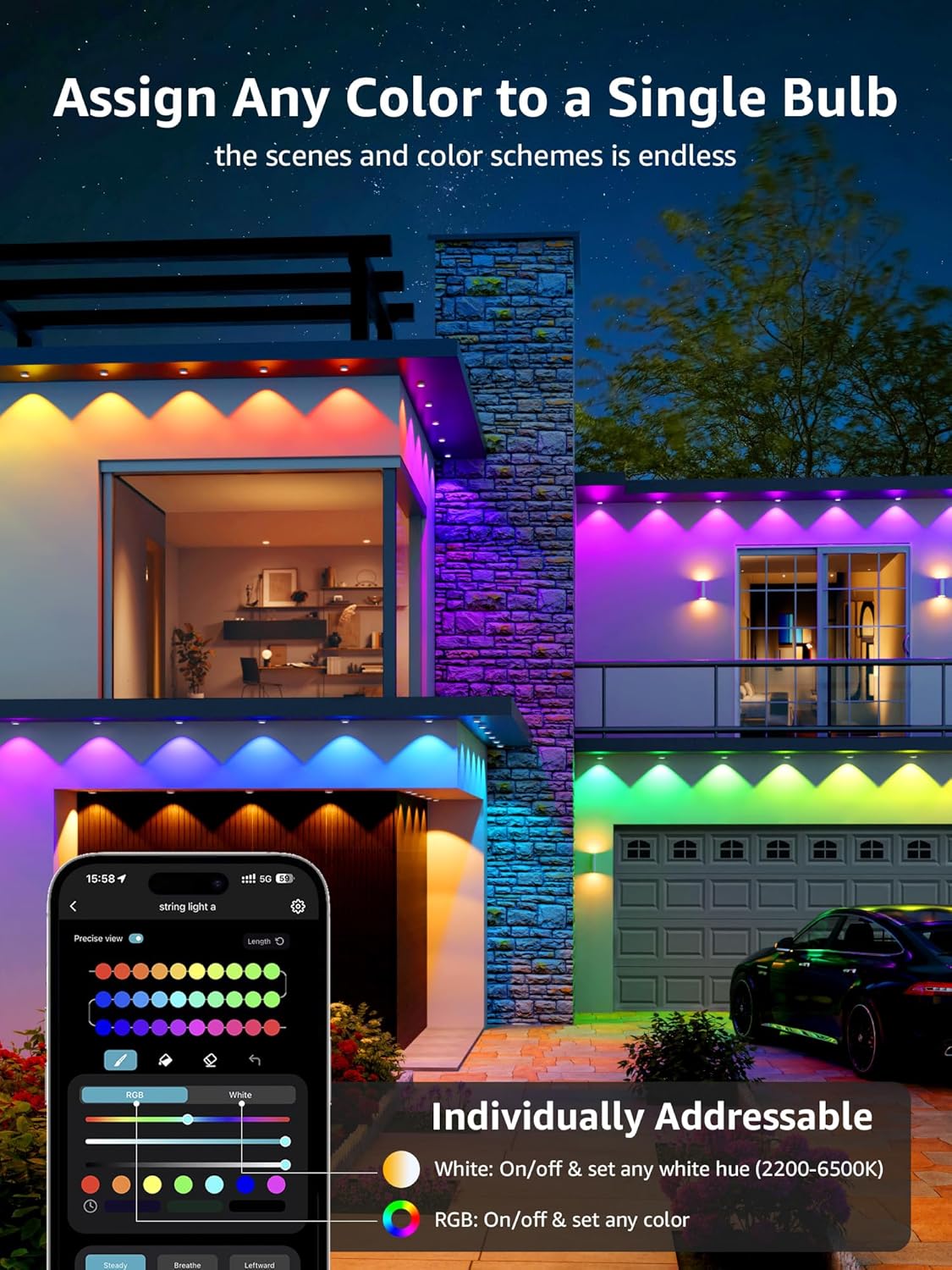
Image 5.1: The Lepro app demonstrating the ability to assign any color to individual bulbs on the E1 Permanent Outdoor Lights.
5.2. AI Voice Control (In-App)
The Lepro app integrates an AI voice assistant, allowing you to control your lights using natural language commands without needing external smart assistants.
- Activate AI: Tap the microphone icon within the Lepro app.
- Speak Commands: State your desired activity or mood (e.g., "Christmas party," "I am happy," "turn on the lights"). The AI will recommend and apply suitable lighting effects.

Image 5.2: Illustration of the voice-to-AI-to-output process for the permanent lights, showing examples for Christmas, Halloween, accent, and security lighting.

Image 5.3: Illustration of the voice-to-AI-to-output process for the string lights, showing examples for Christmas, Halloween, daily, and party lighting.

이미지 5.4: Examples of AI-generated lighting effects based on voice prompts like "I am happy," "christmas party," and "turn on the lights."
5.3. Alexa / Google Assistant Integration
Both E1 and ZB1 lights can be controlled via Amazon Alexa or Google Assistant for seamless smart home integration.
- 스킬/액션 활성화: In the Alexa or Google Home app, search for and enable the "Lepro" skill or action.
- 계정 연결: Follow the prompts to link your Lepro account with your Alexa or Google account.
- 장치 검색: Once linked, ask your smart assistant to discover new devices. Your Lepro lights should appear.
- 음성 명령: You can now use voice commands such as "Alexa, turn on the permanent lights" or "Hey Google, set string lights to red."
6. 유지관리 및 관리
Proper maintenance ensures the longevity and performance of your Lepro outdoor lights.
- 청소: Periodically wipe the lights and bulbs with a soft, damp cloth. Do not use harsh chemicals or abrasive cleaners. Ensure power is disconnected before cleaning.
- 내후성: Both E1 and ZB1 lights are IP65 rated, meaning they are weatherproof and shatterproof, designed to withstand snow, rain, sun, and wind. However, avoid prolonged submersion.
- 저장: If storing the lights for an extended period, clean them thoroughly, coil them neatly, and store them in a cool, dry place away from direct sunlight.

Image 6.1: Visual representation of the IP65 rating, highlighting snow-proof, waterproof, sun-proof, and windproof features.
7. 문제 해결
If you encounter issues with your Lepro lights, refer to the following common problems and solutions.
| 문제 | 가능한 원인 | 해결책 |
|---|---|---|
| 조명이 켜지지 않습니다. | No power, loose connection, power adapter failure. | 콘센트를 확인하고 모든 연결부가 단단히 고정되어 있는지 확인하십시오. 다른 콘센트에 연결해 보세요. |
| Wi-Fi/앱에 연결할 수 없습니다. | Incorrect Wi-Fi password, 5GHz Wi-Fi, too far from router, network interference. | Ensure 2.4GHz Wi-Fi, re-enter password, move lights closer to router, restart router. |
| 조명이 깜빡이거나 색상이 잘못 표시됩니다. | Loose connection, software glitch, power fluctuation. | Check connections, restart lights by unplugging for 10 seconds, update app firmware. |
| 음성 제어가 작동하지 않습니다. | Microphone issues, incorrect commands, app not linked to smart assistant. | Ensure microphone access, use clear commands, verify Lepro skill/action is enabled and linked. |
If the problem persists, please contact Lepro customer support for further assistance.
8. 제품 사양
8.1. Lepro E1 RGB+IC AI Smart Permanent Outdoor Lights
- 길이: 50 피트
- LED : RGB+IC (Individually Addressable)
- 백색광: 2200K (warm) to 6500K (cool) adjustable
- 연결성: 와이파이(2.4GHz)
- 날씨 등급: IP65 (Weatherproof & Shatterproof)
- 제어: Lepro App, In-App AI Voice, Alexa, Google Assistant
8.2. Lepro ZB1 RGB+IC AI Smart Outdoor String Lights
- 길이: 100 피트
- 전구: 30 Warm LED Bulbs (RGB+IC)
- 백색광: 2700K (warm white only)
- 연결성: 와이파이(2.4GHz)
- 날씨 등급: IP65 (Weatherproof & Shatterproof)
- 제어: Lepro App, In-App AI Voice, Alexa, Google Assistant
9. 보증 및 고객 지원
Lepro products are designed for quality and durability. For warranty information, technical support, or any questions regarding your product, please refer to the warranty card included in your package or visit the official Lepro website. You can also contact Lepro customer service directly through the contact information provided on their website or within the Lepro app.


