1. 소개 및 이상view
This manual provides essential information for the safe and effective use of your Sharp Humidifying Air Purifier, model KI-TS50-W. This appliance combines air purification with humidification, featuring Sharp's unique Plasmacluster 25000 technology and an efficient Coanda airflow system. Its slim design is suitable for various room sizes, including single rooms and bedrooms.

Image: The Sharp KI-TS50-W Humidifying Air Purifier positioned in a modern living space, highlighting its slim profile.
2. 안전 정보
부상이나 제품 손상을 방지하기 위해 제품 작동 전에 모든 안전 지침을 주의 깊게 읽어 주십시오. 나중에 참조할 수 있도록 이 설명서를 보관하십시오.
- Always connect the appliance to a power outlet with the specified voltage.
- 공기 흡입구 또는 배출구를 막지 마십시오. 적절한 공기 흐름을 위해 제품 주변에 충분한 공간을 확보하십시오.
- Do not insert fingers or objects into any openings.
- 인화성 가스나 가연성 물질 근처에서 제품을 사용하지 마십시오.
- Unplug the power cord before cleaning, maintenance, or when not in use for extended periods.
- 기기를 어린이와 애완동물이 닿지 않는 곳에 보관하세요.
- Use only clean tap water in the water tank. Do not add chemicals or aromatic substances.
3. 제품 구성품
공기청정기의 주요 부품들을 숙지하세요:
- 메인 유닛: 팬, 모터, 제어판이 들어 있습니다.
- 수조: Removable tank for humidification.
- 사전 필터: Captures large dust particles. Located on the rear panel.
- Electrostatic HEPA Filter: 미세 입자를 포집합니다.
- Double Deodorizing Filter: Absorbs various odors.
- Humidifying Filter: Used for humidification.

이미지: 앞면 view of the Sharp KI-TS50-W Humidifying Air Purifier, showing the main unit and control panel.

이미지: 후면 view of the Sharp KI-TS50-W Humidifying Air Purifier, showing the air intake and pre-filter location.

이미지: 폭발 view of the internal filter assembly, showing the pre-filter, electrostatic HEPA filter, and double deodorizing filter.
4. 설정
공기청정기 설치는 다음 단계를 따르세요.
- 짐 풀기: 제품을 포장에서 조심스럽게 꺼내십시오. 추후 운송 또는 보관을 위해 포장재를 보관하십시오.
- 필터 설치 : Open the rear panel. Ensure all filters (pre-filter, HEPA filter, deodorizing filter) are correctly installed and any protective plastic bags are removed. Close the rear panel securely.
- 놓기: Place the unit on a stable, flat surface. Ensure there is at least 20 cm of space from walls or furniture to allow for optimal airflow. Avoid placing it in direct sunlight or near heat sources.
- Fill Water Tank (for humidification): Remove the water tank from the side of the unit. Fill it with clean tap water up to the maximum fill line. Reinsert the tank firmly into the unit.
- 전원 연결: 전원 코드를 접지된 콘센트에 꽂으세요.
5. 사용 설명서
The control panel on top of the unit allows you to manage various functions.

Image: Close-up of the top control panel with various buttons and indicators.
- 전원 켜기/끄기: 전원 버튼을 눌러 장치를 켜거나 끌 수 있습니다.
- 모드 선택: Cycle through available modes such as Air Purification Only, Humidifying Air Purification, and various fan speed settings.
- 팬 속도: Adjust the fan speed (e.g., Silent, Medium, High, Auto). The 'Silent' mode operates at a low noise level, ideal for bedrooms.
- Plasmacluster Operation: The Plasmacluster 25000 function operates automatically in most modes to release ions into the air, helping to purify and deodorize.
- Coanda Airflow: The unit utilizes Coanda airflow to efficiently draw in dust and particles from a wide area, enhancing air purification performance.

Image: Diagram showing the Coanda airflow pattern, where air is circulated to draw in dust from a wide area, combined with Plasmacluster ion release.
The unit is designed for low-noise operation, achieving approximately 43dB even during strong humidification, ensuring a comfortable environment.

Image: Visual representation of humidification mist being released from the top of the unit, emphasizing quiet operation.
6. 유지관리
정기적인 유지관리를 통해 공기청정기의 최적의 성능과 수명을 보장할 수 있습니다.
- 사전 필터 청소: The large pre-filter on the rear panel can be easily cleaned by vacuuming directly without removing the panel. Clean approximately once a month or as needed.

Image: A person demonstrating how to clean the pre-filter on the rear of the air purifier using a vacuum cleaner attachment.
- 물탱크 청소: Clean the water tank regularly to prevent mold and bacteria growth. Rinse with clean water and wipe dry.
- Humidifying Filter Cleaning: The humidifying filter should be cleaned periodically. Refer to the detailed instructions in the full manual for specific cleaning methods and frequency.
- Electrostatic HEPA Filter & Double Deodorizing Filter: These filters are not washable and should be replaced according to the recommended schedule (typically every 10 years, depending on usage and environment).

Image: Diagram showing the three filter layers: the pre-filter, the double deodorizing filter, and the electrostatic HEPA filter.

Image: Illustration of the double deodorizing filter and various odors it is designed to absorb, such as tobacco smoke, pet odors, cooking smells, and VOCs.
7. 문제 해결
공기 청정기에 문제가 발생하면 다음의 일반적인 문제와 해결 방법을 참조하세요.
- 장치가 켜지지 않습니다: Check if the power cord is securely plugged into the outlet. Ensure the rear panel and water tank are correctly installed.
- No humidification: Check if the water tank is filled with water and correctly inserted. Ensure the humidification mode is selected.
- 이상한 소음: Check for any foreign objects in the air inlets or outlets. Ensure filters are properly seated. If the noise persists, contact customer support.
- Reduced airflow or purification: Clean the pre-filter. Check if other filters need replacement.
- 표시등이 깜빡임: Refer to the full instruction manual for specific error codes or indicator light patterns. This often indicates a need for cleaning or water refill.
위 해결 방법을 시도한 후에도 문제가 지속되면 샤프 고객 지원팀에 문의하십시오.
8. 사양
| 특징 | 사양 |
|---|---|
| 모델 번호 | KI-TS50-W |
| 상표 | 날카로운 |
| Recommended Plasmacluster Area (approx.) | 13 tatami mats (approx. 21.5 m²) |
| Recommended Air Purification Area (approx.) | 23 tatami mats (approx. 38 m²) |
| Maximum Humidification Capacity | 600 mL / h |
| Air Purification Time (8 tatami mats) | 12 분 |
| 작동 소음 수준 | 17~51데시벨 |
| 치수(폭 x 깊이 x 높이) | 38.4 x 23 x 61.9cm |
| 제품 무게 | 7.9kg |
| 전원 | AC 전원 코드 |
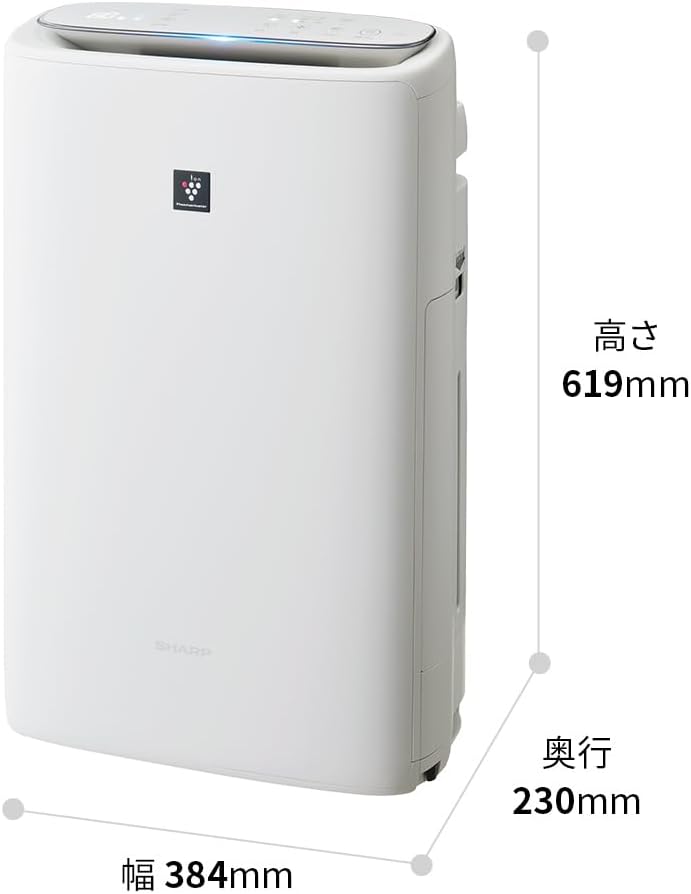
Image: Diagram illustrating the width (384mm), depth (230mm), and height (619mm) of the Sharp KI-TS50-W unit.
9. 보증 및 지원
For warranty information, please refer to the separate warranty card included with your product. For technical support, replacement parts, or further assistance, please contact Sharp customer service. Contact details can typically be found on the manufacturer's web사이트 또는 보증 문서에서 확인하세요.


