1. 서론
This manual provides detailed instructions for the setup, operation, and maintenance of your THOMSON 8-inch Digital Photo Frame (Model: TRDF-8001C). Please read this manual thoroughly before using the device to ensure proper functionality and to maximize your enjoyment of its features. This digital photo frame is designed to display your cherished photos and videos with an 8-inch IPS HD screen, offering a clear and vibrant view경험.
2. 상자 안에 무엇이 들어있나요?
포장을 풀 때 아래 나열된 모든 품목이 모두 들어 있고 상태가 양호한지 확인하세요.
- THOMSON 8-inch Digital Photo Frame
- 원격 제어
- 전원 어댑터
- 사진 액자 스탠드
- 사용자 설명서

Figure 2.1: Contents of the THOMSON Digital Photo Frame package.
3. 설정
3.1 전원 연결
- Connect the power adapter to the DC-IN port on the back of the digital photo frame.
- 전원 어댑터를 표준 전기 콘센트에 연결하십시오.
- 액자 전원이 자동으로 켜집니다.
3.2 초기 설정
- Upon first startup, you will be prompted to select your preferred language. Use the navigation buttons on the remote control or the physical buttons on the back of the frame to select and confirm.
- 현재 날짜와 시간을 설정합니다.
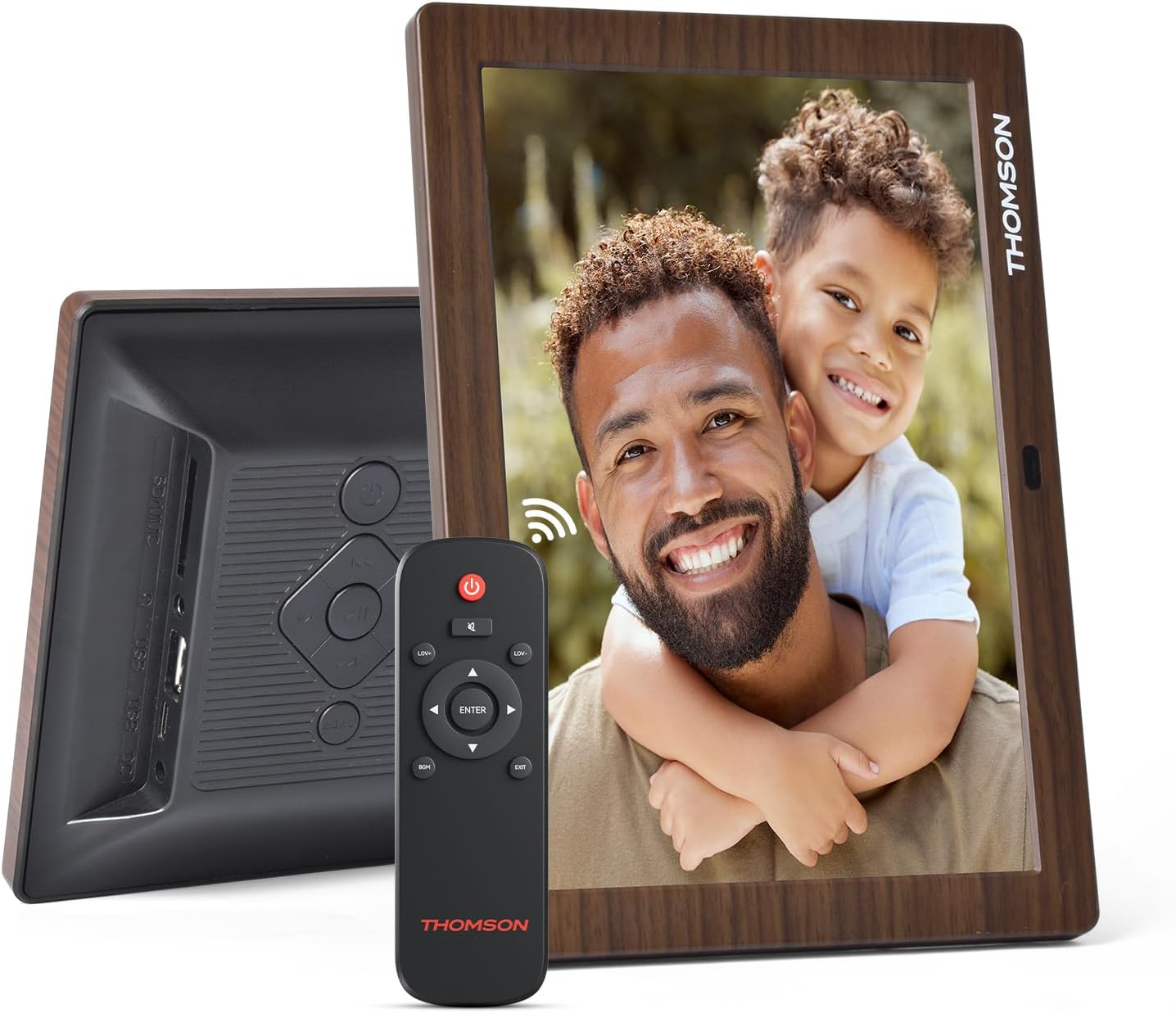
그림 3.1: 후면 view of the frame with power input and physical controls.
3.3 스탠드 설치
The digital photo frame can be placed on a flat surface using the included stand. Insert the stand into the designated slot on the back of the frame. The frame also supports wall mounting using the integrated mounting holes.
4. 사용 설명서
4.1 디스플레이 기능
- 8인치 IPS HD 화면: Enjoy clear and vibrant images with a 1280x800 resolution from various view각도를 나타냅니다.
- 자동 회전: The built-in gravity sensor automatically adjusts the photo orientation (landscape or portrait) for optimal view주고받음.

Figure 4.1: The 8-inch IPS HD screen provides a high-quality display for your memories.
4.2 미디어 재생
The frame supports playback of photos, music, and videos. You can navigate through your media using the remote control or the physical buttons.
- Photo Slideshow: Configure slideshow intervals and transition effects in the settings.
- 음악 재생: 배경 음악을 재생합니다 view잉 사진.
- 비디오 재생 : Enjoy your favorite video clips directly on the frame.

Figure 4.2: User interface for media selection and playback options.
4.3 Remote Control and Physical Buttons
Control your digital photo frame conveniently using the included remote control or the physical buttons located on the back of the frame.
- 원격 제어 기능: Power on/off, adjust volume, navigate images, control background music, and access menus.
- 물리적 버튼: Provide direct control for essential functions, useful for elderly users.

Figure 4.3: Remote control for convenient operation of the frame.
4.4 Expansion Modes
The frame supports various expansion options for storing your media:
- SD/SDHC/MMC Card: Expand storage up to 32 GB.
- USB-A/Type-C/U-disk: Connect USB drives for additional media.
- 메모: This frame does not have built-in storage. An external memory card or USB drive is required for media storage.

Figure 4.4: Memory expansion slots on the back of the frame.
4.5 자동 전원 켜기/끄기
You can set a customized automatic start and stop time for the frame to conserve energy and manage display times.

Figure 4.5: Setting automatic power on/off times for convenience.
5. 유지관리
- 화면 청소: Use a soft, dry, lint-free cloth to gently wipe the screen. For stubborn marks, slightly damp천에 물이나 화면 세척액을 묻혀 닦아주세요. 강한 화학 물질은 피하세요.
- 프레임 청소: 부드럽고 마른 천으로 액자를 닦아주세요.
- 저장: When not in use for extended periods, disconnect the power adapter and store the frame in a cool, dry place away from direct sunlight.
6. 문제 해결
| 문제 | 가능한 원인 | 해결책 |
|---|---|---|
| 프레임의 전원이 켜지지 않습니다. | 전원 어댑터가 연결되지 않았거나 결함이 있습니다. | 전원 어댑터가 프레임과 전원 콘센트에 제대로 연결되어 있는지 확인하세요. 다른 콘센트를 사용해 보세요. |
| No images/videos displayed. | No memory card/USB drive inserted or media files are corrupted/unsupported. | Insert a memory card or USB drive with supported media files. 확인 file formats (JPEG for photos, MP4 for videos). Ensure the memory card/USB drive is properly inserted. |
| 리모컨이 작동하지 않습니다. | 배터리가 부족하거나 방해물이 있습니다. | Replace the remote control battery. Ensure there are no obstructions between the remote and the frame's IR receiver. |
| Images are distorted or incorrect orientation. | Incorrect display settings or disabled auto-rotation. | Check display settings in the menu. Ensure the auto-rotation feature is enabled if desired. |
7. 사양
- 모델 번호: TRDF-8001C
- 화면 크기: 8 인치
- 해결: 1280x800 (WXGA)
- 종횡비: 16시 10분
- 디스플레이 기술: IPS HD
- 연결성: DC-4.0, USB-A, Type-C, SD Card, 3.5MM earphone jack
- 메모리 확장: SD/SDHC/MMC card up to 32GB, U-disk
- 전원: 코드식 전기
- User Interface Input: 버튼, 리모컨
- 프레임 소재: 플라스틱
- 제품 크기: 24.4 x 18 x 2.51cm
- 제품 무게: 240그램
8. 보증 및 지원
For warranty information and customer support, please refer to the documentation included in your product packaging or visit the official Thomson web사이트. 보증 청구에 대비해 구매 증빙 자료로 구매 영수증을 보관하세요.


