1. 서론
This manual provides essential instructions for the safe and efficient operation of your RadioShack Home Projector. Please read this manual thoroughly before using the device and retain it for future reference.
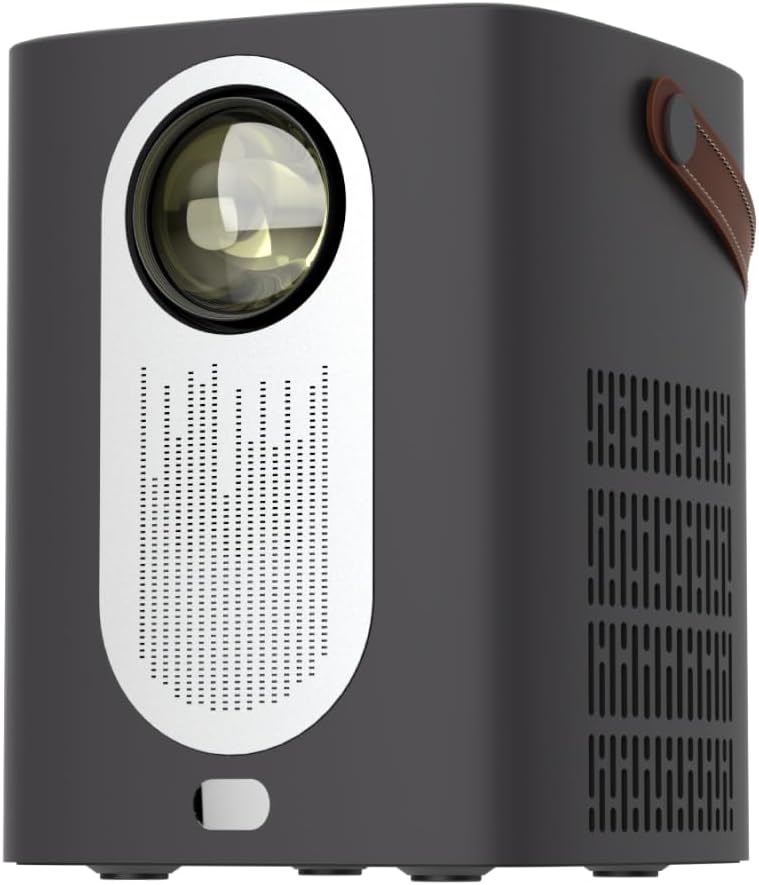
이미지 1.1: 앞면 view of the RadioShack Home Projector, showcasin렌즈와 스피커 그릴을 포함합니다.
2. 패키지 내용
패키지에 모든 품목이 들어 있는지 확인하세요.
- 1 x RadioShack Home Projector
- 1 x 원격 제어
- 1 x 전원 케이블
- 1 x 사용자 매뉴얼(이 문서)

Image 2.1: Illustration of the package contents, including the projector, remote control, power cable, and user manual.
3. 제품 오버view
3.1. 주요 특징
- 고해상도 디스플레이: Supports full HD resolution for clear and detailed images.
- Bright and Long-Lasting: Features impressive brightness and a durable light source.
- 다양한 연결성: Includes Bluetooth, WiFi, Android Miracast, and iOS Cast for streaming.
- 강화됨 Viewing: Digital focus and keystone correction for optimal image alignment.
- 소형 및 휴대성: Lightweight design with a handle for easy transport.
3.2. 포트 및 제어
Familiarize yourself with the projector's input/output ports and controls.

이미지 3.1: 후면 view of the projector showing USB input for media playback, AV input for DVD players, and HDMI input for various devices like video game consoles, streaming sticks, cell phones, tablets, and laptops.

이미지 3.2: 측면 view illustrating the compact dimensions (approximately 7 inches tall, 5.3 inches wide) and the integrated leather handle for portability.
4. 설정 가이드
4.1. 초기 전원 켜기
- 프로젝터와 적절한 전원 콘센트에 전원 케이블을 연결하십시오.
- Press the power button located on the top of the projector or on the remote control to turn on the device. The indicator light will illuminate.
- The RadioShack logo will appear on the projection surface, indicating successful power-on.
Video 4.1: A short demonstration showing the unboxing, connecting the power cable, powering on the projector, and the initial display of the RadioShack logo.
4.2. Placement and Focus
- Place the projector on a stable, flat surface, ensuring the lens is unobstructed.
- Adjust the distance from the projection surface (wall or screen) to achieve the desired image size.
- Use the digital focus adjustment (refer to the remote control or on-screen menu) to sharpen the image.
- Utilize keystone correction if the image appears trapezoidal, to achieve a rectangular projection.
5. 사용 설명서
5.1. 장치 연결
프로젝터는 여러 입력 소스를 지원합니다.
- HDMI : Connect devices such as laptops, gaming consoles, streaming boxes, or Blu-ray players using an HDMI cable. Select HDMI as the input source from the projector's menu.
- USB: Insert a USB drive to play compatible video or audio files. Select USB as the input source.
- 유명인 : Connect older devices like DVD players using an AV cable. Select AV as the input source.
- 블루투스: Pair with Bluetooth audio devices for wireless sound output.
- WiFi / Casting: Connect to a Wi-Fi network to enable Android Miracast or iOS Cast for screen mirroring from compatible smartphones and tablets.

Image 5.1: A couple enjoying content projected by the RadioShack Home Projector, demonstrating its use in a home cinema setting.
5.2. 원격 제어 기능
동봉된 리모컨으로 편리하게 조작할 수 있습니다.
- 힘: 프로젝터를 켜거나 끕니다.
- 원천: 입력 소스(HDMI, USB, AV 등)를 선택하십시오.
- 항해: Arrow keys to navigate menus, OK button to confirm.
- 용량: 오디오 출력 레벨을 조정합니다.
- 초점/키스톤: Access digital focus and keystone correction settings.

Image 5.2: The RadioShack Home Projector placed on a table next to its remote control, ready for use.
6. 유지관리
- 렌즈 청소: 광학 렌즈 전용으로 제작된 부드럽고 보풀 없는 천으로 프로젝터 렌즈를 살살 닦아주세요. 연마성 재질이나 강한 화학 약품은 사용하지 마십시오.
- 외부 청소: 프로젝터 외부는 부드럽고 마른 천으로 닦으세요. 액체 세척제를 기기에 직접 사용하지 마세요.
- 통풍: Ensure the projector's ventilation openings are clear of dust and obstructions to prevent overheating.
- 저장: 장기간 사용하지 않을 경우 프로젝터를 직사광선과 극한 온도를 피해 시원하고 건조한 곳에 보관하세요.
7. 문제 해결
| 문제 | 가능한 원인 | 해결책 |
|---|---|---|
| 이미지가 표시되지 않음 | Power cable disconnected; incorrect input source selected; lens cap on. | Check power connection; select correct input source (HDMI, USB, AV); remove lens cap. |
| 이미지가 흐릿함 | 초점이 조정되지 않았습니다. 프로젝터가 화면에서 너무 가깝거나 멀리 떨어져 있습니다. | Adjust digital focus; reposition projector for optimal distance. |
| 소리가 나지 않습니다 | Volume too low; external audio device not connected/paired; incorrect audio output selected. | Increase volume; ensure Bluetooth device is paired or wired audio is connected; check audio output settings. |
| 리모컨이 작동하지 않습니다 | 배터리가 방전되었거나 리모컨과 프로젝터 사이에 장애물이 있습니다. | Replace remote control batteries; ensure clear line of sight to the projector's IR receiver. |
8. 사양
- 상표: 라디오샤크
- 모델: Home Projector (ASIN: B0DP1GFG9L)
- 디스플레이 해상도: 1280 x 720 (Supports Full HD)
- 연결 기술 : AV, HDMI, USB, Bluetooth, WiFi (Android Miracast, iOS Cast)
- 특별 기능: Portable, Digital Focus, Keystone Correction
- 권장 사용: 홈시네마
- 제품 크기: 5.31 x 5.31 x 7.09 인치
- 품목 무게: 3.91파운드

Image 8.1: The projector displaying content, highlighting its support for full HD resolution and high-quality sound.
9. 보증 및 지원
For warranty information and technical support, please refer to the official RadioShack web해당 사이트를 방문하거나 고객 서비스에 문의하세요. 구매 증빙 자료로 구매 영수증을 보관하세요.
온라인 지원: www.라디오샤크.com


