소개
Welcome to your new RadioShack BT Headphones. This manual provides essential information for the proper setup, operation, and maintenance of your headphones. Please read these instructions carefully before use to ensure optimal performance and longevity of your device.
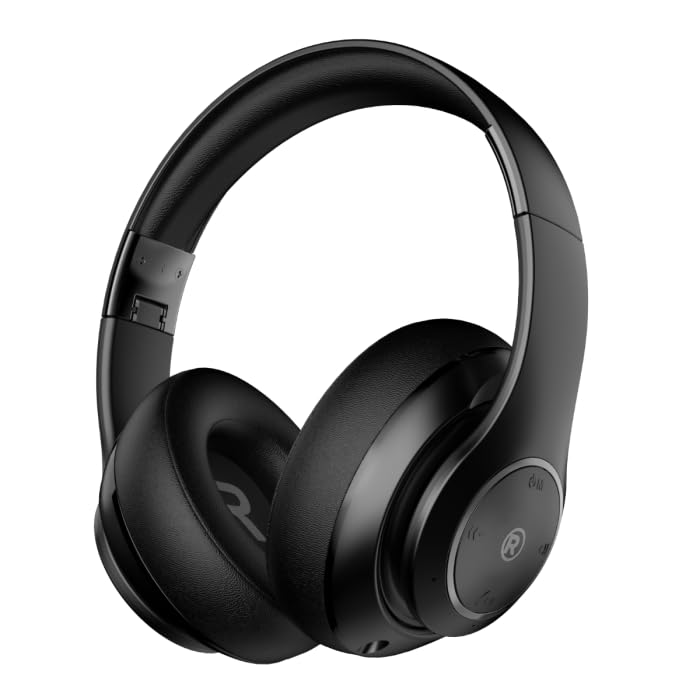
정면도 view of the black RadioShack BT Headphones, showcasing their over-ear design and cushioned earcups.
상자 안에 무엇이 들어있나요?
패키지에 모든 품목이 들어 있는지 확인하세요.
- RadioShack BT Headphones
- 충전 케이블
- 보조 오디오 케이블
- 사용자 설명서
This video demonstrates the unboxing process of the RadioShack BT Headphones, showing the contents included in the package.
제품 특징
The RadioShack BT Headphones are designed for an enhanced audio experience with convenience and durability.
- 연장된 플레이 시간: Enjoy up to 30 hours of uninterrupted music.
- 내장 마이크: Features a built-in microphone for clear and convenient calling functions.
- 고급 Bluetooth 5.4: Equipped with Bluetooth version 5.4 for seamless and stable wireless connectivity.
- 고품질 사운드: 40mm drivers deliver rich, immersive sound with excellent sensitivity and impedance.
- 접이식 디자인 : Compact and foldable design for easy portability and storage.

An informational graphic highlighting the built-in microphone, 400mAh battery capacity, and Bluetooth 5.4 compatibility of the headphones.
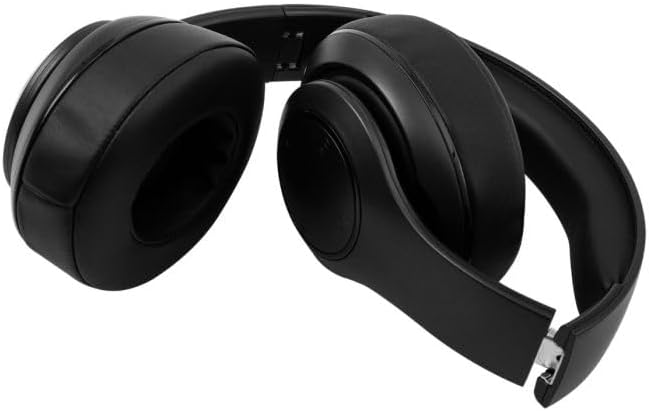
The RadioShack BT Headphones folded for compact storage and portability.
이 영상은 간략한 내용을 제공합니다.view of the RadioShack Over-the-Head Earphones, showcasing their design and use.
설정
헤드폰 충전하기
- 제공된 USB 충전 케이블을 헤드폰의 충전 포트에 연결하십시오.
- USB 케이블의 다른 쪽 끝을 호환되는 USB 전원(예: 컴퓨터, 벽면 어댑터)에 꽂습니다.
- 충전 중에는 LED 표시등이 켜지고, 완전히 충전되면 꺼지거나 색상이 변경됩니다.
- 완충 시 최대 30시간 동안 재생할 수 있습니다.
블루투스를 통한 페어링
- 헤드폰이 완전히 충전되었는지 확인하세요.
- 헤드폰의 전원 버튼을 길게 누르면 LED 표시등이 파란색과 빨간색으로 깜빡이며 페어링 모드에 진입합니다.
- 기기(스마트폰, 태블릿, 컴퓨터)에서 Bluetooth를 활성화하고 사용 가능한 기기를 검색하세요.
- Select "RadioShack BT Headphones" from the list of found devices.
- 연결되면 LED 표시등에 파란색 불이 계속 켜져 있거나 파란색 불이 천천히 깜빡입니다.
작동 지침
전원 켜기/끄기
- 전원 켜기: LED 표시등이 켜질 때까지 약 3초 동안 전원 버튼을 길게 누릅니다.
- 전원 끄기 : LED 표시등이 꺼질 때까지 약 3초 동안 전원 버튼을 길게 누릅니다.
음악 재생
- 재생/일시 중지: 다기능 버튼을 한 번 누릅니다.
- 다음 트랙: 볼륨 높이기 버튼을 길게 누르세요.
- 이전 트랙 : 볼륨 낮추기 버튼을 길게 누릅니다.
통화 관리
- 전화 받기/종료: 다기능 버튼을 한 번 누릅니다.
- 전화 거부: 다기능 버튼을 2초 동안 길게 누릅니다.
- 마지막 번호 재다이얼: 다기능 버튼을 두 번 누릅니다.
볼륨 조절
- 볼륨 업: 볼륨 높이기 버튼을 누르세요.
- 볼륨 작게 : 볼륨 낮추기 버튼을 누르세요.
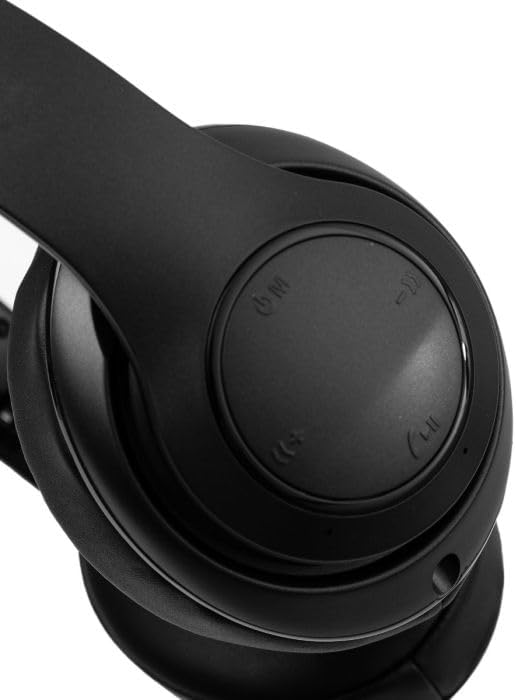
클로즈업 view of the right earcup, showing the integrated control buttons for power, volume, and playback.
유지
청소
- 부드럽고 마른 천으로 헤드폰을 닦으세요.
- 연마성 세척제나 용제를 사용하지 마십시오.
- 충전 포트에 먼지나 이물질이 없도록 하세요.
저장
- 헤드폰은 직사광선과 극한의 온도를 피해 시원하고 건조한 곳에 보관하세요.
- 장기간 사용하지 않을 경우 배터리 수명 유지를 위해 최소 3개월에 한 번씩 헤드폰을 충전하십시오.
문제 해결
| 문제 | 가능한 해결책 |
|---|---|
| 헤드폰 전원이 켜지지 않습니다 | 헤드폰이 충전되어 있는지 확인하세요. 전원에 연결한 후 다시 시도해 보세요. |
| 기기와 페어링할 수 없습니다 | 헤드폰이 페어링 모드인지 확인하세요(파란색/빨간색 LED가 깜빡임). 기기의 블루투스를 껐다가 켜세요. 기기에 더 가까이 이동하세요. |
| 소리가 나지 않거나 볼륨이 작음 | Check volume levels on both headphones and connected device. Ensure headphones are properly paired. Try reconnecting. |
| 간헐적 연결 | Reduce distance between headphones and device. Avoid obstacles. Ensure no other devices are interfering with the Bluetooth signal. |
명세서
| 특징 | 세부 사항 |
|---|---|
| 상표 | 라디오샤크 |
| 모델 번호 | 3304403-PRNT |
| 색상 | 검은색 |
| 귀 위치 | 귀에 |
| 폼 팩터 | 귀 위 |
| 소음 제어 | 능동 소음 제거 |
| 블루투스 버전 | 5.4 |
| 배터리 평균 수명 | 30시간 |
| 주파수 범위 | 20Hz - 20,000Hz |
| 오디오 드라이버 유형 | 동적 드라이버 |
| 내장 미디어 | 케이블 |
| 인클로저 재료 | 플라스틱 |
| 품목 무게 | 0.34 킬로그램 |
| 방수 레벨 | 방수복 |
| 호환 장치 | Smartphones, Laptops, Desktops, Tablets, Televisions, Smart Speakers |
보증 및 지원
보증 정보
These RadioShack BT Headphones come with a 6개월 보증 구매일로부터. 본 보증은 정상적인 사용 중 발생한 제조상의 결함에 적용됩니다. 오용, 사고, 무단 개조 또는 정상적인 마모로 인한 손상은 보증되지 않습니다.
고객 지원
For technical assistance, warranty claims, or further inquiries, please contact RadioShack customer support through their official website or the retailer where the product was purchased. Please have your model number (3304403-PRNT) and proof of purchase ready.
더 자세한 정보를 원하시면 라디오셱 공식 스토어를 방문하세요. RadioShack Store on Amazon


