1. 서론
This manual provides instructions for the installation, operation, and maintenance of your Alpine HDZ-653 Status Series Hi-Res 6.5" 3-Way Component Speaker System and Alpine S-A32F 4-Channel Amplifier. This bundle is designed to deliver high-resolution audio performance in your vehicle. Please read this manual thoroughly before installation and use to ensure proper setup and optimal performance.
제품 끝view
The Alpine HDZ-653 is a 6-1/2 inch three-way component speaker system engineered for high-resolution audio playback. It features a unified carbon composite cone construction for consistent sound reproduction across its 6.5-inch mid-bass driver, 3.5-inch midrange driver, and 1.25-inch high-range driver. The Alpine S-A32F is a compact and efficient 4-channel amplifier, providing 55 watts RMS per channel to enhance your audio system's output.
- High-Resolution Audio Clarity: The HDZ-653 is designed for detailed audio reproduction.
- 강력하고 효율적 Amp합리화: The S-A32F amplifier boosts speaker performance.
- Component Speaker System: Includes 6.5" woofer, 3.5" midrange, and 1.25" tweeter.
- Carbon Composite Cones: Utilized across speaker components for consistent sound.
- 넓은 주파수 범위: 55Hz-40kHz for accurate sound reproduction.
2. 안전수칙
부상이나 장비 손상을 방지하려면 항상 다음 안전 예방 조치를 준수하세요.
- 설치를 시작하기 전에 차량의 배터리 음극 단자를 분리하세요.
- 모든 배선이 적절하게 절연되어 단락을 방지할 수 있는지 확인하세요.
- Mount components securely to avoid detachment during vehicle operation.
- Do not install components in locations that obstruct vehicle operation or safety devices.
- 설치 과정의 어떤 부분이든 확실하지 않은 경우 전문 설치자에게 문의하세요.
3. 설정 및 설치
Proper installation is crucial for optimal performance. This section outlines general installation guidelines. Specific vehicle requirements may vary.
3.1 Speaker Installation (HDZ-653)
The HDZ-653 is a 3-way component system consisting of woofers, midranges, and tweeters, along with external crossovers. Plan your speaker placement carefully for optimal sound stag주고받음.
- Woofer Placement: Install the 6.5-inch woofers in factory speaker locations in the doors or kick panels. Ensure adequate mounting depth and clearance.
- Midrange Placement: Install the 3.5-inch midranges in locations such as the dashboard, A-pillars, or custom door panels, ensuring they are securely mounted and aimed towards the listening position.
- 트위터 배치: Install the 1.25-inch tweeters in locations that provide good imaging, such as A-pillars, dashboard corners, or flush-mounted in door panels.
- 크로스오버 네트워크: Mount the passive crossover networks in a dry, accessible location, away from heat sources and moisture. Connect the amplifier output to the crossover input, and then connect the woofer, midrange, and tweeter outputs from the crossover to their respective speakers. Observe correct polarity.

Image: Alpine HDZ-653 6.5-inch Woofer and 1.25-inch Tweeter. This image displays the main 6.5-inch woofer with its grille and a separate 1.25-inch tweeter, both featuring the Alpine logo.

Image: Alpine HDZ-653 3.5-inch Midrange Speaker. This image shows the 3.5-inch midrange speaker, designed to handle mid-frequency audio reproduction.
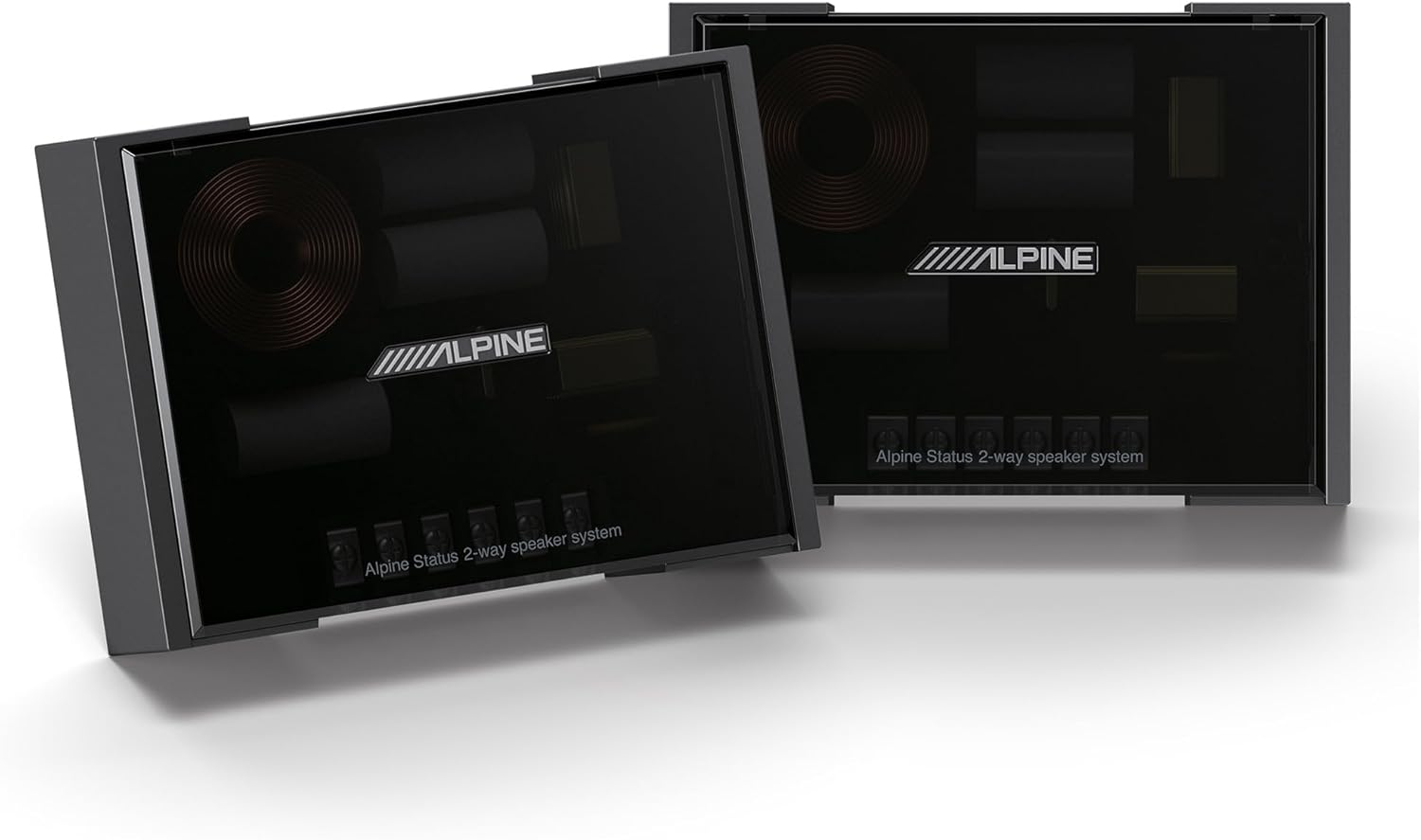
Image: Alpine Status 2-way Speaker System Crossovers. This image displays two passive crossover networks, essential for directing appropriate frequencies to each speaker component.
3.2 Amplifier Installation (S-A32F)
The S-A32F amplifier requires proper power, ground, remote, and audio signal connections.
- 장착 위치: 건조하고 통풍이 잘되는 장소를 선택하세요. amplifier, such as under a seat, in the trunk, or behind a panel. Ensure it is securely mounted to prevent movement.
- 전원 배선: Run a heavy-gauge power cable (e.g., 8 AWG) directly from the vehicle's positive battery terminal to the amplifier's BATT+ terminal. Install an appropriate fuse holder (40A recommended) within 18 inches of the battery.
- 접지 배선: Connect a heavy-gauge ground cable (e.g., 8 AWG) from the amplifier's GND terminal to a clean, unpainted metal surface on the vehicle chassis. The ground point should be as short as possible.
- 원격 켜기: 헤드 유닛의 원격 출력에서 원격 켜기 와이어를 연결하세요. amp리파이어의 REM 단자입니다. 이 전선은 amp앰프를 헤드 유닛과 함께 켜고 끌 수 있습니다.
- 오디오 입력: 헤드 유닛의 사전에서 RCA 케이블을 연결하세요.amp 출력 amplifier's INPUT terminals (CH-1/2 and CH-3/4). If your head unit does not have RCA outputs, use a line output converter (not included) or the amplifier's speaker-level inputs if available.
- 스피커 출력: 에서 스피커 선을 연결합니다. amplifier's SPK OUT terminals to the inputs of the HDZ-653 crossover networks. Ensure correct polarity (+ to + and - to -) for all connections.

Image: Alpine S-A32F 4-Channel Amp리파이어 탑 View. This image shows the top casing of the Alpine S-A32F amplifier, featuring the Alpine logo.

Image: Alpine S-A32F 4-Channel Amp리파이어 사이드 View with Controls. This image displays the side of the S-A32F amplifier, showing the input level, gain controls, and filter switches for channels 1/2 and 3/4.

Image: Alpine S-A32F 4-Channel Amplifier Input and Output Terminals. This image shows the various connection terminals on the S-A32F amplifier, including RCA inputs, speaker outputs, and power/ground/remote terminals.
4. 사용 설명서
Once installed, configure your amp최적의 사운드를 위한 리파이어와 헤드 유닛.
4.1 Amplifier Settings (S-A32F)
- 게인 컨트롤 : Adjust the GAIN controls for Channel 1/2 and Channel 3/4. Start with the gain at minimum, then slowly increase it until the sound is clear and distortion-free at your desired maximum volume level from the head unit. Avoid setting the gain too high, as this can introduce distortion.
- 필터 스위치: The S-A32F features selectable filters (OFF, HP, LP).
- HP(하이패스): Use this setting for the HDZ-653 component speakers to filter out low frequencies that the speakers are not designed to reproduce, protecting them from damage and improving clarity. A common setting is around 80-100 Hz.
- LP(로우 패스): This setting is typically used for subwoofers. Do not use for the HDZ-653 speakers.
- OFF : Disables the filter. Use only if your head unit or external processor provides filtering.
- 주파수 조정 : Use the FREQ. knob to adjust the cutoff frequency for the selected filter (HP or LP).
4.2 Head Unit Settings
Refer to your head unit's manual for specific audio settings. Ensure that any internal amplifier settings or crossovers on your head unit are configured to complement the S-A32F amplifier and HDZ-653 speakers.
5. 유지관리
Regular maintenance ensures the longevity and performance of your Alpine audio system.
- 청소: 부드럽고 건조한 천을 사용하여 청소하십시오. amplifier and speaker grilles. Avoid using harsh chemicals or abrasive cleaners.
- 사이: 모든 배선 연결부의 조임 상태와 부식 여부를 정기적으로 점검하십시오. 연결이 느슨하면 성능 저하나 손상으로 이어질 수 있습니다.
- 통풍: 확인하십시오 amplifier's cooling fins are free from dust and debris to maintain proper heat dissipation. Do not block ventilation openings.
- 환경적 요인: Protect components from extreme temperatures, direct sunlight, and moisture.
6. 문제 해결
If you experience issues with your Alpine audio system, refer to the following common problems and solutions.
| 문제 | 가능한 원인 | 해결책 |
|---|---|---|
| 스피커에서 소리가 나지 않음 |
|
|
| 왜곡된 소리 |
|
|
| 베이스가 없거나 약합니다. 베이스가 전혀 없거나 매우 약합니다. |
|
|
| Amp정수기 과열 |
|
|
7. 사양
Detailed specifications for the Alpine HDZ-653 Component Speakers and S-A32F Amp리퍼.
Alpine HDZ-653 Component Speakers
- 스피커 유형: 3-Way 컴포넌트 시스템
- 우퍼 크기: 6.5 Inches (Carbon Composite)
- Midrange Size: 3.5 Inches (Carbon Composite)
- 트위터 크기 : 1.25 Inches (Carbon Composite Dome)
- 전력 처리(RMS): 100 와트
- 전력 처리(피크): 300 와트
- 주파수 범위: 55-40,000Hz
- 재료: Carbon Composite, Plastic/Metal
- 제품 크기: 2.38"D x 6.38"W x 6.38"H (Woofer)
- 장착 유형: Door Mount (Woofer)
Alpine S-A32F 4-Channel Amp리퍼
- 채널: 4채널
- RMS 전력 출력: 55 Watts x 4 (into 4 ohms)
- 연결 기술 : Speaker Wires (Input/Output)
- 오디오 출력 모드: 스테레오 재생
- 제어 방법: Touch (for settings adjustment)
- 포함된 구성 요소: 보증 카드
- 품목 무게: 약 30파운드(묶음 기준)
8. 보증 및 지원
보증 정보
This Alpine product bundle is covered by a Limited Warranty. Please refer to the included Warranty Card for specific terms, conditions, and duration of coverage. Retain your proof of purchase for warranty claims.
고객 지원
For technical assistance, troubleshooting beyond this manual, or warranty service, please contact Alpine customer support directly. Contact information can typically be found on the Alpine official web사이트 또는 보증 문서에 명시되어 있습니다.
제조업체: 알파인


