소개
This manual provides essential information for the safe and efficient use of your Itel A50 Dual SIM smartphone. Please read this manual carefully before using the device to ensure optimal performance and to prevent damage.

Figure 1: Itel A50 Dual SIM Smartphone (Cyan Blue)
The image displays the Itel A50 smartphone in cyan blue, showcasing both its front screen and the textured back panel with the triple camera module and flash. The phone has a sleek design with rounded corners.
설정
1. SIM 카드 및 메모리 카드 삽입
The Itel A50 supports dual SIM cards and an external memory card (up to 2TB). Ensure the device is powered off before inserting or removing cards.
- 기기 측면에서 SIM 카드 트레이를 찾으세요.
- 제공된 SIM 꺼내기 도구를 사용하여 트레이를 엽니다.
- Carefully place your Nano-SIM cards and microSD card into the designated slots on the tray. Ensure the gold contacts face downwards.
- 딸깍 소리가 날 때까지 트레이를 장치에 다시 부드럽게 밀어 넣습니다.
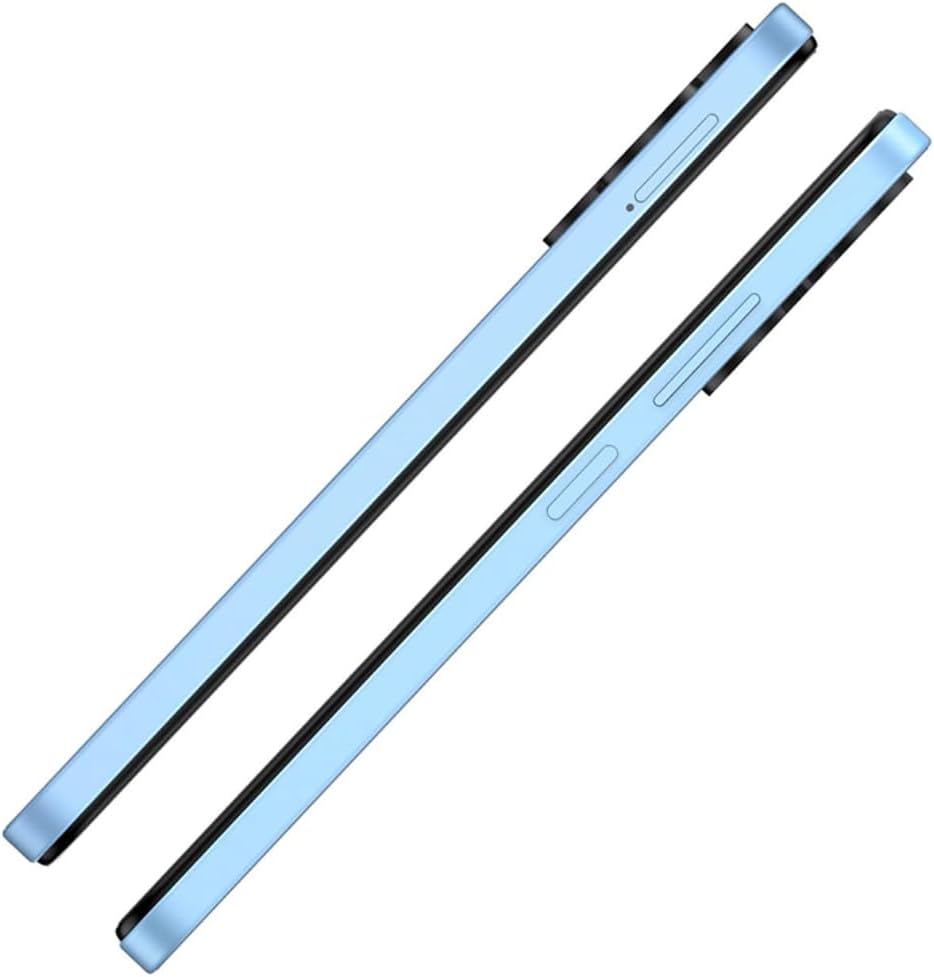
그림 2: 측면 View SIM 트레이 포함
This image shows the right side of the Itel A50 smartphone, highlighting the elongated volume rocker and the power button below it. The SIM card tray slot is visible above the volume buttons.
2. 배터리 충전
Before first use, fully charge the device battery. The Itel A50 comes with a 5000mAh battery.
- USB Type-C 케이블을 휴대폰 하단의 충전 포트에 연결합니다.
- 케이블의 다른 쪽 끝을 전원 어댑터에 연결하고 벽면 콘센트에 꽂습니다.
- 충전 표시등이 화면에 나타납니다.

그림 3: 충전 포트
The image shows the bottom edge of the Itel A50 smartphone with a white USB-C charging cable plugged into the central port. To the left of the charging port, a 3.5mm headphone jack is visible, and to the right, a speaker grille.
작동 지침
1. 전원 켜기/끄기
- 전원을 켜려면: Press and hold the Power button (located on the right side) until the Itel logo appears.
- 전원을 끄려면: 전원 옵션 메뉴가 나타날 때까지 전원 버튼을 길게 누른 다음 "전원 끄기"를 선택합니다.
- 재시작하기 위해: 전원 옵션 메뉴가 나타날 때까지 전원 버튼을 길게 누른 다음 "다시 시작"을 선택합니다.

Figure 4: Front Display
This image displays the front of the Itel A50 smartphone, showing its large screen with a waterdrop notch at the top for the front camera. The display shows a vibrant, abstract wallpaper.
2. 기본 탐색
- 터치 스크린: Tap, swipe, pinch-to-zoom to interact with the interface.
- 홈 화면: 앱과 위젯에 접근할 수 있는 메인 화면입니다.
- 알림: 화면 상단에서 아래로 스와이프하여 view notifications and quick settings. The integrated Dynamic Bar provides essential notifications more seamlessly.
3. 카메라 사용
The Itel A50 features a rear camera system for capturing photos and videos.
- 홈 화면이나 앱 서랍에서 카메라 앱을 엽니다.
- 원하는 모드(사진, 비디오, 인물 사진 등)를 선택하세요.
- 셔터 버튼을 탭하여 사진을 찍거나 비디오 녹화를 시작/중지하세요.

그림 5: 후면 카메라 모듈
This image shows the back of the Itel A50 smartphone, highlighting the prominent camera island in the upper left corner. The island contains three circular lenses and a flash, with "AI CAMERA" text visible. The back panel has a subtle textured pattern.
유지 보수 및 관리
- 청소: 부드럽고 보풀이 없는 천을 사용하여 화면과 본체를 닦으세요. 연마성 세척제나 용제는 사용하지 마세요.
- 온도: 기기를 극한의 온도(더위나 추위)에 노출시키지 마세요.
- 방수 기능: The Itel A50 is not water-resistant. Avoid contact with liquids.
- 배터리 수명: To prolong battery life, avoid fully discharging the battery frequently. Optimize power consumption using the built-in power-saving solutions.
- 소프트웨어 업데이트: 최적의 성능과 보안을 유지하려면 기기의 소프트웨어를 최신 버전으로 업데이트하세요.
문제 해결
| 문제 | 가능한 해결책 |
|---|---|
| 장치의 전원이 켜지지 않습니다. | 배터리가 충전되어 있는지 확인하세요. 충전기에 연결하고 몇 분 정도 기다린 후 다시 전원을 켜보세요. |
| 화면이 응답하지 않습니다. | 전원 버튼을 약 10~15초간 길게 눌러 강제 재시작을 실행하세요. |
| 네트워크 신호가 좋지 않습니다. | SIM 카드 삽입 상태를 확인하세요. 네트워크 신호가 잘 잡히는 지역으로 이동하세요. 기기를 다시 시작하세요. |
| 앱 속도가 느리거나 앱이 충돌합니다. | Close background apps. Clear app cache. Ensure sufficient storage space. Restart the device. The device is designed for smooth and efficient operations, optimizing performance for specific scenarios. |
| 배터리가 빨리 소모됩니다. | Reduce screen brightness. Disable unnecessary features (Wi-Fi, Bluetooth, GPS) when not in use. Use power-saving modes. |
명세서
| 특징 | 세부 사항 |
|---|---|
| 모델명 | T603 (Item model number: A667LP) |
| 상표 | 이텔 |
| 운영 체제 | OS 14 |
| 설치된 RAM 메모리 크기 | 8 GB (3+5GB RAM) |
| 메모리 저장 용량 | 128 GB (Supports up to 2TB external memory) |
| CPU 모델 | 1.2GHz Cortex A8 프로세서 |
| CPU 속도 | 2GHz |
| 화면 크기 | 6.6인치(가시 화면 대각선: 7인치/17cm) |
| 무선 통신사 | 잠금 해제됨 |
| 셀룰러 기술 | 4G |
| 배터리 | 리튬 이온 배터리 1개 필요 (포함), 5000mAh |
| 패키지 크기 | 18 x 9 x 4.5 cm; 187g |
| 첫 번째 이용 가능 날짜 | 25년 2024월 XNUMX일 |
| 제조업체 | 아이텔 |
보증 및 지원
For warranty information and technical support, please refer to the warranty card included in your product packaging or visit the official Itel web사이트. 보증 청구를 위해 구매 증빙 자료를 보관하세요.
For further assistance, you may contact Itel customer service through their official channels.


