소개
Immerse yourself in a captivating visual experience with the iSinbox [Auto Focus] 4K Projector. Boasting WiFi6 and Bluetooth 5.2 connectivity, this projector delivers a native 1080P resolution and a bright 850 ANSI lumens, perfect for outdoor movie nights or indoor gaming sessions. Its smart auto 6D keystone correction ensures a perfectly aligned image, while compatibility with iOS, Android, and TV sticks adds versatility. With a compact and portable design, this projector is the ultimate entertainment companion for your smart home.
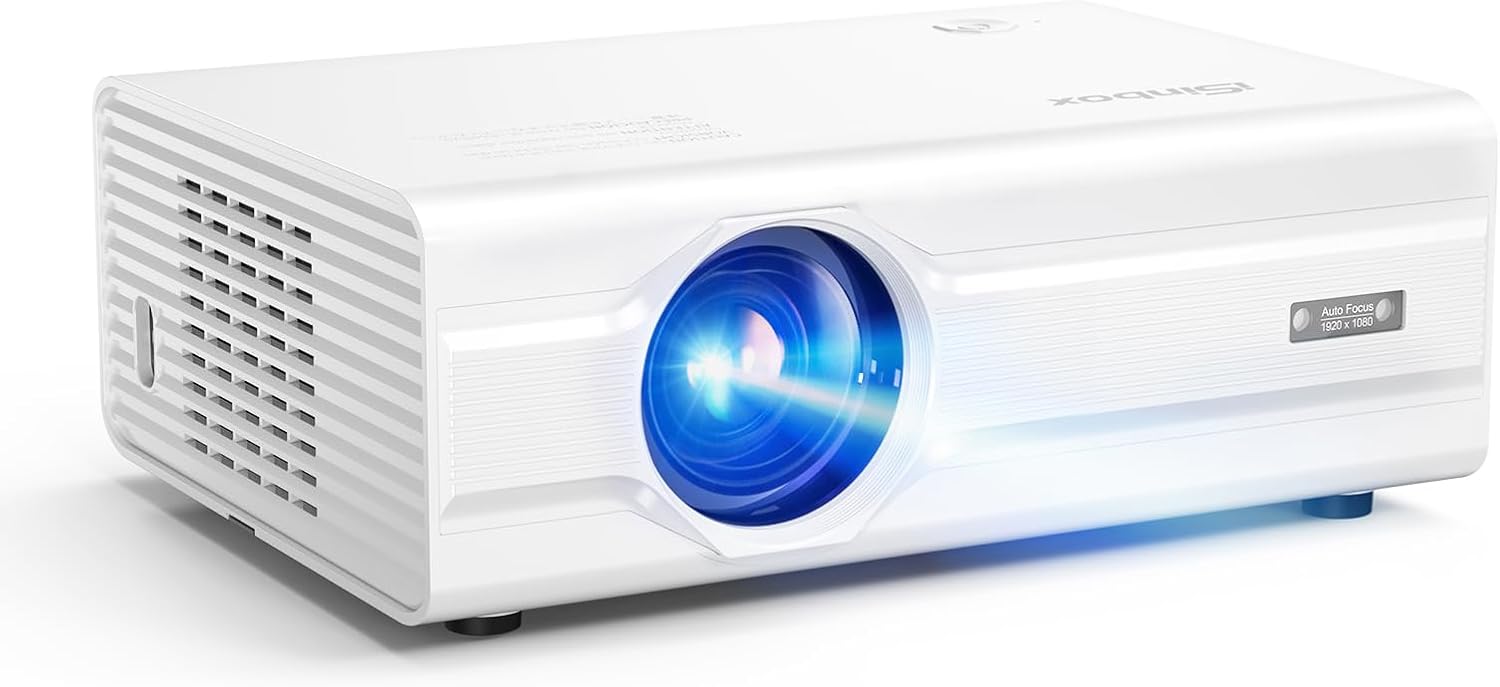
The iSinbox Projector features a sleek white design with a prominent lens and ventilation grilles.
상자 안에 무엇이 들어있나요?
- AV 케이블
- HDMI 케이블
- 전원 코드
- 원격
- 사용자 설명서
주요 특징
- Full Automation: Experience auto-focus, auto-keystone correction, and auto-obstacle avoidance for hassle-free setup.
- Stunning Visual Quality: Native 1080P resolution with 4K support and 850 ANSI lumens brightness for unparalleled clarity and rich color depth.
- 향상된 연결성: Dual-band 2.4G/5G WiFi 6 and Bidirectional Bluetooth 5.2 for stable streaming and versatile audio connections.
- 강력한 성능: Powered by the MTK9269 chip, supporting PPT playback and projection up to 300 inches with 50-100% zoom.
- 개인 설정: Customize image modes, brightness levels, and wallpapers with a unique companion mode.
- 종합 지원: Robust after-sales support ensures an effortless and enjoyable user experience.

This image illustrates the projector's advanced AI features, including automatic focus adjustment, keystone correction for distorted images, obstacle avoidance to prevent projection onto unwanted objects, and automatic screen alignment for a perfect fit.

The iSinbox projector offers stunning visual quality with 4K support and 850 ANSI lumens brightness, providing superior clarity and richer colors compared to standard projectors.

The projector is equipped with the latest WiFi 6 technology, ensuring faster, smoother, and lower-latency wireless streaming for an enhanced view경험.

The iSinbox projector features two-way Bluetooth 5.3 technology, allowing it to connect to external speakers for enhanced audio output or function as a Bluetooth speaker itself when connected to a smartphone or other device.

Powered by an MTK chip, the projector offers personalized settings, enabling users to customize image brightness, select various image modes, set custom wallpapers, and utilize a unique companion mode for tailored view주고받음.

The projector is compatible with a wide range of devices, including TV sticks, allowing seamless streaming of multimedia content and 4K videos from popular platforms.

This projector can create a highly efficient workspace, supporting office presentations directly via USB, making it convenient for business and educational use.
설치 가이드
- 풀다: 포장에서 모든 구성 요소를 조심스럽게 제거합니다.
- 놓기: Place the projector on a stable, flat surface, ensuring adequate ventilation around the device. Position it at an appropriate distance from your projection surface (wall or screen).
- 전원 연결: 프로젝터의 전원 입력 단자에 전원 코드를 연결한 다음 전원 콘센트에 꽂으십시오.
- 초기 전원 켜기: 프로젝터나 리모컨의 전원 버튼을 눌러 장치를 켜세요.
- 자동 조정: The projector will automatically perform auto-focus, auto-keystone correction, auto-obstacle avoidance, and auto-screen alignment upon startup to optimize the image.
- 소스 연결: Connect your desired input source (e.g., HDMI device, USB drive, or connect via Wi-Fi/Bluetooth) as described in the Connectivity section.
작동 지침
원격 제어 사용
The included remote control allows full navigation and control of the projector's functions. Ensure batteries are correctly inserted.
- 전원 버튼: 프로젝터를 켜거나 끕니다.
- 탐색 버튼(위/아래/왼쪽/오른쪽): 메뉴와 옵션을 탐색하는 데 사용됩니다.
- 확인/엔터 버튼: 선택 사항을 확인합니다.
- 뒤로/돌아가기 버튼: 이전 화면 또는 메뉴로 돌아갑니다.
- 소스 버튼 : 입력 소스(HDMI, USB 등)를 선택합니다.
- 메뉴 버튼: 메인 설정 메뉴에 접근합니다.
- 볼륨 버튼: 오디오 볼륨을 조절합니다.
메뉴 탐색 및 설정
From the main menu, you can access various settings to customize your view경험:
- 이미지 설정: Adjust brightness, contrast, color, aspect ratio, and select predefined image modes.
- 사운드 설정: Control volume, audio output, and sound modes.
- 네트워크 설정: Configure Wi-Fi and Bluetooth connections.
- 시스템 설정: Manage language, time, software updates, and reset options.
- 개인 설정: Utilize the unique companion mode and customize wallpapers.
줌 기능
The projector supports a zoom capability from 50% to 100%. This allows you to adjust the screen size without moving the projector. Access this feature through the image settings menu.
연결성
Wi-Fi 6 연결
- Navigate to the Network Settings menu.
- 'Wi-Fi'를 선택하고 켜세요.
- 목록에서 원하는 Wi-Fi 네트워크를 선택하세요.
- 메시지가 표시되면 비밀번호를 입력하고 연결하세요.
블루투스 페어링
The projector supports Bidirectional Bluetooth 5.2, allowing it to connect to external speakers (Bluetooth Output) or act as a speaker for your mobile device (Bluetooth Input).
- Bluetooth Output (Connecting to External Speaker):
- Go to Sound Settings > Bluetooth Output.
- 블루투스를 활성화하고 기기를 검색하세요.
- Select your Bluetooth speaker from the list to pair.
- Bluetooth Input (Using Projector as Speaker):
- Go to Sound Settings > Bluetooth Input.
- Enable Bluetooth Input mode on the projector.
- On your mobile device, search for Bluetooth devices and select the projector to connect.
Wired Connections (HDMI, USB, 3.5mm Jack)
- HDMI : Connect devices like laptops, gaming consoles, or TV sticks using an HDMI cable. Select the corresponding HDMI input from the source menu.
- USB: 미디어를 재생하려면 USB 드라이브를 삽입하세요. files (photos, videos, documents including PPT) directly. Select 'USB' from the source menu and browse files.
- 3.5mm 오디오 잭: 3.5mm 오디오 케이블을 사용하여 헤드폰이나 스피커와 같은 외부 오디오 장치를 연결하세요.
유지
- 렌즈 세척: 광학 렌즈 전용으로 제작된 부드럽고 보풀 없는 천으로 프로젝터 렌즈를 살살 닦아주세요. 연마성 재질이나 강한 화학 약품은 사용하지 마십시오.
- 통풍: 프로젝터의 통풍구가 막히지 않도록 하여 과열을 방지하십시오. 공기 흐름을 막을 수 있는 부드러운 표면에 프로젝터를 놓지 마십시오.
- 먼지 제거: Periodically use a can of compressed air to gently clear dust from the ventilation grilles.
- 저장: When not in use for extended periods, store the projector in a cool, dry place, ideally in its original packaging or a protective case, to prevent dust accumulation and damage.
- 전원을 올바르게 끄십시오: 프로젝터를 끄실 때는 반드시 지정된 전원 버튼을 사용하시고, 전원 코드가 뽑히기 전에 프로젝터가 완전히 꺼질 때까지 기다리십시오.
문제 해결
| 문제 | 가능한 원인 | 해결책 |
|---|---|---|
| 화면에 이미지가 없습니다. | Power cable loose; Incorrect input source; Lens cap on. | 전원 연결을 확인하십시오. 올바른 입력 소스를 선택하십시오. 렌즈 캡을 제거하십시오. |
| 이미지가 흐릿함 | Out of focus; Projector not level. | Allow auto-focus to adjust; Manually adjust focus if needed; Ensure projector is on a flat surface. |
| 소리가 나지 않습니다 | Volume too low; Muted; Incorrect audio output. | Increase volume; Unmute; Check audio output settings (internal speaker/Bluetooth). |
| 리모컨이 작동하지 않습니다 | 배터리 부족/방전; 리모컨과 프로젝터 사이에 장애물이 있음. | 배터리를 교체하십시오. 적외선 수신기와의 시야가 확보되었는지 확인하십시오. |
| Wi-Fi 연결이 불안정합니다 | 라우터가 너무 멀리 떨어져 있어 간섭이 발생합니다. | 프로젝터를 라우터에 더 가까이 이동시키세요. 다른 기기와의 간섭을 줄이세요. |
기술 사양
| 특징 | 사양 |
|---|---|
| 상표 | 아이신박스 |
| 모델 번호 | GC357 |
| 디스플레이 해상도 | Native 1920 x 1080 (Supports 4K) |
| 명도 | 850 ANSI 루멘스 |
| 연결 기술 | 3.5mm Jack, Bluetooth 5.2 (Bidirectional), HDMI, USB, Wi-Fi 6 |
| 특별 기능 | Auto Focus, Auto Keystone, Auto-obstacle avoidance, Auto Screen Alignment, Personalized User Experience, Robust MTK9269 Chip |
| 제품 치수 | 6.97 x 3.46 x 9.37 인치 |
| 품목 무게 | 3.41파운드 |
| 색상 | 하얀색 |
| 추천 용도 | Bedroom, Business, Education, Gaming, Garden, Home Cinema, Indoor, Movies, Outdoor, Party, Video |
보증 및 지원
The iSinbox Projector comes with a manufacturer's warranty covering defects in materials and workmanship under normal use. Please refer to the warranty card included in your product packaging for specific terms and conditions, including the warranty period.
For technical support, troubleshooting assistance, or warranty claims, please contact iSinbox customer service. Contact details can typically be found on the official iSinbox web해당 사이트 또는 제품과 함께 제공된 보증 카드에서 확인하세요.
When contacting support, please have your product model number (GC357) and purchase information ready to expedite the process.


