1. 서론
Thank you for choosing the ZEBRONICS EnergiPOD 27R2 Power Bank. This manual provides essential information for the safe and efficient use of your device. Please read it carefully before use and retain it for future reference.
2. 안전 정보
- 모바일 기기를 극한의 온도, 직사광선 또는 불에 노출시키지 마세요.
- 기기를 떨어뜨리거나, 분해하거나, 직접 수리하려고 하지 마세요.
- 보조 배터리를 물이나 기타 액체에 닿지 않게 보관하세요.
- 호환되는 충전 케이블과 어댑터만 사용하세요.
- 사용하지 않을 때는 시원하고 건조한 곳에 보관하세요.
- This power bank incorporates overcharge, overload, and short-circuit protection for safe operation.
3. 패키지 내용
- ZEBRONICS EnergiPOD 27R2 Power Bank
- Type-C 충전 케이블
4. 제품 오버view
The ZEBRONICS EnergiPOD 27R2 is a high-capacity power bank designed for efficient and fast charging of various devices, including smartphones, tablets, and laptops. It features a durable metallic body and multiple output ports.

Image 1: The ZEBRONICS EnergiPOD 27R2 Power Bank, showcasing its metallic grey finish and compact design.

Image 2: The power bank highlighting its 27000 mAh capacity, suitable for extended use.
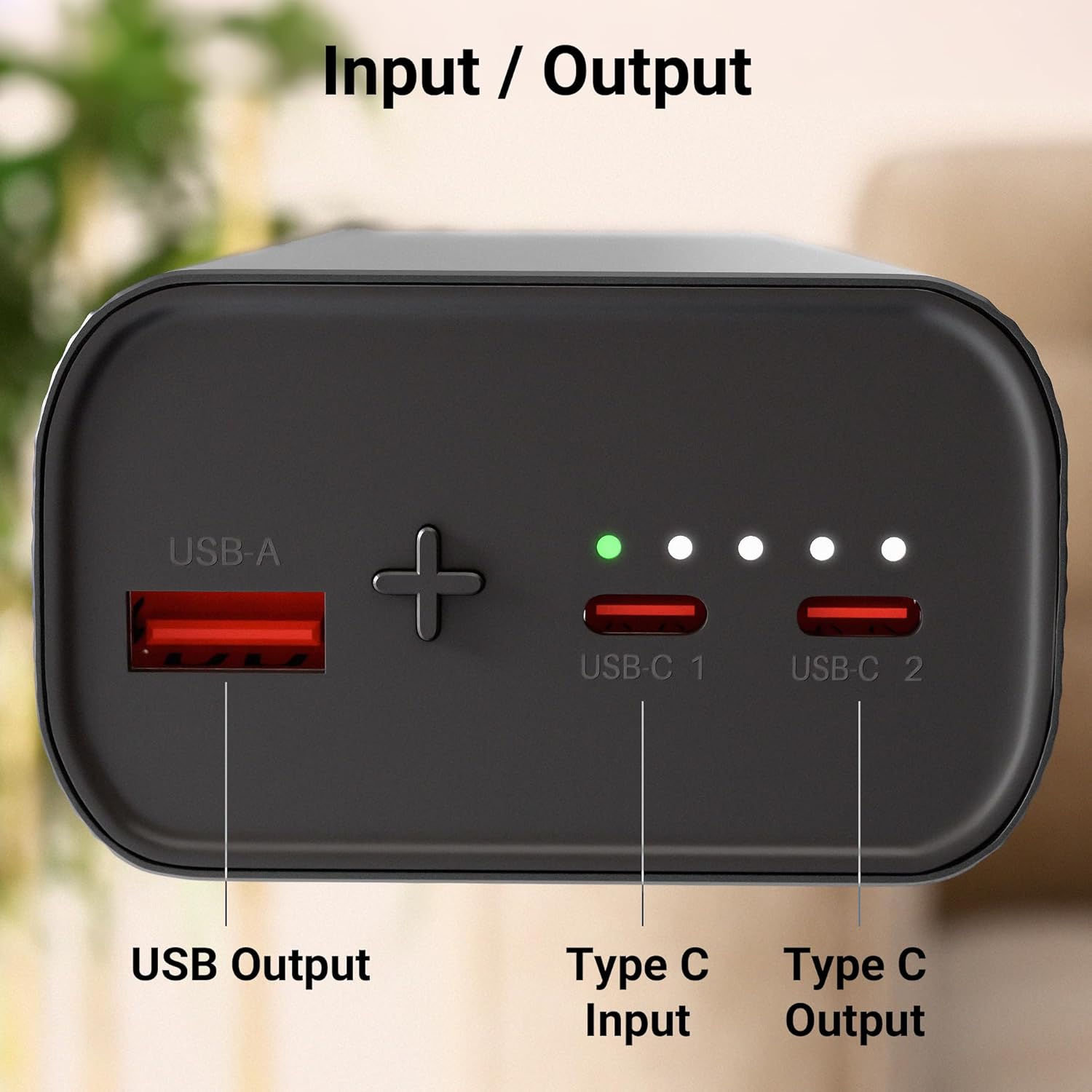
이미지 3: 클로즈업 view of the power bank's ports, including USB Output, Type-C Input, and Type-C Output.
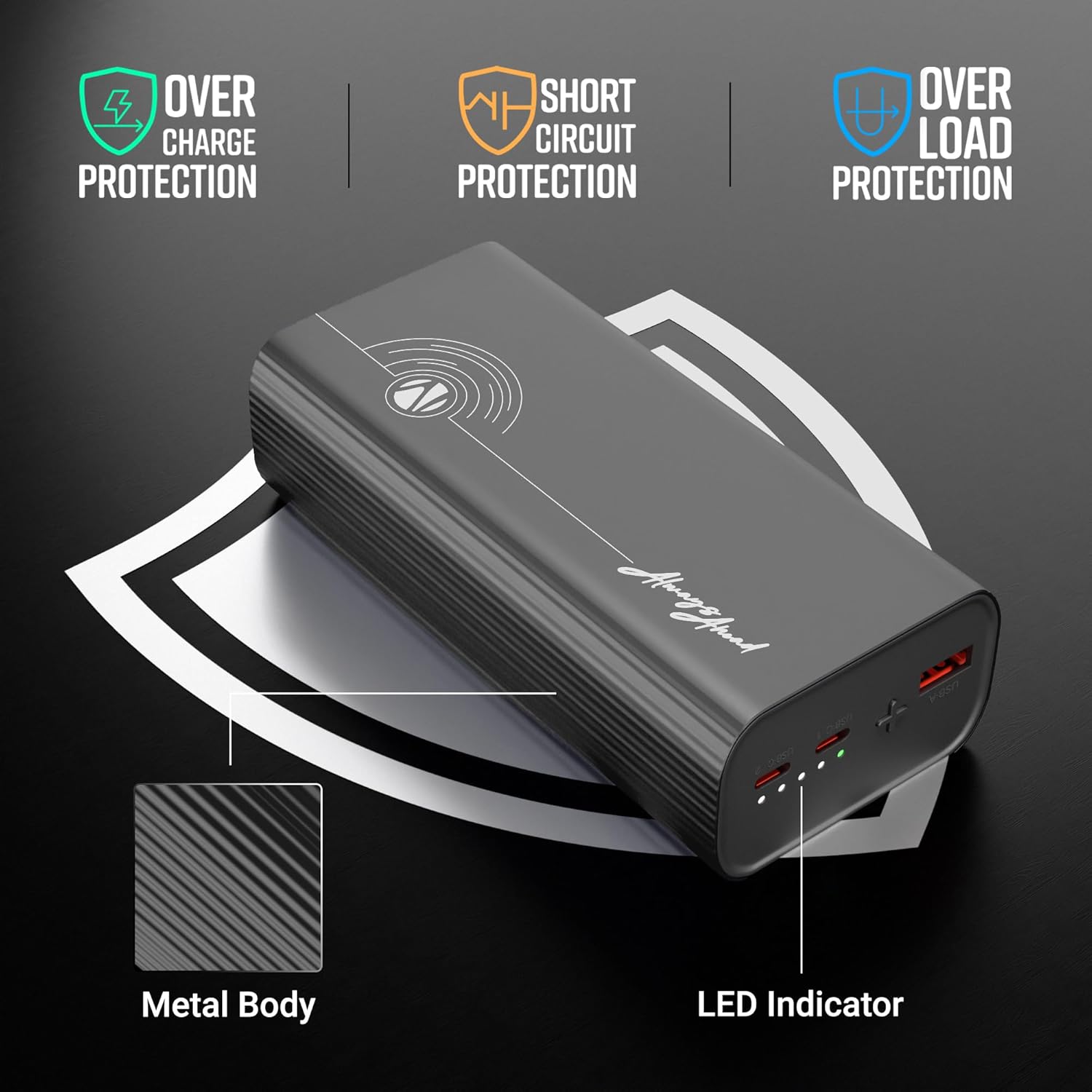
Image 4: Illustration of the power bank's safety protections (overcharge, short circuit, overload) and LED indicator.

Image 5: The power bank shown in a travel context, emphasizing its flight-friendly design.
5. 설정
Before first use, it is recommended to fully charge your ZEBRONICS EnergiPOD 27R2 Power Bank.
- Connect the provided Type-C cable to the Type-C Input port on the power bank.
- 케이블의 다른 쪽 끝을 호환되는 USB 벽면 어댑터(별도 구매)에 연결하십시오.
- 충전 중에는 LED 표시등이 켜집니다. 충전이 완료되면 모든 LED가 켜진 상태로 유지됩니다.
6. 사용 설명서
6.1. 파워뱅크 충전하기
To charge the power bank, use the Type-C Input port. The LED indicators will show the current battery level during charging:
- LED 1개: 0-25%
- LED 2개: 25-50%
- LED 3개: 50-75%
- LED 4개: 75-100%
6.2. 외부 장치 충전
The power bank offers multiple output options for charging your devices:
- Type-C 출력 사용: Connect your device to one of the Type-C Output ports using a compatible Type-C to Type-C cable. This port supports PD3.0 for rapid charging up to 65W.
- USB 출력 사용: Connect your device to the USB Output port using a compatible USB-A to device-specific cable.
The power bank will automatically begin charging your connected device. The LED indicators will show the remaining power bank battery level.
7. 유지관리
- 부드럽고 마른 천으로 보조 배터리를 닦으세요. 강한 화학 물질이나 연마재를 사용하지 마세요.
- 먼지나 이물질로 포트가 막히지 않도록 하십시오.
- If storing for a long period, charge the power bank to approximately 50% every three months to maintain battery health.
8. 문제 해결
- 모바일 기기가 충전되지 않음: 충전 케이블과 어댑터가 제대로 연결되어 작동하는지 확인하세요. 다른 케이블이나 어댑터를 사용해 보세요.
- 전원 은행에서 기기가 충전되지 않음: Check if the power bank has sufficient charge. Ensure the cable connecting the device to the power bank is secure and compatible. Try a different port or cable.
- 느린 충전: 사용하시는 기기와 케이블이 고속 충전 프로토콜을 지원하는지 확인하십시오. 여러 기기를 동시에 연결하면 충전 속도가 느려질 수 있습니다.
- LED 표시등이 작동하지 않습니다. If the power bank is unresponsive, try fully discharging and then recharging it. If the issue persists, contact customer support.
9. 사양
| 모델명 | EnergiPOD 27R2 |
| 배터리 용량 | 27000mAh |
| 최대 출력 전력 | 65와트 |
| Type-C 출력 | DC 5V/3A, 9V/3A, 12V/3A, 15V/3A, 20V/3.25A, 5~21V/2.9A PPS (PD3.0) |
| USB 출력 | DC 5.5V/4A, 5V/3A, 9V/2.22A, 12V/1.67A |
| Type-C 입력 | DC 5V/3A, 9V/3A, 12V/3A, 15V/3A, 20V/3.25A |
| 보호 기능 | Overcharge, Overload, Short-circuit |
| 본체 소재 | 메탈릭 |
| 무게 | 628g |
| 치수 | 16.9 x 8.5 x 7.4cm |
10. 보증 및 지원
For warranty information and customer support, please refer to the official ZEBRONICS web사이트를 방문하거나 고객 서비스에 직접 문의하세요. 보증 청구를 위해 구매 영수증을 보관하세요.


