1. 서론
This manual provides detailed instructions for the installation, operation, and maintenance of your VANBAR 2-in-1 Android Car Wireless Adapter. This device converts your car's wired Apple CarPlay or Android Auto system into a wireless connection, enhancing convenience and user experience.
2. 안전 정보
- 장치를 분해하거나 개조하지 마십시오.
- 장치를 물, 습기 및 극한의 온도로부터 멀리 두십시오.
- Ensure the device is securely placed to avoid obstruction while driving.
- 기기를 책임감 있게 사용하고 운전 중에는 주의를 산만하게 하는 행동을 삼가십시오.
3. 패키지 내용
다음 품목이 패키지에 포함되어 있는지 확인하세요.
- VANBAR 2-in-1 Wireless Adapter (Model: Carplay01)
- USB-A-USB-C 어댑터 케이블
- 사용 설명서 (본 문서)
4. 제품 오버view
The VANBAR 2-in-1 Wireless Adapter is a compact device designed to enable wireless Apple CarPlay and Android Auto in compatible vehicles. It features a durable alloy casing for efficient heat dissipation and includes both USB-A and USB-C connectivity options.

Image 4.1: VANBAR 2-in-1 Wireless Adapter showing USB-A and USB-C connectivity. The adapter is a small black square with a USB cable attached, and an additional USB-C adapter is shown.

Image 4.2: Diagram illustrating the internal structure of the adapter, highlighting the glass and metal alloy components for excellent heat dissipation.
5. 설정 지침
초기 설정을 위해 다음 단계를 따르세요.
- 어댑터를 연결하십시오:
Plug the VANBAR wireless adapter into your car's USB port that supports wired Apple CarPlay or Android Auto. Use the provided USB-C adapter if your car has a USB-C port.
- 블루투스를 통해 페어링 :
스마트폰에서 Bluetooth와 Wi-Fi를 활성화하세요. 검색 the adapter's Bluetooth name (e.g., "VANBAR-XXXX") and pair with it. Confirm any pairing requests on your phone and car display.
- 자동 연결:
Once paired, the adapter will automatically connect to your phone via Wi-Fi to initiate Apple CarPlay or Android Auto. The car's display should switch to the CarPlay or Android Auto interface.

Image 5.1: Visual guide for connecting the adapter to the car's USB port, pairing via Bluetooth, and the automatic connection process.
6. 사용 설명서
After successful setup, the adapter will automatically connect to your smartphone when you start your car. You can then use Apple CarPlay or Android Auto wirelessly.
- 항해: Use your preferred navigation apps directly on your car's display.
- 음악 및 미디어: 음악, 팟캐스트, 오디오북을 스트리밍하세요.
- 통화 및 메시지: 음성 명령 또는 차량 인터페이스를 사용하여 전화를 걸고 받고, 메시지를 보내고 받을 수 있습니다.
- 음성 제어: Utilize Siri (for Apple CarPlay) or Google Assistant (for Android Auto) for hands-free operation.

이미지 6.1: Example of a car display showing multiple CarPlay functions simultaneously, including navigation, music playback, and an incoming call.

Image 6.2: Illustration of different control methods for the car's infotainment system, including touchscreen, steering wheel buttons, and a central rotary knob.
7. 호환성
This wireless adapter is designed for vehicles equipped with factory-wired Apple CarPlay or Android Auto. It supports:
- 차량: Compatible with most car models from 2015 onwards that have wired CarPlay/Android Auto.
- 스마트폰:
- Apple CarPlay: Requires iPhone with iOS 10 or later.
- Android Auto: Requires Android phone with Android 11 or later.
자세한 호환성 목록은 공식 자료를 참조하십시오.
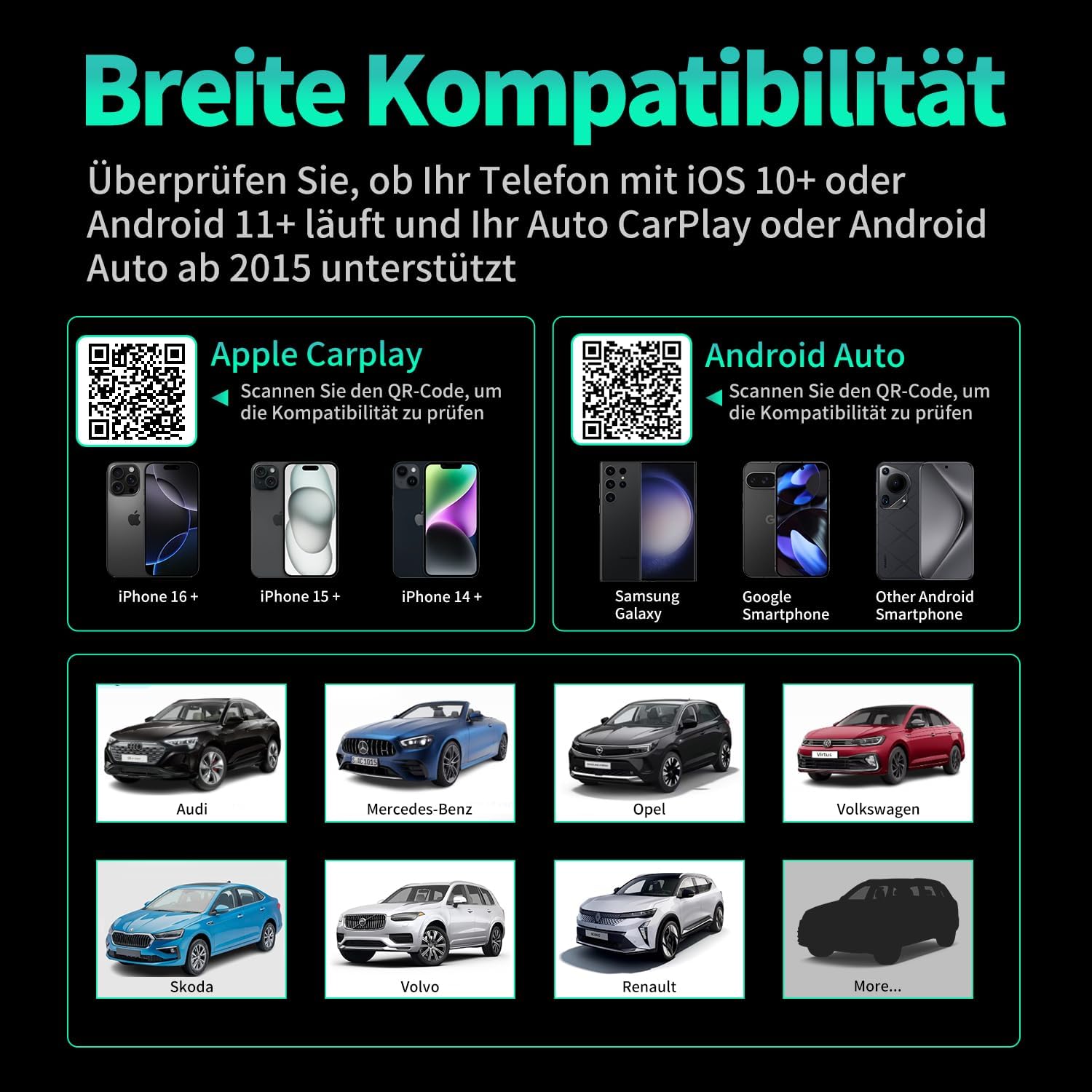
이미지 7.1: 호환성 이상view displaying supported iPhone models (14+, 15+, 16+), Samsung Galaxy, Google, and other Android smartphones, along with car brands like Audi, Mercedes-Benz, Opel, Volkswagen, Skoda, Volvo, and Renault.
8. 유지관리
- 청소: 부드럽고 마른 천으로 기기를 닦으세요. 액체 세척제나 연마재를 사용하지 마세요.
- 저장: 장기간 사용하지 않을 때는 기기를 서늘하고 건조한 곳에 보관하세요.
- 펌웨어 업데이트: 제조사 확인해보세요 web최적의 성능과 호환성을 보장하기 위해 정기적으로 사이트를 방문하여 사용 가능한 펌웨어 업데이트를 확인하세요.
9. 문제 해결
| 문제 | 가능한 원인 | 해결책 |
|---|---|---|
| 어댑터가 차량에 연결되지 않습니다. | Incorrect USB port, car not compatible, loose connection. | Ensure the adapter is plugged into the correct USB port that supports wired CarPlay/Android Auto. Verify car compatibility. Re-plug the adapter firmly. |
| Phone not connecting to adapter. | Bluetooth/Wi-Fi off, incorrect pairing, phone OS not supported. | Ensure Bluetooth and Wi-Fi are enabled on your phone. Forget previous Bluetooth connections and re-pair. Check phone OS version for compatibility (iOS 10+, Android 11+). |
| 연결이 끊기거나 지연 현상이 발생합니다. | Interference, weak signal, outdated firmware. | Ensure no other devices are causing Wi-Fi interference. Try restarting both the car's infotainment system and your phone. Check for firmware updates. |
| CarPlay/Android Auto not launching. | CarPlay/Android Auto not enabled in car settings, app issues. | Check your car's infotainment settings to ensure CarPlay/Android Auto is enabled. Restart your phone and the car's system. |
10. 사양
| 모델 번호 | Carplay01 |
| 상표 | 반바 |
| 연결 기술 | Bluetooth 5.0, Wi-Fi (2.4 GHz + 5 GHz), USB |
| 호환 장치 | 스마트폰 (iOS 10 이상, 안드로이드 11 이상) |
| 커넥터 유형 | USB Type A, USB Type C (with adapter) |
| 제품 치수 | 1 x 5.5 x 4.5cm |
| 품목 무게 | 12g |
| 색상 | 검은색 |
| 특별 기능 | Wireless Android Auto, Wireless Apple CarPlay, GPS Navigation, Spotify, iHeart Radio support |
11. 보증 및 지원
For warranty information and technical support, please refer to the official VANBAR web사이트를 방문하거나 고객 서비스에 직접 문의하세요. 보증 청구를 위해 구매 영수증을 보관하세요.


