소개
This manual provides detailed instructions for the assembly, operation, maintenance, and troubleshooting of your GTRACING Gaming Recliner Chair (Model GT208M). Please read this manual thoroughly before use to ensure proper function and safety.
안전 정보
Always follow assembly instructions carefully. This chair has a maximum weight recommendation of 300파운드. Exceeding this limit may cause damage or injury. Keep children and pets away from moving parts during operation. Ensure all connections are secure before use.
패키지 내용
조립을 시작하기 전에 모든 구성품이 있는지 확인하세요. 부품이 누락되었거나 손상된 경우 고객 지원 센터에 문의하세요.
- 의자 기지
- 등받이
- 팔걸이(좌우)
- 발판 어셈블리
- Lumbar Cushion (with USB cable)
- 하드웨어 키트(나사, 와셔, 육각 렌치)
- Power Adapter (for massage function)
- 사용 설명서
조립 설명서
Assembly typically takes 1-2 hours. It is recommended to have a second person assist with certain steps.
- 구성 요소 풀기: 모든 부품을 포장에서 조심스럽게 꺼낸 후 긁힘을 방지하기 위해 깨끗하고 부드러운 표면에 놓으세요.
- 팔걸이 부착: Secure the left and right armrests to the chair base using the provided screws. Ensure they are firmly attached.
- 등받이 연결: Slide the backrest onto the chair base, aligning the metal brackets. Secure with screws.
- 발판 설치: Attach the footrest assembly to the designated points on the chair base.
- Position Lumbar Cushion: Place the lumbar cushion on the backrest. The USB cable for the massage function should be accessible.
- 최종 점검: 사용하기 전에 모든 나사가 조여져 있고 의자가 안정적인지 확인하세요.

작동 지침
리클라이닝 기능
The chair features a push-back reclining mechanism, allowing you to adjust the backrest and footrest to your desired position. Simply lean back to recline and push forward to return to an upright position. The reclining angle can reach up to 155 degrees.

블루투스 스피커
Your GTRACING recliner is equipped with built-in Bluetooth speakers for an immersive audio experience.
- 전원 켜기: Locate the power button on the side of the chair (usually near the speaker). Press and hold to power on the speakers.
- 페어링 모드 : The speakers will automatically enter pairing mode, indicated by a flashing LED light.
- 장치 연결: On your mobile device or computer, enable Bluetooth and search for "GTRACING Speaker" (or similar name). Select it to pair.
- 오디오 재생: Once paired, audio from your device will play through the chair's speakers. Adjust volume via your device.

요추 마사지 기능
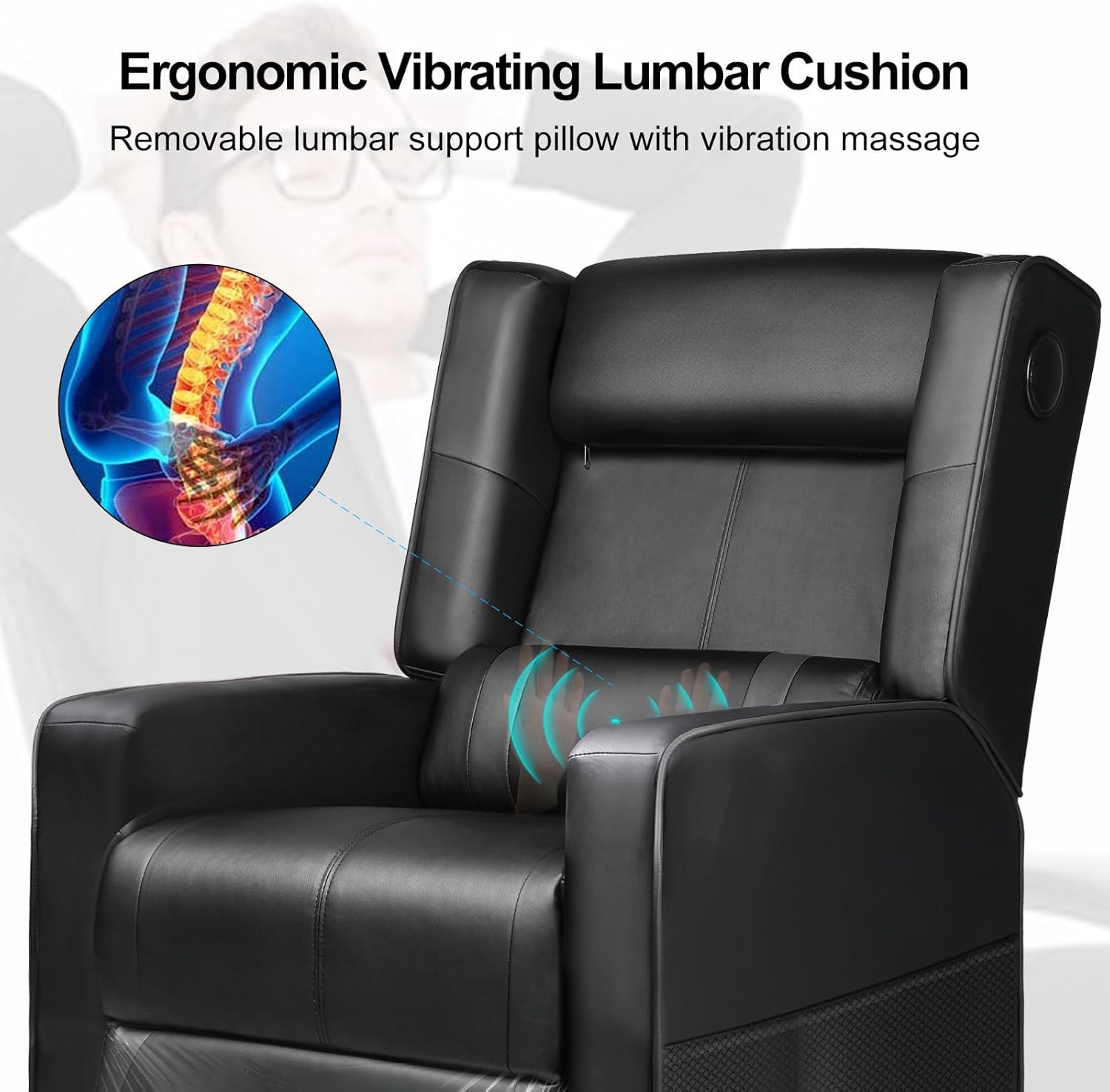
The integrated lumbar cushion provides a vibrating massage function for added comfort. It is powered via a USB connection.
- 전원 연결: Plug the USB cable from the lumbar cushion into a compatible USB power source (e.g., computer USB port, power bank, USB wall adapter).
- 마사지 활성화: The massage function will typically activate upon connection. Some models may have an inline switch on the USB cable.
- 마사지 기능 비활성화: To turn off the massage, disconnect the USB power source.
유지 보수 및 관리
- 청소: 광고로 깨끗이 닦아내세요amp cloth. Avoid harsh chemicals or abrasive cleaners, as these can damage the faux leather material.
- 정기 검사: 모든 나사와 연결부가 단단히 조여져 있는지 정기적으로 점검하세요. 필요하면 다시 조이세요.
- 직사광선을 피하세요: 장시간 직사광선에 노출되면 인조 가죽의 색이 바래거나 갈라질 수 있습니다.
- 중량 제한: 최대 권장 중량인 300파운드를 초과하지 마십시오.
문제 해결
| 문제 | 가능한 원인 | 해결책 |
|---|---|---|
| 의자가 부드럽게 기울어지지 않습니다. | Obstruction in mechanism; insufficient space behind chair. | Check for obstructions. Ensure chair is 18-20 inches from a wall. |
| Bluetooth speakers not pairing. | Speakers not in pairing mode; device Bluetooth off; too far from device. | Ensure speakers are powered on and in pairing mode. Turn on device Bluetooth. Move device closer to chair. |
| 마사지 기능이 작동하지 않습니다. | USB cable not connected; power source issue. | Verify USB cable is securely connected to a working power source. Try a different USB port or power bank. |
| 의자가 불안정하거나 흔들립니다. | 조립 나사가 헐거워졌습니다. | 조립 나사를 모두 확인하고 조여주세요. |
제품 사양
- 모델: GT208M
- 상표: 지트레이싱
- 색상: 검은색
- 재료: 인조 가죽, 폼 필
- 제품 크기(깊이 x 너비 x 높이): 35.03"D x 26.77"W x 38.97"H (Upright)
- 품목 무게: 52.9파운드
- 최대 무게 권장 : 300 파운드
- 기울기 각도: 최대 155도
- 특별 기능: Bluetooth Speakers, Lumbar Massage, Push-back Reclining, Side Pockets
- 한국어: 810170303272
보증 및 지원
For warranty information, technical support, or assistance with missing/damaged parts, please contact GTRACING customer service. Refer to your purchase documentation for specific warranty terms and contact details.
You can often find support contact information on the official GTRACING web제품을 구매한 소매업체나 사이트를 통해서도 구매 가능합니다.


