1. 중요 안전 지침
기기를 사용하기 전에 모든 지침을 주의 깊게 읽고 나중에 참조할 수 있도록 보관하십시오. 지침을 따르지 않으면 감전, 화재 또는 심각한 부상이 발생할 수 있습니다.
- 전기 안전: 볼륨을 확보하세요tag기기에 표시된 e는 해당 지역의 주 전원에 해당합니다.tage before connecting. Do not immerse the cord, plug, or appliance in water or other liquids. Do not operate the appliance with a damaged cord or plug.
- 뜨거운 표면: Surfaces become hot during use. Always use oven mitts when handling hot components. Do not touch hot surfaces directly.
- 통풍: Do not block any ventilation openings. Allow at least 10 cm of free space on the back and sides, and 10 cm above the appliance.
- 놓기: 기기를 안정적이고 내열성이 있는 표면에 놓고 벽이나 기타 열에 민감한 물질로부터 멀리 떨어뜨려 놓으십시오.
- 어린이들: 이 기기는 어린이가 사용하도록 제작되지 않았습니다. 어린이 근처에서 기기를 사용할 때는 세심한 감독이 필요합니다.
- 용법: Do not use the appliance for purposes other than those described in this manual. Do not leave the appliance unattended during operation.
- 유지: Unplug the appliance from the outlet when not in use and before cleaning. Allow it to cool down completely before handling or cleaning.
2. 제품 오버view
The LEHMANN 9L XXL Dual Basket Air Fryer is designed for efficient and healthy cooking. It features two independent cooking zones, a powerful 2400W heating system, 12 preset programs, and WiFi connectivity for smart control.

그림 2.1: 전면 view of the LEHMANN Dual Basket Air Fryer with included paper liners.
2.1 주요 특징
- Dual Independent Baskets: Cook two different foods at different temperatures and times simultaneously.
- 9L XXL Capacity: 넉넉한 용량으로 가족 식사에 적합합니다.
- 2400W 전력: 빠른 가열과 효율적인 조리를 보장합니다.
- 12개의 사전 설정 프로그램: 인기 요리를 원터치로 조리하세요.
- 조정 가능한 온도: 온도 범위는 80°C에서 200°C까지입니다.
- 터치 스크린 제어: 직관적인 디지털 디스플레이로 손쉽게 조작할 수 있습니다.
- WiFi 연결성: Control and monitor cooking via a smartphone app.
2.2 제어판 이상view

그림 2.2: 상세 view of the control panel with key functions highlighted.
- Time/Temperature Adjustment: Use '+' and '-' buttons to set cooking time and temperature.
- 사전 설정 프로그램: Icons representing various food types for quick selection.
- 전원 버튼: 기기를 켜거나 끕니다.
- WiFi 표시기: 연결 상태를 표시합니다.
- 라이트 버튼: Activates the internal basket light.
- 흔들어 알림: Icon indicates when to shake the basket for even cooking.
- SYNC 기능: Synchronizes the finish time of both baskets.
- DUAL COOK Function: Applies the settings of one basket to the other.
- 시작/중지 버튼: 요리 과정을 시작하거나 일시 중지합니다.
3. 처음 사용하기 전에
3.1 포장 풀기 및 초기 청소
- 제품에서 모든 포장재, 스티커, 라벨을 제거하세요.
- Wash the baskets and crisper plates thoroughly with hot water, dish soap, and a non-abrasive sponge. Rinse and dry completely.
- 기기 내부와 외부를 광고용 세제로 닦아주세요.amp 옷감. 본체를 물에 담그지 마십시오.
- 제품의 전원을 연결하기 전에 모든 부품이 완전히 건조되었는지 확인하십시오.
3.2 배치
- 에어프라이어를 안정되고 평평하며 내열성이 있는 표면에 놓으십시오.
- Ensure there is adequate air circulation around the appliance (at least 10 cm clearance on all sides).
- 기기를 가연성 물질이나 열원 근처에 두지 마십시오.
4. 사용 설명서
4.1 기본 작업
- Place the crisper plate into the basket and then insert the basket into the main unit.
- Add your ingredients to the basket. Do not overfill.
- Plug the power cord into a grounded wall outlet. The appliance will beep, and the display will illuminate.
- 전원 버튼 (3에어프라이어를 켜려면 )
- Select the desired basket (1 or 2) if not already selected.
- Adjust the temperature using the '+' and '-' buttons for temperature.
- Adjust the cooking time using the '+' and '-' buttons for time.
- 시작/중지 버튼을 눌러 요리를 시작하세요.
4.2 사전 설정 프로그램 사용

Figure 4.1: The control panel showing various preset cooking program icons.
The air fryer comes with 12 preset programs for common foods. To use a preset program:
- After turning on the appliance, select the desired basket.
- Tap the icon corresponding to your desired food (e.g., fries, chicken, fish). The display will show the default time and temperature for that program.
- You can adjust the time and temperature manually if needed.
- 시작/중지 버튼을 눌러 요리를 시작하세요.
4.3 듀얼 존 조리
The dual basket design allows for versatile cooking. You can cook two different foods or larger quantities of one food.
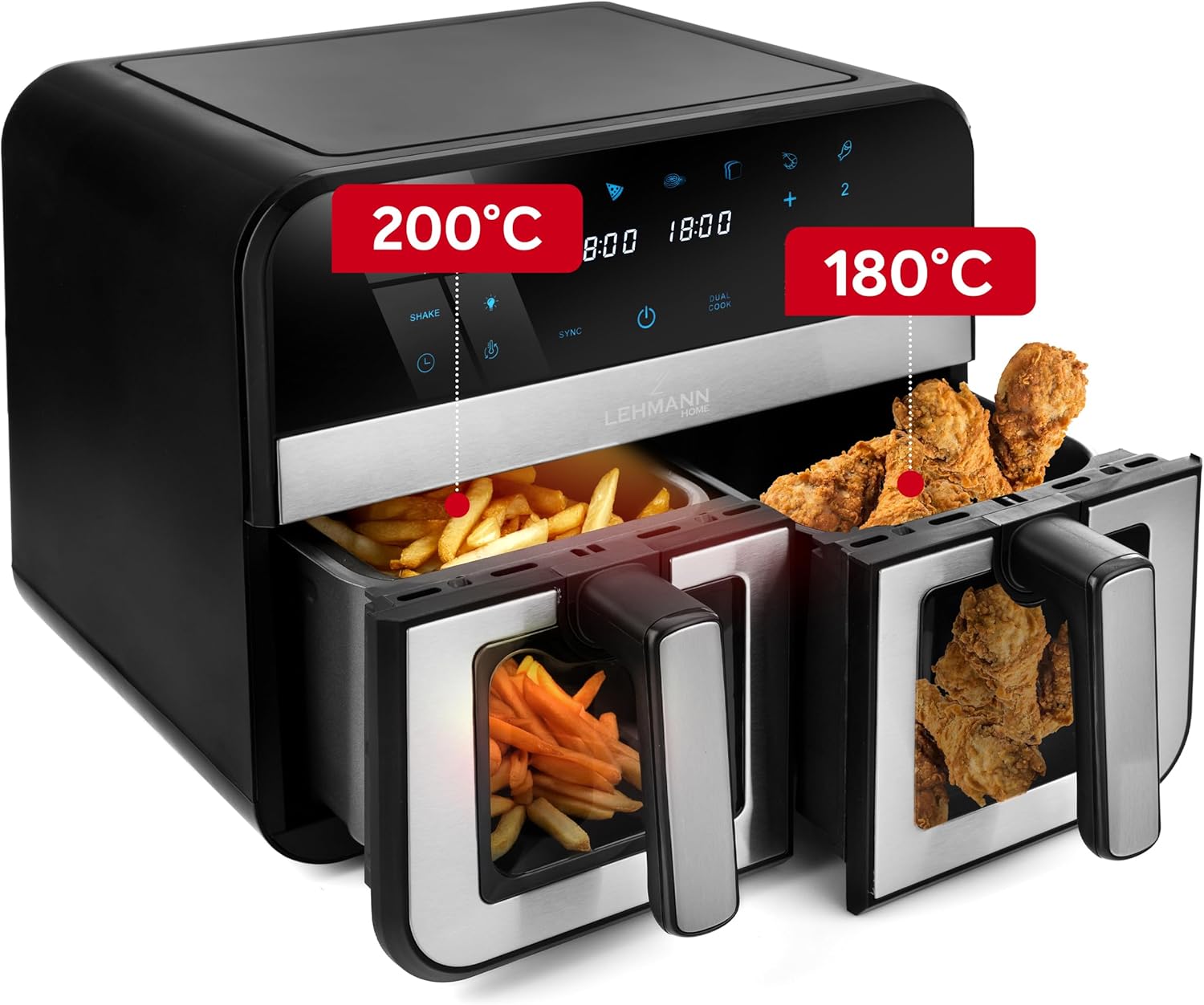
그림 4.2: 예ample of dual zone cooking with different foods and temperature settings.
- SYNC 기능: To ensure both baskets finish cooking at the same time, set the cooking parameters for each basket. Then, press the SYNC button. The air fryer will automatically adjust the cooking times to synchronize completion.
- DUAL COOK Function: If you want to cook the same food in both baskets with identical settings, set the parameters for one basket, then press the DUAL COOK button. This will copy the settings to the second basket.
4.4 WiFi 연결
Control your air fryer remotely using the dedicated smartphone app.

Figure 4.3: Controlling the air fryer via the smartphone application.
- Download the LEHMANN Home app from your smartphone's app store.
- Follow the in-app instructions to pair your air fryer with your device. Ensure your air fryer is powered on and your phone is connected to a 2.4GHz WiFi network.
- Once connected, you can remotely start, stop, adjust settings, and monitor the cooking process.
5. 요리 요령
- 예열: 최상의 결과를 얻으려면 음식을 넣기 전에 에어프라이어를 3~5분간 예열하세요.
- 흔들리는: For even cooking and crispiness, shake the baskets halfway through the cooking time, especially for smaller items like fries or nuggets. The air fryer may have a built-in 'Shake' reminder.
- 기름: While air frying requires little to no oil, a small amount of oil (1 tablespoon) can enhance crispiness for some foods.
- 음식 배치: Arrange food in a single layer in the basket to allow hot air to circulate effectively. Avoid overcrowding.
- 익음 정도: Cooking times may vary based on food type, quantity, and desired crispiness. Always check food for doneness.

Figure 5.1: Illustration of the rapid hot air circulation technology for even cooking.
6. 청소 및 유지 관리
정기적으로 청소하면 에어프라이어의 성능을 최적화하고 수명을 연장할 수 있습니다.
6.1 Cleaning the Baskets and Crisper Plates
- 에어 프라이어의 플러그를 뽑고 완전히 식은 다음 세척하세요.
- Remove the baskets and crisper plates. They are dishwasher safe, or you can wash them by hand with hot water, dish soap, and a non-abrasive sponge.
- For stubborn food residue, soak the baskets in warm, soapy water for about 10 minutes before cleaning.
- 다시 조립하거나 보관하기 전에 모든 부품이 완전히 건조되었는지 확인하세요.
6.2 본체 청소
- 에어프라이어 외부를 광고로 닦아보세요amp 옷감. 연마성 세제나 수세미를 사용하지 마십시오.
- 광고로 기기 내부 청소amp cloth. If necessary, a mild detergent can be used.
- 본체를 물이나 다른 액체에 절대로 담그지 마십시오.
7. 문제 해결
에어 프라이어에 문제가 발생하면 아래 표를 참조하여 일반적인 문제와 해결 방법을 확인하세요.
| 문제 | 가능한 원인 | 해결책 |
|---|---|---|
| 기기가 켜지지 않습니다. | 플러그를 꽂지 않았습니다. 콘센트 문제입니다. | 전원 코드가 제대로 작동하는 콘센트에 제대로 꽂혀 있는지 확인하세요. |
| 음식이 고르게 익지 않습니다. | 바구니가 너무 꽉 찼고, 음식은 흔들지 않았다. | Do not overcrowd baskets. Shake food halfway through cooking. |
| 음식이 바삭하지 않습니다. | 기름이 너무 부족하거나 (일부 음식의 경우), 온도가 너무 낮거나, 조리 시간이 너무 짧을 수 있습니다. | 음식에 기름을 살짝 바르세요. 온도나 조리 시간을 높이세요. |
| 기기에서 흰 연기가 나옵니다. | 이전 사용으로 인한 기름 찌꺼기; 기름진 음식. | 바구니와 야채 보관함 접시를 깨끗이 닦으세요. 음식에서 과도한 기름기를 제거하세요. |
| 와이파이 연결이 실패했습니다. | Incorrect network; app issue. | Ensure your phone is on a 2.4GHz WiFi network. Restart the app and air fryer. Refer to the app's help section. |
8. 기술 사양
Detailed specifications for the LEHMANN 9L XXL Dual Basket Air Fryer.

Figure 8.1: Product dimensions of the air fryer.
| 사양 | 값 |
|---|---|
| 상표 | 레만 |
| 모델 | LHODF-2811 |
| 용량 | 9리터 |
| 왓tage | 2400 와트 |
| 권tage | 230 볼트 |
| 온도 범위 | 80°C - 200°C |
| 치수(길이 x 너비 x 높이) | 40.5 x 40.5 x 38.5cm |
| 무게 | 7.3 킬로그램 |
| 재료 | 금속, 플라스틱 |
| 특별 기능 | Temperature Control, Dual Zone Functionality, Non-stick Coating, Timer, WiFi Control |
9. 보증 및 고객 지원
LEHMANN 제품은 높은 품질 기준에 따라 제조됩니다. 보증 범위에 대한 자세한 내용은 구매 시 동봉된 보증 카드를 참조하거나 LEHMANN 공식 웹사이트를 방문하십시오. web대지.
If you have any questions, require technical assistance, or need to report an issue, please contact LEHMANN customer support through the contact information provided in your product packaging or on the official LEHMANN website. Please have your model number (LHODF-2811) and purchase details ready when contacting support.


