제품 끝view
The Valeton VPS-6 is a fully isolated power supply designed for guitar and bass effects pedals. It provides clean, reliable power with extremely low noise, ensuring optimal performance for your pedalboard. Each output features double isolation to prevent unwanted noise interference. The unit offers a versatile range of power options, including fixed 9V DC outputs and adjustable outputs for 9V, 12V, or 18V DC, accommodating a wide variety of pedals.
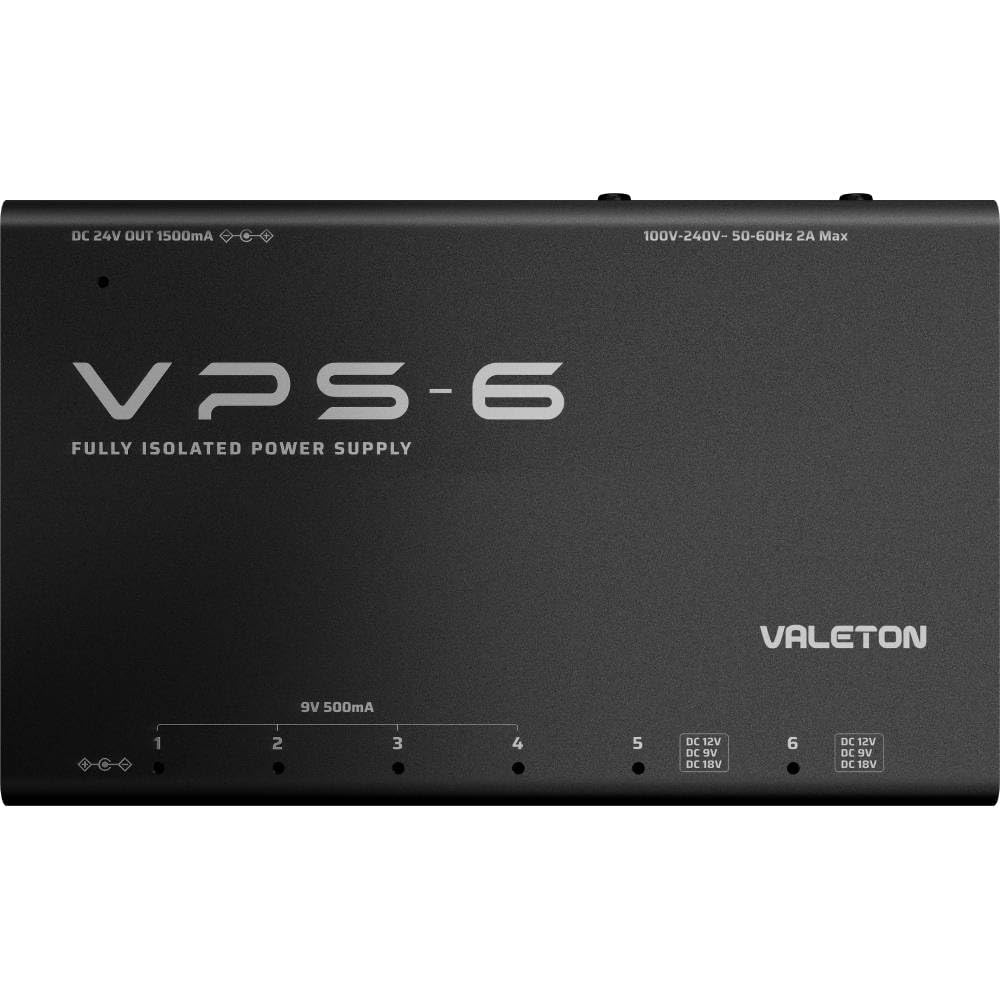
이미지: 위에서 아래로 view of the Valeton VPS-6 Fully Isolated Power Supply, showcasing its compact black metal casing and clearly labeled output ports.
주요 특징
- Fully Isolated Outputs: 6 high-current, fully isolated outputs with center-negative polarity to eliminate ground loop noise.
- 다양한 전원 옵션: 4 dedicated 9V DC outputs (500mA each) and 2 adjustable outputs offering 9V (500mA), 12V (375mA), or 18V (250mA) DC options.
- 확장 가능한 전력: Includes a DC 24V OUT (1500mA) for expanding your power supply system with other compatible products.
- Comprehensive Cable Set: Comes with 9 power cables (various lengths and angles), an IEC power cable, a 9V battery connection cable, and a polarity reversal cable.
- LED 표시등: Each output is equipped with an LED indicator light that illuminates red when a pedal is connected and turns off if the cable is unplugged or the device is short-circuited. Blinks for overcurrent.
- 견고한 구조: Energy-efficient, compact design with 6 independent customized transformers for clean and reliable power. Wide-range voltage input (100V-240V) for worldwide compatibility.
상자 안에 무엇이 들어있나요?
- Valeton VPS-6 Fully Isolated Power Supply Unit
- IEC 전원 케이블
- 9V Battery Connection Cable
- Polarity Reversal Cable
- 9 DC Power Cables (6x 9V 60cm straight to right-angled, 1x 9V 30cm straight to right-angled, 1x 9V 90cm straight to right-angled, 1x 24V 60cm straight to straight-angled)
설치 지침
- AC 전원 연결: Connect the included IEC cable to the VPS-6 unit and plug the other end into a standard AC power outlet (100V-240V, 50-60Hz). The unit will automatically adapt to the voltage.
- Connect 9V DC Pedals: For standard 9V DC, center-negative pedals, use the provided 9V cables to connect them to outputs 1-4. Each of these outputs provides 500mA.
- Connect Adjustable Voltage Pedals: For pedals requiring 9V, 12V, or 18V DC, use outputs 5 and 6. Ensure the correct voltage is selected for your pedal.
- 9V : 500mA
- 12V : 375mA
- 18V : 250mA
Always confirm the recommended voltage, polarity, and current requirements of your pedals before connecting them to avoid damage.
- Expand Power (Optional): If you need to power additional compatible power supply products, use the 24V DC OUT (1500mA, center-positive) port.
- 모니터 연결: Observe the LED indicators next to each output. A red light indicates a successful connection and power delivery.

이미지: 클로즈업 view of the Valeton VPS-6 output ports, showing the fixed 9V outputs and the adjustable 9V/12V/18V outputs with their respective LED indicators.
작동 지침
Once all pedals are connected and the unit is powered, the VPS-6 will automatically supply power. There is no separate on/off switch for the outputs; power is delivered as long as the unit is connected to AC power and the output cables are properly inserted into pedals.
LED 표시등:
- 단색 빨간색: Indicates normal operation and power delivery to the connected pedal.
- 끄다: The output cable is unplugged, or the connected device is short-circuited.
- 빨간색으로 깜박임: The current draw on the output exceeds the maximum amount available (overcurrent protection).
비디오: 오버view of the Valeton VPS-6, demonstrating its features and connectivity for powering guitar and bass effects pedals.
명세서
| 품목 무게 | 2.24파운드 |
| 제품 치수 | 6.22 x 3.86 x 1.26 인치 |
| 품목 모델 번호 | VPS6 |
| 색상 | 검은색 |
| 재료 유형 | 금속, 플라스틱 |
| 입력 Voltage | 100V-240V 교류, 50-60Hz |
| 출력 1-4 | 9V DC, 500mA (Center Negative) |
| Output 5-6 (Adjustable) | 9V DC (500mA), 12V DC (375mA), 18V DC (250mA) (Center Negative) |
| DC 24V 출력 | 1500mA (Center Positive) |
문제 해결
- No Power / LED Off:
- Check if the IEC power cable is securely connected to both the VPS-6 and the AC outlet.
- Ensure the output cable is firmly plugged into both the VPS-6 and the pedal.
- If the LED remains off, the connected pedal might be short-circuited. Disconnect the pedal and test with another known working pedal.
- LED Blinking Red (Overcurrent):
- This indicates the current draw of the connected pedal exceeds the maximum output of that port.
- Verify the current requirements of your pedal against the output specifications.
- If using an adjustable output (5 or 6), ensure the correct voltage is selected, as higher voltages provide less current.
- Disconnect the pedal causing the overcurrent. The power supply will enter hiccup protection status and the LED will blink. After troubleshooting, the power will return to normal and the LED will be solid red.
- 소음 문제:
- The VPS-6 features fully isolated outputs to minimize noise. If you experience noise, ensure all connections are secure.
- 모든 페달이 해당 볼륨에 맞는 출력 단자에 연결되어 있는지 확인하십시오.tage and polarity requirements. Incorrect connections can sometimes introduce noise.
유지
Keep the unit clean and free from dust. Avoid exposing the unit to moisture or extreme temperatures. Do not attempt to open or service the unit yourself, as this may void the warranty and poses a risk of electric shock. Refer all servicing to qualified personnel.
보증 및 지원
For warranty information and technical support, please refer to the documentation provided with your purchase or visit the official Valeton web사이트. 보증 청구를 위해 구매 증빙 자료를 보관하세요.


