1. 서론
Thank you for choosing the WOLFANG WB03 Baby Monitor. This device is designed to provide reliable and secure monitoring of your baby, offering peace of mind through advanced features and a clear display. This manual provides essential information for setting up, operating, and maintaining your baby monitor.
The WOLFANG WB03 features a 5-inch HD display, a 1080P camera with 360-degree rotation and zoom, infrared night vision, two-way audio, temperature detection, and cry detection. It operates on a secure, non-Wi-Fi connection, ensuring privacy and stability.
2. 패키지 내용
다음 품목이 패키지에 포함되어 있는지 확인하세요.
- 상위 유닛(모니터)
- 베이비 유닛(카메라)
- 사용자 설명서
- 2 x 전원 어댑터
- 2 x USB 케이블
- 벽걸이 브라켓
- 벽면 장착용 나사
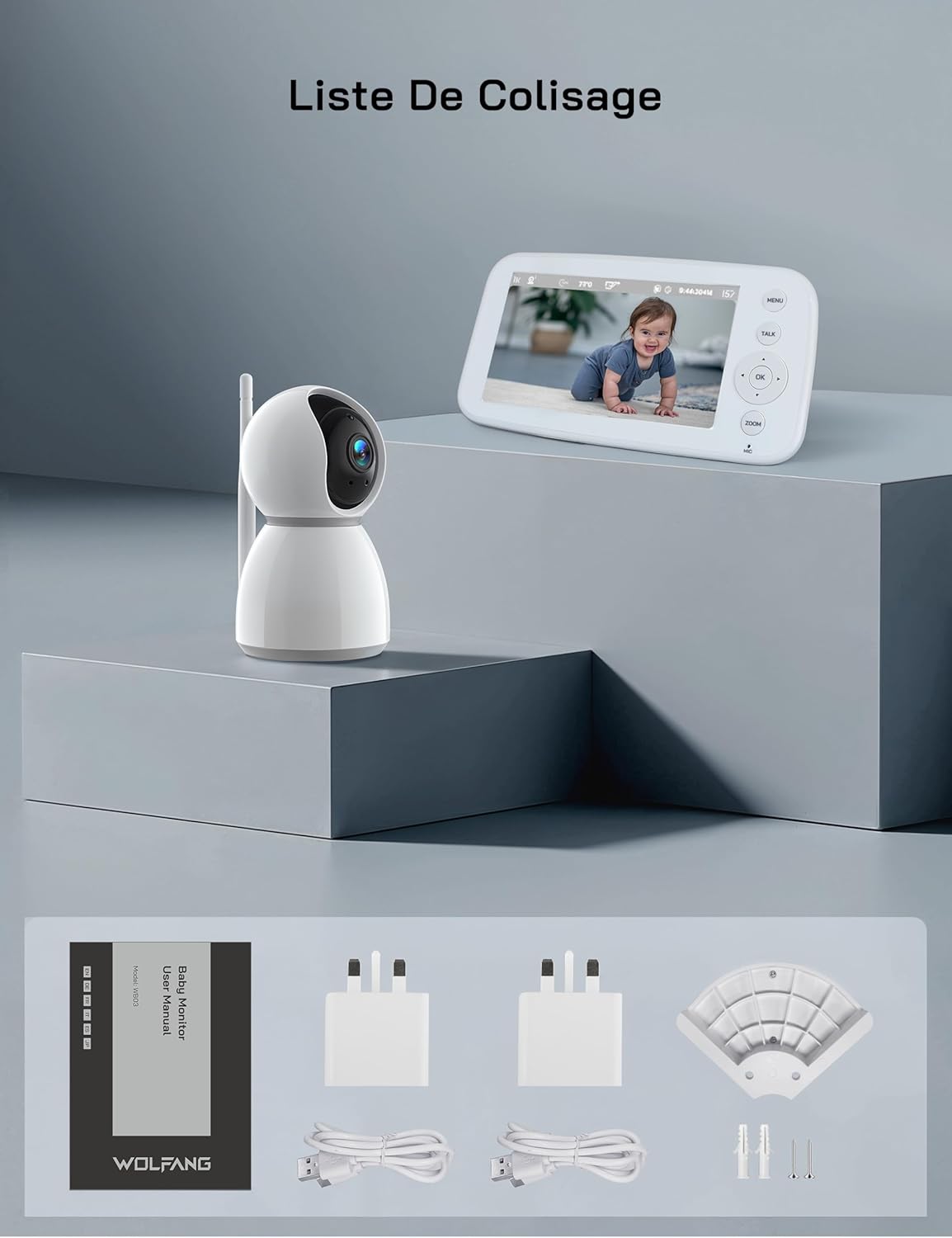
그림 2.1: Visual representation of the WOLFANG WB03 baby monitor package contents, including the monitor, camera, user manual, two power adapters, two USB cables, and wall mounting hardware.
3. 제품 오버view
The WOLFANG WB03 system consists of a Parent Unit (monitor) and a Baby Unit (camera). Familiarize yourself with the components and their functions.

그림 3.1: The WOLFANG WB03 baby monitor system, featuring a white parent unit with a screen displaying a baby, and a white pan-tilt camera unit.
상위 유닛(모니터)
- 5인치 HD 디스플레이: For clear video feed.
- 제어 버튼: Menu, Talk, OK, Navigation (Up/Down/Left/Right), Zoom.
- 마이크로폰: 양방향 소통을 위해서입니다.
- 스피커: For audio from the baby unit and lullabies.
- 안테나: 무선 연결용입니다.
- 전원 포트: Type-C for charging.
베이비 유닛(카메라)
- 1080P Camera Lens: High-resolution video capture.
- 적외선 LED: 야간 시야를 위해.
- 마이크로폰: To pick up baby's sounds.
- 스피커: For two-way talk and lullabies.
- 온도 센서: To monitor room temperature.
- 안테나: 무선 연결용입니다.
- 전원 포트: Type-C for continuous power.

그림 3.2: An illustration highlighting key features of the WOLFANG WB03 baby monitor, including VOX Mode, Night Vision, 8 Lullabies, Remote Pan/Tilt, Type-C charging, Two-Way Intercom, 2350 mAh Battery, and Temperature Detection.
4. 설정 지침
4.1 상위 장치 충전
- Connect one USB cable to a power adapter and plug it into the Parent Unit's Type-C port.
- 전원 어댑터를 벽면 콘센트에 꽂으세요.
- Charge the Parent Unit for at least 3 hours before first use. The battery indicator on the screen will show charging status.
4.2 베이비 유닛 전원 공급
- Connect the second USB cable to a power adapter and plug it into the Baby Unit's Type-C port.
- Plug the power adapter into a wall outlet. The Baby Unit requires continuous power to operate.
- The Baby Unit will automatically power on once connected to power.
4.3 베이비 유닛의 배치
아기용 유닛을 깨끗한 곳에 놓으세요. view of your baby. Ensure it is at least 1.5 to 2 meters (5 to 6 feet) away from the Parent Unit to avoid audio feedback (bip sound).
- Place the camera on a flat, stable surface, such as a dresser or shelf.
- Alternatively, use the included wall mount bracket to secure the camera to a wall.
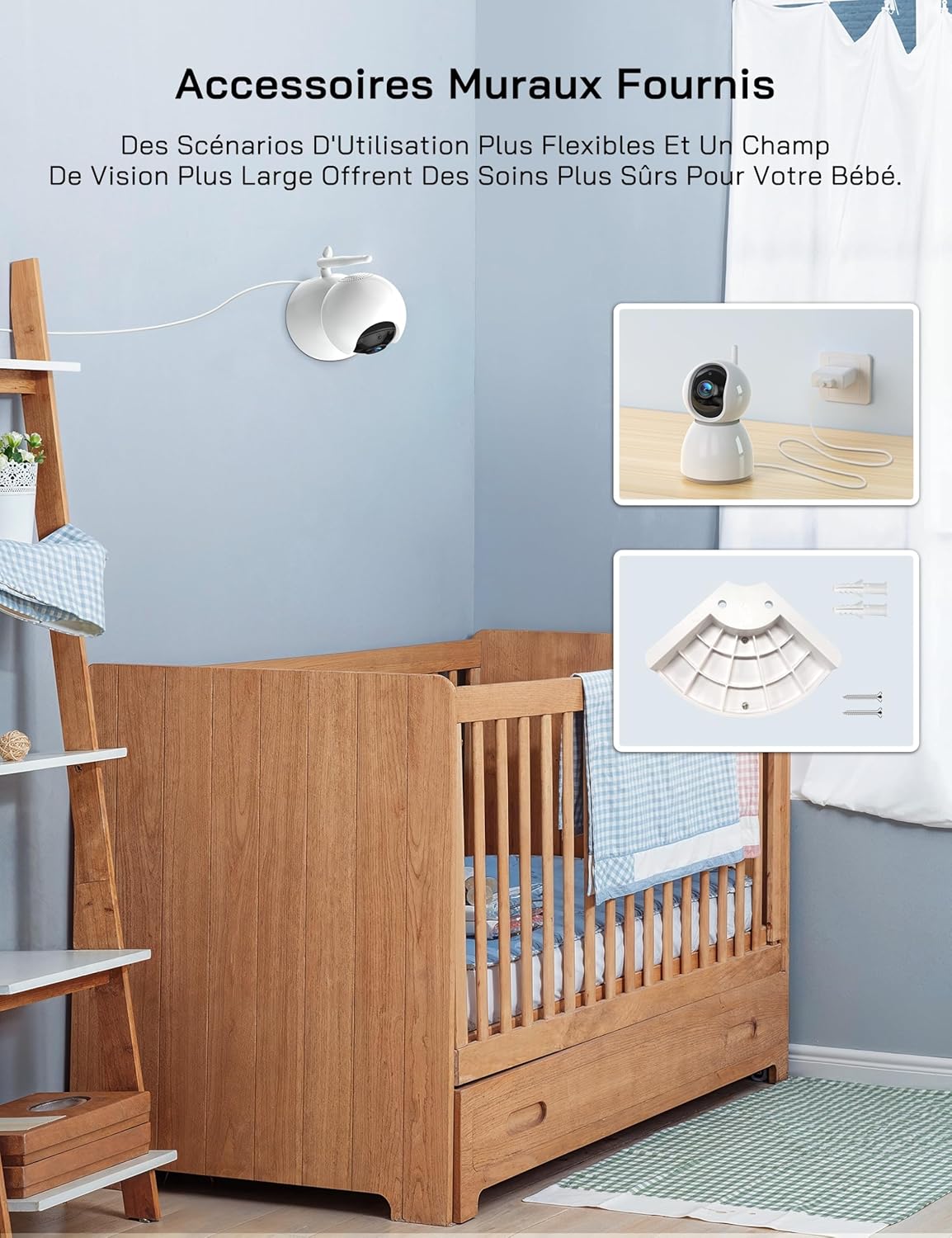
그림 4.1: An image showing the included wall mount bracket and screws, demonstrating how the camera can be securely mounted to a wall above a crib.
4.4 Pairing (If Necessary)
The Parent Unit and Baby Unit are pre-paired at the factory. If the connection is lost or you are adding additional cameras (up to 4 cameras supported), follow these steps:
- 부모 장치에서 다음을 누릅니다. 메뉴 단추.
- Navigate to the Camera icon (📷) and select it.
- Choose an empty camera channel (e.g., CAM 2, CAM 3, CAM 4).
- Select the 'Pair' option. The monitor will display 'Pairing...'.
- Within 10 seconds, press the pairing button on the back of the Baby Unit.
- Once paired, the video feed from the Baby Unit will appear on the Parent Unit screen.
5. 사용 설명서
5.1 전원 켜기/끄기
- 상위 단위: Press and hold the Power button on the side of the monitor to turn it on or off.
- 베이비 유닛 : The camera powers on automatically when connected to a power source. Disconnect from power to turn off.
5.2 기본 모니터링
두 장치의 전원이 켜지고 페어링되면 부모 장치는 아기 장치에서 전송되는 실시간 비디오 영상을 자동으로 표시합니다.
5.3 팬, 틸트 및 줌
The camera offers 360-degree horizontal rotation and 90-degree vertical tilt, along with 2x digital zoom.
- 팬/틸트: Use the navigation buttons (Up/Down/Left/Right) on the Parent Unit to adjust the camera's view잉 각도.
- 줌: 를 누르세요 줌 button on the Parent Unit to activate 2x digital zoom. Use navigation buttons to move the zoomed area.

그림 5.1: An image showing the camera's 360-degree rotation and 2x zoom capability, with the monitor displaying the zoomed view of a baby.
5.4 양방향 대화
Communicate with your baby remotely using the two-way talk feature.
- 를 누르고 계세요 말하다 부모 유닛의 버튼.
- Speak clearly into the microphone on the Parent Unit. Your voice will be transmitted to the Baby Unit.
- 릴리스하다 말하다 button to hear your baby's sounds again.

그림 5.2: An image depicting the two-way talk feature, with a mother in the kitchen communicating with her baby in the nursery via the monitor.
5.5 적외선 야간 투시경
베이비 유닛은 어두운 환경에서 적외선 야간 투시 기능을 자동으로 활성화하여 선명한 흑백 영상 피드를 제공합니다.

그림 5.3: Two images demonstrating the clear infrared night vision feature, showing a sleeping baby in a dimly lit room.
5.6 온도 모니터링
The Baby Unit continuously monitors the room temperature and displays it on the Parent Unit screen. An alarm will sound if the temperature exceeds 30°C (86°F) or falls below 14°C (57.2°F).
5.7 Cry Detection (VOX Mode)
The VOX (Voice Operated eXchange) mode conserves battery life by turning off the screen when no sound is detected. The screen will automatically activate when your baby cries or makes significant noise.
- To enable/disable VOX mode or adjust sensitivity (Low/Medium/High), navigate to the VOX settings in the Parent Unit's menu.
- If you wish to keep the screen on continuously, you must disable cry detection and the automatic screen off feature in the settings.
5.8 자장가
이 모니터에는 아기를 진정시키는 데 도움이 되는 8가지 편안한 자장가가 포함되어 있습니다.
- 를 누르세요 메뉴 부모 유닛의 버튼.
- Navigate to the Music icon (🎵) and select it.
- Choose a lullaby to play or select 'Loop' for continuous playback.
5.9 수유 알림
Set a timer to remind you of feeding times.
- 를 누르세요 메뉴 부모 유닛의 버튼.
- Navigate to the Timer icon (🕑) and select it.
- Set your desired feeding interval (e.g., 2h, 3h, 4h).
5.10 Multi-Camera Support and Split Screen
The WOLFANG WB03 supports connecting up to 4 cameras simultaneously. The 5-inch screen supports split-screen display for simultaneous viewing or scheduled rotation of camera feeds.
- To switch between cameras or activate split-screen mode, access the camera settings in the Parent Unit's menu.
- 당신은 할 수 있습니다 view multiple cameras at once in split-screen or set a timed rotation to cycle through each camera's view.
6. 유지관리
6.1 청소
- 부모 유닛과 아기 유닛의 표면을 마른 부드러운 천으로 닦아주세요.
- 청소 스프레이나 액체 세제를 사용하지 마십시오.
6.2 배터리 관리(부모 장치)
- 배터리 수명을 극대화하려면 배터리를 자주 완전히 방전하지 마세요.
- If storing the unit for an extended period, charge the battery to about 50% and store it in a cool, dry place.
7. 문제 해결
| 문제 | 해결책 |
|---|---|
| Monitor beeps or produces feedback noise. | Ensure the Baby Unit and Parent Unit are at least 1.5 to 2 meters (5 to 6 feet) apart. Proximity can cause audio interference. |
| No video/audio on the Parent Unit. |
|
| 카메라가 켜지지 않습니다. | The camera must be continuously plugged into a power source. Ensure the power adapter and cable are securely connected and the outlet is functional. |
| Screen turns off automatically. | This is likely due to VOX mode. If you want the screen to stay on, disable cry detection and the automatic screen off feature in the Parent Unit's settings. |
| Temperature alarm sounds frequently. | Check the room temperature displayed on the monitor. Adjust the room's climate control if necessary to keep the temperature within the safe range (14°C to 30°C). |
8. 사양
| 특징 | 세부 사항 |
|---|---|
| 모델명 | WB03 |
| 부모 단위 표시 크기 | 5인치 |
| 카메라 해상도 | 1080피 |
| 모니터 해상도 | 720피 |
| 연결 기술 | 무선(FHSS) |
| Wi-Fi 요구 사항 | 없음 |
| 부모 장치 배터리 용량 | 2350mAh |
| 배터리 수명(일반 모드) | 약 8시간 |
| 배터리 수명(VOX 모드) | 약 10시간 이상 |
| 카메라 팬 각도 | 360도 |
| 카메라 틸트 각도 | 90도 |
| 디지털 줌 | 2x |
| 특별 기능 | Two-Way Audio, Infrared Night Vision, Temperature Detection, Cry Detection, Feeding Alarm, 8 Lullabies, Split Screen, Wall Mountable |
| 제품 크기(L x W x H) | 16 x 8.3 x 1.9cm |
| 품목 무게 | 411그램 |
| 권장 사용 | 아기 모니터링 (실내용) |
9. 보증 및 지원
9.1 보증 정보
WOLFANG provides a 2년 제품 보증 and accessory upgrade services. We are committed to delivering high-quality imaging products and support.
9.2 고객 지원
Our customer service team is available 24 hours a day on weekdays to assist you. If you have any questions, require assistance, or need support, please contact us via our official email:
support.vc@wolfang.co
We aim to resolve any issues to your satisfaction as quickly as possible.


