1. 서론
Thank you for choosing the Daakro SR-3800 5.1 Channel Home Audio Amplifier. This manual provides essential information for the proper setup, operation, and maintenance of your new audio system. Please read it thoroughly before use to ensure optimal performance and safety.
The Daakro SR-3800 is designed to deliver high-quality audio for your home theater, studio, or entertainment needs, featuring a dynamic DSP display, multiple input options, and Bluetooth 5.4 connectivity.
동영상 1.1 : 위에view of the Daakro SR-3800 5.1 Channel Home Audio Amp리파이어, 쇼크asin디자인, 기능 및 연결 옵션을 비교합니다.
2. 안전 정보
- 전기 안전: To reduce the risk of fire or electric shock, do not expose this appliance to rain or moisture. Do not open the casing; 모든 서비스는 자격을 갖춘 인력에게 의뢰하세요.
- 통풍: 장치 주변에 충분한 환기가 이루어지도록 하세요. 환기구를 막지 마세요.
- 놓기: Place the unit on a stable, flat surface. Avoid direct sunlight, heat sources, and excessive dust or vibration.
- 전원 공급 장치: Use only the specified power supply (110 Volts AC).
- 스피커 호환성: 이것 amplifier is compatible only with 5-12 inch passive speakers with an impedance of 4 to 16 ohms. The subwoofer interface supports passive subwoofers only.
- 마이크 사용법: External wired and wireless microphones may cause feedback noise if not positioned correctly or if gain levels are too high.
3. 패키지 내용
패키지에 모든 품목이 들어 있는지 확인하세요.
- Daakro SR-3800 5.1 Channel Home Audio Amp리퍼
- 리모컨
- 사용 설명서 (본 문서)
- 전원 케이블
- FM 안테나
- 블루투스 안테나
4. 제품 오버view
4.1 전면 패널 컨트롤
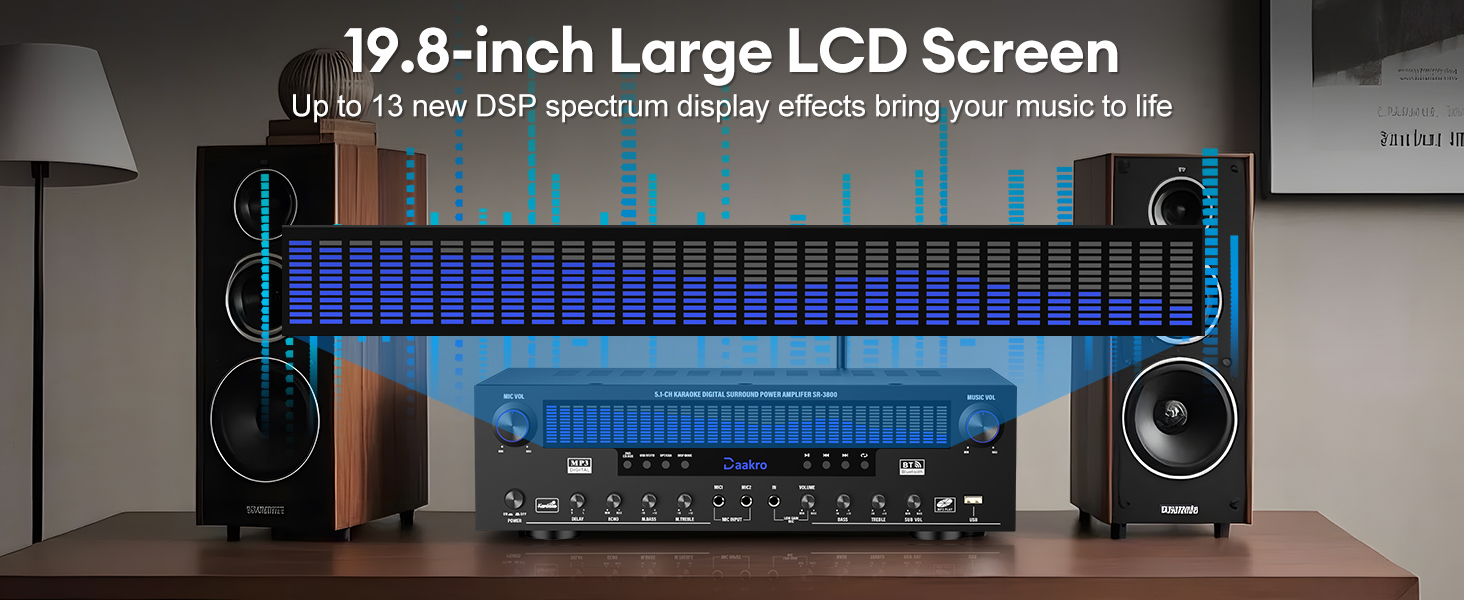
그림 4.1: Detailed diagram of the Daakro SR-3800 front panel, highlighting all controls and their functions, including microphone volume, power, delay, echo, microphone bass/treble, wireless microphone volume, master volume, bass, treble, subwoofer volume, and input selection buttons.
The front panel provides access to all primary controls and the dynamic DSP display. Key controls include:
- 마이크 볼륨: 마이크 입력 볼륨을 조절합니다.
- 전원 켜기/끄기: 주 전원 스위치.
- LCD 화면: Displays current mode, input, and dynamic DSP spectrum.
- DELAY/ECHO: Adjusts microphone delay and echo effects.
- M.BASS/M.TREBLE: Adjusts microphone bass and treble.
- WIRELESS MIC VOL: Adjusts volume for wireless microphones.
- 음량: Master music volume control.
- 저음/고음: 음악의 저음과 고음을 조절합니다.
- 서브 볼륨: Adjusts passive subwoofer volume.
- 입력 선택 버튼: Select between DVD/CD/AUX, USB/BT/FM, OPT/COAX, and DISP modes.
- 재생 컨트롤: Play/Pause, Previous, Next, Single Song/Playlist Loop.
4.2 후면 패널 연결

그림 4.2: Detailed diagram of the Daakro SR-3800 rear panel, illustrating all input and output ports for connecting speakers, audio sources, and antennas.
The rear panel houses all input and output ports for connecting your audio sources and speakers:
- FM 개미: FM antenna input.
- AUX 입력 : 3.5mm 보조 입력.
- 광/동축: Optical and Coaxial digital audio inputs.
- BT 개미: 블루투스 안테나 연결.
- 오디오 입력(DVD, CD, 라인): RCA stereo inputs for DVD, CD players, and other line-level sources.
- AUDIO OUT (LINE): RCA stereo line output for connecting to active speakers or another amp리퍼.
- 스피커 출력: Terminals for connecting passive speakers (Front Left/Right, Center, Surround Left/Right, Subwoofer).
- 전원 입력: AC 전원 연결.
4.3 Dynamic DSP Display

그림 4.3: The 19.8-inch dynamic DSP display of the Daakro SR-3800, illustrating real-time music rhythm analysis with various spectrum effects.
The 19.8-square-inch LED display screen analyzes and displays music rhythms in real-time within the 20 Hz to 20 kHz frequency response range. It offers 13 spectrum effects, enhancing your audio-visual experience.
5. 설정 지침
5.1 스피커 연결
Connect your passive speakers to the corresponding terminals on the rear panel. Ensure correct polarity (+ to + and - to -) for each speaker. The amplifier supports 5-12 inch passive speakers with an impedance of 4 to 16 ohms.
- Front Left (FL) / Front Right (FR): For your main stereo speakers.
- Center (C): 센터 채널 스피커용입니다.
- Surround Left (SL) / Surround Right (SR): For your surround sound speakers.
- 서브우퍼(SUB): For a passive subwoofer only.

그림 5.1: 후면 패널은 amplifier showing various audio inputs and speaker outputs with cables connected, demonstrating a typical setup.
5.2 오디오 소스 연결
Connect your audio sources to the appropriate input ports on the rear panel:
- DVD/CD/LINE: Use RCA cables to connect DVD players, CD players, or other analog audio devices.
- 광/동축: Use optical or coaxial cables for digital audio sources like TVs or game consoles.
- AUX 입력 : Use a 3.5mm audio cable for portable devices.
- USB: Insert a USB drive for direct media playback.
5.3 안테나 연결
- Connect the provided FM antenna to the FM 개미 terminal for radio reception.
- Connect the Bluetooth antenna to the 비티 앤트 terminal for optimal Bluetooth signal reception.
5.4 전원 연결
After all audio and speaker connections are made, connect the power cable to the 전원 입력 on the rear panel and then to a standard 110V AC power outlet.
6. 사용 설명서
6.1 전원 켜기/끄기
를 누르세요 전원 켜기/끄기 전면 패널의 스위치를 켜십시오 ampliifier를 켜거나 끕니다.
6.2 입력 선택
Use the input selection buttons on the front panel or the remote control to choose your desired audio source (DVD/CD/AUX, USB/BT/FM, OPT/COAX).
6.3 블루투스 페어링
블루투스 장치를 연결하려면:
- 선택하세요 USB/BT/FM input mode. The display will show 'BT'.
- On your smartphone, tablet, or other Bluetooth device, search for available devices and select 'Daakro SR-3800'.
- 페어링이 완료되면 디스플레이에 연결 성공이 표시됩니다.
그만큼 amplifier features Bluetooth 5.4 for a stable connection within a 30-foot range.

그림 6.1: The Daakro SR-3800 amplifier demonstrating its Bluetooth 5.4 connectivity with a stable 30-foot range, surrounded by various compatible smart devices.
6.4 Volume and Equalizer Control
Use the rotary knobs on the front panel or the remote control to adjust audio parameters:
- 음량: Controls the overall music volume.
- 저음/고음: 음악의 저음과 고음을 조절합니다.
- 서브 볼륨: Adjusts the volume of the connected passive subwoofer.
- The remote control also offers preset EQ settings (e.g., 'Hall') for quick sound adjustments.
6.5 마이크 사용
그만큼 amplifier supports two wired microphones and one wireless microphone input. Connect your microphones to the designated inputs on the front panel.

그림 6.2: The Daakro SR-3800 amplifier facilitating a karaoke session with multiple microphone inputs, allowing for simultaneous use.
Use the dedicated microphone controls:
- 마이크 볼륨: Adjusts the overall microphone volume.
- DELAY/ECHO: Adds delay and echo effects to the microphone audio.
- M.BASS/M.TREBLE: Adjusts the bass and treble for microphone audio.
- WIRELESS MIC VOL: Adjusts the volume for the wireless microphone input.
6.6 FM 라디오
In USB/BT/FM mode, select FM to access the radio tuner. Use the playback control buttons (Previous/Next) to scan for stations. Ensure the FM antenna is properly connected for optimal reception.
7. 유지관리
7.1 청소
Wipe the unit with a soft, dry cloth. Do not use liquid cleaners or aerosol sprays, as they may damage the finish or internal components.
7.2 환기
The Daakro SR-3800 features an innovative cooling system with built-in fans, heat sinks, and side ventilation ports. Ensure these vents are not obstructed to maintain optimal cooling efficiency and extend the equipment's lifespan. The fan operates quietly and is virtually inaudible at idle.
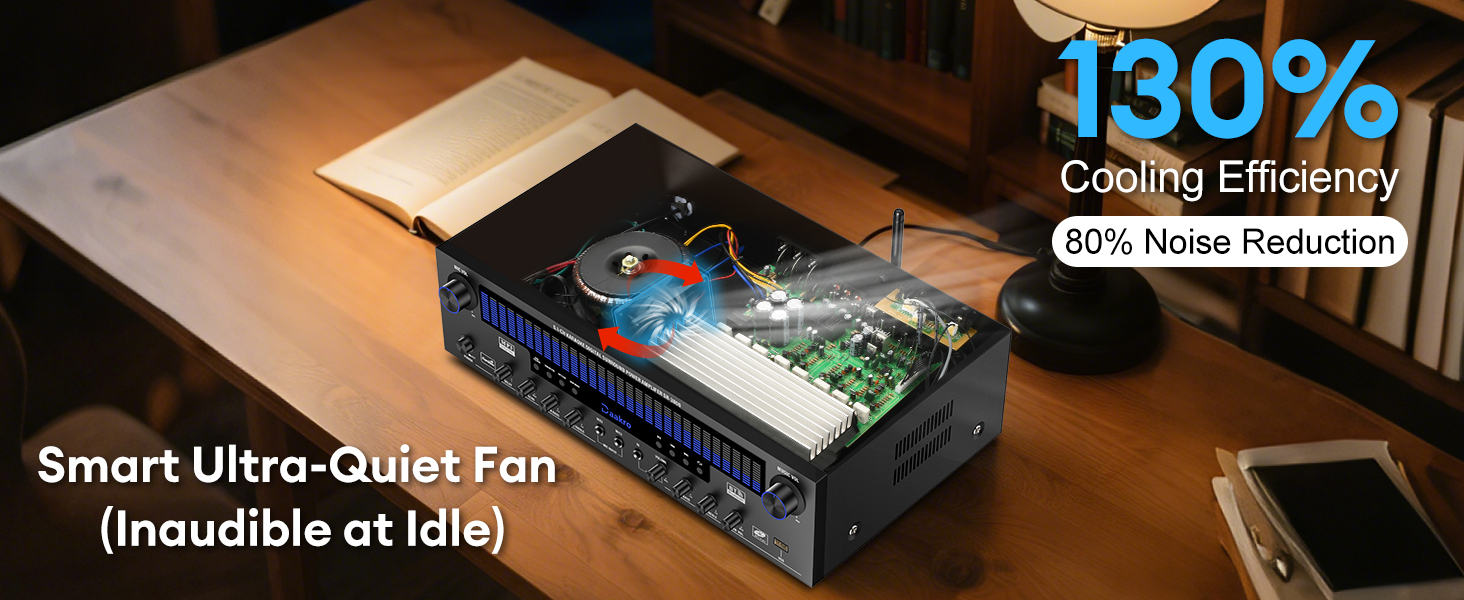
그림 7.1: 내부 view of the Daakro SR-3800 amplifier, illustrating the smart ultra-quiet fan and heat sinks designed for efficient cooling and noise reduction.
8. 문제 해결
| 문제 | 가능한 원인 | 해결책 |
|---|---|---|
| 전원이 없습니다 | Power cable not connected; Power switch off; Outlet issue | Ensure power cable is securely connected; Turn power switch on; Test outlet with another device. |
| 스피커에서 소리가 나지 않음 | Incorrect input selected; Speaker cables loose/incorrectly connected; Speaker impedance mismatch; Volume too low | Select correct input; Check all speaker connections for polarity; Ensure speakers are 4-16 ohms passive; Increase volume. |
| 블루투스가 연결되지 않습니다 | Not in Bluetooth mode; Device too far; Interference; Bluetooth antenna loose | Select USB/BT/FM mode; Move device closer (within 30ft); Ensure Bluetooth antenna is securely attached. |
| Microphone feedback/noise | Microphone too close to speakers; Gain levels too high | Reposition microphone; Reduce MIC VOL or individual microphone gain controls. |
| 리모컨이 작동하지 않습니다 | Batteries dead/incorrectly inserted; Obstruction between remote and unit | Replace batteries; Ensure clear line of sight to the amp리파이어의 IR 수신기. |
| 서브우퍼가 작동하지 않음 | Active subwoofer connected; Incorrect connection | Ensure only a passive subwoofer is connected to the SUB output; Check subwoofer cable connection. |
9. 사양
| 특징 | 사양 |
|---|---|
| 모델 번호 | SR-3800 |
| 정격 출력 | 300W (채널당 50W) |
| 채널 수 | 5.1 |
| 스피커 임피던스 | 4-16 Ohms (Passive Speakers) |
| 블루투스 버전 | 5.4 |
| 블루투스 범위 | 최대 30피트(10미터) |
| DSP Display Size | 19.8인치 |
| 주파수 응답 범위 | 20Hz ~ 20kHz |
| 입력 인터페이스 | Bluetooth, USB, Wireless Mic, 2x Wired Mic, FM, AUX, OPT, COAX, DVD, CD, LINE |
| 출력 인터페이스 | 5.1 Channel Passive Speaker Output, Passive Subwoofer Output, Line Output |
| 권tage | 110볼트(AC) |
| 품목 무게 | 13.31파운드 |
| 패키지 크기 | 19.45 x 13.39 x 7.64 인치 |
10. 보증 및 지원
The Daakro SR-3800 amplifier는 30일 보증 from the date of purchase. Daakro is committed to providing high-quality products and customer satisfaction.
For technical assistance, troubleshooting, or warranty claims, please contact our customer support team. We offer 24시간 온라인 고객 서비스 to address your inquiries promptly.
You can find more information and support on the official Daakro brand store: Daakro Brand Store.


