1. 서론
The SainSmart Genmitsu Kiosk 2.5W Laser Engraver is a compact and precise tool designed for engraving and cutting various materials. It offers high-speed performance up to 12000 mm/min and a precision of 0.01 mm, making it suitable for detailed projects. The device features smart control options via a dedicated mobile application and is compatible with popular software like LightBurn and LaserGRBL. Its design prioritizes user safety and ease of use, making it accessible for both beginners and experienced users.

Image: The Genmitsu Kiosk 2.5W Laser Engraver with its orange acrylic enclosure.
2. 안전 정보
Your Genmitsu Kiosk Laser Engraver is designed with multiple safety features to ensure a secure operating environment. Always adhere to the following guidelines:
- 1등급 레이저 제품: This device is a certified Class 1 laser product, meaning it is safe under all conditions of normal use.
- Acrylic Enclosure: The orange acrylic enclosure is designed to filter harmful laser light. Always ensure the lid is closed during operation.
- Lid Opening Sensor: The machine is equipped with a sensor that automatically stops operation if the lid is opened during engraving.
- Tilt Induction: An integrated tilt sensor will instantly halt operation if the machine is tilted beyond a safe angle.
- 눈 보호: Although the enclosure provides protection, it is recommended to wear additional laser safety glasses when observing the engraving process closely.
- 통풍: Ensure adequate ventilation in your workspace to dissipate any fumes or odors produced during engraving.

Image: Visual representation of the lid opening sensor and tilt induction safety features.
3. 패키지 내용
Upon unpacking your Genmitsu Kiosk Laser Engraver, please verify that all components listed below are present and in good condition:
- Genmitsu Kiosk Main Unit (Pre-assembled Frame)
- 2.5W 레이저 모듈
- 전원 어댑터
- USB-C 케이블
- 레이저 안전 안경
- Sample Engraving Materials (e.g., wood pieces)
- Tool Accessory Kit (e.g., paintbrush, marker, USB drive with software)
- 사용 설명서 (본 문서)

Image: The Genmitsu Kiosk unit as it appears when unboxed, highlighting the pre-assembled frame and laser module.
4. 설정
The Genmitsu Kiosk is designed for quick and easy setup. Follow these steps to get your engraver ready for its first use:
- 짐 풀기: 포장에서 모든 구성 요소를 조심스럽게 제거합니다.
- 레이저 모듈 설치: Insert the laser module into its designated slot on the main unit. Secure it using the locking lever.
- 전원 연결: Plug the power adapter into the machine and then into a power outlet.
- Connect to Computer/App:
- USB 연결: Connect the machine to your computer using the provided USB-C cable.
- Wi-Fi Connection (Genmitsu App): Download the Genmitsu App on your mobile device. Follow the in-app instructions to connect the engraver to your Wi-Fi network.
- 소프트웨어 설치: Install the necessary software (LightBurn, LaserGRBL, or Genmitsu App) from the provided USB drive or by downloading the latest version from the official SainSmart web대지.

Image: Screenshot illustrating the Wi-Fi connection process within the Genmitsu App.
5. 사용 설명서
5.1 소프트웨어 옵션
The Genmitsu Kiosk supports multiple software platforms for design and control:
- Genmitsu App: For effortless remote control via mobile devices (iOS/Android). Features include photo tracing, multi-language support, and custom fonts.
- 라이트번: A popular third-party laser engraving software known for its advanced features and compatibility.
- 레이저GRBL: A free, open-source software for controlling GRBL-based laser engravers.

Image: Diagram showing multi-platform support (Windows, Mac, iOS, Linux, Android) and offline engraving via TF card.
5.2 조각 과정
- 재료 배치: Place your material securely on the engraving bed. For larger objects, the removable base plate allows for working on taller items.
- 초점 조정: Adjust the laser focus according to your material and desired engraving depth.
- 디자인 가져오기: Import your design into your chosen software (Genmitsu App, LightBurn, or LaserGRBL). The Genmitsu App allows direct photo uploads and tracing.
- 매개 변수 설정 : Adjust engraving parameters such as speed, power, and passes based on the material type and desired effect. Recommended settings for common materials are available in the detailed manual.
- 사전view 및 위치: 소프트웨어의 사전 사용view function to confirm the engraving area and position. The machine also features one-touch control for preview주고받음.
- 조각 시작: Initiate the engraving process. The one-touch repeat engraving function is useful for batch production.

Image: Illustration of the one-touch control buttons for preview, start, pause, and stop engraving.

Image: Depiction of the Genmitsu App interface for remote control, showing preview, position, and engrave functions.
6. 재료 호환성
The Genmitsu Kiosk 2.5W Laser Engraver is versatile and can engrave on a variety of materials. The 2.5W laser is ideal for crisp results on the following:
| 재료 유형 | 노트 |
|---|---|
| 목재 | Excellent for detailed engravings and cuts. |
| 가죽 | Ideal for personalized text and designs. |
| 플라스틱 | Suitable for various plastic types, test settings first. |
| Thin Fabrics | Good for delicate patterns and labels. |
| Card Paper | Precise cutting and engraving for crafts. |
| 코팅 된 금속 | Engraves through coatings to reveal the metal underneath. |
| 스테인리스 스틸 | Can achieve marking effects on stainless steel. |
| 유리 | Can achieve etching effects on glass. |
Always perform a small test engraving on a scrap piece of the material to determine optimal settings before starting your main project.
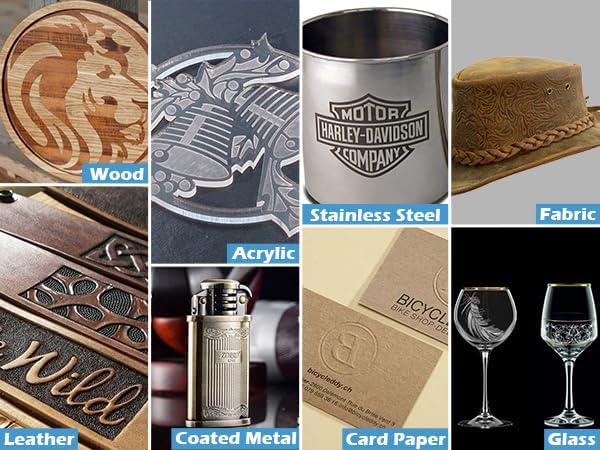
Image: A grid displaying various materials such as wood, stainless steel, fabric, leather, coated metal, card paper, and glass, with engraved designs.
7. 유지관리
Regular maintenance ensures the longevity and optimal performance of your Genmitsu Kiosk Laser Engraver:
- 청소: Regularly clean the engraving area and the laser lens to prevent residue buildup from engraved materials. Use a soft, lint-free cloth and appropriate cleaning solutions.
- 렌즈 관리: The laser lens is crucial for engraving quality. Keep it free from dust and debris. Refer to the detailed manual for specific lens cleaning instructions.
- 환기 시스템: Ensure the built-in air assist and any external ventilation systems are clear and functioning correctly to prevent smoke and debris accumulation.
- 펌웨어 업데이트: Periodically check for firmware updates on the SainSmart website to ensure your machine has the latest features and performance enhancements.
8. 문제 해결
If you encounter issues with your Genmitsu Kiosk, consider the following common troubleshooting steps:
- 기기가 연결되지 않습니다:
- Ensure the machine is powered on and the indicator light is active.
- For Wi-Fi connection, verify your mobile device and the Kiosk are on the same network. Restart the app and the machine if necessary.
- For USB connection, check the cable and port. Reinstall drivers if prompted by your operating system.
- 낮은 조각 품질:
- Check the laser focus. An improperly focused laser can lead to blurry or weak engravings.
- Adjust engraving parameters (speed, power, passes) for the specific material. Refer to recommended settings.
- Clean the laser lens and the engraving area.
- 기계가 예기치 않게 멈춤:
- Verify the lid is fully closed. The safety sensor will stop operation if the lid is open.
- Check if the machine has been tilted. The tilt induction safety feature will activate.
- 전원 공급이 안정적인지 확인하세요.
- 소프트웨어 문제: Reinstall the software or update to the latest version. Consult the software's documentation or online communities for specific issues.
If problems persist, please contact SainSmart customer support for further assistance.
9. 사양
- 제품 크기: 12.8 x 10.63 x 10.83 인치
- 품목 모델 번호: KK2W5
- 레이저 파워: 2.5W(2500mW)
- 조각 영역: 3.9'' x 3.9'' (100x100mm)
- 조각 속도: 최대 12000mm/분
- 정도: 0.01mm (XNUMXmm)
- 품목 무게: 8.84파운드
- 제조업체: 겐미츠
- 안전 수업: 1등급 레이저제품
10. 보증 및 지원
SainSmart provides a standard warranty for the Genmitsu Kiosk Laser Engraver. For detailed warranty terms, conditions, and duration, please refer to the official SainSmart web사이트를 방문하거나 고객 서비스에 직접 문의하세요.
For technical support, troubleshooting assistance, or any inquiries regarding your product, please reach out to SainSmart customer support through their official channels. They offer comprehensive support, including detailed manuals, tutorial videos, and a responsive support team to help you with your engraving projects.
You can often find additional resources, FAQs, and community forums on the SainSmart website to further assist you.


