소개
This manual provides detailed instructions for the installation, operation, and maintenance of your Carro Smart Ceiling Fan. The Tilbury 52-inch smart ceiling fan is designed to provide efficient cooling and lighting for large indoor and outdoor living spaces. It features a modern design with a white finish, elegant plywood blades, and an integrated 4000K LED cool light. This fan incorporates remote control, Wi-Fi app control, Siri Shortcut, and voice control technology, compatible with Amazon Alexa and Google Home Assistant, to customize your fan preferences.
안전 정보
설치 및 사용 전에 모든 안전 지침을 주의 깊게 읽어 주십시오. 이 지침을 따르지 않을 경우 감전, 화재 또는 부상을 입을 수 있습니다.
- 설치나 정비를 하기 전에 회로 차단기의 전원이 꺼져 있는지 확인하세요.
- 모든 배선은 국가 및 지역 전기 규정을 준수해야 합니다.
- 배선 절차에 대해 확실하지 않은 경우 자격을 갖춘 전기 기술자에게 문의하세요.
- Mount the fan to a structurally sound ceiling capable of supporting the fan's weight.
- 선풍기 작동 중에는 손, 머리카락, 옷이 날개에 닿지 않도록 하십시오.
- 선풍기를 직접 수리하거나 개조하지 마십시오. 고객 지원팀에 문의하여 도움을 받으십시오.
설정 및 설치
The Carro Smart Ceiling Fan is designed for straightforward installation. The process typically takes about 20 minutes to replace your current ceiling fan.
- 구성 요소 풀기: 포장에서 모든 부품을 조심스럽게 꺼내십시오. 포장 목록에 따라 모든 구성품이 있는지 확인하십시오.
- 전원 차단: Before beginning installation, ensure the power supply to the fan location is turned off at the main circuit breaker.
- 장착 브래킷 설치: Securely attach the mounting bracket to the ceiling junction box. Ensure the junction box is rated for ceiling fan support.
- 배선 연결: Connect the fan's electrical wires to the household wiring according to the provided wiring diagram. Ensure all connections are secure and properly insulated.
- 팬 어셈블리: Attach the fan motor assembly to the mounting bracket. Install the fan blades and light kit as per the instructions.
- 전원 복원: Once installation is complete, restore power at the circuit breaker and test the fan's operation.

이미지: 이상view of Carro Smart Ceiling Fan components and general installation steps.
작동 지침
Your Carro Smart Ceiling Fan offers multiple control methods for convenience and customization.
1. 제어 방법
The fan can be controlled via the included remote, a mobile app, or voice commands through smart home assistants.
- 원격 제어: Use the dedicated remote to adjust fan speed, light settings, and turn the fan on/off. This ensures control even without a Wi-Fi connection.
- 모바일 앱: Download the Carro Home app to customize settings remotely. The app allows for advanced control and scheduling.
- 음성 제어: The fan is compatible with Amazon Alexa, Siri, and Google Assistant. Use voice commands such as "Alexa, set the white ceiling fan in the bedroom to speed 8, turn the yellow light to 75%, and adjust the white light to 36%."

Image: Remote control and mobile phone app interface for fan operation.

Image: Demonstrates voice control functionality with Amazon Alexa, Google Assistant, and Siri Shortcuts.
2. Fan Operation (DC Motor)
The fan is equipped with an efficient DC motor, offering quiet operation and energy savings.
- 속도 설정: Choose from 10 adjustable wind speeds, ranging from a maximum airflow of 4500 CFM to a minimum of 980 CFM.
- 공기 흐름 방향 전환 가능: The reversible function allows you to change the direction of airflow. Use the downward airflow for cooling in summer and upward airflow to circulate warm air in winter.
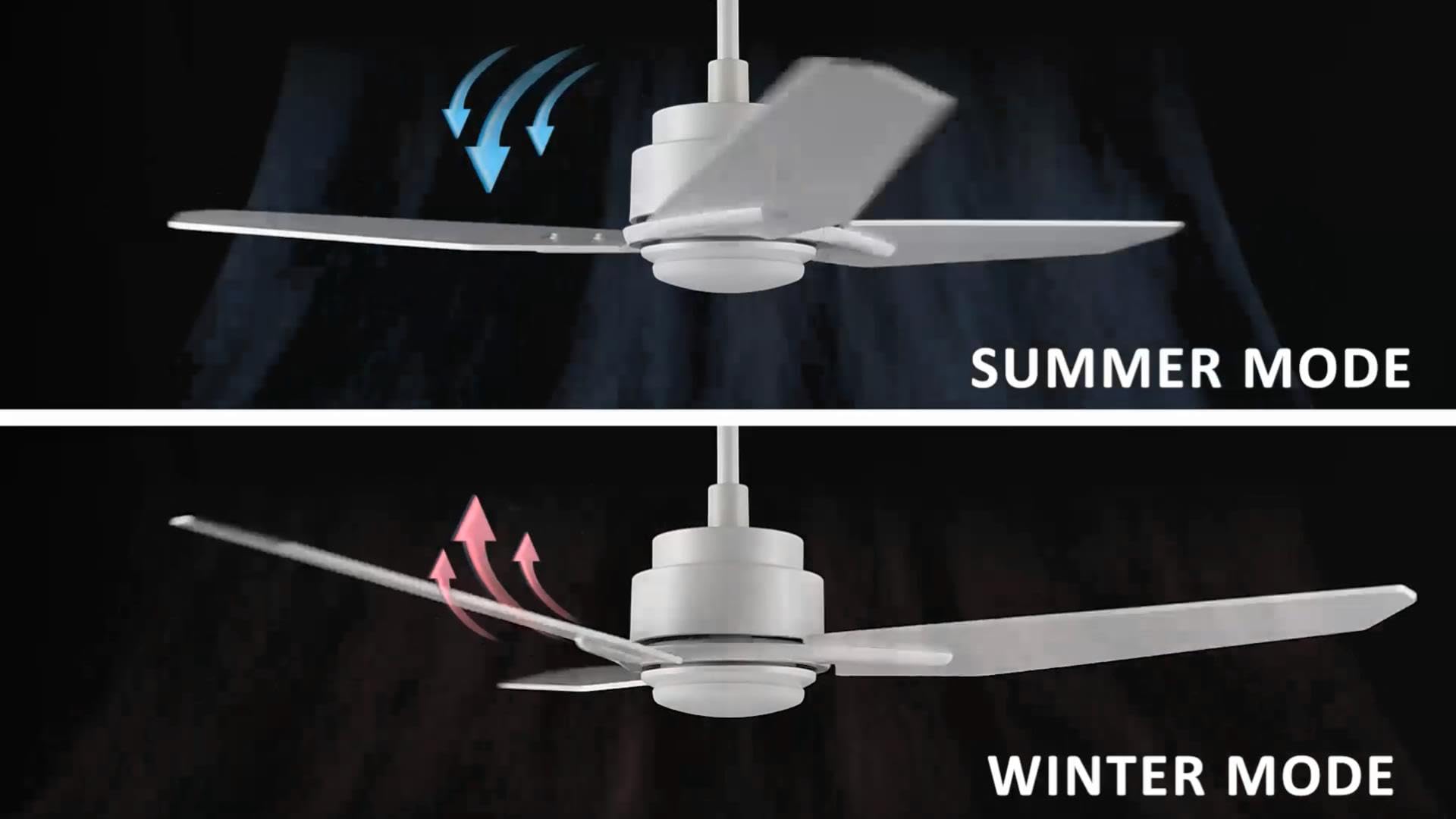
Image: Illustration of summer mode (downward airflow) and winter mode (upward airflow) for optimal air circulation.
3. Adjustable Dimmable LED Lights
Control the fan's lighting independently with ease.
- 색온도 옵션: Select from three light colors: 4000K (cool light), 3000K (bright light), and 2700K (warm light).
- 밝기 조절 가능 기능: The LED lights are dimmable from 1% to 100%, allowing you to adjust brightness for any situation.
- Smart Grouping: Group the LED lights with the fan or other smart devices for unified control via the app or voice commands.

Image: Visual representation of the three dimmable light color options: Cool Light (4000K), Natural Light (3000K), and Warm Light (2700K).
4. Timer and Scheduling Options
Utilize the scheduling feature through the mobile app to automate fan and light operations.
- 루틴 설정: Program the fan to activate at specific times, with desired light and fan settings, for different areas of your home.
- Examp르 : Program the living room fan to turn on daily at 18:00 with both yellow and white lights. Set the study fan to turn on at 21:00 from Monday to Friday, illuminating only the yellow light.
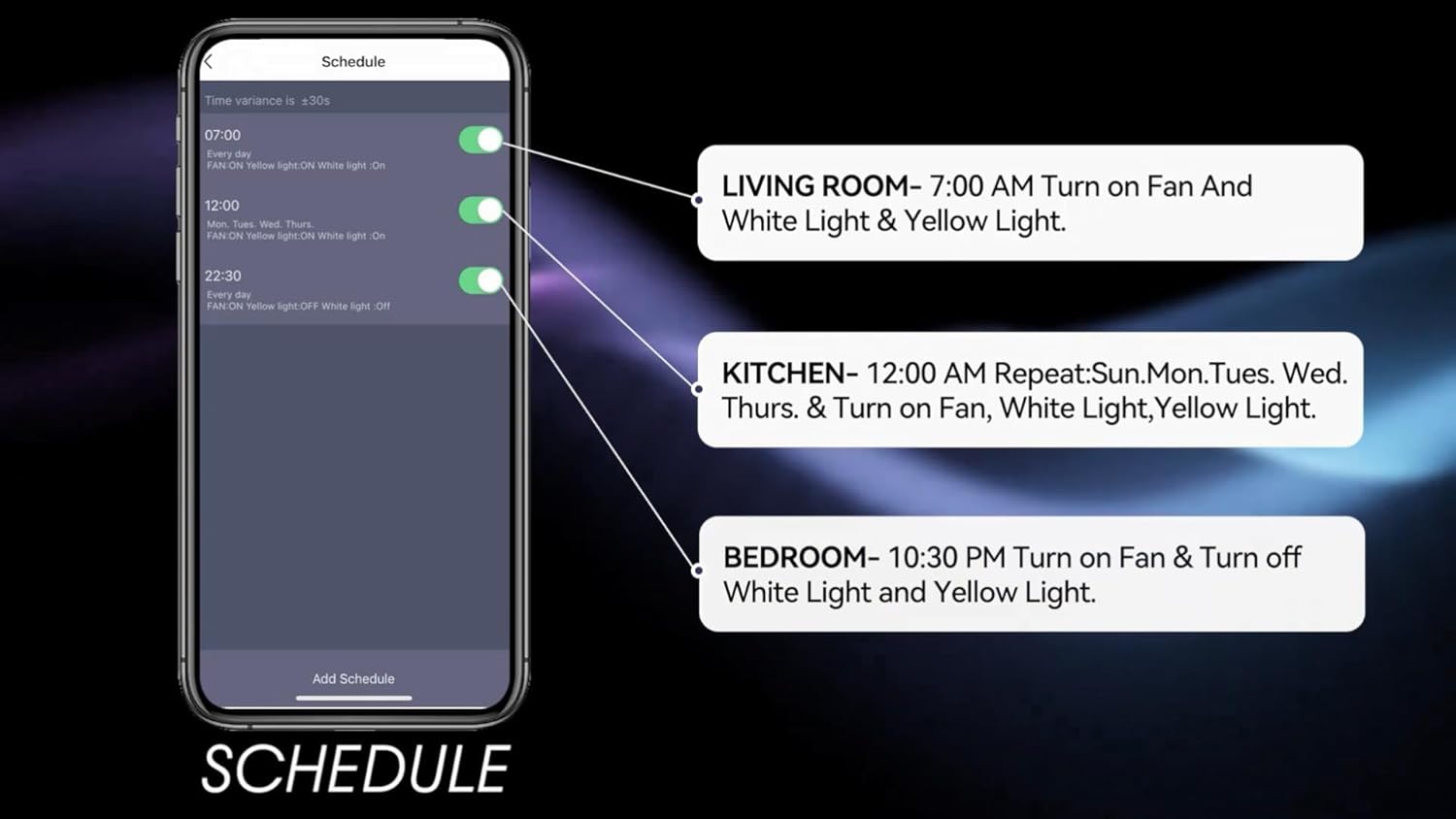
Image: Screenshot of the mobile app's scheduling interface, demonstrating how to set routines for different rooms.
유지
정기적인 유지관리를 통해 천장선풍기의 최적의 성능과 수명을 보장할 수 있습니다.
- 청소: 팬 블레이드와 모터 하우징을 부드러운 천으로 주기적으로 닦아주세요.amp 천. 연마성 세척제나 용매를 사용하지 마십시오.
- 칼날 조임 정도: 톱날 나사가 단단히 고정되어 있는지 매년 점검하십시오. 톱날이 헐거워지면 흔들림과 소음이 발생할 수 있습니다.
- 조명 키트: 일체형 LED 광원은 수명이 길도록 설계되어 일반적으로 교체가 필요하지 않습니다. 문제가 발생할 경우 고객 지원팀에 문의하십시오.
- 전원 끄기 : 청소나 유지 보수를 하기 전에 항상 차단기에서 전원을 차단하십시오.
문제 해결
If you encounter issues with your Carro Smart Ceiling Fan, refer to the following common problems and solutions:
| 문제 | 가능한 원인 | 해결책 |
|---|---|---|
| 팬이 시작되지 않음 | 팬에 전원이 들어오지 않습니다. 전선 연결이 느슨합니다. 리모컨 배터리가 부족합니다. | 회로 차단기를 확인하세요. 모든 전선 연결이 안전한지 확인하세요. 리모컨 배터리를 교체하세요. |
| 팬이 흔들린다 | 날 나사가 헐거워짐; 날의 균형이 맞지 않음; 장착 브래킷이 헐거워짐. | 모든 날 고정 나사를 조이십시오. (별도 구매한) 밸런싱 키트를 사용하여 날의 균형을 맞추십시오. 장착 브래킷이 단단히 고정되었는지 확인하십시오. |
| 빛이 작동하지 않습니다 | No power to the light kit; Loose wire connections; Light setting off. | Check power supply; Verify light kit wiring; Ensure light is turned on via remote, app, or voice control. |
| 리모컨이 작동하지 않습니다 | 배터리 부족; 리모컨이 페어링되지 않았습니다. | Replace remote battery; Refer to pairing instructions in the full manual (if applicable). |
| Wi-Fi/앱에 연결할 수 없습니다 | 와이파이 비밀번호가 잘못되었습니다. 공유기가 너무 멀리 떨어져 있습니다. 앱이 업데이트되지 않았습니다. | Verify Wi-Fi password; Move router closer or use a Wi-Fi extender; Update the Carro Home app to the latest version. |
제품 사양
| 특징 | 사양 |
|---|---|
| 상표 | 카로 |
| 모델 | 52" White |
| 색상 | 하얀색 |
| 선풍기 디자인 | 천장 선풍기 |
| 전원 | 교류/직류 |
| 스타일 | 현대의 |
| 제품 치수 | 52인치 깊이 x 52인치 너비 x 13.4인치 높이 |
| 객실 유형 | Bedroom, Dining Room, Home Office, Living Rooms, Study Room |
| 특징 | 프로그래밍 가능 |
| 추천 용도 | 공기 순환 |
| 블레이드 수 | 3 |
| 기류 용량 | 분당 4500입방 피트 |
| 블레이드 길이 | 22.7 인치 |
| 권tage | 120 볼트 |
| 포함된 구성 요소 | Ceiling fan X1 |
| 사양 충족 | 전자상거래 |
| 제어 방법 | 음성, 원격, 앱 |
| 품목 무게 | 15.7파운드 |
| 장착 유형 | 다운로드 마운트 |
보증 정보
Carro products are manufactured to the highest quality standards. This product comes with a limited warranty against defects in materials and workmanship. Please refer to the warranty card included in your product packaging or visit the official Carro web자세한 보증 약관은 해당 사이트에서 확인하세요.
고객 지원
For technical assistance, troubleshooting, or warranty claims, please contact Carro customer support:
- Web대지: Visit the official Carro webFAQ 및 지원 리소스를 위한 사이트입니다.
- 이메일: Refer to your product packaging for customer service email.
- 핸드폰: Refer to your product packaging for customer service phone number.
Please have your model number (52" White) and purchase date ready when contacting support.


