1. 중요한 안전 정보
Please read this entire instruction manual before installation and assembly. If you have any questions regarding any instructions or warnings, please contact your local distributor for assistance. Keep this manual for future reference.
- 본 제품은 자격을 갖춘 전문가만 설치해야 합니다.
- Ensure the mounting surface can safely support the combined weight of the equipment and all attached hardware and components.
- Use mounting screws as provided and DO NOT overtighten.
- 본 제품은 실내에서만 사용하도록 설계되었습니다.
- Do not mount on drywall alone.
2. 제품 사양
| 모델 번호 | CM2365 |
| 호환 가능한 TV 크기 | 23 ~ 65 인치 |
| 중량 용량 | 최대 110kg(50파운드) |
| VESA 장착 패턴 | 100x100mm, 200x100mm, 200x200mm, 300x300mm, 400x200mm, 400x400mm |
| 기울기 조정 | 0° ~ -25° (하향) |
| 회전 조정 | 360° (left-right) |
| 레벨 조정 | ±3° |
| 높이 조정 | 16.89" to 24.76" (from ceiling to center of mounting plate) |
| 재료 | 금속 |
| 색상 | 검은색 |
This mount is designed for flat ceilings and is suitable for various environments including homes, bars, restaurants, fitness centers, schools, and offices.
3. 패키지 내용
Verify that all components are present and undamaged. If any parts are missing or damaged, please contact WALI customer support.

Figure 3.1: All Parts Included
- TV Ceiling Mount Assembly (Ceiling Plate, Extension Pole, TV Bracket)
- 장착 하드웨어 키트(다양한 나사, 와셔, 스페이서, 앵커)
- 사용자 설명서
- Tools (Allen wrench, open-end wrench)
4. 설정 및 설치
Before beginning, ensure you have the necessary tools and understand all instructions. Professional installation is recommended for safety.
4.1. Choose a Suitable Ceiling Type
This mount is compatible with brick, concrete, and wood joist ceilings. 석고보드에만 부착하지 마십시오.

Figure 4.1: Compatible Ceiling Types
4.2. 설치 단계
- TV 뒷면에 브래킷을 부착하세요: Secure the TV mounting brackets to the back of your television using the appropriate screws and spacers from the hardware kit. Ensure they are tightened securely.
- 천장 고정판을 설치하세요: Position the ceiling plate on your chosen ceiling location. Mark the drill holes. Drill pilot holes and then secure the ceiling plate using the provided anchors and screws.
- Assemble Extension Pole: Attach the extension pole to the ceiling plate. Adjust the height as desired and secure it with the provided bolts and nuts. Ensure all connections are tight.
- TV를 산에 걸어보세요: Carefully lift the television with the attached brackets and hook it onto the extension pole's TV bracket. Secure the TV to the mount using the safety screws.

그림 4.2: 간편한 설치 단계
Video 4.1: WALI TV Ceiling Mount Installation Guide. This video demonstrates the step-by-step installation process for the WALI ceiling TV mount, including securing the mount to the ceiling and attaching the TV.
5. 운영 및 조정
The WALI CM2365 ceiling TV mount offers various adjustments for optimal view각도를 나타냅니다.
5.1. 높이 조절
The mount features 2-inch incremental height adjustments, allowing you to set the TV from 16.89 inches to 24.76 inches (from the ceiling to the center of the mounting plate).
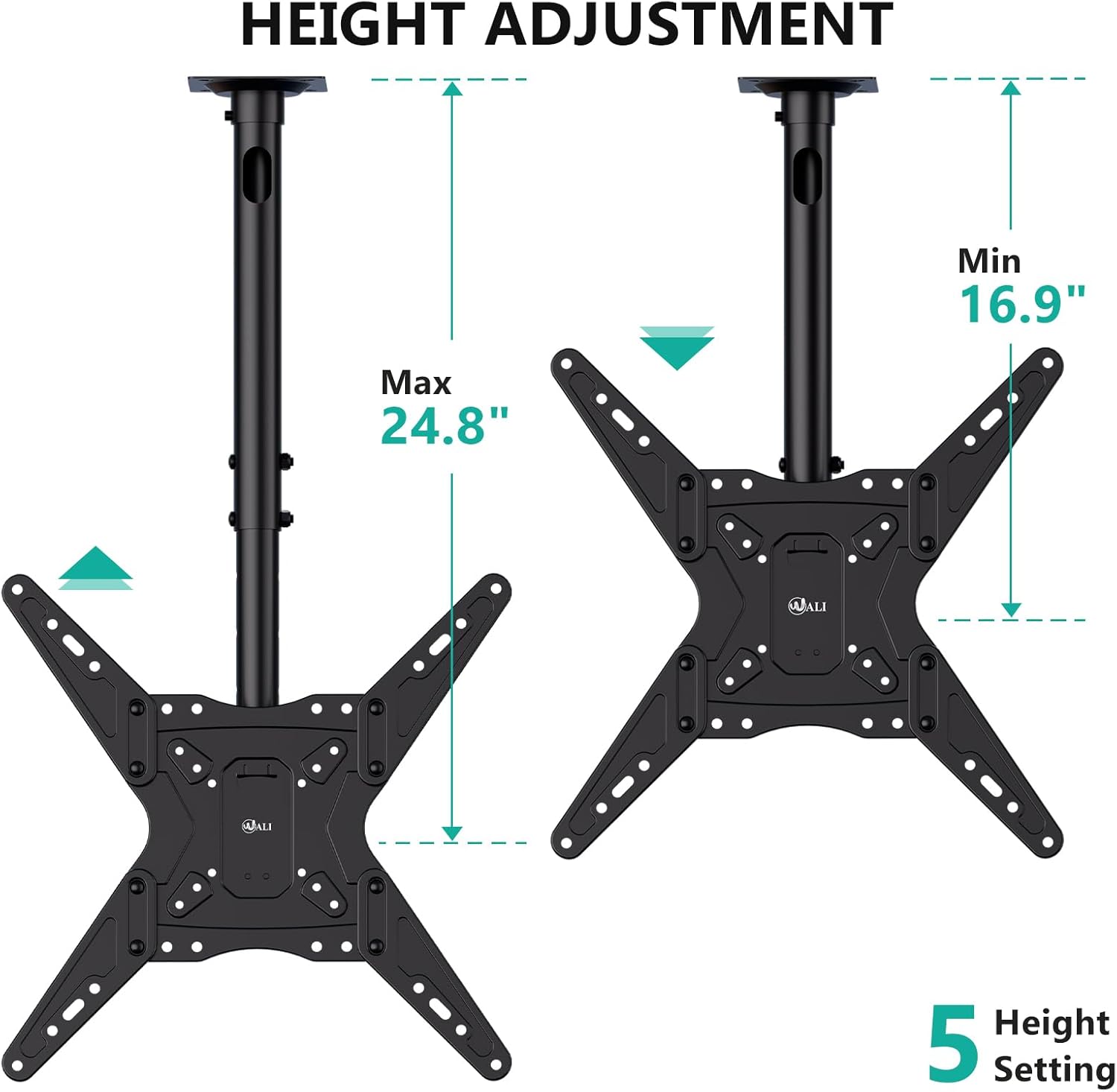
그림 5.1: 높이 조절 범위
5.2. Tilt, Swivel, and Level Adjustments
- 경사: The TV can be tilted down by 25° to reduce glare and optimize view주고받음.
- 받침: A 360° left-right swivel range allows for flexible positioning.
- 수준: The TV can be rotated ±3° after installation to ensure a perfectly level screen.

Figure 5.2: Adjustment Overview
Video 5.1: WALI Ceiling TV Mount 65 Inch Features. This video showcases the various features and adjustments of the WALI ceiling TV mount, including tilt, swivel, and height adjustments, demonstrating its versatility for different view시나리오를 진행 중입니다.
6. 유지관리
Regular maintenance ensures the longevity and safe operation of your WALI CM2365 Ceiling TV Mount.
- 청소: 먼지를 제거하려면 부드럽고 마른 천으로 거치대를 닦으십시오. 연마성 세척제나 용제를 사용하지 마십시오.
- 점검: 모든 나사와 연결부가 단단히 조여져 있는지 정기적으로 점검하세요. 필요하면 다시 조이세요.
- 중량 제한: 최대 중량 용량인 110파운드를 초과하지 마십시오.
7. 문제 해결
If you encounter any issues with your WALI CM2365 Ceiling TV Mount, refer to the following common solutions:
- TV가 수평이 아닙니다: Use the ±3° level adjustment feature to correct the angle. Ensure all mounting screws are tightened evenly.
- 산이 불안정하다고 느껴집니다: Double-check all ceiling and TV connections. Ensure the mount is securely fastened to a compatible ceiling type and that the TV's weight does not exceed the maximum capacity.
- 기울기/회전 조절에 어려움이 있습니다. Ensure no cables are obstructing movement. Check if any locking mechanisms are engaged and release them if necessary.
For further assistance, please contact WALI customer support.
8. 고객 지원 및 보증
WALI provides experienced and friendly US-based customer support, available to assist 7 days a week.
- 연락처 정보: Please refer to the product packaging or the official WALI web최신 고객 지원 연락처 정보는 사이트에서 확인하세요.
- 보증: 특정 보증 세부 사항은 일반적으로 제품 포장이나 제조업체의 공식 문서에 제공됩니다. website. Please consult these resources for information regarding your product's warranty coverage.


