소개
This manual provides detailed instructions for the AULA F99 Pro Wireless Mechanical Keyboard. It covers setup, operation, maintenance, and troubleshooting to ensure optimal performance and user experience. The AULA F99 Pro is a versatile mechanical keyboard designed for various applications, including work, gaming, and general use, offering multiple connectivity options and customizable features.
패키지 내용
패키지에 모든 품목이 들어 있는지 확인하세요.
- AULA F99 Pro 무선 기계식 키보드
- 키캡 풀러
- USB 케이블(C형)
- 사용자 설명서
- Extra 2 Switches
설정
연결 모드
The AULA F99 Pro keyboard supports three connection methods: Bluetooth 5.0 (BT5.0), 2.4GHz wireless, and USB-C wired mode. A switch located on the back of the keyboard allows selection between these modes.
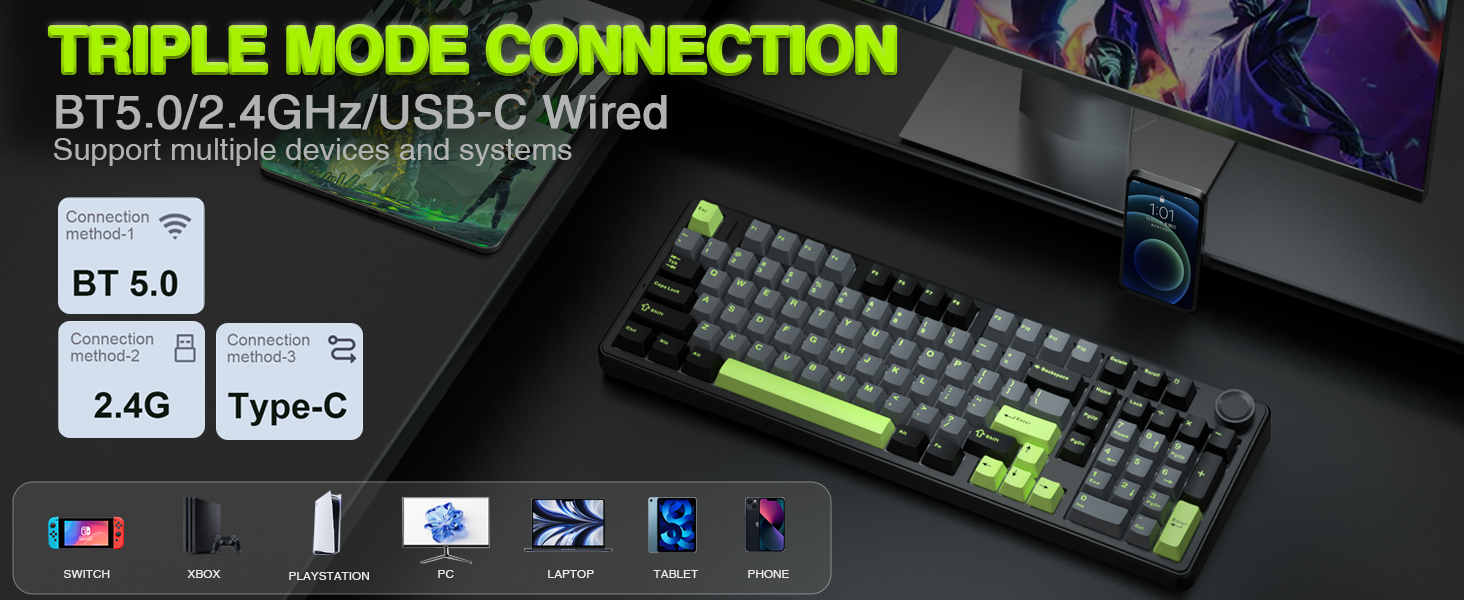
Image: The AULA F99 Pro keyboard highlighting its triple mode connection capabilities (BT5.0, 2.4GHz, USB-C wired) and compatibility with multiple devices and systems.

이미지: 클로즈업 view of the mode switch keys and ports on the side of the keyboard, indicating USB, BT/Wired/2.4G, and Type-C connections.
유선 모드(USB-C)
- 제공된 USB-C 케이블을 키보드와 컴퓨터에 연결합니다.
- 키보드의 모드 스위치가 'USB'로 설정되어 있는지 확인하십시오.
- 키보드는 시스템에서 자동으로 인식됩니다.
2.4GHz 무선 모드
- 키보드 상단 수납 공간에 보관되어 있는 2.4GHz USB 수신기를 찾으십시오.
- USB 수신기를 컴퓨터의 사용 가능한 USB 포트에 연결합니다.
- 키보드의 모드 스위치를 '2.4G'로 설정하세요.
- The keyboard should connect automatically. If not, press and hold FN + R for approximately 5 seconds to initiate pairing. The indicator light will flash and then turn solid upon successful connection.
블루투스 5.0 모드
- 키보드의 모드 스위치를 'BT'로 설정하세요.
- To pair with a new device, press and hold FN + 1, FN + 2, or FN + 3 for approximately 5 seconds. The indicator light for the selected channel will flash rapidly, indicating pairing mode.
- On your device (PC, laptop, tablet, smartphone), search for Bluetooth devices and select 'AULA F99 Pro'.
- The indicator light will turn solid upon successful connection.
- To switch between paired Bluetooth devices, press FN + 1, FN + 2, or FN + 3 briefly.
작동 지침
다기능 조절 손잡이
The keyboard features a multi-function knob for quick adjustments. Long press the knob for approximately 5 seconds to switch between Backlit Control Mode and Multimedia Mode.

Image: A visual guide to the multi-function control knob, detailing its use for lighting adjustments and multimedia control.
Backlit Control Mode
- 손잡이 회전: 백라이트 밝기를 조절합니다.
- 클릭 노브: Switches between different lighting effects.
멀티미디어 모드
- 손잡이 회전: 시스템 볼륨을 조절합니다.
- 클릭 노브: 미디어를 재생하거나 일시 정지합니다.
RGB 백라이트 조절
The keyboard offers 16 RGB lighting effects. Use the following key combinations to control the backlight:
- FN + Shift (right): Switches between light bar mode or turns off the light bar.
- FN + \|: Switches between 15 RGB light effects or turns off the backlight.
- FN + 탭: Switches lighting color.
- FN + ↑: 조명 밝기를 높입니다.
- FN + ↓: 조명 밝기를 낮춥니다.
- FN + ←: 빛의 속도를 증가시킵니다.
- FN + →: 빛의 속도를 감소시킵니다.

Image: The AULA F99 Pro keyboard illuminated with 16.8 million RGB backlighting, demonstrating various lighting effects and controls.
Macro Customization
The F99 Pro supports macro customization for keys, allowing users to record and edit macros, customize key functions, and select from 16.8 million light colors. It also supports music rhythm lighting effects via the driver software. The driver is compatible with Windows systems and functions in wired mode.
Image: A visual representation of the custom software interface for the AULA F99 Pro, showing options for light effects, color customization, and macro recording.
유지
핫스왑 가능한 디자인
The AULA F99 Pro features a hot-swappable PCB, allowing users to easily replace 3-pin or 5-pin switches without soldering. The package includes a keycap/switch puller for convenience.

Image: An illustration detailing the hot-swappable PCB socket and the pre-lubed switches (LEOBOG Greywood V3) of the F99 Pro keyboard.
PBT 키캡
The keyboard is equipped with double-shot PBT keycaps. These keycaps are made from two colors of material molded into each other, ensuring that the characters remain vibrant, saturated, clear, and resistant to fading over time.

이미지: 클로즈업 view of a durable PBT keycap, illustrating its construction and resistance to wear.
문제 해결
- 키보드가 응답하지 않습니다: Check the connection mode switch (USB, 2.4G, BT). Ensure the USB cable is securely connected or the wireless receiver is properly inserted. For Bluetooth, verify pairing status.
- 백라이트가 작동하지 않습니다: Ensure the keyboard is powered on. Adjust brightness using the control knob or FN key combinations.
- 간헐적 연결: For wireless modes, ensure the keyboard is within range of the receiver/device and there are no significant obstructions. Check for interference from other wireless devices.
- 키가 등록되지 않음: If specific keys are not working, try replacing the switch using the provided tools and extra switches.
- 소프트웨어 문제: Ensure the driver software is installed correctly and is the latest version. Run the software in wired mode for full functionality.
명세서
| 모델 번호 | F99 프로 |
| 연결 기술 | 블루투스 5.0, 2.4GHz 무선, USB-C 유선 |
| 키보드 설명 | 기계적 |
| 키 레이아웃 | 99 keys (96% layout with Numpad) |
| 키캡 | 더블샷 PBT |
| 스위치 | Pre-lubed Linear Switches (LEOBOG Greywood V3) |
| 핫스왑 가능 | 예 (3핀/5핀 스위치) |
| 백라이트 | RGB (16 effects, 16.8 million colors via driver) |
| 특별 기능 | Gasket Structure, Programmable Keys, Multi-function Knob, N-key Rollover |
| 호환 장치 | 게임 콘솔, 노트북, PC, 스마트폰, 태블릿 |
| 치수 | 17.04 x 6.69 x 2.09 인치 |
| 품목 무게 | 3.23파운드 |
배터리 정보
The AULA F99 Pro is equipped with an 8000mAh high-capacity rechargeable battery. This battery provides extended usage times:
- Approximately 53 hours with backlight ON.
- Approximately 400 hours with backlight OFF.

Image: A visual representation emphasizing the 8000mAh high-capacity battery of the keyboard.
제품 비디오
AULA F99 Pro Gasket Mechanical Keyboard with Creamy Sound
Video: This video demonstrates the typing sound and feel of the AULA F99 Pro Gasket Mechanical Keyboard, highlighting its creamy sound profile.
보증 및 지원
For warranty information, technical support, or service inquiries, please refer to the official AULA web제품 포장에 제공된 웹사이트 또는 연락처 정보를 이용하십시오. 보증 청구를 위해 구매 영수증을 보관하십시오.


