소개
The LAUNCH Creader Elite V2.0 is a professional diagnostic scan tool designed specifically for Land Rover and Jaguar vehicles. This device offers comprehensive system diagnostics, bi-directional control, and a wide range of maintenance services. It is equipped with an improved Android 8.1 operating system, a 4-inch touchscreen, and a 3000mAh battery for efficient and smooth operation. This manual provides detailed instructions for setting up, operating, maintaining, and troubleshooting your device.
1. 설정
1.1 상자 내용물
- 1 * LAUNCH Creader Elite V2.0 OBD2 Scanner for JLR
- 1 * OBD2 Diagnostic Cable
- 1 * 빠른 시작 가이드
- 1 * 사용자 설명서
1.2 초기 설정 및 전원 켜기
To begin using your LAUNCH Creader Elite V2.0, connect the OBD2 diagnostic cable to the device and then to your vehicle's OBD2 port. The device will typically power on automatically upon connection to the vehicle's power supply. Ensure your vehicle's ignition is in the ON position (engine off) for proper communication.
1.3 소프트웨어 업데이트
The device supports lifetime free updates via Wi-Fi. It is recommended to regularly update the software to ensure access to the latest functions, bug fixes, and vehicle model support. To update, navigate to the "Upgrade" icon on the main screen and follow the on-screen instructions. A stable Wi-Fi connection is required.

Figure 1: LAUNCH Creader Elite V2.0 Main Interface. The "Upgrade" icon facilitates software updates via Wi-Fi.
2. 장치 작동
2.1 OE-Level All System Diagnosis
The Creader Elite V2.0 provides in-depth diagnostics for all available electronic control modules in Land Rover and Jaguar vehicles. This includes, but is not limited to, Engine, ABS, SRS, Transmission, EPB, TPMS, and more. The device can automatically identify the vehicle's VIN and perform a comprehensive scan of all systems.
- Auto-Identify VIN: Automatically detects vehicle identification number for quick setup.
- Auto-Scan All Systems: Performs a complete scan across all modules to identify faults.
- 코드 읽기 및 삭제: Displays diagnostic trouble codes (DTCs) and allows for their clearing after repairs.
- View 라이브 데이터 스트림: Shows real-time sensor data in various formats (text, waveform, graphic).
- ECU 정보 읽기: Accesses control unit details such as unit type and version numbers.
- Freeze Frame을 읽어보세요: Captures a snapshot of vehicle conditions when a fault occurs.

Figure 2: OE-Level All System Diagnosis. This image illustrates the comprehensive diagnostic capabilities across various vehicle systems.
2.2 Enhanced Bi-directional Control (Active Test)
This function allows the diagnostic tool to send commands to the vehicle's ECUs to perform specific tests on actuators and components. This helps in quickly determining if a specific system, component, or subsystem is functioning correctly without disassembling parts. Examples include activating the fuel pump, cycling ABS solenoids, or testing window motors.
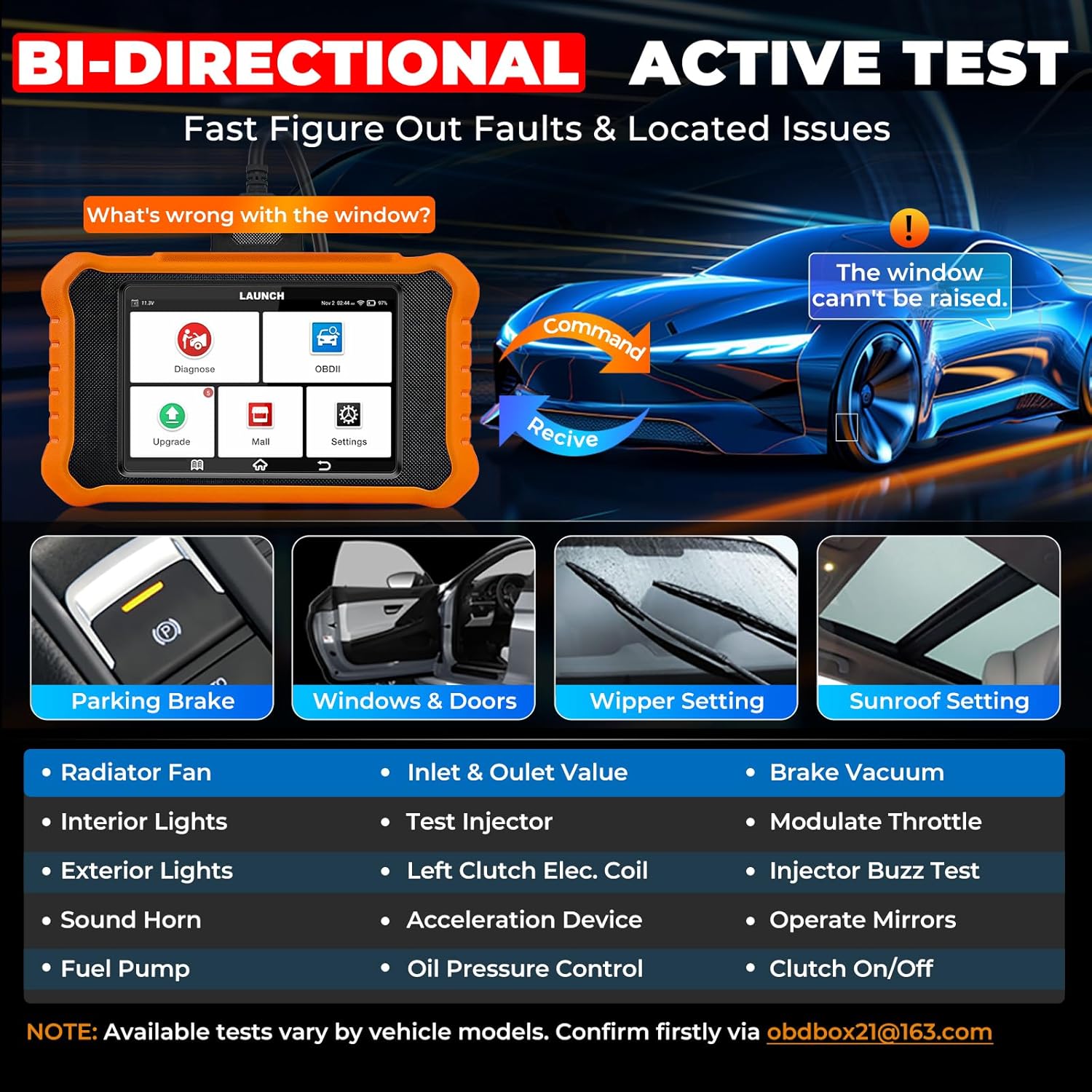
Figure 3: Bi-directional Control (Active Test). This feature enables direct control over vehicle components for diagnostic purposes.
2.3 Full OBD2 Functions for All Car Brands
In addition to Land Rover/Jaguar specific functions, the Creader Elite V2.0 serves as a universal OBD2 code reader for all vehicles manufactured after 1996 that comply with OBD2 protocols. It supports all 10 OBD2 test modes:
- Read/Erase Codes
- View 라이브 데이터 스트림
- 정지 프레임 데이터
- I/M Readiness Check
- O2 센서 테스트
- On-Board Monitoring Test (Mode 6)
- EVAP 시스템 테스트(모드 8)
- 컴포넌트 테스트
- 차량 정보
- DTC 조회

Figure 4: Full OBD2 Functions. This image displays the comprehensive OBD2 capabilities for general vehicle diagnostics.
2.4 Smart Diagnostic Features
The device incorporates several smart features to enhance diagnostic efficiency:
- 4-IN-1 Data Stream Graphing: Visually displays sensor data for in-depth analysis.
- 데이터 기록 및 재생: 녹화 및 재생을 허용합니다viewing of live data streams.
- Diagnostic Report Share & Print: Generates detailed reports that can be shared via email or printed.
- DTC Lookup & Code Search: Provides explanations for over 3000 DTCs and offers online code search.
- 온라인 피드백: Enables users to send issues directly to technical support for troubleshooting.
- 다국어 지원: Supports 11 languages for broader accessibility.

Figure 5: Smart Diagnostic Features. These features streamline the diagnostic process and data management.
3. 유지 보수 서비스
The LAUNCH Creader Elite V2.0 provides a wide array of special functions and reset services specifically for Land Rover and Jaguar vehicles, designed to assist with common maintenance tasks. These services can be accessed via "Diagnose > Brand > System Selection > Special Function".
| 서비스 | 설명 |
|---|---|
| 오일 엘amp 다시 놓기 | Resets the oil service light and maintenance mileage after an oil change. |
| Parking Brake Reset (EPB) | Deactivates/activates the brake control system for brake pad replacement. |
| 인젝터 코딩 | Codes new injector numbers into the ECU after replacement. |
| SAS 교정 | 조향 각도 센서를 보정합니다. |
| 배터리 교체 | Registers new battery information with the vehicle's power management system. |
| ABS 출혈 | Performs brake system bleeding when ABS contains air. |
| Throttle Body Adaptation | 스로틀 액추에이터를 기본 상태로 초기화합니다. |
| 높이 보정 | Calibrates the electronic air suspension system, crucial for Land Rover/Jaguar. |
| 전송 적응 | 전송 적응형 학습 값을 재설정합니다. |
| Sunroof Calibration | 선루프 시스템을 초기화합니다. |
| Airbag (SRS) Reset | Resets the Supplemental Restraint System. |
Note: Specific functions may vary by vehicle model and year. Always check compatibility before performing a service.

Figure 6: All Free Maintenance Services. A visual representation of the various reset and calibration functions available.
4. 문제 해결
This section addresses common issues and provides solutions to help you resolve problems encountered while using the LAUNCH Creader Elite V2.0.
4.1 일반적인 문제 및 해결 방법
- 문제: The device does not power on or connect to the vehicle.
해결책: Ensure the OBD2 cable is securely connected to both the device and the vehicle's OBD2 port. Verify that the vehicle's ignition is in the ON position (engine off). Check the vehicle's battery voltage; 저용량tage can prevent proper communication.
- 문제: The device fails to communicate with a specific vehicle system or module.
해결책: Confirm the vehicle's ignition is ON. Ensure the software is up to date. Some functions or system access may vary by vehicle model and year; verify compatibility. Try restarting both the device and the vehicle.
- 문제: Received a broken or used product.
해결책: If you receive a product that appears broken or used, please contact customer support at obdbox21@163.com 교체를 위해.
- 문제: Topology map not working after free update period.
해결책: The topology map function should continue to work even after the free update period expires. Updates primarily provide bug fixes, optimizations, and support for new functions and models.
- 문제: Need assistance with a specific problem or function.
해결책: For technical assistance, please contact our support team via email at obdbox21@163.com. Provide detailed information about the issue, including vehicle make, model, year, and any error messages displayed.
5. 사양
| 특징 | 세부 사항 |
|---|---|
| 상표 | 시작하다 |
| 모델 | LAUNCH CRE V2.0 for JLR |
| 제품 치수 | 8인치 길이 x 1.5인치 너비 x 7.5인치 높이 |
| 운영 체제 | 안드로이드 8.1 |
| 자동차 적합 유형 | Universal Fit (for OBD2), Specific for Land Rover/Jaguar |
| 한국어: | 884508003790 |
| 품목 무게 | 1.55파운드 |
| 배터리 | 1개의 리튬 이온 배터리(포함) |
| 연결성 | 2.4GHz 와이파이 |
| 메모리 | 2GB RAM + 16GB 스토리지 |
| 화면 | 4-inch Bright Full Touchscreen |
6. 보증 및 지원
LAUNCH provides comprehensive support for the Creader Elite V2.0:
- 평생 무료 업데이트: Enjoy continuous software updates for Land Rover and Jaguar specific functions.
- 반품 및 교환: An extended 60-Day Return & Replacement policy is offered.
- 품질 백업: A 5-Year Quality Backup ensures long-term reliability.
- 기술 지원: 24/7/365 technical assistance is available. For any questions or support, please contact us via email at obdbox21@163.com.


