1. 제품 오버view
The SmallRig x Brandon Li All-in-One Mobile Video Kit 4596 is a comprehensive solution designed for professional smartphone video shooting. This kit integrates a universal phone cage, rotatable handles with M.2 SSD enclosure, a 67mm magnetic VND filter system, a 4-in-1 USB-C docking station, and various mounting options to enhance your mobile filmmaking experience.

Figure 1: Complete Kit Components. This image displays all the components included in the SmallRig x Brandon Li All-in-One Mobile Video Kit, providing a visual overview 제품의.

Figure 2: Key Features and Components. This image highlights the main features of the kit, including the wireless control rotating handle, power bank holder, M.2 SSD enclosure, 4-in-1 USB-Hub, and universal 67mm magnetic filter series.
2. 설정 가이드
2.1 Universal Phone Cage Installation
The universal phone cage is compatible with mobile phones ranging from 2.52 to 3.46 inches (64mm to 88mm) in width. It supports both MagSafe magnetic attachment and a secure phone clip for various phone models, including iPhone 16/15/14/13 series, Samsung Galaxy S24/S23/S22 series, Huawei Mate 60/40 series, and Google Pixel 8/7/6 series. It also supports phones with cases.
- Open the Phone Clip: Press the phone clip lock button to extend the clip.
- 전화번호를 입력하세요: Place your smartphone into the cage, ensuring it is securely held by either the MagSafe magnetic suction or the phone clip.
- 보안 전화: If using the phone clip, ensure it firmly grips your device.
중요 참고 사항:
- When using the 67mm filter system, the phone cannot be connected to the cage via MagSafe simultaneously. The phone must be fixed with the phone clip.
- Due to size constraints, the attachment for MagSafe and 67mm magnetic filters cannot be used simultaneously.

Figure 3: Phone Cage Compatibility and Usage. This image illustrates the adjustable phone cage and its compatibility with various smartphone models, highlighting the phone clip mechanism.
2.2 Rotatable Side Handle with M.2 SSD Enclosure
The rotatable side handle offers versatile grip options and includes an M.2 SSD enclosure for direct external recording of high-quality video formats like ProRes. The handle features a quick-release mechanism for easy attachment and adjustment without tools.
- 핸들 부착: Slide the handle onto the HawkLock self-locking interface on the side of the phone cage until it clicks securely.
- M.2 SSD 설치 (선택 사항): Open the M.2 SSD enclosure on the handle. Insert a compatible M.2 SSD (2230, 2242, 2260, and 2280 models) and secure it. Close the enclosure. Note: M.2 SSD must be purchased separately.
- 각도 조정: Use the stepless rotation feature to switch between side and top handle modes as needed for your shooting style.

Figure 4: Handle with M.2 SSD Enclosure and Wireless Remote. This image details the integrated M.2 SSD enclosure within the handle and the detachable wireless remote control for comprehensive shooting control.
2.3 67mm Magnetic VND Filter and Filter Adapter
The kit includes a magnetic 67mm VND filter (ND2-ND32, 1-5 Stop) and a universal filter adapter to achieve smoother, more cinematic footage by controlling light exposure and reducing glare.
- Attach Filter Adapter: Secure the 67mm universal filter adapter to the phone cage. The adapter is designed to be adjustable for various phone camera positions.
- Attach VND Filter: Magnetically attach the 67mm VND filter to the adapter.
중요 참고 사항:
- Vignetting may occur when using the ultra-wide mode for Huawei Mate series.
- The filter system can only be used with the phone clamp맥세이프가 아닙니다.

Figure 5: Magnetic Filter System. This image shows the adjustable 67mm magnetic filter attachment with different rings for various phone models, demonstrating its adaptability.
2.4 4-in-1 USB-C 도킹 스테이션
The docking station provides a high-power PD 100W charging port, a USB-C 3.1 port, and two USB-C 2.0 ports, enabling simultaneous charging, ProRes video storage, and USB-C microphone utilization during mobile videography.
- Mount Docking Station: Attach the 4-in-1 USB-C docking station to an available mounting point on the phone cage.
- 장치 연결: Use the multifunctional data cable to connect your phone and other accessories (e.g., microphone, external SSD) to the docking station.
중요 참고 사항:
- When used with the MagSafe attachment, the 4-in-1 dock station should be mounted on the side of the cage.
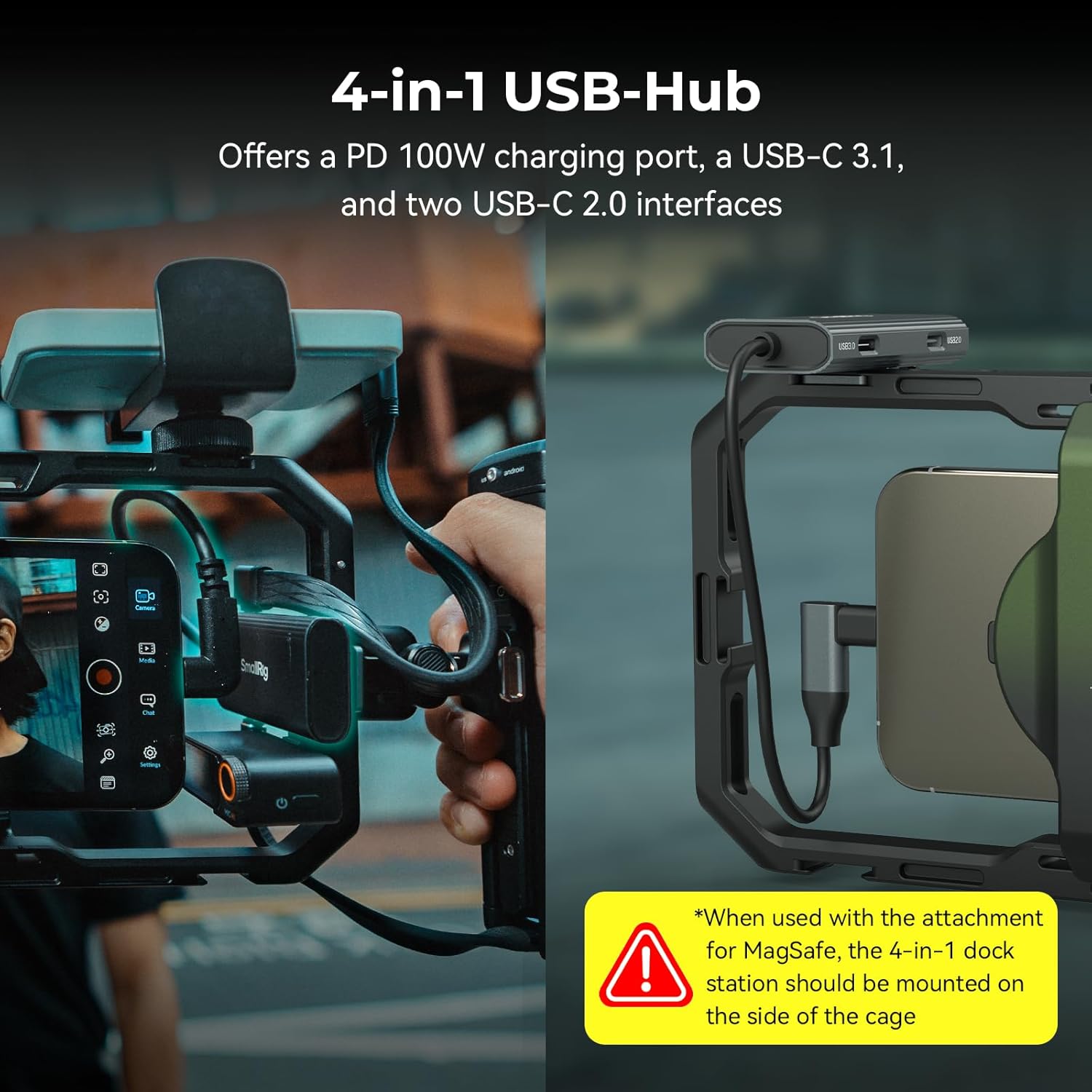
Figure 6: USB-C Docking Station in Use. This image illustrates the 4-in-1 USB-C hub connected to the phone rig, showcasin다양한 포트와 연결 옵션을 제공합니다.
2.5 Adjustable Power Bank Holder and Tripod QR Adapter
조절 가능한 파워 뱅크amp accommodates mobile power banks with a width range of 55 to 86 mm (2.2 to 3.4 inches) and is compatible with most power banks on the market. The tripod quick-release adapter allows for quick connection to professional tripods.
- Attach Power Bank Holder: Secure the power bank holder to a desired mounting point on the cage. Insert your power bank into the clamp.
- Attach Tripod QR Adapter: Connect the tripod quick-release adapter via the standard Arca plate and the 1/4''-20 threaded hole on the cage. This allows for rapid attachment and detachment from compatible tripods.

Figure 7: Versatile Mounting Options. This image highlights the various interface configurations available on the phone cage, including 1/4"-20 threaded holes, cold shoe mounts, QR mounts, and strap slots.
3. 사용 설명서
3.1 Wireless Remote Control Operation
The detachable wireless remote control enables remote shooting, focusing, and zooming in/out, providing greater flexibility during filming.
- 편성: Ensure the remote control is charged and powered on. Activate Bluetooth on your smartphone and pair with the remote control (refer to your phone's Bluetooth settings for specific pairing steps).
- 기능: Use the buttons on the remote to trigger recording, adjust focus, and zoom in/out within compatible camera applications.
호환성 참고:
- Compatible with Android, Harmony OS, and iOS models (iPhone 12-15 full series, iPhone 16 Pro).
- When adapting for iPhone 16 Pro Max, the mouse sensitivity of the mobile phone's auxiliary touch function needs to be adjusted to the 7th level.
3.2 iOS System Connection Settings for Optimal Control
For seamless control with the wireless remote on iOS devices, specific accessibility settings may need adjustment.
- AssistiveTouch를 활성화하세요: 휴대전화 "설정" → "손쉬운 사용" → "터치" → "AssistiveTouch" → 켜기를 선택하세요.
- Adjust Mouse Key Speed: Navigate to "AssistiveTouch" → "Mouse Key" → "Maximum Speed". Adjust to Variable 6. For iPhone 16 Pro Max, adjust to Variable 7.
- Adjust Tracking Sensitivity: In "AssistiveTouch" → "Tracking Sensitivity", adjust to Minimum.
- Lock Portrait Orientation: Drop down to open "Control Center" → turn on "Portrait Orientation Lock" → ON.

Figure 8: iOS Setup Guide. This image provides a step-by-step visual guide for configuring Apple iOS system settings to ensure proper functionality with the kit's wireless remote control.
3.3 Versatile Handle Modes
The rotatable side handles allow for instant switching between various shooting modes, providing ergonomic flexibility for different scenarios.
- Side Handle Mode: Attach handles horizontally for a traditional camera grip.
- Top Handle Mode: Rotate handles vertically for low-angle shots or increased stability.
- Single Handle Mode: Use only one handle for a more compact setup.
- Briefcase Handle Mode: Position handles for a briefcase-style carry, ideal for low-to-the-ground shots.
Video 1: SmallRig x Brandon Li All-in-One Mobile Video Kit 4596. This video demonstrates the various features and operational modes of the kit, including handle adjustments, filter usage, and overall versatility in mobile filmmaking scenarios.
4. 유지관리
Proper maintenance ensures the longevity and optimal performance of your SmallRig Mobile Video Kit.
- 청소: Use a soft, dry cloth to wipe down the metal surfaces of the cage and handles. For the VND filter, use a microfiber lens cloth and a lens cleaning solution if necessary. Avoid abrasive materials.
- 저장: Store the kit in a dry, dust-free environment, preferably in the included photography bag, when not in use. Avoid extreme temperatures and humidity.
- Handle Mechanism: Periodically check the quick-release mechanisms on the handles for smooth operation. Keep them free of debris.
- 케이블 관리: Ensure the multifunctional data cable is not kinked or strained during use or storage to prevent damage.
5. 문제 해결
This section addresses common issues you might encounter with your SmallRig Mobile Video Kit.
- 무선 리모컨이 연결되지 않습니다:
- 리모컨이 충전되어 있고 전원이 켜져 있는지 확인하십시오.
- Verify Bluetooth is enabled on your phone and the remote is in pairing mode.
- 휴대폰의 블루투스 설정에서 리모컨의 연결을 해제했다가 다시 연결해 보세요.
- Check if your phone's operating system is compatible (Android, Harmony OS, iOS 12-16 Pro).
- Filter Vignetting (Dark Corners):
- This can occur with ultra-wide lenses, especially on Huawei Mate series phones.
- Ensure the filter adapter is correctly positioned and the phone is secured with the phone clip (not MagSafe) when using filters.
- Adjust the filter plate position if possible to minimize vignetting.
- Phone Not Secure in Cage:
- Verify your phone's width is within the compatible range (2.52~3.46 inches / 64mm~88mm).
- Ensure the phone clip is fully engaged and tightened.
- If using MagSafe, ensure the phone is properly aligned and the magnetic connection is strong.
- M.2 SSD Not Recognized:
- Ensure the M.2 SSD is correctly installed and fully seated in its enclosure.
- Verify the SSD is a compatible model (2230, 2242, 2260, or 2280).
- Check the connection of the USB-C cable from the handle to the phone/docking station.
6. 제품 사양
| 특징 | 사양 |
|---|---|
| 제품 치수 | 9.29 x 4.8 x 1.22 인치 |
| 품목 무게 | 2.55파운드(1156그램) |
| 품목 모델 번호 | 4596 |
| 호환 장치 | Cellphone (Width: 2.52~3.46 inches / 64mm~88mm) |
| 최대 중량 권장 사항 | 300그램 |
| Folded Size (Cage) | 236 x 122 x 31mm / 9.3 x 4.8 x 1.2인치 |
| Folded Size (Handle) | 148 x 81 x 42mm / 5.8 x 3.2 x 1.7인치 |
| 배터리 | 1 비표준 배터리(포함) |
| 필터 시스템 | 67mm Magnetic VND 2-32 (1-5 Stop) |
| 도킹 스테이션 포트 | 1x PD 100W USB-C, 1x USB-C 3.1, 2x USB-C 2.0 |
| M.2 SSD 호환성 | 2230, 2242, 2260, and 2280 M.2 drive models (SSD not included) |
7. 상자 안에 무엇이 들어있나요?
The SmallRig x Brandon Li All-in-One Mobile Video Kit 4596 includes the following items:
- Universal Phone Cage x 1
- 67mm Magnetic Filter Adapter x 1
- 67mm VND 2-32 (1-5 Stop) x 1
- Rotatable Bilateral Side Handle with M.2 SSD Enclosure and Wireless Control x 1
- Rotatable Bilateral Side Handle x 1
- 4-in-1 Dock Station (USB-C PD / USB-C 3.1 / USB-C 2.0) x 1
- Arca-Swiss Quick Release Adapter x 1
- Power Bank Holder x 1
- Multifunctional Data Cable x 1
- Velcro Ties x 1
- 사용 설명서 x 4
- Photography Bag x 1

Figure 9: Included Items. This image provides a visual representation of all the items you will find inside the product packaging.
8. 보증 및 지원
This SmallRig product is covered by a standard manufacturer's warranty. For detailed warranty information, technical support, or service inquiries, please contact SmallRig customer service directly or visit their official web대지.
- 제조업체: 스몰리그
- Web대지: www.smallrig.com (공식 내용을 확인해 주세요) website for the most up-to-date information.)


