1. 서론
This manual provides detailed instructions for the installation, operation, and maintenance of the LiftMaster 41AB050-2 / 41AB050-2M Replacement Logic Control Board. This board is designed for specific LiftMaster and Chamberlain AC Belt Drive Garage Door Openers. Please read this manual thoroughly before proceeding with installation to ensure safe and correct operation.
2. 중요한 안전 정보
WARNING: To prevent serious injury or death from electrocution, always disconnect electrical power to the garage door opener BEFORE installing or servicing the logic control board. Garage door springs are under extreme tension and can cause serious injury or death. DO NOT attempt to adjust, repair, or remove any components related to the garage door springs or cables.
- Ensure the garage door opener is unplugged from the power outlet.
- Wear appropriate safety gear, including safety glasses.
- 어떤 단계든 확신이 서지 않으면 자격을 갖춘 차고문 기술자에게 문의하십시오.
- 어린이와 애완동물을 작업 구역에서 멀리 두십시오.
3. 호환성
The LiftMaster 41AB050-2 / 41AB050-2M Logic Control Board is a 315MHz Security+ Receiver Logic Board with an End Panel Replacement Kit. It is compatible with various LiftMaster and Chamberlain AC Belt Drive Garage Door Openers manufactured between 2005 and 2015. This unit features a purple learn button. It is also compatible with Sears Craftsman models 41AB150-2 and 41AB150-2M.
중요한: Verify your existing garage door opener's logic board has a purple learn button and matches the model numbers (41AB050-2, 41AB050-2M, 041AB050-2M, 41AB150-2, 41AB150-2M) before installation to ensure proper compatibility.
4. 패키지 내용
패키지에는 다음 항목이 포함되어 있어야 합니다.
- 1 x LiftMaster 41AB050-2 / 41AB050-2M Logic Control Board
- 1 x End Panel
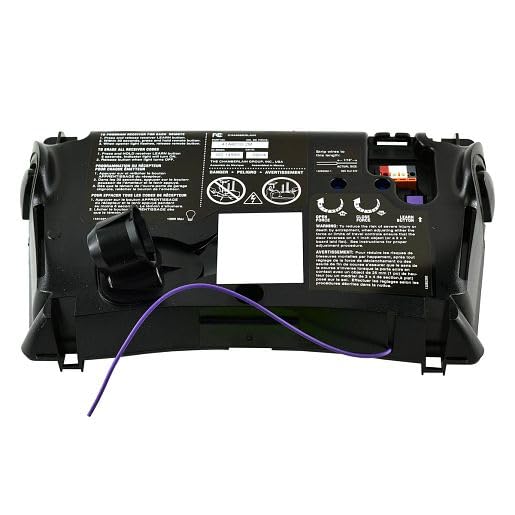
Image 1: The LiftMaster 41AB050-2 / 41AB050-2M Logic Control Board with its end panel. This image shows the overall appearance of the replacement part.
5. 설정 및 설치
Follow these steps carefully to replace your garage door opener's logic control board:
- 전원 분리: Crucial Safety Step! Unplug the garage door opener from the electrical outlet. If there is a wall switch, ensure it is in the "OFF" position.
- 제어판에 접근하세요: Remove the cover of your garage door opener unit to expose the existing logic control board. This usually involves unscrewing a few fasteners.
- 사진 배선: Before disconnecting any wires, take clear photos of all wire connections to the existing board. This will serve as a reference for reconnecting wires to the new board.
- 전선 분리: Carefully disconnect all wires from the old logic board. Note the position and color of each wire.
- 오래된 보드 제거: Unscrew or unclip the old logic board from its mounting points.
- 새 보드 설치: Position the new LiftMaster 41AB050-2 / 41AB050-2M logic control board in place and secure it with the screws or clips.
- 전선을 다시 연결하세요: Using your photographs as a guide, carefully reconnect all wires to the corresponding terminals on the new logic board. Ensure all connections are secure.
- Replace End Panel (if applicable): If your kit includes a new end panel, replace the old one now.
- 커버 교체: Securely reattach the garage door opener cover.
- 복원력 : Plug the garage door opener back into the electrical outlet.
6. 운영 및 프로그래밍
After installing the new logic board, you will need to program your remote controls and keypads to the opener. The 41AB050-2 / 41AB050-2M board features a purple learn button.
- 학습 버튼을 찾으세요: On the new logic board, locate the purple learn button.
- 학습 모드 활성화: Press and immediately release the purple learn button. The LED indicator light next to the button will illuminate steadily for 30 seconds.
- 원격 프로그램: While the LED is illuminated, press and hold the button on your remote control that you wish to operate the garage door.
- 프로그래밍 확인: Release the remote control button when the opener lights flash or two clicks are heard. This indicates successful programming.
- 테스트 작업: Press the programmed button on your remote control to test the garage door opener's function.
- Program Additional Remotes/Keypads: Repeat steps 2-5 for any additional remote controls or wireless keypads you wish to program.
For detailed instructions on programming specific remote models or troubleshooting programming issues, refer to your remote control's individual instruction manual or the LiftMaster support web대지.
7. 유지관리
The LiftMaster 41AB050-2 / 41AB050-2M Logic Control Board is designed for long-term reliability and requires minimal maintenance. However, consider the following:
- 깨끗하게 유지하십시오: Ensure the area around the control board inside the opener housing remains free of dust, debris, and insects.
- 환경 조건: Avoid exposing the garage door opener to excessive moisture or extreme temperatures, which can affect electronic components.
- 전문 검사: It is recommended to have your garage door opener system professionally inspected annually to ensure all components, including the logic board, are functioning correctly.
8. 문제 해결
If you encounter issues after installing the new logic board, review 다음은 일반적인 문제와 해결책입니다.
| 문제 | 가능한 원인 | 해결책 |
|---|---|---|
| Opener does not respond after installation. | Power not restored, incorrect wiring, or remote not programmed. |
|
| 원격 제어가 작동하지 않습니다. | Remote not programmed, dead remote battery, or interference. |
|
| Opener lights flash but door does not move. | Safety sensors are misaligned or obstructed. |
|
If troubleshooting steps do not resolve the issue, contact LiftMaster customer support or a qualified technician.
9. 사양
- 모델 번호: 41AB050-2, 41AB050-2M, 041AB050-2M
- 호환성: LiftMaster and Chamberlain AC Belt Drive Garage Door Openers (2005-2015 models) with purple learn button. Also compatible with Sears Craftsman 41AB150-2 / 41AB150-2M.
- 빈도: 315MHz 보안+
- 포함된 구성 요소: Control Board, End Panel
- 치수: 약 10 x 4 x 1cm(25.4 x 10.16 x 2.54인치)
- 무게: 약 2kg(0.91파운드)
- 제조업체: 리프트마스터
10. 보증 정보
For specific warranty details regarding the LiftMaster 41AB050-2 / 41AB050-2M Logic Control Board, please refer to the official LiftMaster web해당 웹사이트를 방문하거나 고객 서비스 센터에 직접 문의하십시오. 보증 조건은 일반적으로 구매일로부터 특정 기간 동안 제조상의 결함을 보장합니다.
11. 고객 지원
If you require further assistance, have questions about installation, or need to report a defective product, please contact LiftMaster customer support through their official website or the contact information provided with your original purchase documentation.
리프트마스터 공식 웹사이트 Web대지: www.liftmaster.com


