1. 서론
The AOCHUAN Smart X2 Gimbal Stabilizer is designed to provide stable and smooth footage for smartphone users. Featuring a 3-axis design and an upgraded anti-shake algorithm, it ensures professional-looking videos in various environments. Its compact and lightweight design, along with an integrated extension rod, makes it ideal for on-the-go filmmaking.
Key features include smart AI tracking (face, body, object, and third-party live tracking), 280° panoramic shooting, and wide device compatibility for phones under 7 inches. The gimbal also boasts a high-capacity lithium-ion battery, offering 8-10 hours of uninterrupted shooting and the ability to charge your smartphone while filming.
2. 상자 안에 무엇이 들어있나요?
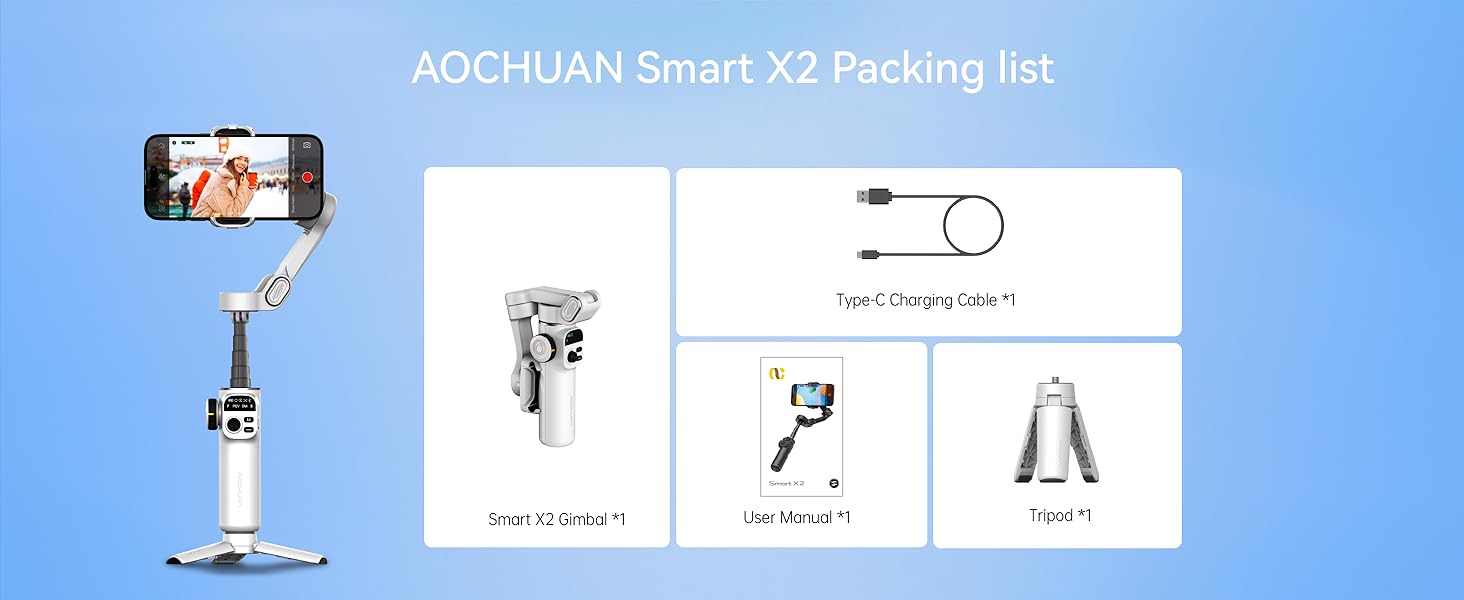
- Smart X2 Gimbal ×1
- Type-C 충전 케이블 ×1
- 사용 설명서 ×1
- 삼각대 ×1
3. 설정
3.1 삼각대 부착하기
The included mini tripod can be screwed into the 1/4-inch thread interface at the bottom of the gimbal handle. This allows the gimbal to stand independently for stable shots or hands-free operation.
3.2 짐벌 펼치기
Hold the device with both hands and unfold the folding arm upwards until it forms a '7' shape, ensuring the phone holder's clip is facing up.
3.3 스마트폰 장착
Pull open the phone holder and securely place your smartphone in the center. If your phone's camera is large or heavy, adjust the phone slightly left or right within the holder to achieve optimal balance. The phone holder accommodates all iPhone and Android phones under 7 inches, weighing up to 0.62 pounds, and measuring up to 6.3 inches in length, 3.5 inches in width, and 0.4 inches in thickness.

3.4 전원 켜기
After mounting your phone, press and hold the power button on the right side of the gimbal for three seconds to turn it on. The gimbal will automatically stabilize.
3.5 연장봉
The gimbal features a built-in 7.8-inch aluminum alloy extension rod. Pull it up to extend the reach for high-angle shots or wider perspectives. Bend it to the desired angle for shooting.

3.6 Connecting to the App (AOCHUAN APP)
For full functionality, download the "AOCHUAN" app from your smartphone's app store. Turn on your phone's Bluetooth, open the app, and it will automatically search for the gimbal. Select "SMART_X2" from the list and confirm the connection. The Bluetooth indicator light on the gimbal handle will turn on, signifying a successful connection.
4. 작동 모드
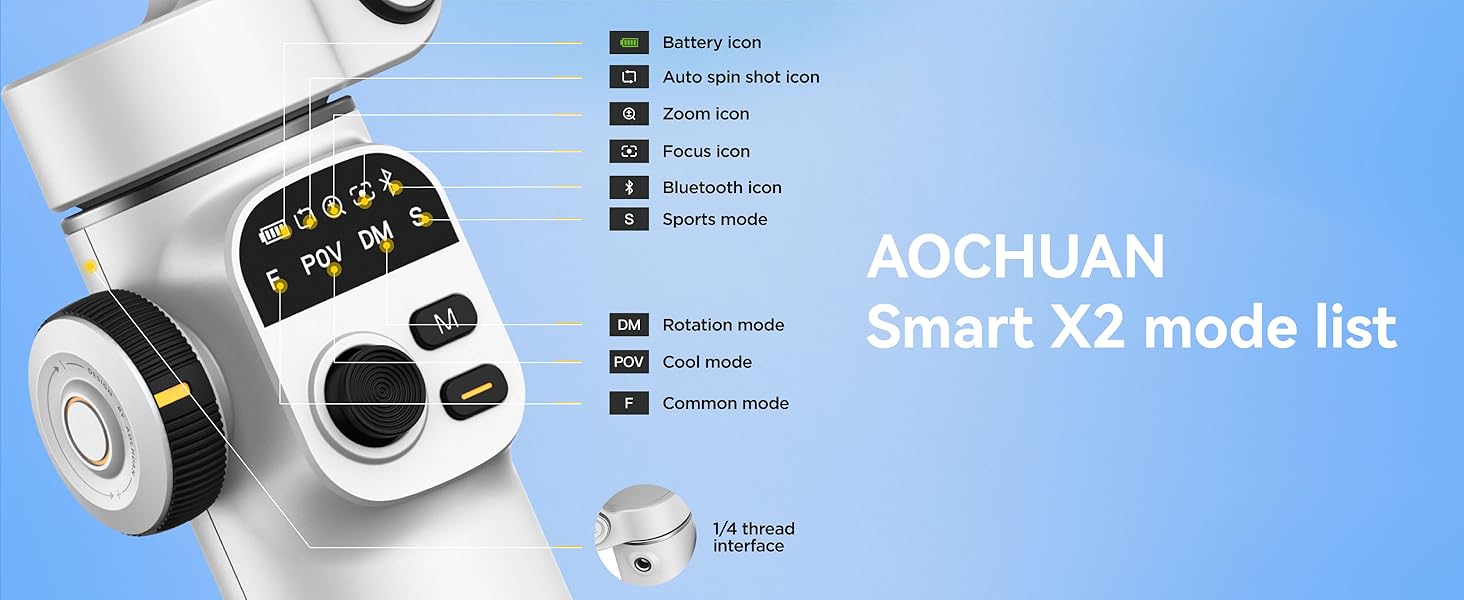
The Smart X2 Gimbal offers four distinct operating modes, indicated by the handle lights, to suit various shooting scenarios:
- F (공통 모드): The phone follows left/right and up/down movements of the handle, suitable for horizontal or vertical panning shots.
- POV (시원한 모드): Allows for 360° follow, enabling tilt shots and shooting from any angle.
- DM(회전 모드): The phone automatically rotates 180°, ideal for dynamic, rotating shots.
- S (스포츠 모드): Similar to F mode but with stronger motor power for quick left/right and up/down follow, ideal for fast transitions and action shots.
5. 컨트롤 및 기능
5.1 제어판
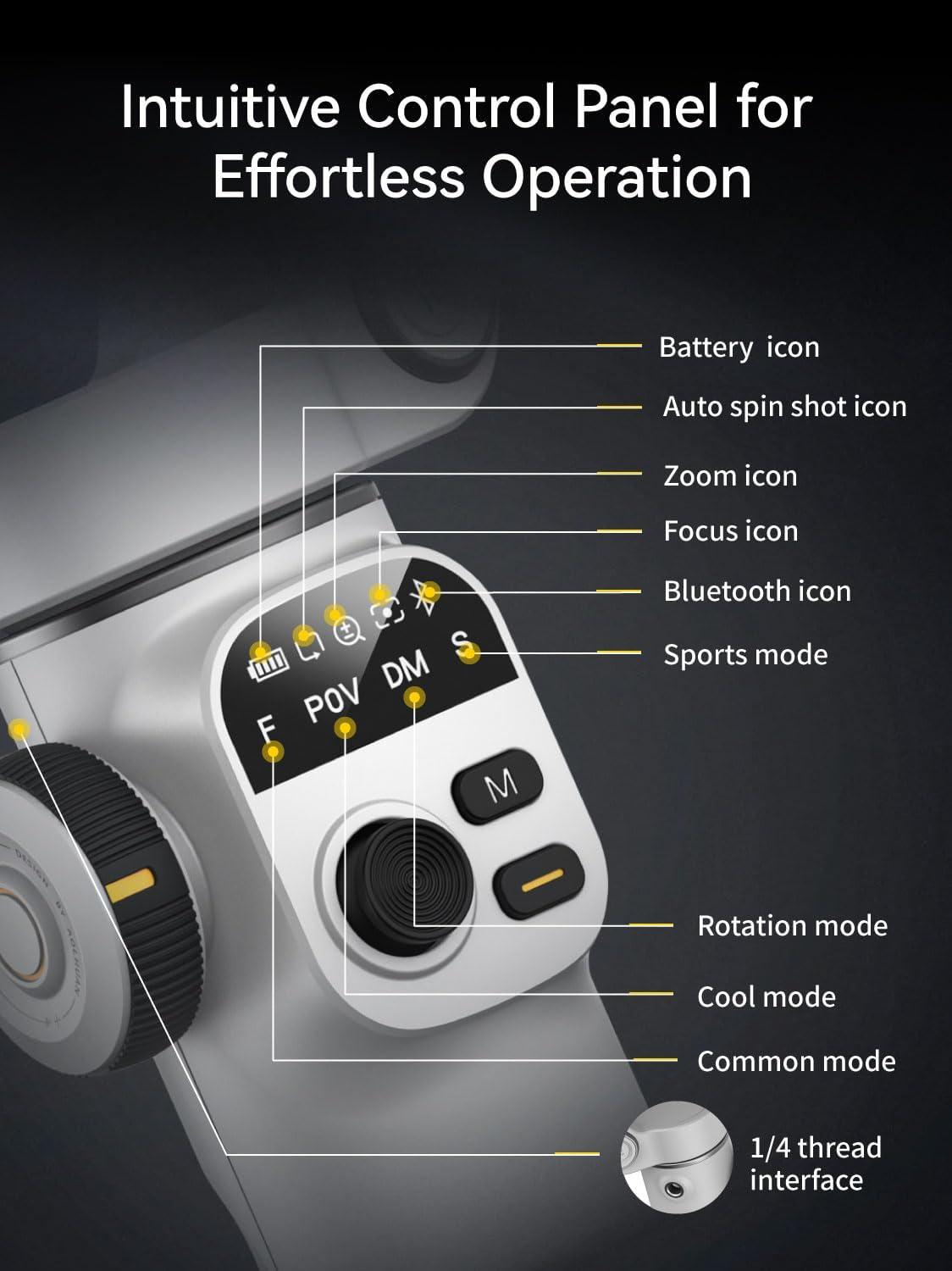
The gimbal features an intuitive control panel with an OLED display for real-time monitoring of device status, including battery icon, auto spin shot icon, zoom icon, focus icon, Bluetooth icon, and sports mode indicator.
5.2 셔터 버튼
- 한 번 클릭: 사진을 찍거나 비디오 녹화를 시작/중지합니다.
- 더블 클릭: Switches between horizontal and vertical shooting modes.
- Triple-click (with app): 전면 카메라와 후면 카메라를 전환합니다.
- Long-press (with app): Enables or disables smart tracking.
5.3 M 버튼
- 한 번 클릭: Switches between F (Common) mode and POV (Cool) mode.
- 더블 클릭: Recenter the phone's position.
- 세 번 클릭: Activates DM (Rotation) mode.
- 잡고 있다: Enters S (Sport) mode.
5.4 조이스틱
Move the joystick up, down, left, or right to manually adjust the phone's shooting direction.
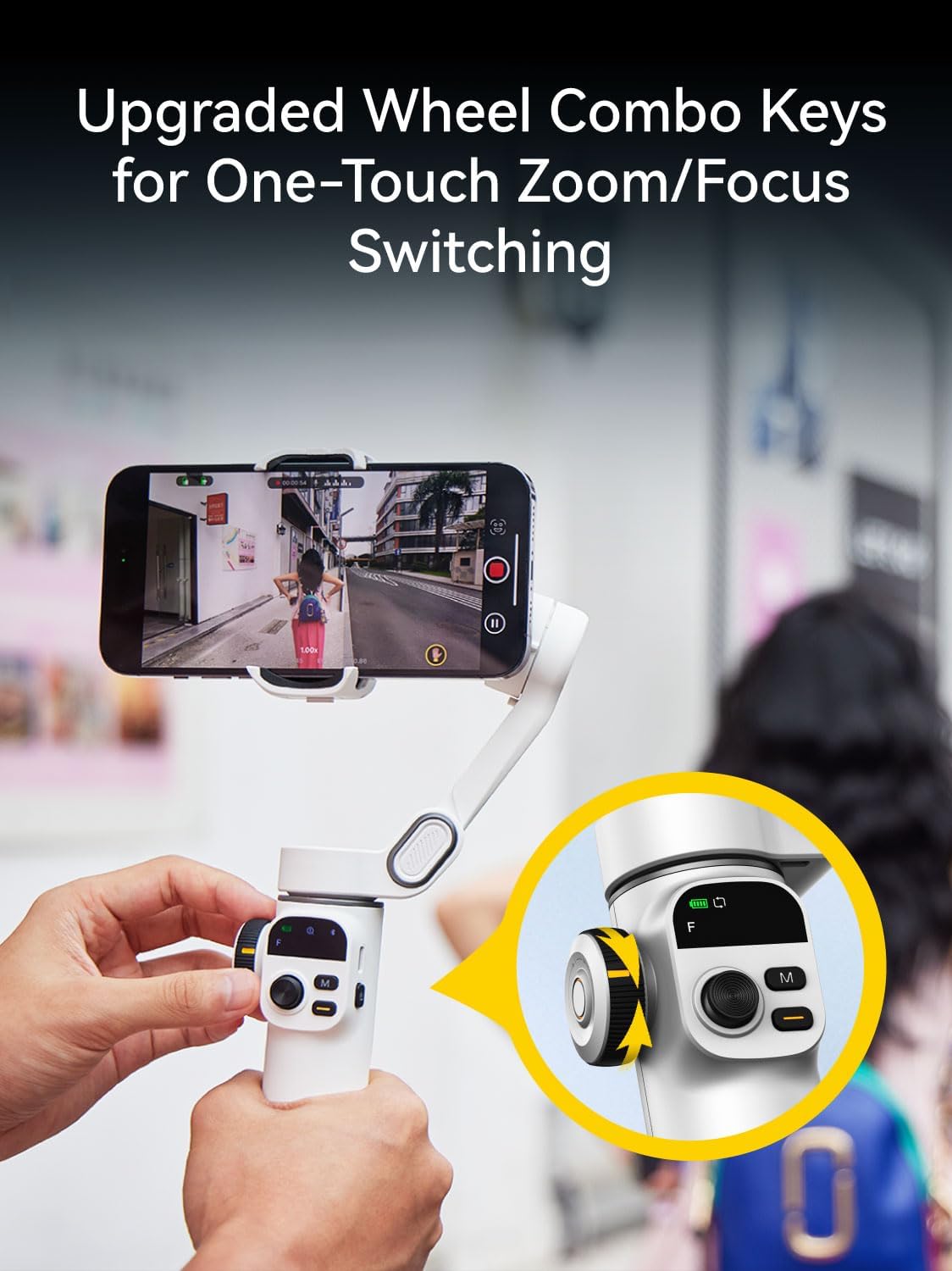
5.5 Wheel Combination Key
- 한 번 클릭: Switches between Zoom and Focus control.
- Zoom (default): Rotate the wheel clockwise to zoom in, counter-clockwise to zoom out (requires app).
- 집중하다: Rotate the wheel to switch between sharp and blurred focus (requires app).
- 더블 클릭: Activates 280° Auto Panorama shooting mode.
5.6 스마트 AI 추적
The gimbal features innovative smart tracking technology, accessible via the AOCHUAN APP. It offers four tracking modes:
- 얼굴 추적 : Automatically tracks a detected face, keeping it in focus.
- 신체 추적: Follows a person's body, suitable for long-distance tracking.
- 객체 추적: Draw a box around any subject on the screen to initiate tracking.
- 제3자 실시간 추적: Enables tracking within other live streaming or video apps.

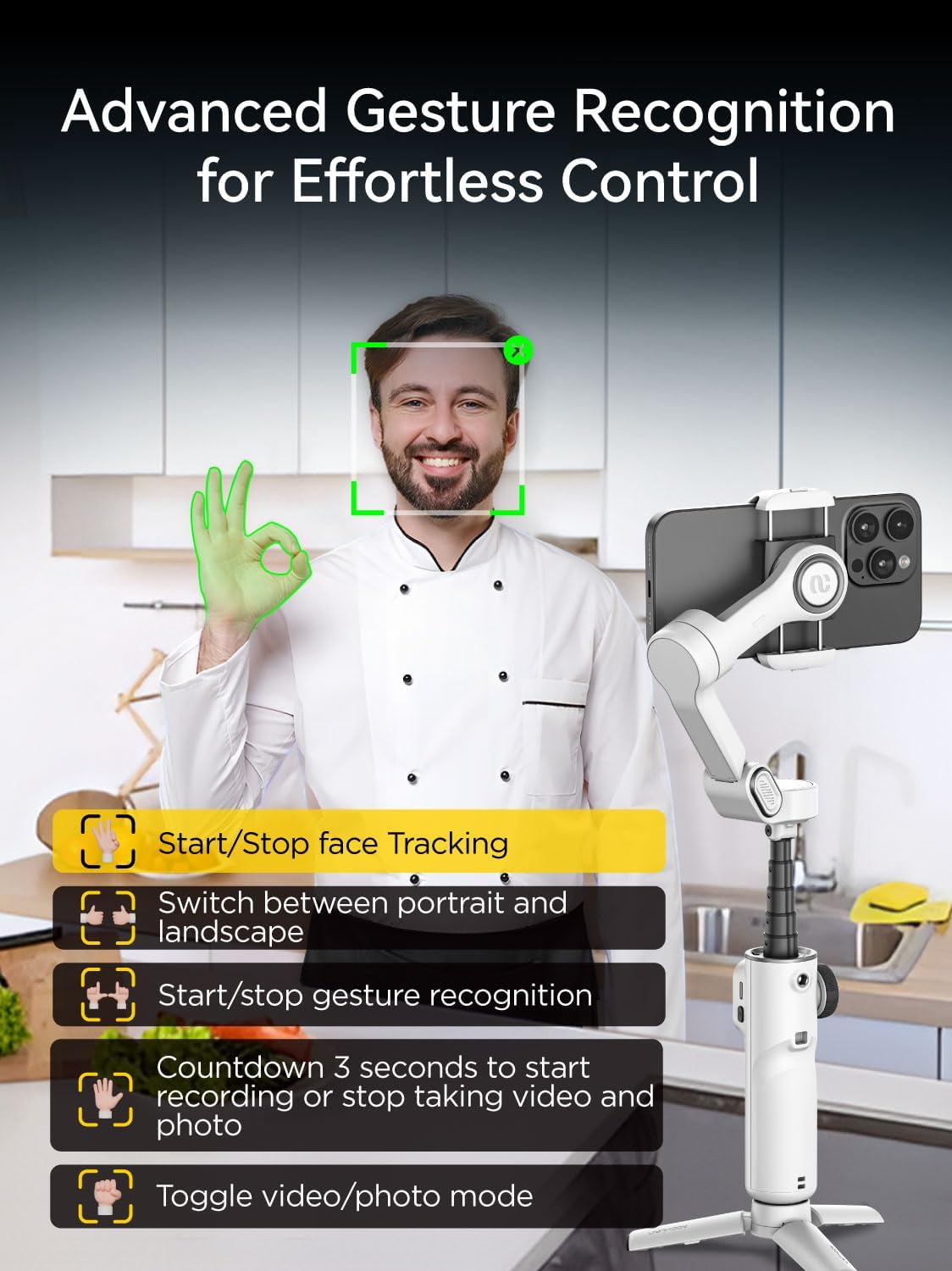
5.7 제스처 제어
The AOCHUAN app supports gesture control for hands-free operation:
- 확인 제스처: Enable/Disable face tracking.
- 손바닥 제스처: Initiates a 3-second countdown for photo or video capture.
- 양손 엄지손가락을 치켜드는 제스처: Switches between horizontal and vertical modes.
- 주먹 쥔 손동작: 사진 모드와 비디오 모드를 전환합니다.
- 더블 L 제스처: Pauses/restarts gesture recognition.
6. 앱 통합
The AOCHUAN app unlocks a variety of creative shooting modes and features:
- 파노라마: Capture stunning wide-angle shots with 180°, 330°, 3x3, or 3x5 panoramas.
- 돌리 줌: Achieve cinematic visual effects.
- 처음: Create rotating, dream-like footage.
- 타임랩스: Condense long events into short, dynamic videos.
- Auto 180° Spin Shot: Capture dynamic scenes with smooth, professional-quality rotation.

7. 유지관리
- 짐벌을 깨끗하고 먼지나 이물질이 없도록 유지하세요. 청소 시에는 부드럽고 마른 천을 사용하세요.
- 짐벌을 극한의 온도나 습기에 노출시키지 마세요.
- When not in use, fold the gimbal into its compact form and store it in a protective case to prevent damage.
- 배터리 성능을 유지하려면 자주 사용하지 않더라도 배터리를 정기적으로 충전하세요.
8. 문제 해결
- 짐벌 전원이 켜지지 않음: 배터리가 충전되었는지 확인하십시오. Type-C 충전 케이블을 연결하고 다시 시도하십시오.
- Phone not balancing: Adjust the phone's position within the holder, especially if it has a large or heavy camera module.
- Bluetooth 연결 문제: Ensure Bluetooth is enabled on your phone and the gimbal. Restart both devices and try reconnecting via the AOCHUAN app.
- 반응하지 않는 컨트롤: Check the battery level. If issues persist, try restarting the gimbal.
9. 사양
| 특징 | 세부 사항 |
|---|---|
| 제품 치수 | 11.3 x 2.76 x 5 inches (Expanded) |
| 품목 무게 | 12.8 온스(0.8 파운드) |
| 품목 모델 번호 | Smart X2 |
| 배터리 | 2개의 리튬 이온 배터리 필요(포함) |
| 제조업체 | 아오촨 |
| 호환 장치 | iPhone 16 15 14 13 12 Pro Max, Samsung Galaxy S21/S21 Ultra S23 Ultra, Huawei p30 pro/p30/p20 pro/p10/p10 plus (under 7 inches, max 0.62 lbs, 6.3"L x 3.5"W x 0.4"T) |
| 접힌 크기 | 6.2 x 4.3 x 2인치(16.5 x 11 x 5.3cm) |
| 연장 막대 길이 | 7.8 inches (Built-in) |
| 배터리 수명 | 8-10시간 |
| 충전 시간 | 2시간 |
| Thread Interface | 1/4 인치 |
10. 보증 및 지원
For warranty information and customer support, please refer to the official AOCHUAN web사이트를 방문하거나 고객 서비스에 직접 문의하세요. 보증 청구를 위해 구매 영수증을 보관하세요.