소개
The Hyundai L43HYNDA630 is an advanced 43-inch Full HD Smart LED TV designed to deliver a superior viewing experience. This frameless television integrates excellent features with a sleek aesthetic, operating on the intuitive WebOS 2.0 platform. It provides crisp images with a 1920 x 1080 resolution via an A+ grade panel, boasting a brightness of 300 ± 20 nits and a 60 Hz refresh rate. Equipped with a TPD.SK331.PB801 (75W) mainboard, 1.5 GB RAM, and 8 GB storage, it ensures smooth smart TV functionality. Comprehensive connectivity includes 3 HDMI ports, 2 USB ports, Bluetooth, and screen sharing capabilities. The built-in T2/S2 receiver further enhances its versatility. The TV features a durable metal back cabinet and dual 8W speakers for high-quality audio. It comes with a Magic Remote for convenient control and supports multiple OSD languages including English, Arabic, French, German, Italian, Spanish, and Dutch.
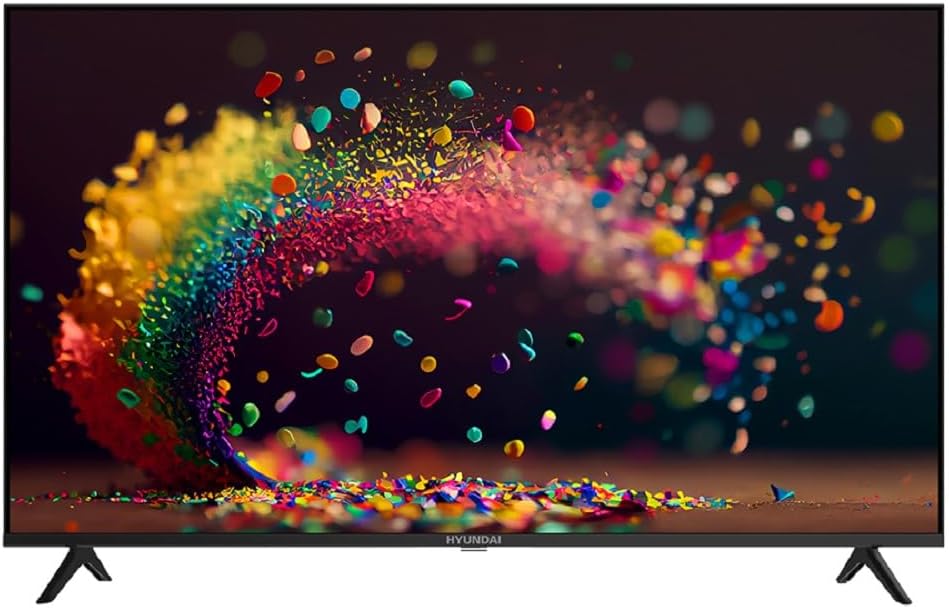
그림 1: 전면 view of the Hyundai 43-inch Smart LED TV.
설치 가이드
1. 개봉 및 검사
Carefully remove the TV from its packaging. Inspect the TV and all accessories for any signs of damage. Keep the packaging materials for future transport or service needs.
2. 스탠드 부착
Place the TV screen-down on a soft, flat surface to prevent scratches. Align the stand bases with the corresponding slots on the bottom of the TV. Secure the stands using the provided screws. Ensure they are firmly attached.

그림 2: 측면 view TV의 장점을 보여주는file 그리고 스탠드 디자인.
3. 전원 연결하기
전원 코드를 TV의 전원 입력 단자에 꽂은 다음, 다른 한쪽 끝을 벽면 콘센트에 꽂으세요. TV가 대기 모드로 전환됩니다.
4. 초기 설정
Upon first power-on, the TV will guide you through the initial setup process. This includes selecting your preferred language, connecting to a Wi-Fi network, and scanning for channels using the built-in T2/S2 receiver. Follow the on-screen prompts.
5. Magic Remote Pairing
The included Magic Remote may require pairing. Point the remote at the TV and press the OK button. If pairing fails, try replacing the batteries or moving closer to the TV.
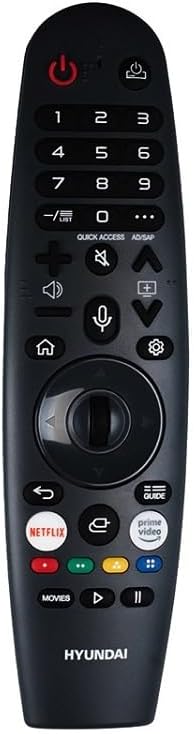
Figure 3: The Hyundai Magic Remote control.
작동 지침
기본 제어
- 전원 켜기/끄기: 를 누르세요 힘 리모컨의 버튼을 누르세요.
- 볼륨 조절: 사용하세요 볼륨 높이기/낮추기 버튼.
- 채널 선택: 사용하세요 채널 업/다운 버튼이나 숫자 키패드.
- 입력 소스: 를 누르세요 입력 HDMI, USB 및 기타 소스 중에서 선택하는 버튼입니다.
스마트 TV 기능 (WebOS 2.0)
Your Hyundai Smart TV runs on WebOS 2.0, providing a user-friendly interface for accessing various applications and streaming services. Use the Magic Remote's pointer function to navigate the on-screen menus and select apps.
- 홈 화면: 를 누르세요 집 button to access the launcher bar with your favorite apps.
- 앱 스토어: 통합 앱 스토어에서 새로운 애플리케이션을 다운로드하여 설치하세요.
- 화면 공유: Utilize the screen sharing feature to mirror content from compatible devices to your TV.
연결성
이 TV는 다양한 연결 옵션을 제공합니다.
- HDMI 포트: Connect external devices like Blu-ray players, gaming consoles, or set-top boxes to the 3 HDMI ports.
- USB 포트: USB 드라이브를 연결하세요 view photos, videos, or listen to music via the 2 USB ports.
- 블루투스: Pair Bluetooth-enabled devices such as headphones or soundbars for wireless audio.
- 와이파이: 인터넷 접속과 스마트 TV 기능을 위해 홈 네트워크에 연결하세요.

그림 4: 하단 view displaying the TV's connectivity ports.
OSD Language Selection
To change the On-Screen Display (OSD) language, navigate to the TV's settings menu. Select 'General' or 'Language' and choose your preferred language from the available options (English, Arabic, French, German, Italian, Spanish, Dutch).
유지
화면 청소
To clean the screen, first turn off the TV and unplug it from the power outlet. Use a soft, lint-free cloth, slightly dampened with water or a specialized screen cleaner. Do not spray liquid directly onto the screen. Avoid using abrasive cleaners, alcohol, or benzene, as these can damage the screen surface.
TV 본체 청소
For the TV's body, use a soft, dry cloth to wipe away dust. For stubborn marks, a slightly damp cloth can be used. Ensure no liquid enters the ventilation openings or ports.
소프트웨어 업데이트
Periodically check for software updates through the TV's settings menu. Keeping your TV's software updated ensures optimal performance and access to the latest features and security enhancements.
문제 해결
TV에 문제가 발생하면 고객 지원팀에 문의하기 전에 다음의 일반적인 문제와 해결 방법을 참조하세요.
| 문제 | 가능한 해결책 |
|---|---|
| TV가 켜지지 않습니다. | 전원 코드가 TV와 정상적으로 작동하는 벽면 콘센트에 모두 단단히 꽂혀 있는지 확인하세요. 다른 콘센트에 연결해 보세요. |
| 사진이나 소리가 없습니다. | Check that the correct input source is selected. Verify all cable connections (HDMI, antenna, etc.) are secure. |
| 리모컨이 작동하지 않습니다. | Check and replace the batteries. Ensure there are no obstructions between the remote and the TV. Re-pair the Magic Remote if necessary. |
| Wi-Fi에 연결할 수 없습니다. | Wi-Fi 라우터가 켜져 있고 작동하는지 확인하세요. Wi-Fi 비밀번호를 다시 입력하세요. TV와 라우터를 모두 다시 시작해 보세요. |
| 화질이 좋지 않습니다. | Check the signal strength for broadcast channels. For external devices, ensure high-quality cables are used and the device output resolution matches the TV's capabilities. |
명세서
| 특징 | 세부 사항 |
|---|---|
| 상표 | 현대 |
| 모델 번호 | L43HYNDA630 |
| 화면 크기 | 43인치 |
| 디스플레이 기술 | 주도의 |
| 해결 | 풀 HD(1920 x 1080픽셀) |
| 새로 고침 빈도 | 60Hz |
| 운영 체제 | WebOS 2.0 |
| 숫양 | 1.5GB (XNUMX기가바이트) |
| 저장 | 8GB (XNUMX기가바이트) |
| 명도 | 300 ± 20 nits |
| 연결성 | Wi-Fi, Bluetooth, 3 x HDMI, 2 x USB |
| 내장 수신기 | T2/S2 Digital Wireless Frequency |
| 오디오 출력 | 듀얼 8W 스피커 |
| 특별 기능 | Frameless Design, A+ Panel, Magic Remote |
| 제품 크기(D x W x H) | 8.6 x 95.6 x 56cm |
| 제품 무게 | 7.4kg |
| 포함된 구성 요소 | Remote Control, Stand |
| 원산지 | 이집트 |
보증 정보
Your Hyundai L43HYNDA630 Smart LED TV comes with a standard manufacturer's warranty. Please refer to the warranty card included in your product packaging for specific terms, conditions, and duration. Keep your proof of purchase for any warranty claims.
제3자 공급업체를 통해 연장 보증 옵션을 이용할 수 있습니다. 예를 들어ample, extended warranty plans for 1 or 2 years are offered by Boxy. Please check with your retailer or the warranty provider for details on coverage and purchase.
고객 지원
For technical assistance, service, or further inquiries regarding your Hyundai Smart LED TV, please contact Hyundai customer support. Refer to the contact information provided in your product documentation or visit the official Hyundai web귀하의 지역에 대한 사이트.
When contacting support, please have your TV's model number (L43HYNDA630) and serial number ready. This will help the support team assist you more efficiently.


