1. 서론
The 3M Speedglas G5-03 Pro Welding Helmet is engineered with advanced technology to provide dynamic protection for welders. This helmet is designed to meet the challenges of various welding tasks, offering intuitive features such as a haptic tapping function for activating grind or cut modes. It is highly customizable, allowing users to adjust settings for optimal weld pool visibility and enhanced protection against radiation, sparks, and spatter. The G5-03 Pro incorporates 3M Speedglas Natural Color Technology and a Tack Welding Mode (with G5-01/03TW ADF). Optional accessories like a task light and helmet adapter system for hard hat integration further enhance its versatility.

Figure 1.1: The 3M Speedglas G5-03 Pro Welding Helmet, showcasing its robust design and integrated auto-darkening filter.
2. 주요 특징
- Robust, Compact Design: Engineered for durability and ease of use in demanding environments.
- Ergonomic, Adjustable Head Suspension: 장시간 착용해도 편안하고 안정적인 착용감을 제공합니다.
- GRIND and CUT Mode Functionality: Easily switch between welding and grinding/cutting tasks using the G5 auto-darkening filters.
- Available in Two Auto-Darkening Lens Options (VC/TW): Choose between Variable Color (VC) or Tack Weld (TW) auto-darkening filters to suit specific welding needs.
- Suitable for Most Types of Arc Welding: Versatile for a wide range of arc welding applications.
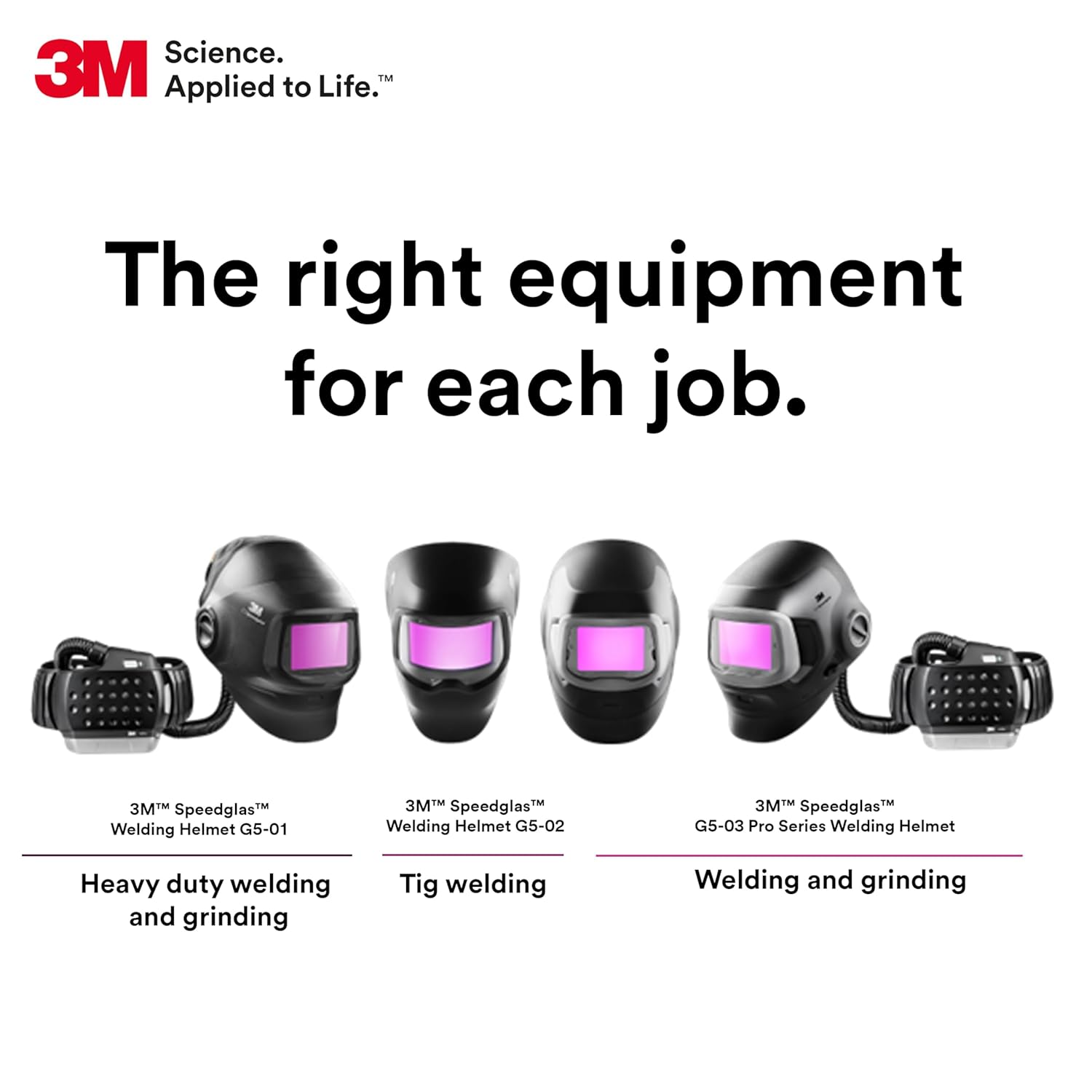
그림 2.1: 오버view of different 3M Speedglas welding helmets, highlighting the G5-03 Pro's suitability for welding and grinding tasks.
3. 상자 안에 무엇이 들어있나요?
개봉 후 모든 구성품이 있는지 확인하십시오.
- 3M Speedglas Welding Helmet G5-03 Pro
- G5TW Auto-Darkening Filter (ADF)
4. 중요한 안전 정보
3M 산업 및 직업용 제품은 작업장 사용을 위해 훈련된 산업 및 직업 분야 고객에게 판매하도록 의도, 표시 및 포장되었습니다. 이러한 제품은 일반 소비자(예: 가정, 개인, 초등학교 또는 중등학교, 레크리에이션/스포츠 또는 해당 제품 포장이나 설명서에 명시되지 않은 기타 용도)에게 판매하거나 사용하도록 의도, 표시 또는 포장되지 않았으며, 해당 보건 및 안전 규정 및 표준(예: 미국 OSHA, ANSI)은 물론 모든 제품 설명서, 사용자 지침, 경고 및 기타 제한 사항을 준수하여 선택 및 사용해야 합니다. 또한 사용자는 리콜, 현장 조치 또는 기타 제품 사용 공지에 따라 필요한 모든 조치를 취해야 합니다. 3M 산업 및 직업용 제품을 오용하면 부상, 질병, 사망 또는 재산 피해가 발생할 수 있습니다. 제품 선택 및 사용에 대한 도움이 필요하면 현장 안전 전문가, 산업 위생 전문가 또는 기타 관련 분야 전문가에게 문의하십시오. 추가 제품 정보는 다음 웹사이트를 방문하십시오. www.3M.com.
Always wear appropriate personal protective equipment (PPE) in conjunction with the welding helmet, such as safety glasses and respirators, as required by your specific welding application and workplace safety regulations.

Figure 4.1: A welder utilizing the 3M Speedglas helmet in a professional setting, emphasizing the importance of proper usage and safety protocols.
5. 설정 및 조정
5.1 Head Suspension Adjustment
The G5-03 Pro features an ergonomic and adjustable head suspension system for a comfortable and secure fit. Adjust the headband to ensure the helmet sits firmly and balanced on your head without causing pressure points. Use the ratcheting mechanism at the back to tighten or loosen the fit. Adjust the top straps to control the helmet's height and angle relative to your face.

그림 5.1: 측면 view of the helmet showing the adjustable head suspension system, crucial for a personalized and stable fit.
5.2 Auto-Darkening Filter (ADF) Installation and Settings
Ensure the G5TW ADF is correctly installed in the helmet. The ADF is powered by a Lithium Metal battery (included). Familiarize yourself with the controls on the ADF for shade, sensitivity, and delay settings. The G5TW ADF offers a light state of 2.5 and variable dark shades from 5/8-13, with 4 arc sensors for reliable detection.

Figure 5.2: Close-up of the G5-01/03TW Auto-Darkening Filter (ADF), illustrating its controls for shade, sensitivity, and delay, along with the tack welding mode feature.
6. 사용 설명서
6.1 Natural Color Technology
The 3M Speedglas G5-03 Pro features Natural Color Technology, which provides a more realistic view of your work area in both light and dark states. This technology enhances clarity and contrast, allowing for better visibility of the weld puddle and surrounding environment.

Figure 6.1: Visual representation of 3M Speedglas Natural Color Technology, demonstrating improved clarity in both light and dark states during welding.

Figure 6.2: An illustration highlighting the enhanced clarity provided by Natural Color Technology throughout the welding process.
6.2 TAP Function for Grind/Cut Mode
The G5-03 Pro introduces a haptic TAP function for quick and easy switching between welding and grind/cut modes without removing the helmet. This feature is particularly useful for welders who frequently alternate between tasks.
- Set Filter to GRIND (or CUT) Mode: Ensure the ADF is set to the desired grind or cut mode.
- Activate TAP Function: Press the + and - buttons on the ADF simultaneously to activate the TAP function.
- 스위치 모드: Tap the side of the helmet 3 times to toggle between GRIND (or CUT) mode and WELD mode.
- Deactivate TAP Function: Press the + and - buttons simultaneously again to deactivate the TAP function.
Note: Additional settings and customization options for the TAP function and other helmet features can be accessed via the 3M Connected Equipment App.

Figure 6.3: A step-by-step guide illustrating the operation of the TAP function for seamless mode switching on the 3M Speedglas G5-03 Pro helmet.

Figure 6.4: A user demonstrating interaction with the 3M Connected Equipment App, which allows for advanced customization of the helmet's settings.
7. 유지관리 및 관리
7.1 청소
- 헬멧 쉘: Clean the helmet shell with a mild soap and water solution. Avoid abrasive cleaners or solvents that could damage the material.
- ADF and Lenses: Gently wipe the auto-darkening filter and protective lenses with a soft, lint-free cloth. Use a specialized lens cleaning solution if necessary. Do not use harsh chemicals or abrasive materials that could scratch the lenses.
7.2 보관
Store the welding helmet in a clean, dry place away from direct sunlight, extreme temperatures, and corrosive substances. Protect the ADF from impact and scratches when not in use.
7.3 배터리 교체
The ADF is powered by a Lithium Metal battery. Refer to the specific instructions provided with your ADF for battery replacement procedures. Ensure proper polarity when installing new batteries.
8. 문제 해결
| 문제 | 가능한 원인 | 해결책 |
|---|---|---|
| ADF not darkening | Low battery; Sensors obstructed; Incorrect sensitivity setting; Too little light. | Replace battery; Clean sensors; Adjust sensitivity; Ensure sufficient arc light. |
| Poor visibility through ADF | Dirty outer/inner lens; Scratched lens; Incorrect shade setting. | Clean lenses; Replace scratched lenses; Adjust shade setting. |
| Helmet feels uncomfortable or loose | Head suspension not properly adjusted. | Adjust headband and top straps for a snug and balanced fit. |
| TAP function not responding | Function not activated; Incorrect tapping motion. | Ensure TAP function is activated (press + and - simultaneously); Tap firmly and consistently on the side of the helmet. |
9. 기술 사양
| 사양 | 세부 사항 |
|---|---|
| 모델 번호 | G5-03 |
| 패키지 크기 | 15 x 10 x 10 인치 |
| 품목 무게 | 2.9 파운드 |
| 부서 | Safety and Industrial |
| 배터리 | 1개의 리튬 금속 배터리 필요(포함) |
| 제조업체 | 3M |
| 재료 | 폴리카보네이트(PC) |
| 색상 | 검은색 |
| 스타일 | 현대의 |
| 사양 충족 | ANSI Z87.1, CSA Z94.3 |
10. 보증 및 지원
For specific warranty information regarding your 3M Speedglas G5-03 Pro Welding Helmet, please refer to the warranty card included with your product or visit the official 3M website. For technical support, product inquiries, or to purchase replacement parts, please contact 3M customer service or an authorized 3M distributor.
You can find more information and contact details on the official 3M web대지: www.3m.com.