1. 중요한 보호 조치
전기 제품을 사용할 때는 화재, 감전 및 부상의 위험을 줄이기 위해 기본적인 안전 수칙을 항상 준수해야 합니다. 제품을 작동하기 전에 모든 사용 설명서를 꼼꼼히 읽으십시오.
- 뜨거운 표면을 만지지 마십시오. 손잡이나 손잡이를 사용하십시오.
- 감전을 예방하려면 코드, 플러그 또는 기기를 물이나 다른 액체에 담그지 마십시오.
- 어린이가 가전제품을 사용하거나 어린이 근처에서 사용할 때는 면밀한 감독이 필요합니다.
- 사용하지 않을 때와 세척하기 전에는 콘센트에서 플러그를 뽑으세요. 부품을 끼우거나 떼기 전에 식히세요.
- 코드나 플러그가 손상된 경우 또는 기기가 오작동하거나 어떤 식으로든 손상된 경우에는 기기를 작동하지 마십시오.
- 가전제품 제조업체가 권장하지 않는 부속품을 사용하면 부상을 입을 수 있습니다.
- 옥외에서는 사용하지 마십시오.
- 코드가 테이블이나 카운터 가장자리에 걸려 있거나 뜨거운 표면에 닿지 않도록 하세요.
- 뜨거운 가스나 전기 버너 근처 또는 가열된 오븐에 두지 마십시오.
- 뜨거운 기름이나 기타 뜨거운 액체가 담긴 가전제품을 옮길 때는 극히 조심해야 합니다.
- 항상 먼저 제품에 플러그를 꽂은 후, 코드를 벽면 콘센트에 꽂으세요. 전원을 끊으려면 모든 조절기를 '끔'으로 돌린 후 벽면 콘센트에서 플러그를 뽑으세요.
- 본 제품을 본래 용도 외에는 사용하지 마십시오.
2. 제품 오버view
The Cello Smart Digital Air Fryer is designed for healthier cooking with rapid air technology. Familiarize yourself with its components:
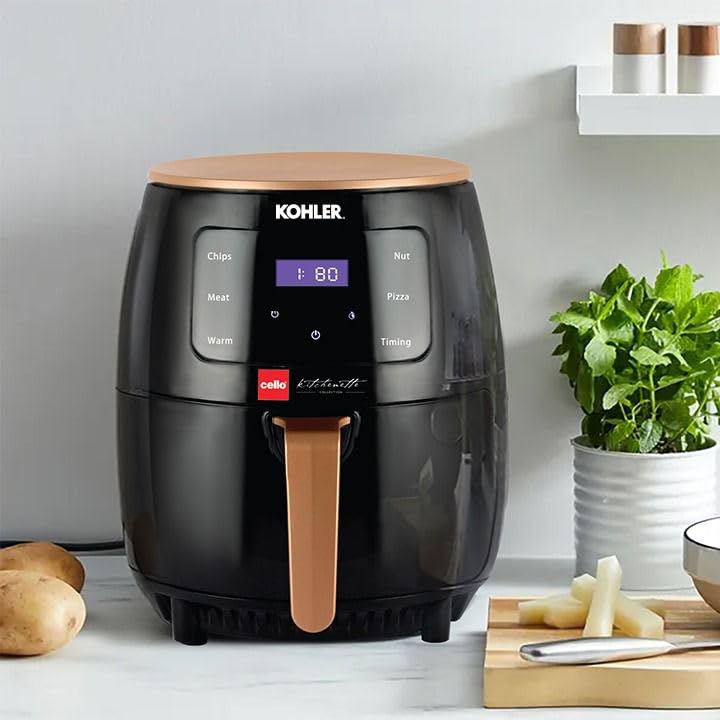
The image displays the Cello Smart Digital Air Fryer, a black appliance with a rose gold top and handle. The front features a digital touch panel with pre-set cooking options like 'Chips', 'Meat', 'Warm', 'Nut', 'Pizza', and 'Timing', along with a digital display showing time and temperature. The air fryer is shown on a kitchen counter next to potatoes and herbs.
- 디지털 터치 패널: For setting time, temperature, and selecting pre-set cooking modes.
- 공기 유입구: 유닛 상단에 위치합니다.
- 공기 배출구: 유닛 후면에 위치해 있습니다.
- 프라이팬 바구니: 음식을 담을 수 있는 분리형 바구니.
- 바구니 손잡이: 튀김 바구니를 안전하게 꺼내고 넣기 위한 방법입니다.
3. 처음 사용하기 전에
- 제품에서 모든 포장재, 스티커, 라벨을 제거하세요.
- 튀김 바구니와 프라이팬을 뜨거운 물과 주방세제, 그리고 흠집이 나지 않는 스펀지를 사용하여 깨끗하게 닦으세요.
- 젖은 천으로 기기의 내부와 외부를 닦으세요.
- Ensure the appliance is placed on a stable, level, heat-resistant surface, away from walls or other appliances to allow proper air circulation.
4. 설정
- 에어 프라이어를 안정적이고 내열성이 있는 표면에 놓으세요.
- Ensure there is sufficient space around the air fryer for proper ventilation (at least 10 cm on all sides).
- Insert the frying basket into the pan, then slide the pan back into the air fryer until it clicks into place.
- Plug the power cord into a grounded wall outlet. The air fryer will emit a beep and the display will light up briefly.
5. 사용 설명서
전원 켜기/끄기
- To turn on, press the power icon (⏻) on the digital touch panel. The display will show default settings.
- To turn off, press and hold the power icon (⏻) 화면이 꺼질 때까지.
Setting Time and Temperature Manually
- With the air fryer powered on, press the temperature icon (° C (섭씨)) to adjust the temperature. Use the + 그리고 - 버튼을 눌러 원하는 온도를 설정하세요.
- Press the timer icon (⏱) to adjust the cooking time. Use the + 그리고 - 버튼을 눌러 원하는 시간을 설정하세요.
- 전원 아이콘(⏻) again to start the cooking process.
사전 설정된 함수 사용
The air fryer comes with several pre-set cooking modes for common foods:
- 작은 조각: Optimized settings for French fries.
- 고기: Suitable for various meat dishes.
- 따뜻한: 요리 후 음식을 따뜻하게 유지합니다.
- 너트: For roasting nuts.
- 피자: Ideal for cooking pizzas.
- 타이밍: Allows for custom time settings.
To use a pre-set function:
- Press the desired pre-set icon on the touch panel. The display will show the default time and temperature for that function.
- You can adjust the time and temperature manually after selecting a pre-set, if needed.
- 전원 아이콘(⏻) 요리를 시작합니다.
일반적인 조리 과정
- 튀김 바구니에 재료를 넣으세요. 너무 많이 넣지 마세요.
- 튀김 바구니를 다시 에어프라이어에 밀어 넣습니다.
- Set the desired time and temperature, or select a pre-set function.
- 시작 버튼을 누르세요. 에어프라이어가 가열을 시작합니다.
- Some foods may require shaking the basket halfway through the cooking time for even results. Pull out the basket by the handle, shake, and reinsert. The air fryer will resume cooking automatically.
- When the cooking time is complete, the air fryer will beep. Carefully pull out the basket and empty the food.
6. 요리 요령
- 작은 재료는 일반적으로 큰 재료보다 조리 시간이 약간 더 짧습니다.
- A small amount of oil can be added to fresh potatoes for a crispier result.
- 오븐에 구울 수 있는 간식도 에어프라이어에 구울 수 있다.
- Use pre-made dough for quick and easy filled snacks.
- For best results, shake the basket halfway through cooking for items like fries, nuggets, or chicken wings.
7. 청소 및 유지 관리
매번 사용 후 기기를 청소하세요.
- 에어 프라이어의 플러그를 뽑고 완전히 식힌 후 청소하세요.
- 제품 외부를 젖은 천으로 닦으세요.
- Clean the pan and basket with hot water, dishwashing liquid, and a non-abrasive sponge. For stubborn residue, soak the pan and basket in hot water for about 10 minutes.
- 뜨거운 물과 비마모성 스펀지를 사용하여 제품 내부를 청소하세요.
- 청소 브러시로 가열 소자를 청소하여 음식 찌꺼기를 제거하세요.
- Do not use abrasive cleaning materials or harsh detergents.
8. 문제 해결
| 문제 | 가능한 원인 | 해결책 |
|---|---|---|
| 에어프라이어가 작동하지 않습니다. | 기기의 전원이 꽂혀 있지 않습니다. | 메인 플러그를 접지된 벽면 소켓에 꽂으세요. |
| 음식이 고르게 조리되지 않았습니다. | 바구니에 음식이 너무 많아서 음식을 흔들지 않았습니다. | 음식의 양을 줄이세요. 요리 중간에 바구니를 흔들어주세요. |
| 기기에서 흰 연기가 나옵니다. | Fat residues from previous use; basket not cleaned properly. | 사용 후에는 바구니와 팬을 깨끗이 세척하십시오. |
| 갓 튀긴 감자는 바삭하지 않다. | Not enough oil used; potatoes not dried properly. | Add a little more oil; ensure potatoes are dry before adding oil. |
9. 사양
| 특징 | 세부 사항 |
|---|---|
| 상표 | 첼로 |
| 모델명 | CelloSmartDigital |
| 용량 | 4.5리터 |
| 출력 와트tage | 1400 와트 |
| 제어 방법 | 만지다 |
| 특징 | 온도 조절 |
| 제품 치수 | 35.5D x 35.5W x 33.8H 센티미터 |
| 색상 | 검은색 |
| 재료 | 플라스틱 |
| 품목 무게 | 3.45킬로그램(3450그램) |
| 포함된 구성 요소 | Smart Airfryer 4.5 Liter |
10. 보증 및 지원
For any product-related queries, complaints, or warranty information, please contact Cello customer support:
- 담당자: Customer care executive
- 연락처 번호: 7400007370
- 이메일 ID: customercare@celloworld.com
- 회사 사무실 주소: Cello World Pvt Ltd, B’ Wing, Cello House, Corporate Avenue, Sonawala Road, Sonawala Industry Estate, Goregaon (E), Mumbai 400063
보증 청구를 위해 구매 증빙서류로 구매 영수증을 보관하세요.