소개
This manual provides detailed instructions for the setup, operation, and maintenance of your TONOR TW361 4-Channel UHF Wireless Microphone System. Please read this manual thoroughly before use to ensure optimal performance and longevity of your device.
상자 안에 무엇이 들어있나요?

Image shows the complete TONOR TW361 system, including four grey handheld microphones and one compact black receiver with a 6.35mm jack and antenna.
- 핸드헬드 마이크 4개
- 충전식 수신기 1개
- 4 x 미끄럼 방지 링(다양한 색상)
- 마이크 커버 4개
- 1 x USB to Type-C 충전 케이블
- 1 x 사용자 설명서

This image displays all the accessories: two microphones, the receiver, four anti-slip rings, four mic covers, a charging cable, and the user manual. The microphone dimensions are also indicated as 10.7 inches (27.2 cm).
제품 끝view
핸드헬드 마이크

The image highlights key features of the handheld microphone: a metal shockproof mic head, a real-time battery indicator on the display, and a mute/power button. Each microphone requires 2 AA batteries (not included).
- Metal Shockproof Mic Head: Designed for durability and sound protection.
- 실시간 배터리 표시기: 현재 배터리 잔량을 표시합니다.
- Mute/Power Button: 마이크의 전원을 제어하고 음소거합니다.
- 디스플레이 화면: Shows frequency, battery status, and mute status.
- 전원: Each microphone requires 2 AA batteries (not included).
다이나믹 마이크 캡슐
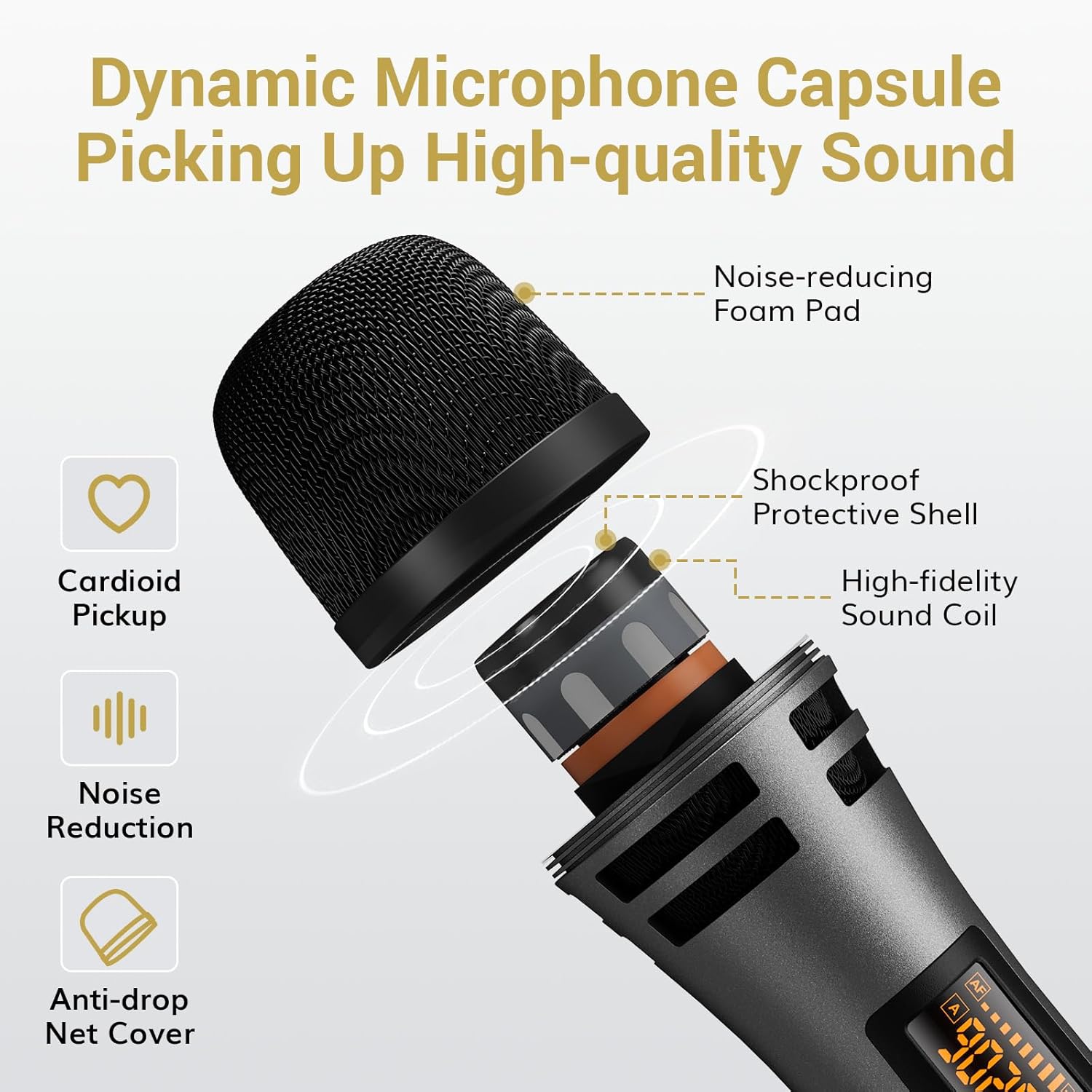
이 이미지는 폭발된 모습을 제공합니다. view of the microphone head, showing its internal components: a noise-reducing foam pad, a shockproof protective shell, a high-fidelity sound coil, and an anti-drop net cover. It also indicates cardioid pickup and noise reduction features.
- 카디오이드 픽업 패턴: Minimizes background noise, focusing on the sound source.
- 소음 감소: Integrated features for clear audio.
- 구성 요소: Includes noise-reducing foam pad, shockproof protective shell, high-fidelity sound coil, and anti-drop net cover.
충전식 수신기

The image details the receiver's features: current frequency display, battery indicator, connection indicator, disconnection indicator, USB-C charging port, antenna, power switch, charging indicator, and a 6.35mm jack. The antenna can be adjusted to 0°, 45°, or 90°.
- 디스플레이 화면: Shows current frequency, battery indicator, connection, and disconnection status.
- USB-C 충전 포트: 내장된 1500mAh 배터리를 충전하기 위한 것입니다.
- 6.35mm 잭: 오디오 기기 연결용입니다.
- 조절 가능한 안테나: Can be set to 0°, 45°, or 90° for optimal signal reception.
- 배터리 수명: 7-9 hours of usage time on a full charge.
- 충전 시간: 완전히 충전하는 데 약 4~5시간이 걸립니다.
- 중요 참고 사항: Use a 5V charging head. Avoid fast charging heads (e.g., 9V, 12V) to prevent damage.
설치 지침
1. Install Batteries in Microphones
Unscrew the bottom part of each microphone and insert 2 AA batteries, ensuring correct polarity. Batteries are not included.
Video demonstrating how to insert 2 AA batteries into the handheld microphone. This is the first step in preparing the microphone for use.
2. Pairing the Microphones and Receiver (Plug & Play)
- 마이크를 켜세요.
- 수신기를 켭니다.
- The microphone and receiver will automatically synchronize.

This image illustrates the three simple steps for pairing: 1. Turn on the microphone. 2. Turn on the receiver. 3. Plug the receiver into the speaker. A checkmark indicates successful pairing.
3. 오디오 장치에 연결
Plug the receiver's 6.35mm jack directly into the MIC IN port of your compatible audio device (e.g., karaoke machine, powered speaker, amplifier, mixer). If your device has a 3.5mm input, use the included 6.35mm to 3.5mm converter.
Video demonstrating the connection of the receiver to an audio device (speaker) and the successful pairing with a microphone. It also briefly shows the wireless range and adjustable features.

This image illustrates the wide compatibility of the system with devices featuring a 1/4" (6.35mm) Mic Input, including outdoor speakers, power amplifiers, sound mixer boards, DJ controllers, karaoke machines, and portable speakers. It also explicitly states that the system is not compatible with mobile phones, computers, or tablets without an additional 3.5mm interface.
작동 지침
채널 및 볼륨 조정
The system offers 10 adjustable channels to minimize interference. Each microphone has a unique channel and frequency number. You can adjust the volume directly on the microphone.

This image shows how to adjust the microphone's channel and volume. It displays the microphone's screen changing from one frequency to another (e.g., 902.8 MHz to 903.4 MHz) and indicates the volume up (VOL+) and volume down (VOL-) buttons.
- 채널 조정: If interference occurs, you can change the microphone's channel. Refer to the troubleshooting section for detailed steps on switching channels.
- 볼륨 조절: Use the VOL+ and VOL- buttons on the microphone to adjust the output volume.
- 음소거 기능: The power button also functions as a one-touch mute button.
수신기 충전 중
The receiver has a built-in 1500mAh rechargeable battery. Use the provided USB to Type-C charging cable to charge it. A full charge takes approximately 4-5 hours and provides 7-9 hours of usage.

This image shows the receiver being charged via a USB-C cable connected to a wall adapter, indicating 7-9 hours of usage time and 4-5 hours of charging time. It also reminds that each microphone is powered by 2 AA batteries (not included).
호환성
The TONOR TW361 system is designed for wide compatibility with various audio equipment. However, certain devices require specific connections or are not supported.
Compatible Devices (with 6.35mm MIC IN port):
- 노래방 기계
- 전원 스피커
- Amp리퍼
- 믹서
- PA 시스템
- 야외용 스피커
- DJ 컨트롤러
- 휴대용 스피커
Incompatible Devices / Special Considerations:
- Mobile Phones, Computers, Tablets: Not directly compatible. An additional 3.5mm interface converter is needed (not included).
- 블루투스: 해당 시스템은 블루투스 연결을 지원하지 않습니다.
- TV/Soundbar: Requires an intermediary audio device for connection.

This image provides important tips for better usage and connectivity, visually indicating that output devices require XLR and 6.35mm inputs, an adapter is needed for mobile/laptop connections, Bluetooth is not supported, and a TV/Soundbar requires an intermediary audio device.
유지
- Store the microphones and receiver in a dry, cool place when not in use.
- Clean the microphone body and receiver with a soft, dry cloth. Avoid using harsh chemicals or abrasive materials.
- Ensure the receiver is fully charged before each use for optimal performance.
- Replace AA batteries in the microphones when the battery indicator shows low power.
문제 해결
Microphone Not Working / Signal Issues
If you encounter a microphone that is not working or experiencing signal issues, follow these steps:
- Check Microphone Channels: Ensure that the microphone channels are not duplicated. If two microphones are on the same channel, they cannot be used normally. You will need to switch channels for one of them.
- Re-pair the Microphone and Receiver: If the signal light on the receiver does not turn steady after turning on the microphone, re-pairing is necessary.
Video illustrating how to connect the receiver and audio devices, showing the pairing process and the wireless range of the system.
Video explaining troubleshooting steps when a microphone is not working, specifically addressing duplicated channels and the need to switch channels or re-pair the microphone and receiver.
How to Switch Microphone Channels (A/B Mic)
- Turn off the microphone with the problem.
- Long press the power button for 10 seconds, waiting for the screen to display from "A" to "B" and then release it. This switches the channel group.
- Each microphone has a unique channel and frequency number that can be used simultaneously.
Video demonstrating the re-pairing process for the microphone and receiver. It shows how to activate pairing mode on the microphone and then confirm successful pairing on the receiver.
How to Re-pair the Microphone and Receiver
- Turn on the mic, and long press the "SET" button until the screen flashes quickly.
- 수신기를 켭니다.
- Then click the "SET" button on the microphone once.
- When the RF light on the receiver turns steady, the pairing is successful.
Video demonstrating the re-pairing process for the microphone and receiver. It shows how to activate pairing mode on the microphone and then confirm successful pairing on the receiver.
명세서
| 모델명 | 티와이361 |
| 마이크 폼 팩터 | 핸드헬드 |
| 연결 기술 | 초고주파 |
| 채널 수 | 10 |
| 무선 범위 | Up to 200 ft (60 m) line-of-sight |
| 주파수 응답 | 40Hz-18kHz |
| 감광도 | 52dB±3dB |
| 왜곡 | <0.03% |
| 숨어 있음 | <3ms |
| 수신기 배터리 | 1500mAh 리튬 이온(충전식) |
| 수신기 사용 시간 | 7-9시간 |
| 수신기 충전 시간 | 4-5시간 |
| 마이크 전원 | AA 배터리 2개(포함되지 않음) |
| 커넥터 유형 | 6.35 mm 잭 |
| 제품 치수 | 15.16 x 12.2 x 2.36 인치 |
| 품목 무게 | 2.91파운드 |
| 재료 | 플라스틱 |
| 색상 | 회색 |
보증 및 지원
TONOR products are designed for reliability and performance. For warranty information, technical support, or any inquiries regarding your product, please refer to the official TONOR web사이트를 방문하거나 고객 서비스에 직접 문의하세요. 보증 청구를 위해 구매 영수증을 보관하세요.
추가 지원을 받으려면 다음을 방문하세요. Amazon의 TONOR 스토어.


