소개
The REACHER Sleep Trainer Alarm Clock K2 is a versatile 3-in-1 device designed to assist families in establishing healthy sleep routines. It functions as a gentle night light, a calming white noise machine, and a reliable sleep training clock for toddlers. This manual provides detailed instructions for setup, operation, and maintenance to ensure optimal performance and a better night's rest for the entire family.

Image: The REACHER Sleep Trainer Alarm Clock K2, highlighting its three core functions: Sleep Trainer, Night Light, and Sound Machine, positioned on a bedside table in a child's room.
패키지 내용
다음 항목에 대한 상자를 체크해 주세요.
- REACHER Sleep Trainer Alarm Clock K2 Unit
- USB 충전 케이블
- 전원 어댑터
- 사용 설명서 (본 문서)
제품 끝view & 컨트롤
The K2 features intuitive controls on its top panel and dimmers on the bottom for display and light brightness.
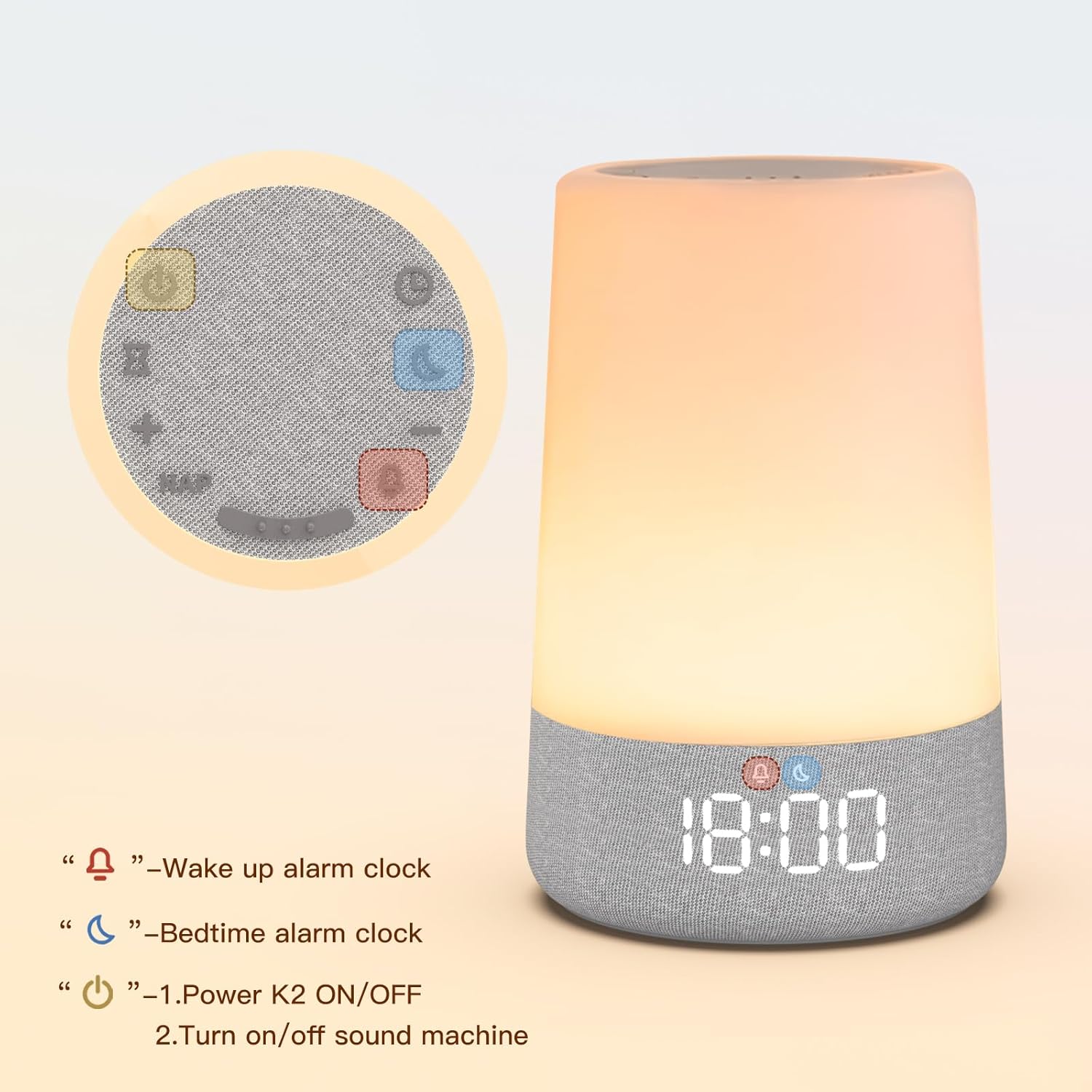
Image: Top panel of the K2 device, illustrating the layout of the control buttons for various functions.
- 전원 버튼(①): Hold for 3 seconds to power on/off. Press to turn sound machine on/off.
- 타이머 버튼(②): Press repeatedly to change sleep sounds. Hold for 2 seconds to turn off sound machine. Press to set auto-off timer when light or sound is playing.
- Nap Button (NAP): Press to set nap timer.
- 볼륨 높이기/줄이기(+/-): 볼륨을 조절하세요.
- Wake Up Alarm Button (④): Enter snooze when alarm goes off. Press to turn on/hold 2 seconds to turn off light. Press repeatedly to change light color. Enter/confirm wake alarm setting.
- Bedtime Alarm Button (⑤): Enter/confirm sleep alarm setting. Hold to turn sleep alarm on/off.
- Time Setting Button (③): Enter/confirm time setting.
On the bottom of the unit, you will find sliders for 디스플레이 디머 그리고 라이트 디머 to adjust brightness levels independently.
설정
장치 충전하기
The K2 features a rechargeable battery for cordless use, but can also be powered via plug-in for continuous operation.
- Connect the USB charging cable to the DC 5V port on the back of the K2 unit.
- Plug the other end of the USB cable into the power adapter, then into a standard household outlet.
- The indicator light will show red while charging and turn green when fully charged.
- When the battery is completely drained, the K2 will automatically shut down safely. Recharge it to resume use.

Image: The K2 unit, emphasizing its rechargeable and app-free design, suitable for home or travel.
작동 지침
1. 시간 설정
- Press the Time Setting button (③). The hour display will flash.
- Use the Volume Up (+) and Volume Down (-) buttons to adjust the hour.
- Press the Time Setting button (③) again to confirm the hour and move to minute adjustment.
- Use the Volume Up (+) and Volume Down (-) buttons to adjust the minute.
- Press the Time Setting button (③) once more to confirm the minute.
- To switch between 12H/24H format, press the Time Setting button (③) after setting the minutes.
2. Wake/Sleep Alarm Setting (OK-to-Wake System)
The K2 uses a simple red and green light system to signal sleep and wake times, helping children understand routines.

Image: The K2 displaying a red light with '20:00' for bedtime and a green light with '9:00' for wake-up time, illustrating the OK-to-Wake system.
Setting Wake Alarm:
- Press the Wake Up Alarm button (④). The hour display will flash.
- Adjust the hour using Volume Up (+) and Volume Down (-) buttons.
- Press the Wake Up Alarm button (④) to confirm the hour and adjust minutes.
- Adjust minutes using Volume Up (+) and Volume Down (-) buttons.
- Press the Wake Up Alarm button (④) to confirm minutes and select ringtone.
- Use Volume Up (+) and Volume Down (-) to choose a ringtone.
- Press the Wake Up Alarm button (④) to confirm the alarm setting.
Setting Sleep Alarm:
- Press the Bedtime Alarm button (⑤). The hour display will flash.
- Adjust the hour using Volume Up (+) and Volume Down (-) buttons.
- Press the Bedtime Alarm button (⑤) to confirm the hour and adjust minutes.
- Adjust minutes using Volume Up (+) and Volume Down (-) buttons.
- Press the Bedtime Alarm button (⑤) to confirm the alarm setting.
메모: Wake/Sleep alarm light and night light share the same brightness setting.
3. Night Light Setting
The K2 offers customizable light colors and adjustable brightness to create a soothing environment.

Image: The K2 unit displaying various gentle colors like soft blue, warm amber, calming green, and elegant pink, indicating customizable options.
- To turn on the night light, press the Wake Up Alarm button (④).
- Press the Wake Up Alarm button (④) repeatedly to cycle through different light colors.
- To adjust brightness, use the 'Light Dimmer' slider on the bottom of the unit.
- To turn off the night light, hold the Wake Up Alarm button (④) for 2 seconds.

Image: A visual representation of the adjustable brightness feature, showing the K2 light at 5% and 100% intensity.
4. Sound Machine Setting
The K2 offers 17 soothing sleep sounds to create an immersive bedtime routine.

Image: The K2 unit on a bedside table with a sleeping child, illustrating the variety of 17 soothing sleep sounds available, categorized as White Noise, Lullabies, Fans, and Natural Music.
- To turn on the sound machine, press the Power button (①).
- Press the Timer button (②) repeatedly to cycle through different sleep sounds.
- Adjust the volume using the Volume Up (+) and Volume Down (-) buttons.
- To turn off the sound machine, hold the Power button (①) for 2 seconds.
5. Nap Timer
Set a flexible nap timer from 15 to 180 minutes to suit your child's needs.

Image: The K2 unit on a bedside table with a sleeping child in the background, displaying the nap timer function with options ranging from 15 to 180 minutes.
- Press the Nap button (NAP). The nap duration will be displayed.
- Use the Volume Up (+) and Volume Down (-) buttons to adjust the nap duration.
- The nap timer will start automatically after selection.
6. 아동 잠금
실수로 설정이 변경되는 것을 방지하려면 아동 잠금 기능을 활성화하세요.

Image: A baby interacting with the K2 unit, with an overlay showing a lock icon, indicating the child lock feature for worry-free use.
- To activate the child lock, press and hold both the Volume Up (+) and Volume Down (-) buttons simultaneously for 3 seconds. A lock icon will appear on the display.
- To deactivate the child lock, repeat the same action (press and hold Volume Up (+) and Volume Down (-) buttons for 3 seconds). The lock icon will disappear.
7. 자동 꺼짐 타이머
Set a timer for the sleep machine and night light to turn off automatically.

Image: Close-up of the K2's top panel, highlighting the auto-off timer button (hourglass icon) for setting sleep duration.
- While the night light or sound machine is active, press the Timer button (②).
- Each press will cycle through available timer durations (e.g., 1 hour, 2 hours, 3 hours).
- Select your desired duration, and the device will automatically turn off after the set time.
유지
To ensure the longevity and proper functioning of your REACHER Sleep Trainer Alarm Clock K2, please follow these maintenance guidelines:
- 청소: Use a soft, dry cloth to wipe the exterior of the device. Do not use abrasive cleaners, solvents, or harsh chemicals, as these may damage the surface.
- 물 노출: 기기를 물과 습기로부터 멀리하십시오. 방수 기능이 없습니다.
- 저장: 장기간 사용하지 않을 경우, 직사광선과 극한의 온도를 피해 시원하고 건조한 곳에 보관하세요.
- 배터리 관리 : To maintain battery health, avoid fully discharging the battery frequently. Recharge the device when the battery level is low.
문제 해결
If you encounter any issues with your REACHER Sleep Trainer Alarm Clock K2, please refer to the following table for common problems and solutions:
| 문제 | 가능한 원인 | 해결책 |
|---|---|---|
| 장치의 전원이 켜지지 않습니다. | 배터리 잔량이 부족하거나 전원에 연결되어 있지 않습니다. | Ensure the device is fully charged or connected to a power source. Hold the power button for 3 seconds. |
| Display is blank or light not working. | Display dimmer is set to minimum or light is off. | Adjust the 'Display Dimmer' slider on the bottom. Press the Wake Up Alarm button (④) to turn on the light. |
| 음향 기기가 작동하지 않습니다. | Sound is off or volume is too low. | Press the Power button (①) to turn on sound. Increase volume using the Volume Up (+) button. |
| 알람이 울리지 않습니다. | 알람이 설정되지 않았거나 볼륨이 너무 낮습니다. | 알람 설정을 확인하고 볼륨이 적절한지 확인하세요. |
| 설정이 예기치 않게 변경되었습니다. | Child lock is not activated. | Activate the child lock by holding Volume Up (+) and Volume Down (-) buttons for 3 seconds. |
명세서
- 모델 이름: K2
- 상표: 리처
- 제품 크기: 4.33 x 4.33 x 6.89 인치
- 품목 무게: 1.61파운드(0.73킬로그램)
- 재료: 아크릴로니트릴 부타디엔 스티렌(ABS)
- 색상: 하얀색
- 배터리: 1 AA batteries required (for internal clock backup, not main power)
- 전원 입력: DC 5V (via USB cable and power adapter)
공식 제품 영상
Watch this official video from the seller for a quick overview of the REACHER Sleep Trainer Alarm Clock K2's features and benefits.
Video: An official product video titled "Sleep Trainer Alarm Clock for Kids" by ReacherDirect, demonstrating the key functionalities of the K2 sleep trainer.
보증 및 지원
For warranty information or technical support, please contact REACHER customer service:
- 이메일: 고객@reachershop.com
- 구체적인 보증 약관 및 조건은 구매 영수증을 참조하세요.


