1. 서론
Thank you for choosing the MOREFINE M6 Mini PC N200. This compact and powerful mini computer is designed for various applications, from home entertainment to office tasks, offering efficient performance and versatile connectivity. This manual provides essential information for setting up, operating, maintaining, and troubleshooting your device.
2. 안전 정보
- 전원 공급 장치: 제공된 전원 어댑터만 사용하십시오. 전원 공급 장치가 지정된 용량과 일치하는지 확인하십시오.tage와 현재.
- 통풍: 통풍구를 막지 마십시오. 과열을 방지하기 위해 기기 주변에 충분한 공기 흐름을 확보하십시오.
- 액체 노출: Keep the device away from water, moisture, and other liquids. Avoid spills.
- 온도: Operate the device within a stable temperature range. Avoid extreme heat or cold.
- 청소: 청소하기 전에 전원을 차단하십시오. 부드럽고 마른 천을 사용하십시오. 액체 세척제나 스프레이형 세척제는 사용하지 마십시오.
- 손질: 기기를 조심스럽게 다루십시오. 떨어뜨리거나 강한 충격을 주지 마십시오.
3. 패키지 내용
패키지에 모든 품목이 들어 있는지 확인하세요.
- 1 x MOREFINE M6 Mini PC
- 1 x 전원 어댑터
- 1 x 사용자 매뉴얼(이 문서)
- 1 x HDMI 케이블
4. 제품 오버view
The MOREFINE M6 Mini PC N200 is a compact computing solution. Its small form factor allows for easy placement in various environments, while its robust internal components ensure reliable performance.
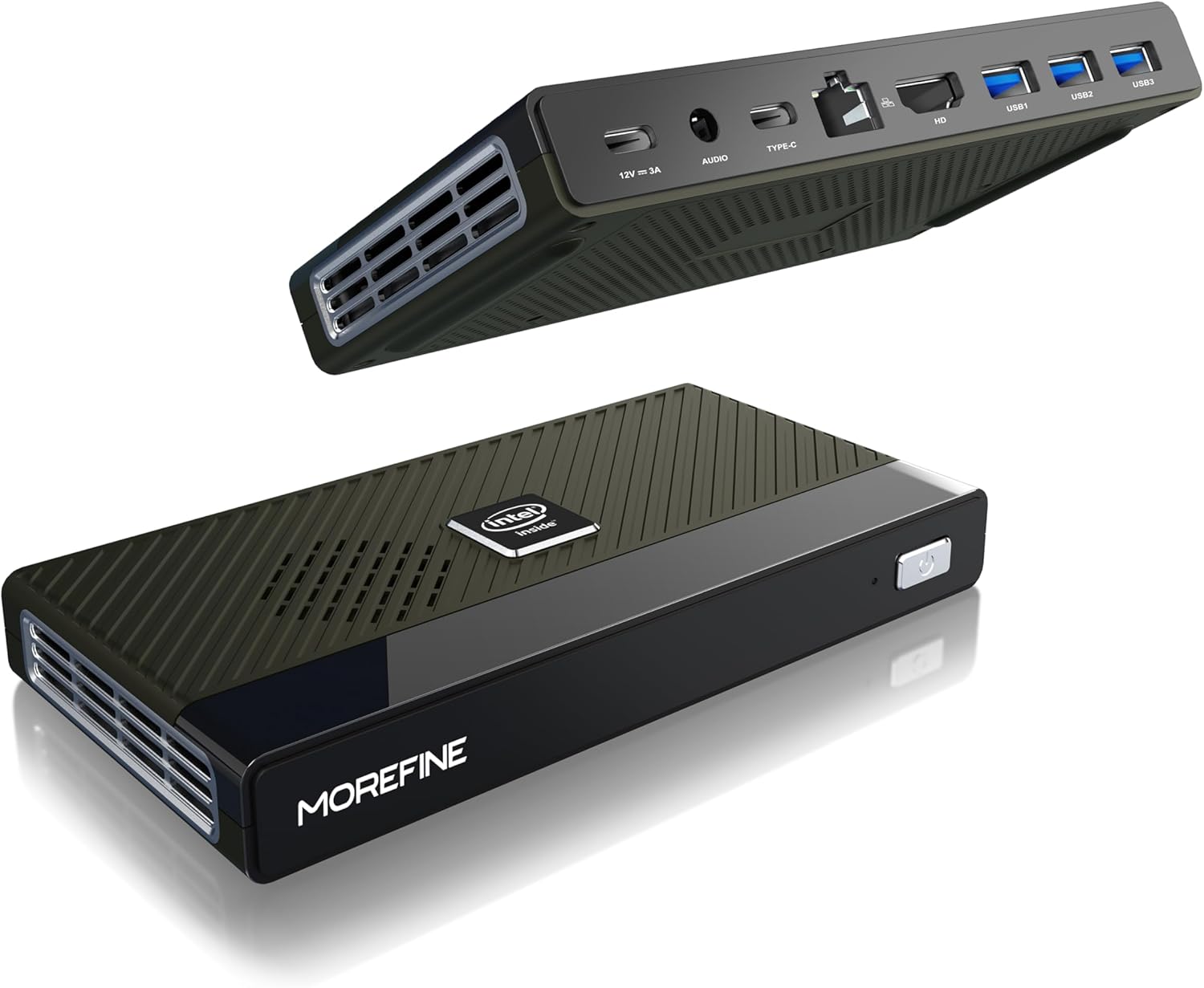
Figure 4.1: MOREFINE M6 Mini PC N200, showcasin컴팩트한 디자인과 포트 배치가 특징입니다.
4.1 포트 및 커넥터
The M6 Mini PC features a comprehensive set of ports for connectivity:

그림 4.2: 상세 view of the MOREFINE M6 Mini PC's input/output ports.
- DC-IN (Type-C): Power input (12V/3A).
- 오디오 잭 : 헤드폰 또는 스피커 연결을 위한 3.5mm 오디오 출력 단자가 있습니다.
- Type-C (Data/Display): Supports 4K@60Hz display output and data transfer.
- 2.5G 랜: Ethernet port for high-speed wired network connection.
- HDMI : HDMI 2.0 port for 4K@60Hz display output.
- USB 3.2 Gen1 (3개): 주변기기 연결을 위한 고속 USB 포트.
4.2 내부 구성 요소
The M6 Mini PC is powered by an Intel Alder Lake N200 processor, offering enhanced performance and energy efficiency. It includes 16GB LPDDR5 RAM and a 1TB PCIe M.2 SSD for fast operation and amp르 스토리지.

Figure 4.3: Intel Alder Lake N200 Processor overview.
The device incorporates a silent copper cooling fan to maintain optimal operating temperatures, ensuring stable performance even under load.

Figure 4.4: Internal components and cooling system.
4.3 Compact Design and Versatility
The M6 Mini PC's compact size (approximately 5.91 x 3.01 x 0.75 inches) and lightweight design make it highly portable and suitable for various applications, including office work, home entertainment, and digital signage.

Figure 4.5: Size comparison of the M6 Mini PC.
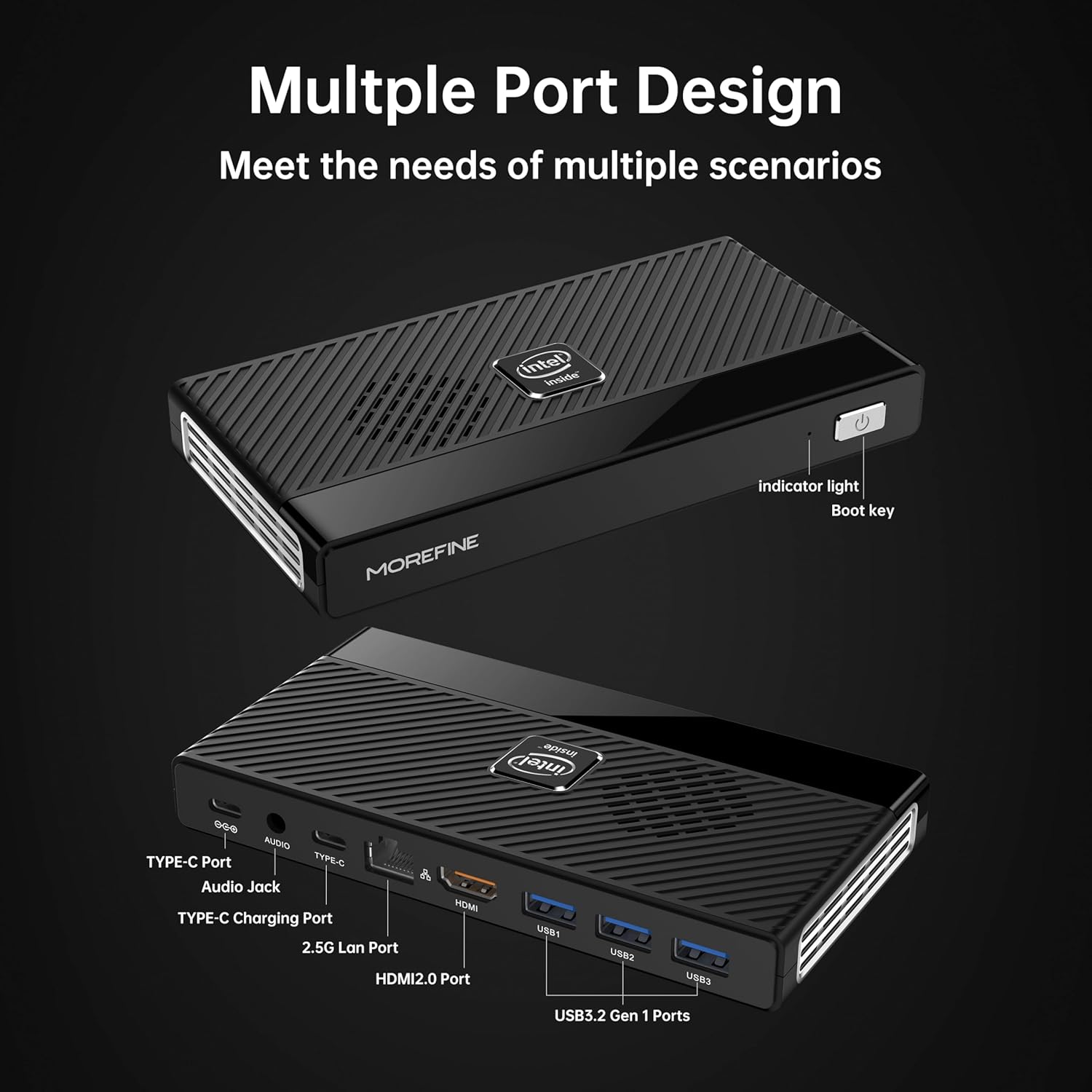
Figure 4.6: Illustrative usage scenarios for the M6 Mini PC.
5. 설정
5.1 초기 연결
Follow these steps to set up your MOREFINE M6 Mini PC:
- 디스플레이 연결: Connect your monitor or TV to the Mini PC using the provided HDMI cable or a compatible Type-C to display cable. The device supports dual 4K@60Hz displays.
- 주변기기 연결: 키보드, 마우스 및 기타 USB 장치를 사용 가능한 USB 3.2 포트에 연결하십시오.
- 네트워크 연결(선택 사항): For a wired internet connection, connect an Ethernet cable to the 2.5G LAN port. Alternatively, the device supports WiFi 6 for wireless connectivity.
- 전원 연결: Connect the power adapter to the DC-IN Type-C port on the Mini PC, then plug the adapter into a power outlet.
5.2 첫 번째 부팅
After connecting all necessary components, press the power button on the front of the Mini PC. The device will power on, and the operating system (OS) setup process will begin. Follow the on-screen instructions to complete the OS configuration.

Figure 5.1: Dual 4K display setup examp르.
비디오 5.1: 오버view of the MOREFINE M6 Mini PC, demonstrating its features and compact design.
6. 사용 설명서
6.1 전원 켜기/끄기
- 전원 켜기: 전원 버튼을 한 번 누르세요. 표시등이 켜집니다.
- 전원 끄기 : To shut down the system, use the operating system's shutdown function. For a forced shutdown, press and hold the power button for approximately 5 seconds.
6.2 듀얼 디스플레이 구성
The M6 Mini PC supports connecting two external displays simultaneously via the HDMI and Type-C ports. Once connected, you can configure display settings within your operating system to extend or duplicate your desktop.
6.3 스토리지 확장
The Mini PC has two PCIe 3.0 SSD slots. One slot supports NVMe/SATA SSDs (up to 2TB), and the other supports NVMe SSDs (up to 2TB). To expand storage:
- Ensure the device is powered off and disconnected from the power supply.
- 미니 PC의 아래쪽 덮개를 조심스럽게 여세요.
- M.2 SSD를 해당 슬롯에 삽입하고 제공된 나사로 고정하십시오.
- 하단 덮개를 교체합니다.
- Upon booting, you may need to initialize and format the new SSD through your operating system's disk management tools.
7. 유지관리
- 청소: Regularly clean the exterior of the Mini PC with a soft, dry cloth. Use compressed air to clear dust from ventilation openings.
- 통풍: Ensure the Mini PC is placed in a well-ventilated area. Do not obstruct the air vents.
- 소프트웨어 업데이트: 최적의 성능과 보안을 유지하려면 운영 체제와 드라이버를 최신 상태로 유지하십시오.
- 데이터 백업: Regularly back up important data to an external storage device or cloud service.
8. 문제 해결
This section addresses common issues you might encounter with your MOREFINE M6 Mini PC.
| 문제 | 가능한 원인 | 해결책 |
|---|---|---|
| 장치의 전원이 켜지지 않습니다. | 전원 어댑터가 연결되지 않았거나 결함이 있습니다. 전원 콘센트 문제입니다. | 전원 어댑터가 기기와 작동하는 콘센트에 제대로 연결되어 있는지 확인하십시오. 다른 콘센트를 사용해 보십시오. |
| 모니터에 표시되지 않습니다. | Display cable loose or faulty; incorrect input selected on monitor. | Check display cable connections. Ensure the monitor is set to the correct input source (HDMI/Type-C). Try a different cable or monitor. |
| 성능이 느립니다. | Too many applications running; insufficient storage space; outdated drivers. | Close unnecessary applications. Free up disk space. Update operating system and drivers. |
| 기기가 뜨겁습니다. | Obstructed ventilation; prolonged heavy usage. | Ensure air vents are clear and the device is in a well-ventilated area. Reduce heavy workload if necessary. If overheating persists, contact support. |
| Wi-Fi에 연결할 수 없습니다. | Wi-Fi module disabled; incorrect password; driver issue. | Check Wi-Fi settings in the OS. Verify password. Ensure Wi-Fi drivers are installed and up to date. |
9. 기술 사양
| 특징 | 사양 |
|---|---|
| 프로세서 | Intel Alder Lake N200 (up to 3.7 GHz, 4 Cores) |
| 숫양 | 16GB LPDDR5 4800MHz (non-removable) |
| 저장 | 1TB PCIe M.2 SSD (expandable via 2 M.2 slots, up to 2TB each) |
| 제도법 | 인텔 UHD 그래픽 |
| 비디오 출력 | HDMI (4K@60Hz) x1, Type-C (4K@60Hz) x1 |
| USB 포트 | USB 3.2 Gen1 x3, Type-C x1 (data/display) |
| 회로망 | 2.5G LAN (RJ45), WiFi 6 (802.11ax) |
| 블루투스 | 블루투스 5.2 |
| 오디오 | 3.5mm 오디오 잭 |
| 운영 체제 | 운영체제 사전 설치됨 (구체적인 버전은 다를 수 있음) |
| 치수 | 대략. 5.90 x 3.07 x 0.75mm(149.86 x 76.5 x 19.05인치) |
| 무게 | 약 0.102온스(240g) |
| 특별 기능 | Wake On LAN, PXE 부팅, RTC 웨이크업, 자동 전원 켜기 |
10. 보증 및 지원
MOREFINE products are designed for reliability and performance. For warranty information, please refer to the documentation included with your purchase or visit the official MOREFINE web대지.
If you encounter any issues or require technical assistance, please contact MOREFINE customer support. You can typically find contact information on the MOREFINE official store page or through the retailer where you purchased the product. When contacting support, please have your product model (M6-N200) and purchase details ready.


