1. 서론
This manual provides essential instructions for the safe and efficient use of your DALI IO-8 Wireless/Wired Hi-Fi Headphones. Please read this manual thoroughly before using the product and retain it for future reference. The DALI IO-8 headphones are designed to deliver a high-fidelity audio experience with advanced features such as Active Noise Cancellation (ANC), Bluetooth AptX Adaptive connectivity, and a long-lasting battery.
2. 제품 오버view
Familiarize yourself with the components and controls of your DALI IO-8 headphones.

그림 2.1: 앞쪽 view of the DALI IO-8 headphones, showcasing the caramel and white color scheme and overall design.

그림 2.2: 위에서 아래로 view of the DALI IO-8 headphones, highlighting the earcups and visible control buttons on the side.
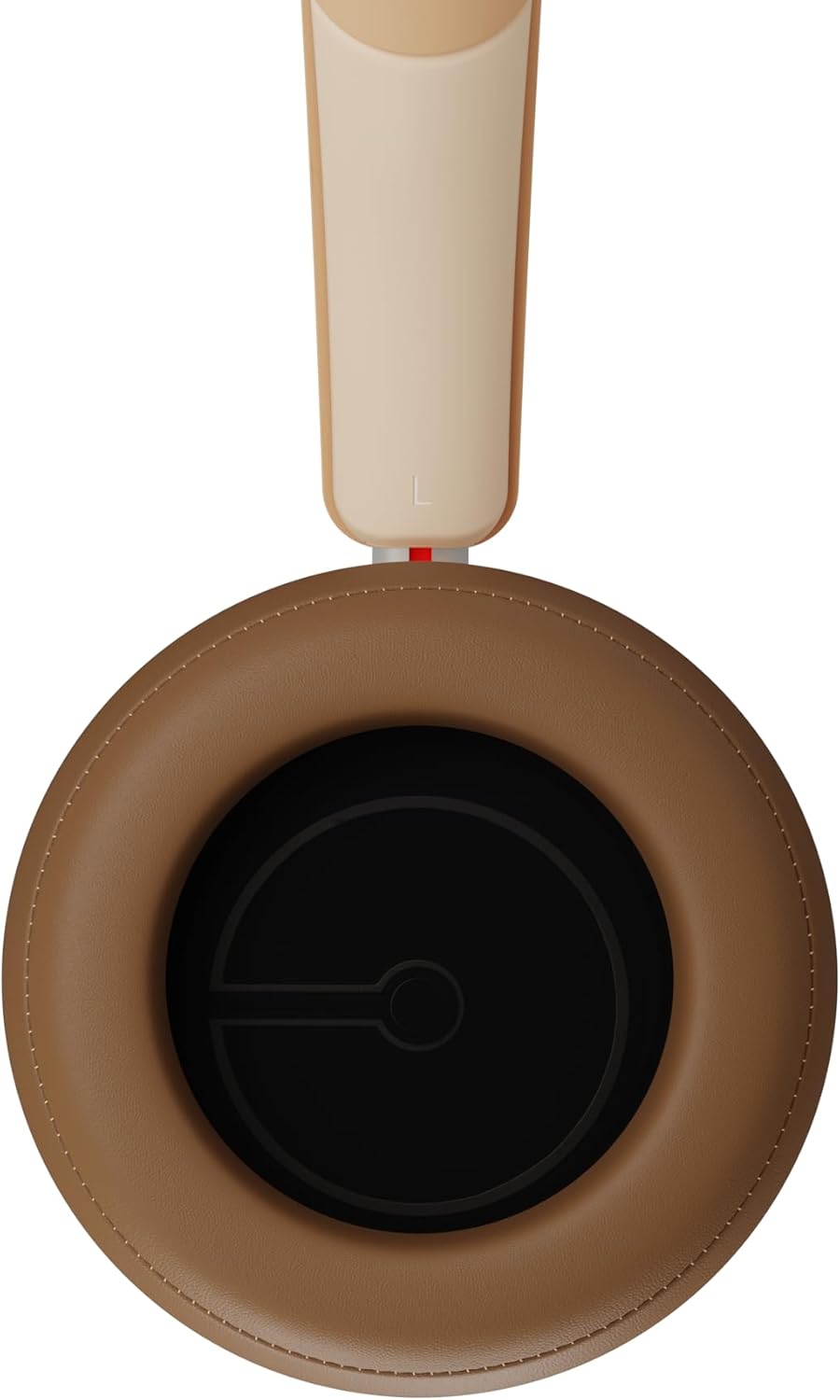
그림 2.3: 내부 view of a DALI IO-8 earcup, showing the soft padding and driver grille, designed for comfort and sound delivery.

그림 2.4: 클로즈업 view of the DALI IO-8 earcup, showing the USB-C charging port and other control buttons.
2.1 패키지 내용
- DALI IO-8 헤드폰
- USB-C 충전 케이블
- 3.5mm 오디오 케이블
- Travel Case (if included)
- 사용 설명서 (본 문서)
2.2 헤드폰 구성 요소

그림 2.5: 폭발했다 view illustrating the internal components of the DALI IO-8 headphones, including the 50mm driver, circuitry, and earcup structure.
- Headband (Adjustable)
- Earcups (Over-ear design with genuine leather)
- 50mm Driver (SMC Driver Technology)
- Control Buttons (Power, Volume, ANC, Multifunction)
- USB-C Port (Charging and Wired Audio)
- 3.5mm Audio Jack (Wired Audio)
- Microphones (for ANC and calls)
3. 설정
3.1 헤드폰 충전
Before initial use, fully charge your DALI IO-8 headphones.
- Connect the supplied USB-C cable to the USB-C port on the headphone earcup.
- USB-C 케이블의 다른 쪽 끝을 호환되는 USB 전원(예: 컴퓨터 USB 포트, USB 벽면 어댑터)에 연결합니다.
- The LED indicator will show charging status. A full charge provides up to 35 hours of playback with ANC enabled.
- 완전히 충전되면 케이블을 분리하세요.
3.2 전원 켜기/끄기
- 전원을 켜려면: Press and hold the Power button for approximately 2 seconds until the LED indicator illuminates.
- 전원을 끄려면: LED 표시등이 꺼질 때까지 약 3초 동안 전원 버튼을 길게 누릅니다.
3.3 블루투스 페어링
The DALI IO-8 supports Bluetooth AptX Adaptive for high-quality wireless audio.
- 헤드폰의 전원이 꺼져 있는지 확인하십시오.
- Press and hold the Power button for approximately 5 seconds until the LED indicator flashes blue rapidly. This indicates pairing mode.
- 오디오 기기(스마트폰, 태블릿, 컴퓨터)에서 블루투스를 활성화하고 사용 가능한 기기를 검색하세요.
- Select "DALI IO-8" from the list of found devices.
- Once paired, the LED indicator will glow solid blue or flash slowly.
- 헤드폰의 전원을 켜면 마지막으로 페어링된 기기에 자동으로 다시 연결을 시도합니다.
3.4 유선 연결
The DALI IO-8 can be used with a wired connection via the 3.5mm audio jack or USB-C.
- 3.5mm 오디오 케이블: Connect one end of the supplied 3.5mm audio cable to the headphone's 3.5mm jack and the other end to your audio source's headphone output. The headphones can be used passively in this mode, or actively with ANC and amplification if powered on.
- USB-C 오디오: Connect the supplied USB-C cable to the headphone's USB-C port and the other end to a compatible USB audio output on your computer or device. This mode allows for digital audio transmission and charging simultaneously.
4. 헤드폰 작동
4.1 능동형 소음 제거(ANC)
The DALI IO-8 features three distinct ANC modes and wind noise suppression.
- Press the dedicated ANC button to cycle through the available modes:
- ANC 켜기: Maximum noise cancellation.
- 투명 모드: Allows ambient sounds to pass through for situational awareness.
- ANC 끄기: Active noise cancellation is disabled.
- Wind noise suppression is automatically engaged in ANC modes to reduce interference from wind.
4.2가지 사운드 모드
Customize your listening experience with two sound profiles.
- Press the Sound Mode button (if available, or refer to specific button on device) to switch between:
- 하이파이 모드: Delivers a balanced and neutral sound signature.
- 베이스 모드: Enhances low-frequency response for a more impactful bass.
4.3 Playback and Volume Control
Use the control buttons on the earcup for media playback and volume adjustments.
- 볼륨 업: '+' 버튼을 누르세요.
- 볼륨 작게 : '-' 버튼을 누르세요.
- 재생/일시 중지: 다기능 버튼을 한 번 누릅니다.
- 다음 트랙: 다기능 버튼을 두 번 누르세요.
- 이전 트랙 : 다기능 버튼을 세 번 누르세요.
4.4 통화 관리
Manage phone calls when connected via Bluetooth.
- 전화 받기/종료: 다기능 버튼을 한 번 누릅니다.
- 전화 거부: 다기능 버튼을 2초 동안 길게 누릅니다.
- Voice Assistant 활성화 : Press and hold the Multifunction button for 2 seconds (when not on a call).
5. 유지관리
5.1 청소
- 부드럽고 마른 보푸라기 없는 천으로 헤드폰을 닦으세요.
- 연마성 세척제, 용제 또는 화학 스프레이를 사용하지 마십시오.
- 이어컵의 경우, 가볍게 d로 닦아주세요.amp 필요하다면 천으로 닦아낸 후 바로 말리세요.
- 포트나 개구부에 습기가 들어가지 않도록 하십시오.
5.2 보관
- When not in use, store the headphones in their protective travel case to prevent damage.
- 헤드폰을 극한의 온도, 습도 또는 직사광선에 노출시키지 마세요.
6. 문제 해결
| 문제 | 가능한 원인 | 해결책 |
|---|---|---|
| 전원이 없습니다 | 배터리가 소진되었습니다. | 제공된 USB-C 케이블을 사용하여 헤드폰을 충전하세요. |
| 블루투스로 페어링이 불가능합니다 | 헤드폰이 페어링 모드가 아닙니다. 기기의 Bluetooth가 꺼져 있습니다. 기기와 너무 멀리 떨어져 있습니다. | Ensure headphones are in pairing mode (rapid blue LED flash). Turn on Bluetooth on your device. Move headphones closer to the device. Forget "DALI IO-8" on your device and re-pair. |
| 소리가 나지 않습니다 | Volume too low; incorrect input source; headphones not connected. | Increase volume on headphones and source device. Check Bluetooth connection or wired cable. Ensure the correct audio output is selected on your device. |
| ANC가 효과적으로 작동하지 않음 | ANC mode off; poor earcup seal. | Ensure ANC is enabled. Adjust headphones for a proper seal around your ears. |
7. 사양
| 특징 | 세부 사항 |
|---|---|
| 모델명 | DALI IO-8 |
| 상표 | 달리 |
| 연결 기술 | 유선, 무선(블루투스) |
| 무선 통신 기술 | Bluetooth (AptX Adaptive) |
| 소음 제거 | Active Noise Suppression (ANC) with Wind Noise Suppression |
| 귀 위치 | 오버이어 |
| 드라이버 크기 | 50mm (SMC Driver Technology) |
| 임피던스 | 25옴 |
| 헤드폰 잭 | 3.5mm (XNUMXmm) |
| 배터리 수명 | 최대 35시간(ANC 사용 시) |
| 재료 | Genuine Leather (earcups) |
8. 안전 정보
Please observe the following safety guidelines to ensure safe operation and prevent damage to your headphones or injury to yourself.
- Do not expose the headphones to water, rain, or moisture.
- 극한의 온도를 피하세요.
- Do not disassemble, repair, or modify the headphones. This voids the warranty.
- 청력 손상을 예방하려면 적당한 볼륨으로 들으세요.
- 어린이의 손이 닿지 않는 곳에 보관하세요.
- 현지 규정에 따라 책임감 있게 제품을 폐기하십시오.
9. 보증 및 지원
DALI products are manufactured to high standards and are covered by a limited warranty. For specific warranty terms and conditions, please refer to the warranty card included with your product or visit the official DALI website. For technical support, troubleshooting assistance, or service inquiries, please contact your authorized DALI dealer or DALI customer support.

그림 9.1: A person wearing the DALI IO-8 headphones, demonstrating their comfortable fit and use in a real-world environment.