1. 서론
Thank you for choosing the EvoFox Ronin Wired Mechanical Gaming Keyboard. This manual provides detailed instructions for setting up, operating, and maintaining your keyboard to ensure optimal performance and longevity. The EvoFox Ronin is designed for a superior typing and gaming experience, featuring advanced sound dampening, customizable switches, and dynamic RGB lighting.

Image 1.1: EvoFox Ronin Wired Mechanical Gaming Keyboard (Black)
주요 특징:
- 9-Layer Gasket Structure: Advanced design for reduced noise, improved stability, and enhanced tactile feedback.
- Hot-Swappable Outemu Red Silent Switches: Customizable, durable, and smooth typing experience with included switch puller.
- 키별 RGB 백라이트: 21 effects and Audio Sync Mode for personalized and immersive lighting.
- 전용 볼륨 노브: Convenient control over audio levels.
- Powerful Windows Software: Program keys, create macros, control backlighting, and manage profiles with onboard memory.
- 크로스 플랫폼 호환성: Easily switch between Windows and Mac modes.
- Detachable Braided USB-C Cable: Robust 1.5m cable with EMI ring for reliable connection and portability.
2. 패키지 내용
패키지에 모든 품목이 들어 있는지 확인하세요.
- 1 x EvoFox Ronin Mechanical Gaming Keyboard
- 1 x 키캡 풀러
- 4 x Outemu Red Switches (Spare)
- 1 x 사용자 설명서
3. 제품 오버view
3.1 가스켓 구조
The EvoFox Ronin features an advanced 9-layer gasket structure. This design incorporates silicone gaskets, a mounting plate, and multiple layers of vibration and sound dampening materials to provide a stable, quiet, and comfortable typing experience by minimizing unwanted noise and resonance.
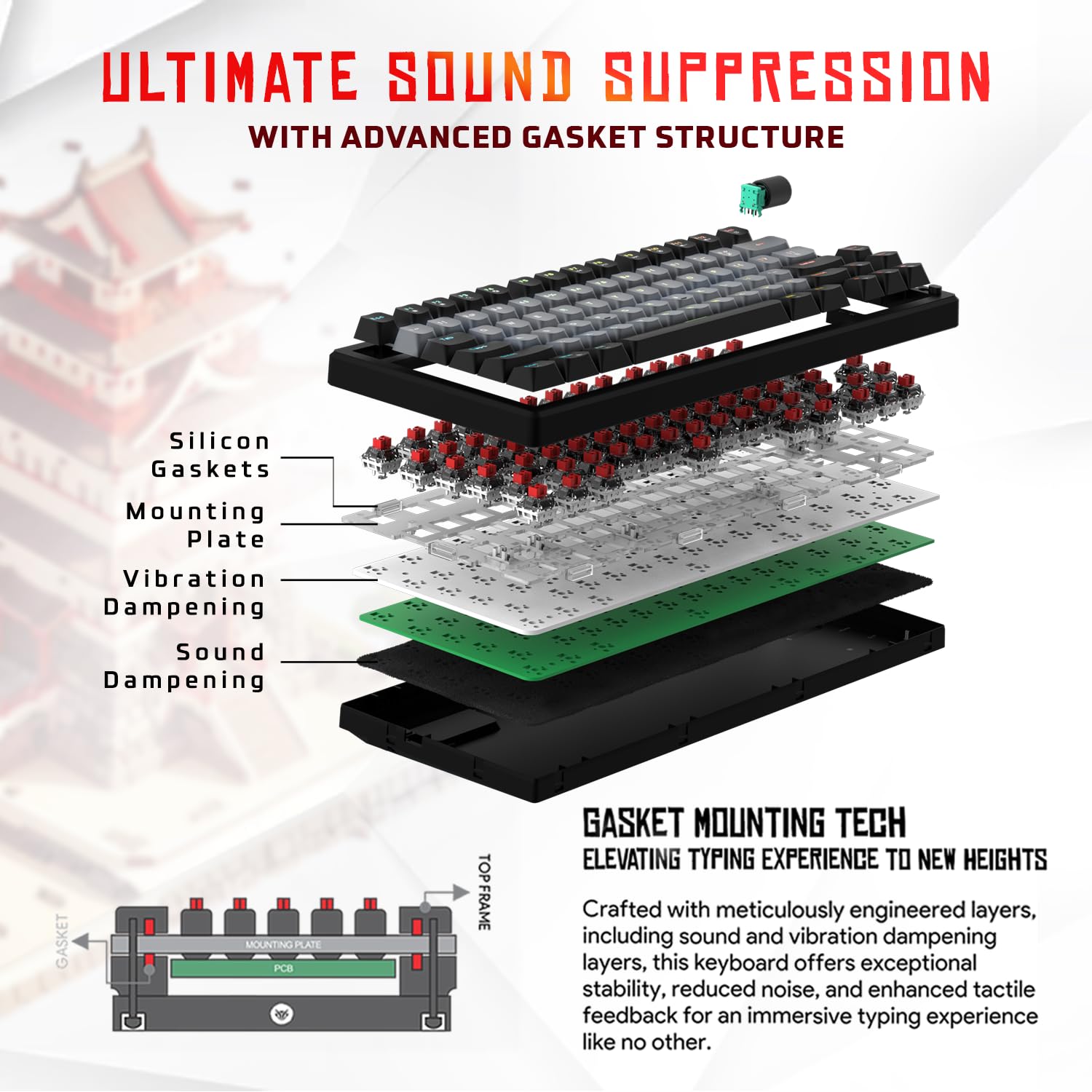
이미지 3.1: 폭발 view of the 9-layer gasket structure, showing silicone gaskets, mounting plate, and damp층을 쌓아 올리다.
3.2 Outemu Red Silent Switches
The keyboard is equipped with Outemu Red Dust Proof Switches, known for their linear and silent operation. These switches are hot-swappable, allowing users to easily replace them with other compatible 3-pin mechanical switches without soldering, enabling full customization of the typing feel.
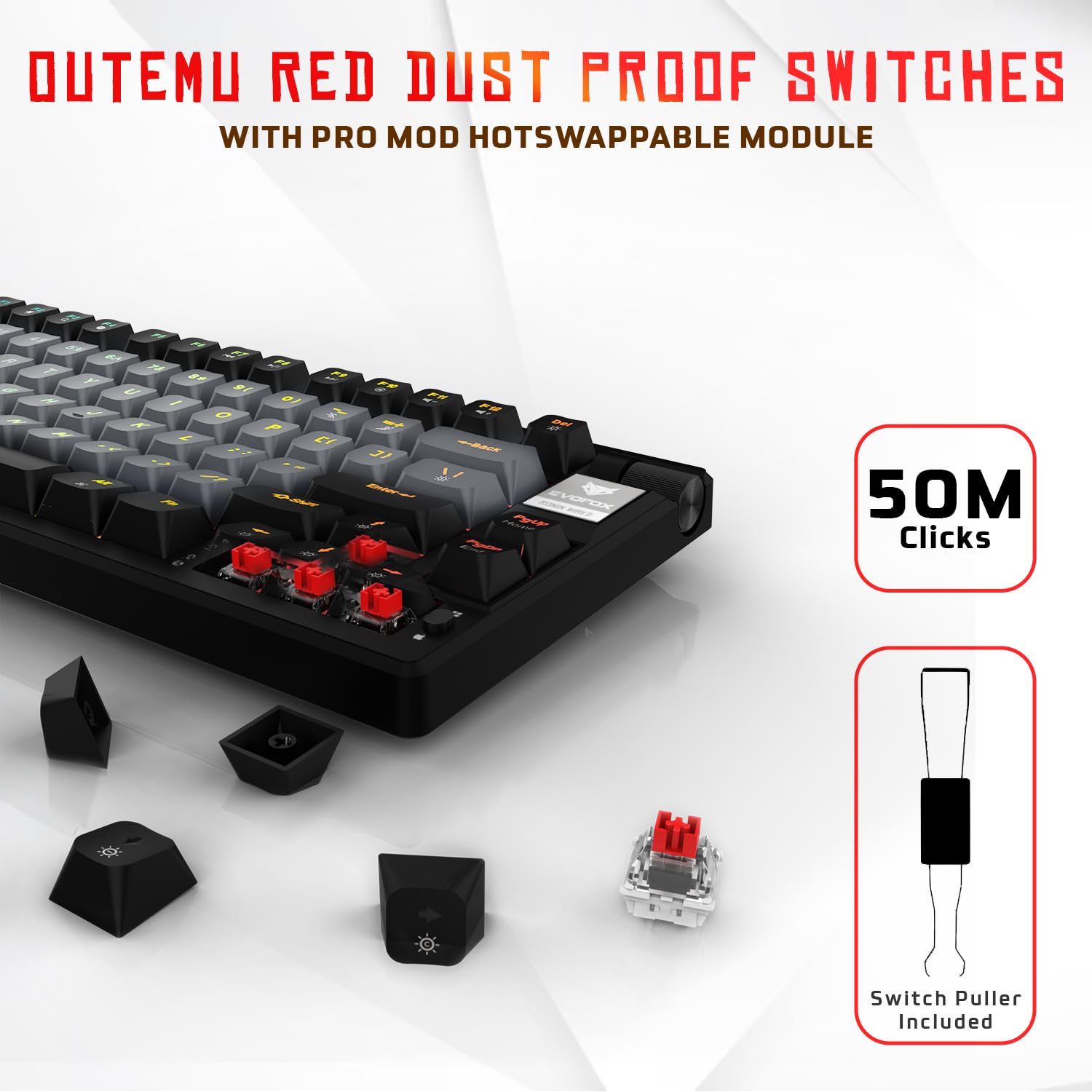
Image 3.2: Close-up of Outemu Red switches and the included switch puller, demonstrating hot-swappable functionality.
3.3 Per-Key RGB Backlighting
Each key on the EvoFox Ronin features individual RGB backlighting, offering 16 million colors and 21 pre-set lighting effects. The lighting can be customized directly on the keyboard or through the dedicated software, including an Audio Sync Mode that reacts to sound.

Image 3.3: The EvoFox Ronin keyboard showcasing its customizable per-key RGB backlighting.
3.4 Dedicated Volume Knob
A metal volume knob is integrated into the keyboard for quick and precise audio adjustments. Rotate to change volume, and press to mute/unmute.
3.5 Detachable USB-C Cable
The keyboard connects via a robust 1.5-meter braided USB-C cable, which is detachable for easy portability and storage. The cable includes an EMI ring to minimize signal interference.

Image 3.4: Features of the EvoFox Ronin, including the volume knob, detachable USB-C cable, and double-height adjustable legs.
4. 설정 지침
Follow these steps to set up your EvoFox Ronin keyboard:
- 키보드 풀기: 키보드와 모든 액세서리를 포장에서 조심스럽게 꺼내세요.
- USB-C 케이블을 연결합니다. 제공된 케이블의 USB-C 단자를 키보드 뒷면의 포트에 삽입하십시오.
- 컴퓨터에 연결: 케이블의 USB-A 단자를 컴퓨터(PC 또는 Mac)의 사용 가능한 USB 포트에 꽂으세요.
- 드라이버 설치: 키보드는 플러그 앤 플레이 방식입니다. 운영 체제가 필요한 드라이버를 자동으로 감지하여 설치합니다.
- 선택적 소프트웨어 설치: For advanced customization, download the dedicated Windows software from the official EvoFox web대지.
5. 사용 설명서
5.1 기본 키 기능
The EvoFox Ronin functions as a standard TKL (Tenkeyless) keyboard. All keys perform their labeled functions. The keyboard supports N-Key Rollover, ensuring every key press is registered accurately, even during rapid input.
5.2 멀티미디어 및 기능 키
Access multimedia and additional functions by pressing the Fn key in combination with the designated F-keys or other keys. Refer to the keycap legends for specific functions (e.g., Fn + F1 for media player, Fn + F2 for volume down).
5.3 RGB 조명 제어
You can control the RGB lighting directly from the keyboard:
- 변화 효과: 사용 Fn + \| 21가지의 다양한 조명 효과를 순환하며 사용할 수 있습니다.
- 밝기 조정: 사용 Fn + 위쪽 화살표 밝기를 높이고 Fn + 아래쪽 화살표 밝기를 낮추려면.
- 속도 조정: 사용 Fn + 왼쪽 화살표 효과 속도를 줄이기 위해 Fn + 오른쪽 화살표 효과 발현 속도를 높이기 위해.
- Audio Sync Mode: Activate specific modes that react to audio input.
5.4 소프트웨어 사용자 정의
The dedicated Windows software allows for comprehensive customization:
- 주요 프로그래밍: 모든 키를 다른 기능으로 다시 매핑합니다.
- 매크로 생성: Record and assign complex key sequences to a single key.
- Backlighting Effects: Fine-tune RGB colors, effects, brightness, and speed.
- 찬성file 관리: 여러 개의 프로를 생성하고 저장하세요file다양한 애플리케이션이나 게임에 적합합니다.
- 폴링 속도: 폴링 속도를 최대 1000Hz까지 조정합니다.

Image 5.1: Screenshot of the EvoFox Ronin's dedicated software, showing options for light settings, button settings, and macro management.
5.5 플랫폼 간 호환성
The keyboard supports both Windows and Mac operating systems. Use the designated key combination (typically Fn + Win or similar, refer to keycap legends) to switch between modes, ensuring correct key mapping for your OS.
6. 유지관리
6.1 키보드 청소
키보드의 모양과 기능을 유지하려면:
- 청소하기 전에 키보드를 컴퓨터에서 분리하세요.
- 압축 공기 캔을 사용하여 키캡 사이의 먼지와 이물질을 제거합니다.
- 키캡과 키보드 표면은 부드럽고 약간 d로 닦으세요.amp 천으로 닦아주세요. 과도한 습기는 피해주세요.
- 독한 화학 물질이나 연마성 세제를 사용하지 마십시오.
6.2 스위치 교체
The EvoFox Ronin features hot-swappable switches, allowing for easy replacement without soldering:
- 키보드를 컴퓨터에서 분리합니다.
- 포함된 키캡 풀러를 사용하여 원하는 키캡을 조심스럽게 제거하세요.
- 동봉된 스위치 풀러를 사용하여 스위치의 위쪽과 아래쪽 클립을 조심스럽게 잡고 위로 똑바로 당기십시오.
- Align the pins of the new switch with the holes on the PCB and gently press it down until it clicks into place. Ensure the pins are not bent.
- 키캡을 교체하세요.

Image 6.1: A keycap being removed from the keyboard using a keycap puller.
7. 문제 해결
If you encounter issues with your EvoFox Ronin keyboard, refer to the following common solutions:
- 키보드가 응답하지 않음:
- USB-C 케이블이 키보드와 컴퓨터에 모두 단단히 연결되어 있는지 확인하세요.
- 키보드를 컴퓨터의 다른 USB 포트에 연결해보세요.
- 다른 컴퓨터에서 키보드를 테스트하여 컴퓨터 특정 문제인지 확인하세요.
- 컴퓨터를 다시 시작하세요.
- RGB 조명이 작동하지 않음/잘못됨:
- Check the on-board lighting controls (Fn key combinations) to ensure brightness is not set to zero or an effect is not disabled.
- 소프트웨어를 사용하는 경우, 소프트웨어가 실행 중이고 올바른 프로그램인지 확인하십시오.file 활성화되어 있습니다.
- Reinstall the keyboard software if issues persist.
- 키가 등록되지 않음:
- 키캡이나 스위치 아래에 이물질이 끼지 않았는지 확인하세요.
- If a specific key is not working, try replacing its switch (refer to Section 6.2).
- Check for bent pins on the switch if you recently replaced one.
- Software Issues (e.g., Antivirus Flagging):
- Ensure you download the software from the official EvoFox website to avoid unofficial versions.
- If your antivirus flags the software, you may need to add an exception for the software's executable file. Proceed with caution and only if you trust the source.
- Contact EvoFox support for the latest software version or assistance.
8. 사양
| 특징 | 세부 사항 |
|---|---|
| 상표 | 에보폭스 |
| 모델명 | EvoFox Ronin TKL Wired |
| 키보드 설명 | 기계적 |
| 연결 기술 | USB-C(유선) |
| 스위치 | Outemu Red Silent Dust Proof Switches (Hot-Swappable) |
| 백라이트 | Per-Key RGB (16 Million Colors, 21 Effects, Audio Sync Mode) |
| 폴링 속도 | 최대 1000Hz |
| 키 롤오버 | N-Key Rollover (All Anti-Ghosting Keys) |
| 특별 기능 | Advanced Gasket Structure, Compact TKL Design, Multimedia Keys, Pro Mod Hotswap Module, Powerful Windows Software, Dedicated Volume Controller |
| 호환 장치 | 노트북, PC |
| 하드웨어 플랫폼 | PC/Mac/Linux/Unix |
| 케이블 길이 | 1.5m Detachable Braided Type-C with EMI Ring |
| 재료 | 플라스틱 |
| 제품 치수 | 32 x 13.5 x 2.6cm |
| 품목 무게 | 640g |
| 원산지 | 중국 |
9. 보증 및 지원
The EvoFox Ronin Mechanical Gaming Keyboard comes with a standard manufacturer's warranty. Please refer to the warranty card included in your package for specific terms and conditions, including warranty period and coverage details.
For technical support, troubleshooting assistance, or warranty claims, please contact EvoFox customer support. You can find contact information on the official EvoFox website or through the manufacturer, Allied Electronics & Magnetics Private Limited.
제조업체: Allied Electronics & Magnetics Private Limited
주소: C-64/4, Okhla Phase - 2, New Delhi - 110020


