1. 서론
Thank you for choosing Blackview Smart Glasses. These innovative sunglasses combine stylish design with advanced audio technology, allowing you to enjoy music, make calls, and interact with your voice assistant while staying aware of your surroundings. This manual provides detailed instructions for setup, operation, and maintenance to ensure optimal performance and longevity of your device.

그림 1: 전면 view 블랙view Smart Glasses.
2. 제품 특징
- 블루투스 5.3 기술: Ensures faster and more stable signal transmission with low latency, offering a connection range of up to 12 meters.
- IP65 방수 등급: Protects against sweat and small raindrops, suitable for outdoor activities and gym use.
- 원스텝 페어링: After initial pairing, the glasses automatically reconnect to the last paired device upon opening.
- 폭넓은 호환성: Compatible with various devices including smartphones and computers.
- Immersive Open Ear Sound: Features an open headphone speaker design, dynamic drivers, and ultra-sensitive polymer diaphragms for rich, balanced audio without isolating you from your environment.
- Unparalleled Call Clarity: Advanced microphone design with noise reduction technology suppresses up to 90% of background noise for clear communication.
- 직관적인 터치 컨트롤: Manage playback, volume, calls, and voice assistant activation directly from the glasses.
- 연장 근무 시간: Equipped with 80mAh+80mAh rechargeable batteries, providing approximately 7 hours of communication, 6 hours of music playback, and 160 hours of standby time.
3. 제품 오버view
Familiarize yourself with the components of your Blackview 스마트 안경:

Figure 2: Key components of the Smart Glasses.
- 렌즈: TAC+UV400 (UV resistant)
- Nose Bridge: Provides comfortable fit.
- 터치 버튼 : For various control functions.
- Stereo-speaker: Delivers open-ear audio.
- 내장 마이크 : 선명한 통화 품질을 위해.
- Charging Indicator Port: For magnetic charging.
- 거울 프레임: PC+light steel construction.
4. 사양
Refer to the following specifications for your Blackview 스마트 안경:
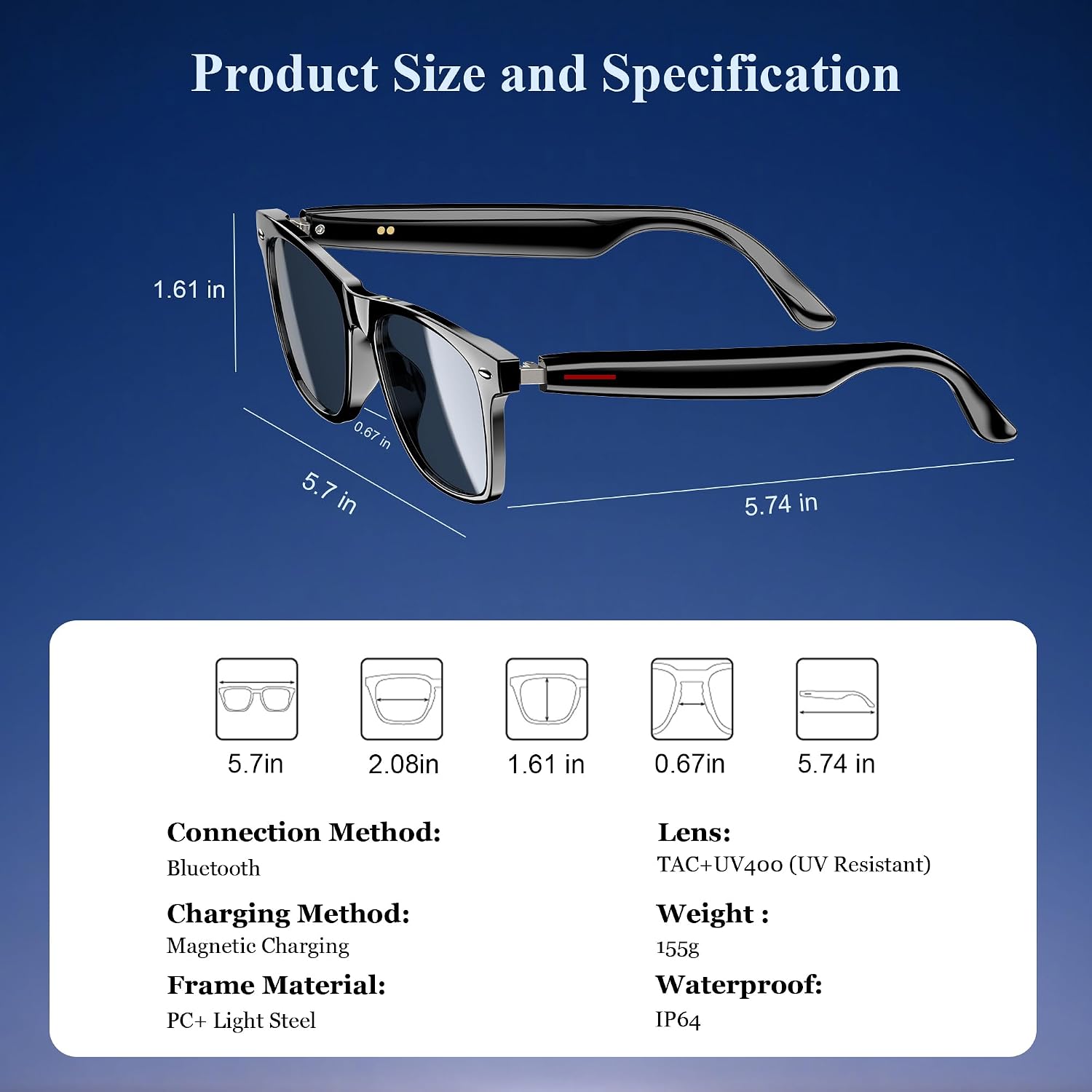
그림 3: 제품 치수 및 주요 사양.
| 사양 | 값 |
|---|---|
| 블루투스 버전 | 5.3 |
| 방수 등급 | IP65 |
| 배터리 용량 | 80mAh+80mAh |
| 통신 시간 | 약 7시간 |
| 음악 재생 시간 | 약 6시간 |
| 대기 시간 | 약 160시간 |
| 충전 시간 | Approx. 1.2 hours (magnetic charge) |
| 렌즈 유형 | TAC+UV400 (UV Resistant) |
| 프레임 소재 | PC + Light Steel |
| 품목 무게 | 4.6 온스 |
| 패키지 크기 | 6.65 x 2.36 x 1.93 인치 |
5. 상자 안에 무엇이 들어있나요?
당신의 검은색view Smart Glasses package includes:
- 스마트 선글라스
- 자기 충전 케이블
- 청소용 천
- 사용자 설명서
6. 설정
6.1. 안경 충전하기
처음 사용하기 전에 Black을 완전히 충전하십시오.view Smart Glasses. Use the provided magnetic charging cable.
- Connect the magnetic charging cable to the charging port on the temple of the glasses.
- 케이블의 다른 쪽 끝을 USB 전원(예: 컴퓨터, 벽면 어댑터)에 연결합니다.
- The charging indicator light will illuminate (usually red) during charging and turn off or change color (usually blue/green) when fully charged.
- 완전 충전에는 약 1.2시간이 걸립니다.

그림 4: 자석식 충전 연결.
6.2. 전원 켜기/끄기
- 전원 켜기: Long touch the touch button on the temple for 5 seconds until you hear a power-on prompt.
- 전원 끄기 : Long touch the touch button for 5 seconds until you hear a power-off prompt.
6.3. 블루투스 페어링
- 안경이 충전되어 있고 전원이 켜져 있는지 확인하세요.
- 스마트폰이나 기기에서 Bluetooth를 활성화하고 사용 가능한 기기를 검색하세요.
- Select "Blackview Smart Glasses" (or similar name) from the list to pair.
- Once paired, the glasses will automatically reconnect to your device when powered on and within range.
7. 사용 설명서
당신의 검은색view Smart Glasses feature intuitive touch controls located on the temples:

Figure 5: Touch control functions.
- 음악 재생/일시 중지: One-tap the touch button on either temple.
- 다음 트랙: Twice-tap the touch button on the right temple.
- 이전 트랙 : Twice-tap the touch button on the left temple.
- 볼륨 높이기/낮추기: (Specific gesture not detailed in image, typically long press or swipe, refer to quick start guide if included).
- 전화 받기/끊기: One-tap the touch button on either temple.
- Voice Assistant 활성화 : Long touch the touch button for 2 seconds.
- 원격 촬영: Double click the touch button to trigger your phone's camera shutter.

Figure 6: Voice assistant activation examp르.
8. 관리 및 유지 보수
To ensure the longevity and optimal performance of your smart glasses, follow these care guidelines:
- 청소: 제공된 세척용 천을 사용하여 렌즈와 프레임을 부드럽게 닦으세요. 연마재나 강한 화학 물질은 사용하지 마세요.
- 방수 기능: The glasses have an IP65 rating, meaning they are resistant to sweat and light splashes of water. Do not submerge them in water or expose them to heavy rain.
- 저장: Store the glasses in a protective case when not in use to prevent scratches and damage. Avoid exposing them to extreme temperatures.
- 충격 방지: While the lenses are strong, avoid dropping the glasses or subjecting them to strong impacts.

Figure 7: Smart Glasses demonstrating water resistance.
9. 문제 해결
블랙 제품 사용 중 문제가 발생하면view Smart Glasses, refer to the following common solutions:
- 전원 없음: Ensure the glasses are fully charged. Connect them to the magnetic charger and check the indicator light.
- 페어링할 수 없습니다:
- Ensure Bluetooth is enabled on your device and the glasses are in pairing mode (usually indicated by a flashing light).
- Make sure the glasses are not already connected to another device. Turn off Bluetooth on other nearby devices.
- Restart both the glasses and your device, then attempt pairing again.
- 소리가 나지 않음/볼륨이 낮음:
- 안경과 연결된 기기의 볼륨 레벨을 모두 확인하세요.
- Ensure the glasses are properly positioned on your ears for optimal open-ear audio.
- Verify that the glasses are correctly paired and selected as the audio output device on your phone.
- 통화 품질 문제:
- 마이크가 가려지지 않았는지 확인하세요.
- 배경 소음이 적은 곳으로 이동하세요.
- Check your phone's signal strength.
- 반응하지 않는 터치 컨트롤:
- 손가락이 깨끗하고 건조한지 확인하세요.
- 안경을 다시 시작하세요.
이러한 조치를 취해도 문제가 해결되지 않으면 Black에 문의하십시오.view 추가 지원을 위한 고객 지원.
10. 공식 제품 영상
자세한 내용은 공식 제품 비디오를 시청하세요.view 검은색의view Smart Glasses features and usage:
비디오 1: 블랙view Polarized Sport Smart Sunglasses for Men and Women. This video highlights the design and features of the smart sunglasses, including their polarized lenses and smart capabilities.


