1. 서론
Thank you for choosing the RUJIXU Large Digital Kitchen Scale. This precision instrument is designed for accurate weighing in various settings, from home kitchens to commercial environments. With a maximum capacity of 30kg (66lb) and multiple functions including tare, unit conversion, price computing, and counting, this scale offers versatility and reliability. Please read this manual thoroughly before use to ensure proper operation and longevity of your device.
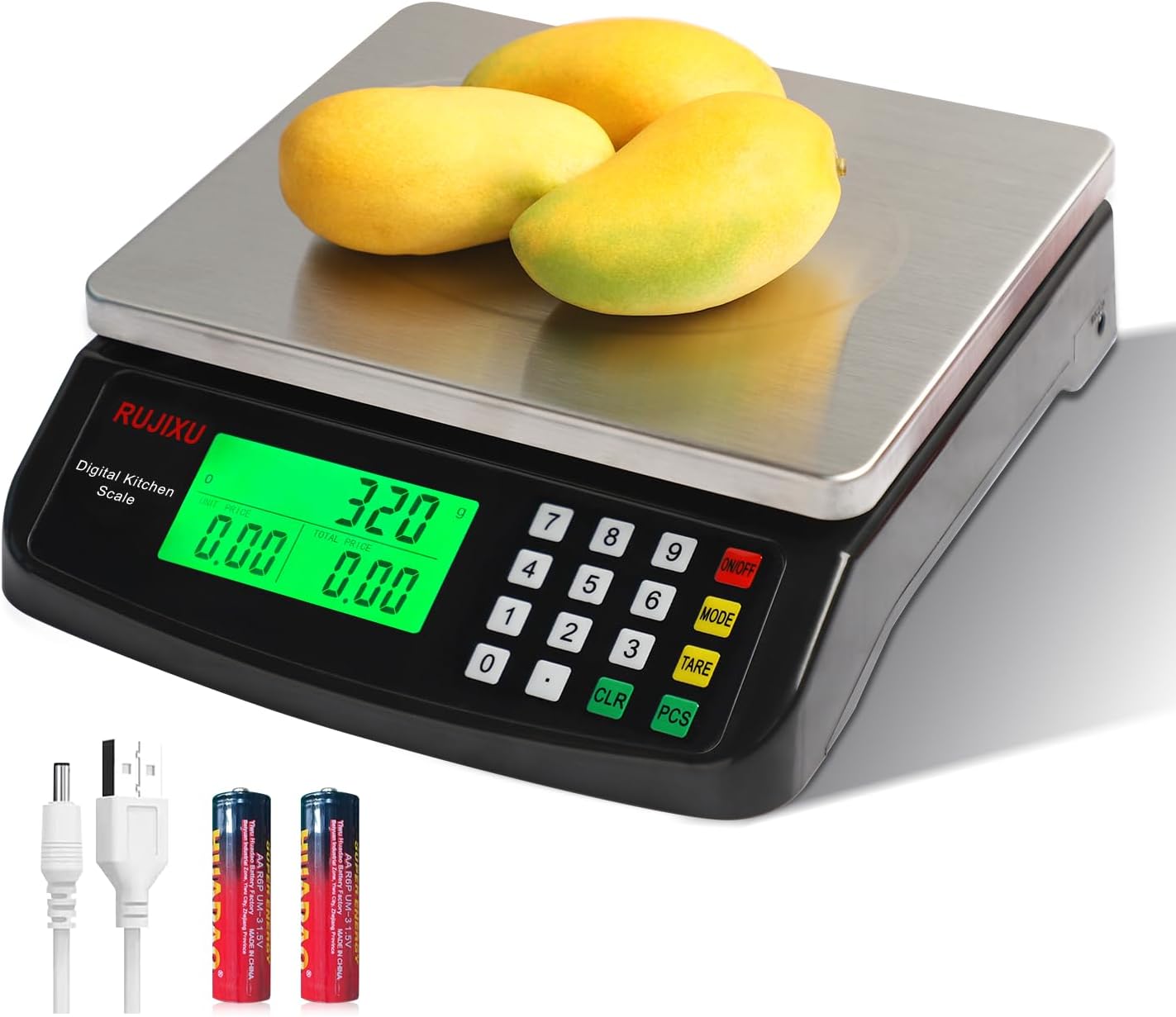
Image 1.1: RUJIXU Large Digital Kitchen Scale (Model DT-580)
2. 제품 구성품 및 특징
2.1 주요 특징
- 대용량: Weighs items from 3g up to 30kg (66lb).
- 여러 장치: Supports grams (G), kilograms (KG), pounds (LB), and ounces (OZ).
- 용기 기능: Allows subtraction of container weight for net measurements.
- 계수 함수(PCS): Enables counting of small, identical items.
- Price Computing: Calculates price based on weight and unit price input.
- LCD 백라이트 디스플레이: Provides clear and easy-to-read measurements, even in varying light conditions.
- 내구성 있는 구조: Features a stainless steel platform and ABS plastic frame.
- 이중 전원 공급 장치: Operates with an AC power adapter or 2x 1.5V AA batteries (not included).
- 자동 종료: Automatically shuts off after 120 seconds of inactivity to conserve power.
2.2 치수

Image 2.1: Scale Dimensions
The scale features a stainless steel weighing surface measuring approximately 7 inches by 8.7 inches (18cm by 22cm). The overall product dimensions are 9.8 x 9 x 2.5 inches (24.9 x 22.9 x 6.4 cm).
3. 설정
3.1 풀기
Carefully remove all components from the packaging. Ensure that the scale, AC power adapter, and user manual are present.
3.2 전원 공급
The scale can be powered by either the included AC power adapter or two 1.5V AA batteries (not included).
- AC 전원: Connect the AC power adapter to the scale's power input port and then plug it into a standard electrical outlet.
- 배터리 전원: Open the battery compartment on the underside of the scale and insert two 1.5V AA batteries, observing the correct polarity.
메모: The two power sources cannot be used simultaneously. If both are connected, the scale will prioritize AC power.

Image 3.1: Power Supply Modes
3.3 배치
Place the scale on a firm, flat, and stable surface to ensure accurate readings. Avoid placing it near strong electromagnetic fields, vibrations, or extreme temperature changes.
4. 운영
4.1 켜기/끄기
- 저울을 켜려면 버튼을 누르세요. 켜짐/꺼짐 button. The display will light up and show "0.000".
- 저울을 끄려면 버튼을 길게 누르세요. 켜짐/꺼짐 디스플레이가 꺼질 때까지 몇 초 동안 버튼을 누르세요.
4.2 유닛 전환
The scale supports four units of measurement: grams (G), kilograms (KG), pounds (LB), and ounces (OZ).
- 저울을 켜고 다음을 누르세요. 방법 button to cycle through the available units. The selected unit will be displayed on the LCD screen.

Image 4.1: Unit Switching
4.3 용기 기능
용기 무게 제외 기능은 용기의 무게를 빼고 내용물의 순중량만 측정할 수 있도록 해줍니다.
- Place the empty container on the weighing platform. The display will show the container's weight.
- 를 누르세요 살갈퀴 버튼을 누르면 디스플레이가 "0.000"으로 재설정됩니다.
- Add the items you wish to weigh into the container. The display will now show only the weight of the items.

Image 4.2: Tare Function Steps
4.4 계수 기능(PCS)
The PCS function is useful for counting small, identical items such as screws, coins, or beads.
- Turn on the scale and ensure it reads "0.000".
- 를 누르고 계세요 PC(전자제품) button for approximately 5 seconds. The display will show a sample size (e.g., "25").
- Use the number pad to enter the quantity of items you will use as a sample (e.g., "10", "20", "50", "100").
- s를 놓으세요ample quantity of items on the platform.
- 를 누르세요 PC(전자제품) 버튼을 다시 눌러 확인하세요.amp저울은 이제 계수를 위해 보정되었습니다.
- s를 제거ample and place the bulk quantity of items you wish to count on the platform. The display will show the total count.
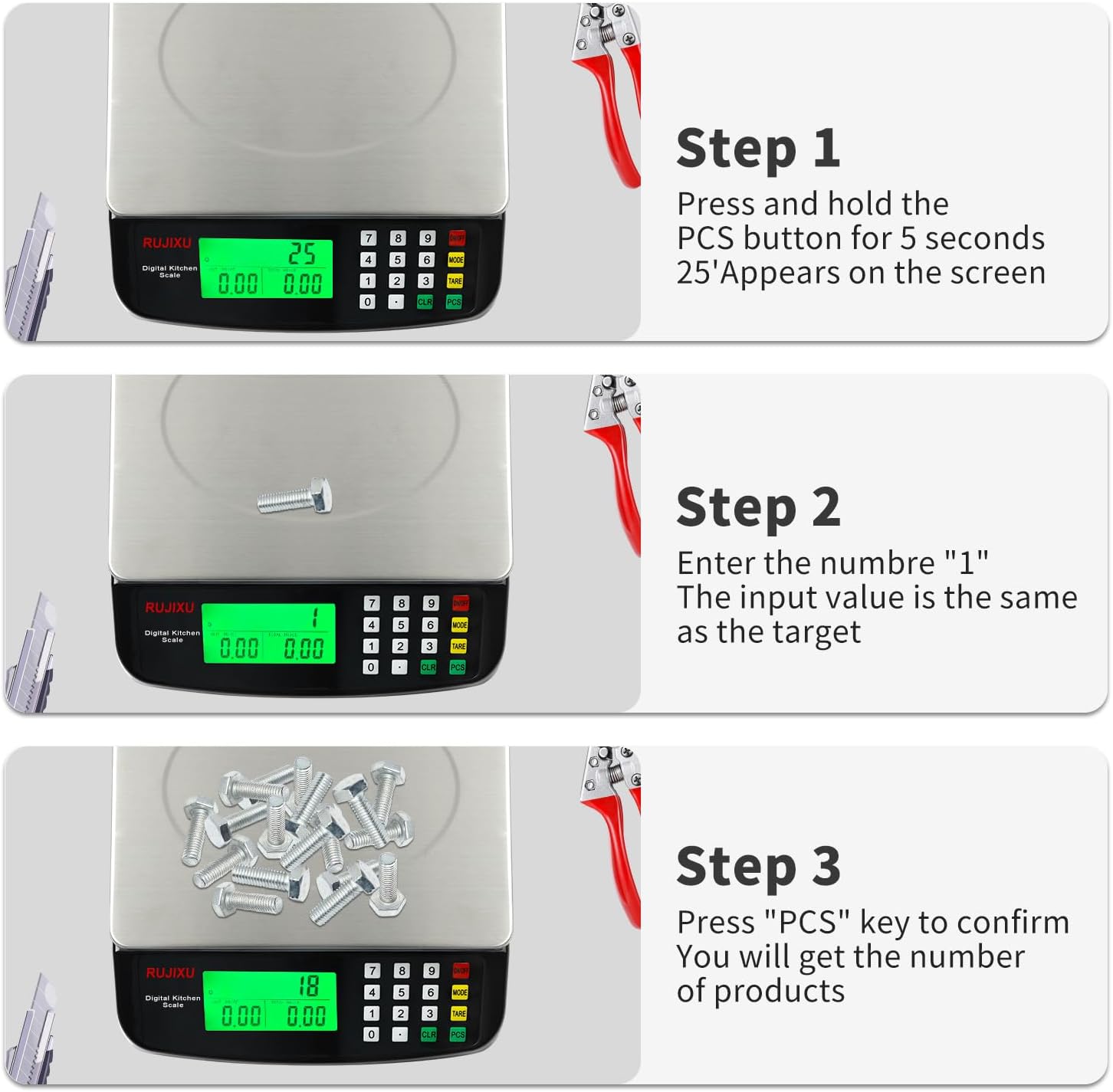
Image 4.3: Counting Function Steps
4.5 Price Computing Function
This function allows you to calculate the total price of items based on their weight and a set unit price.
- Turn on the scale and ensure it reads "0.000".
- Place the item(s) to be weighed on the platform. The scale will display the weight.
- Using the number pad, enter the unit price (e.g., price per KG or LB).
- The scale will automatically calculate and display the total price.

Image 4.4: Price Computing in Use
4.6 자동 꺼짐 기능
To conserve battery life, the scale is equipped with an automatic shut-off feature. If no operation is performed for approximately 120 seconds, the scale will power down.
5. 유지관리
5.1 청소
The stainless steel platform and ABS plastic body are designed for easy cleaning.
- 부드러운 천으로 저울 표면을 닦으세요.amp 옷감.
- For stubborn stains, a mild detergent can be used.
- Do not immerse the scale in water or use abrasive cleaners, as this can damage the electronic components.
- 보관이나 다음 사용 전에 저울이 완전히 건조되었는지 확인하세요.

Image 5.1: Food-Grade Stainless Steel Platform
5.2 보관
Store the scale in a cool, dry place away from direct sunlight and extreme temperatures. If storing for an extended period, remove the batteries to prevent leakage.
6. 문제 해결
- 저울이 켜지지 않습니다:
- Check if the AC adapter is securely plugged in.
- If using batteries, ensure they are inserted correctly with the right polarity and are not depleted. Replace if necessary.
- 부정확한 판독값:
- 저울은 평평하고 안정적이며 수평인 표면에 놓아야 합니다.
- Avoid placing the scale near sources of vibration or drafts.
- Make sure no objects are touching the scale or platform during weighing.
- Recalibrate the scale if possible (refer to specific instructions if available, otherwise, turn off and on).
- Ensure the weight limit (30kg/66lb) is not exceeded.
- 디스플레이가 어둡거나 읽을 수 없음:
- Check battery level if operating on batteries.
- Ensure the scale is not in direct sunlight or extremely bright conditions that might wash out the display. The LCD is designed for full view, but extreme glare can still affect visibility.
- "EEEE" or "O-Ld" error message:
- This indicates an overload. Remove items from the platform immediately to prevent damage.

Image 6.1: Improved LCD Display Visibility
7. 사양
| 특징 | 세부 사항 |
|---|---|
| 제품 모델 | DT-580 |
| 단위 | G, KG, LB, OZ |
| 최대 중량 용량 | 30kg / 66파운드 |
| 최소 중량 | 2g-3g |
| 정밀 측정 | 1g |
| 특징 | Tare function, Price Calculator, Accurate Counting |
| 디스플레이 화면 | 가득한 view LCD display (7.5x3.8cm) |
| 자동 꺼짐 | 120 seconds automatic shut-off when no operation |
| 추천 용도 | Food baking, market business, cooking meal |
| Food Scale Size | 24 × 21.6 × 6.5cm (9.8 x 9 x 2.5인치) |
| Stainless Weighing Surface | 21.6 × 17.5 cm (8.5 x 6.9 inches) |
| 품목 무게 | 1.16kg(2.55파운드) |
| Food Scale Material | ABS 플라스틱과 스테인리스 스틸 |
| 전원 공급 장치 | AC6V Power Adapter, 2x 1.5V AA battery (Batteries not included) |
| 패키지 포함 사항 | 1x Kitchen Scale, 1x Power Adapter, 1x User Manual |

Image 7.1: Product Specifications Table


