1. 서론
This manual provides comprehensive instructions for the setup, operation, and maintenance of your Navihood L3 GPS Bike Computer. The L3 is designed to enhance your cycling experience by providing accurate data tracking, navigation, and connectivity features.

이미지: 앞면 view of the Navihood L3 GPS Bike Computer screen showing speed, altitude, gradient, and power data.
2. 패키지 내용
패키지에 모든 품목이 들어 있는지 확인하세요.
- Navihood L3 GPS Bike Computer
- 자전거 컴퓨터 마운트
- Rubber Bands (for mount installation)
- USB 충전 케이블 (명시적으로 명시되어 있지는 않지만 충전식 기기에 사용됨)
3. 제품 특징
- 2.6" Anti-Glare Screen: Clear visibility in various lighting conditions with automatic backlight.
- IPX7 방수 등급: Designed to withstand rain and wet conditions.
- 정확한 GPS 위치 파악: Utilizes multiple satellite systems (GPS, GLONASS, Galileo, QZSS, Beidou) for fast and precise location tracking.
- ANT+ 및 Bluetooth 5.0 연결: Supports external sensors such as heart rate monitors, speed sensors, cadence sensors, and power meters.
- 사용자 정의 가능한 데이터 표시: Navihood APP allows customization of up to 9 pages with 70 data types.
- 긴 배터리 수명: 한 번 충전으로 최대 35시간 작동 가능.
- 대용량 저장 용량: Stores up to 2500 kilometers of riding data.
- Break-proof Back Base: High-strength aluminum alloy base for secure mounting.
- 인체공학적 버튼: Three buttons for easy operation during rides.
- Night Riding Safety Light: Bright yellow light for enhanced visibility.
- Smart Training Alert Light: Real-time visual feedback on training status (within/exceeded target).

Image: Close-up of the Navihood L3 bike computer showing its break-proof aluminum alloy back base and mounting mechanism.
4. 설정
4.1 장치 장착
- Attach the bike computer mount to your handlebar or stem using the provided rubber bands. Ensure it is securely fastened and positioned for optimal view주고받음.
- Align the Navihood L3 bike computer with the mount and twist it clockwise until it locks into place.

Image: Diagram illustrating the Navihood L3's use of multiple satellite systems (GPS, Galileo, QZSS, GLONASS, Beidou) for accurate positioning.
4.2 초기 전원 켜기 및 GPS 획득
- Press and hold the power button (usually the middle button) to turn on the device.
- For the first use, or after a long period of inactivity, the device may take up to 30 seconds (cold start) to acquire GPS signals. Subsequent starts (warm start) typically take around 2 seconds.
- 당신이 깨끗한 열린 공간에 있는지 확인하십시오 view of the sky for faster GPS acquisition.
4.3 장치 충전
Connect the provided USB charging cable to the charging port on the device and to a standard USB power adapter or computer USB port. A full charge provides up to 35 hours of usage.
5. 사용 설명서
5.1 버튼 기능
The Navihood L3 features three ergonomic buttons located at the bottom of the device:
- 왼쪽 버튼: Typically used for navigating back, canceling, or accessing menus.
- 중간 버튼: Power on/off, start/stop recording, confirm selections.
- 오른쪽 버튼: Navigate forward, scroll through data pages, or confirm selections.
5.2 Screen Display and Customization
The 2.6-inch anti-glare screen displays various cycling data. You can customize the data fields and pages using the Navihood APP.
- Download the "Navihood" APP from your device's app store (Google Play or Apple App Store).
- Pair your L3 bike computer with the app via Bluetooth.
- Within the app, you can customize up to 9 display pages and choose from 70 different data types to show on your device. This includes adding, deleting, moving, or sorting data fields.

Image: Illustration of the Navihood L3's customizable display with 9 pages and various data types, alongside screenshots of the Navihood mobile application for configuration.
5.3 센서 페어링(ANT+ 및 블루투스)
The L3 supports external sensors for more comprehensive data tracking:
- Ensure your external sensor (e.g., heart rate monitor, speed sensor, cadence sensor, power meter) is active and within range of the L3.
- Navigate to the sensor pairing menu on your L3 device (refer to the on-screen prompts or the Navihood APP for specific steps).
- 선택하다 "검색 Sensors" and choose your desired sensor from the list.
- Once paired, the sensor data will be displayed on your customizable screens.
5.4 데이터 동기화 및 공유
After your ride, you can synchronize your data with the Navihood APP and share it with popular cycling platforms:
- Open the Navihood APP on your smartphone and ensure your L3 is connected via Bluetooth.
- The app will automatically sync your ride data.
- From the app, you can upload your activities to platforms like Strava, TrainingPeaks, Komoot, and Google Fit. The device also supports auto-generation of 3D track videos for sharing.
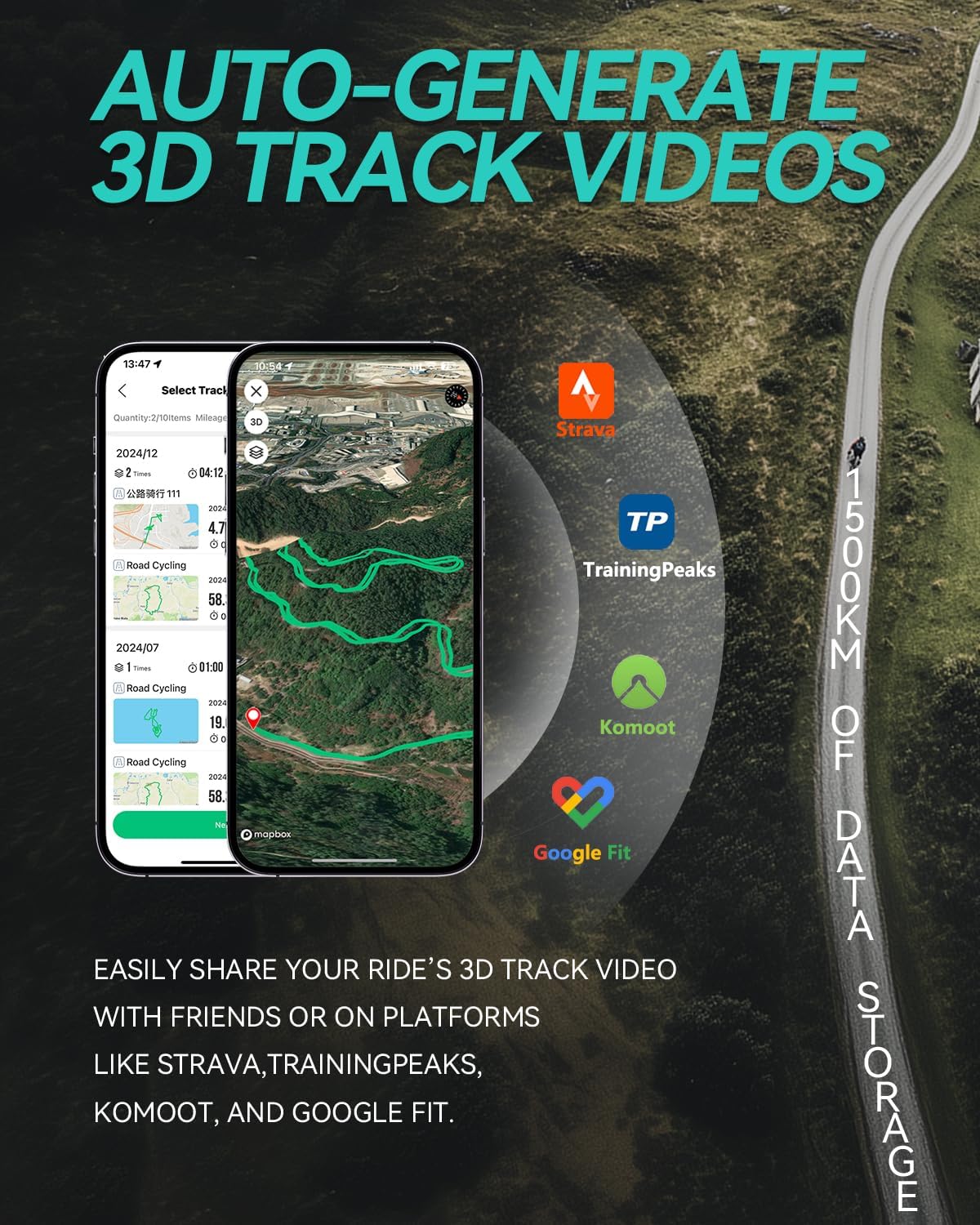
Image: Screenshot of a mobile app displaying a 3D track video of a cycling route, with logos of Strava, TrainingPeaks, Komoot, and Google Fit, indicating data sharing capabilities.
5.5 Smart Training Alerts and Safety Light
- Smart Training Alert Light: The device features an alert light that provides real-time visual feedback on your training status. It can indicate if you are within your target zone (e.g., green light) or have exceeded it (e.g., red light), based on pre-set limits for metrics like heart rate or power.
- Night Riding Safety Light: A bright yellow light is integrated into the device to enhance your visibility to oncoming and side traffic during night rides.

Image: Close-up of the Navihood L3 bike computer showing a green alert light, indicating "within target" for training, with icons for heart rate, speed, cadence, and power.

Image: The Navihood L3 bike computer mounted on a bicycle handlebar during night riding, with its bright yellow safety light illuminated.
6. 유지관리
- 청소: 부드러운 천으로 장치를 닦으십시오. damp 옷감. 연마성 세척제나 용제를 사용하지 마십시오.
- 방수 기능: The device is IPX7 waterproof, meaning it can withstand immersion in up to 1 meter of water for 30 minutes. However, it is not designed for prolonged underwater use. Ensure the charging port cover is securely closed to maintain water resistance.
- 저장: 사용하지 않을 때는 기기를 서늘하고 건조한 곳에 보관하세요. 극한의 온도는 피하세요.
- 배터리 관리 : For optimal battery life, avoid fully discharging the battery frequently. Charge the device regularly, especially if storing it for extended periods.

Image: The Navihood L3 bike computer partially submerged in water, illustrating its IPX7 waterproof capability.
7. 문제 해결
| 문제 | 가능한 해결책 |
|---|---|
| 장치의 전원이 켜지지 않습니다. | 배터리가 충전되어 있는지 확인하세요. 전원에 연결한 후 다시 시도해 보세요. |
| GPS 신호를 수신하지 못했습니다. | 깨끗한 열린 공간으로 이동하세요 view 하늘의. 신호가 잡힐 때까지 몇 분간 기다리세요. |
| External sensor not connecting. | Ensure the sensor is active and its battery is charged. Check if the sensor is within range. Re-attempt pairing through the device's menu or Navihood APP. |
| 앱과 데이터가 동기화되지 않습니다. | Ensure Bluetooth is enabled on your smartphone and the L3. Open the Navihood APP and check for connection. Restart both devices if necessary. |
| Screen is difficult to read. | The screen has an auto-backlight function. Ensure the device is not in direct glare. Adjust display settings via the Navihood APP if available. |
8. 사양
| 특징 | 세부 사항 |
|---|---|
| 모델 | L3 |
| 상표 | 항해 |
| 디스플레이 크기 | 2.6 인치 |
| 디스플레이 유형 | 액정표시장치 |
| 연결성 | 블루투스 5.0, ANT+ |
| GPS 시스템 | GPS, GLONASS, 갈릴레오, QZSS, 베이더우 |
| 방수 등급 | IPX7 |
| 배터리 수명 | 최대 35시간 |
| 데이터 저장 | Up to 2500 KM of riding data |
| 치수 | 8.1 x 4.57 x 2.08cm |
| 무게 | 45g |
| 재료 | ABS (main body), Aluminum Alloy (back base) |

Image: Visual comparison of the Navihood L3 bike computer's thickness (16.3mm) and weight (45g) against a coin and an egg, highlighting its compact design.
9. 보증 및 지원
For warranty information and technical support, please refer to the official Navihood web사이트를 방문하거나 고객 서비스에 직접 문의하세요. 보증 청구에 대비해 구매 증빙 자료로 구매 영수증을 보관하세요.


