1. 제품 오버view
The MageGee LIGHT87 is a versatile 87-key wireless mechanical keyboard designed for gaming and productivity. It features a gasket-mounted structure for a creamy typing sound, hot-swappable switches, vibrant RGB backlighting, and multiple connectivity options including 2.4GHz wireless, Bluetooth 5.0, and USB-C wired mode. It is equipped with an 8000mAh battery and durable side-printed PBT keycaps.

그림 1: 상향식 view of the MageGee LIGHT87 Wireless Mechanical Keyboard, showcasin87키 레이아웃과 RGB 백라이팅이 특징입니다.

그림 2: 이상view of the MageGee LIGHT87's key features, including 8000mAh battery, PBT keycaps, Win/Mac dual system support, gasket mount, 5 layers of silencing foams, 16.8 million RGB backlight, triple mode connection, custom hot-swappable switches, and 87-key anti-ghosting.
2. 패키지 내용
시작하기 전에 패키지에 모든 품목이 들어 있는지 확인하세요.
- MageGee LIGHT87 Wireless Mechanical Keyboard
- USB-C to USB-A 케이블
- 2.4GHz USB 수신기
- 키캡 풀러
- 스위치 풀러
- 사용 설명서 (본 문서)

Figure 3: Contents of the MageGee LIGHT87 keyboard package, including the keyboard, USB cable, keycap puller, switch puller, and user manual.
3. 설정 및 연결
The MageGee LIGHT87 keyboard offers three connection modes: USB-C wired, 2.4GHz wireless, and Bluetooth 5.0.
3.1 키보드 충전
Before first use, it is recommended to fully charge the keyboard. Connect the provided USB-C cable to the keyboard's USB-C port and the other end to a USB power source (e.g., computer USB port, wall adapter). The keyboard features an 8000mAh large-capacity battery.

Figure 4: Illustration of the 8000mAh battery capacity, providing approximately 53 hours with RGB backlight on and 400 hours with RGB backlight off.

Figure 5: Detailed battery life estimates: 53 hours with backlight on, 400 hours with backlight off, and 450 hours of sleep standby time.
3.2 연결 모드
The keyboard supports seamless switching between wired, 2.4GHz, and Bluetooth modes.
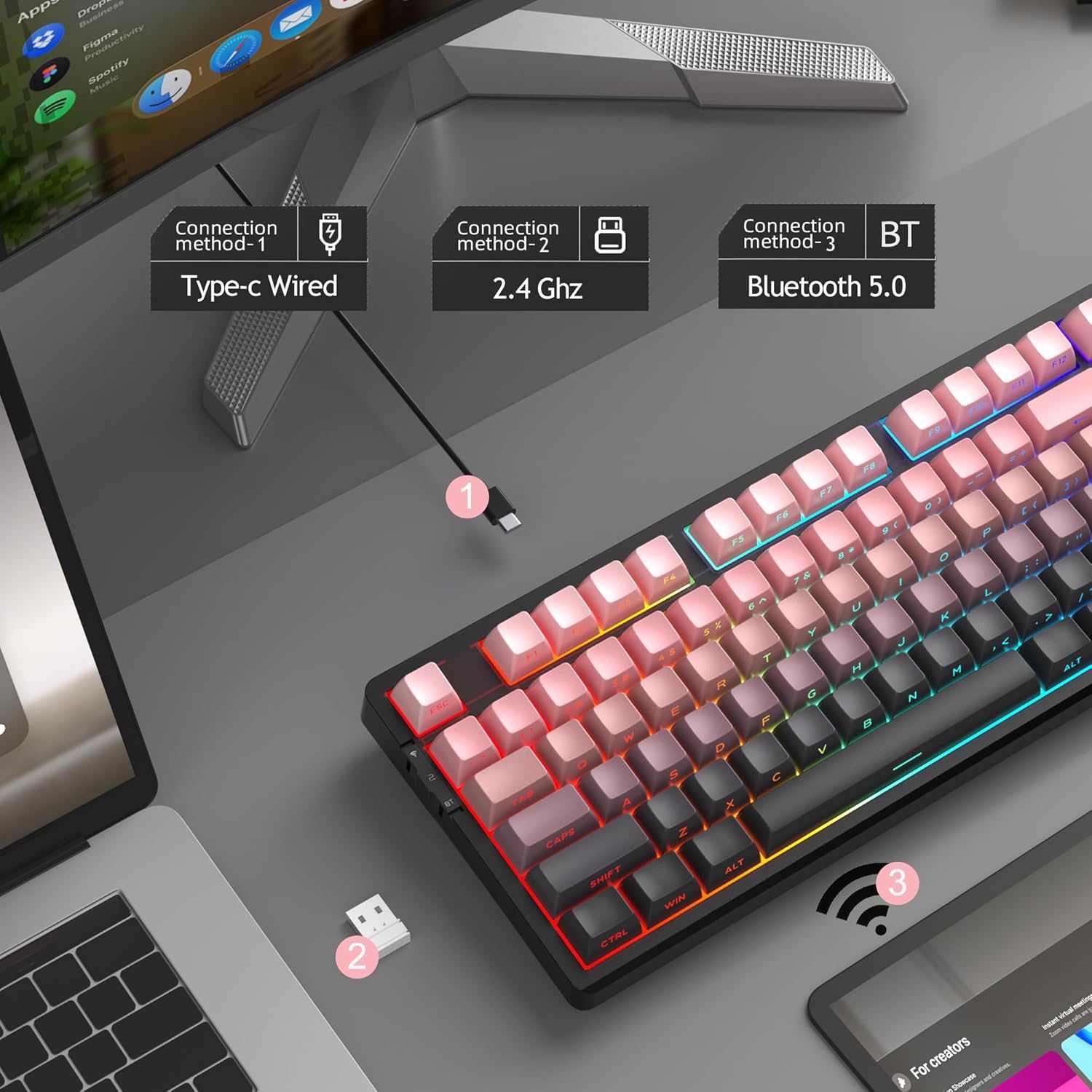
Figure 6: Visual representation of the three connection methods: Type-C Wired, 2.4 GHz Wireless, and Bluetooth 5.0.

Figure 7: Detailed instructions for switching between 2.4GHz, Bluetooth 5.0, and Type-C wired modes using the toggle switch and Fn key combinations.
3.2.1 USB-C 유선 모드
- Connect the USB-C cable to the keyboard and your computer's USB port.
- Toggle the switch on the keyboard to the "2" position (wired mode).
- 키보드는 시스템에서 자동으로 인식됩니다.
3.2.2 2.4GHz 무선 모드
- 2.4GHz USB 수신기를 찾으십시오(일반적으로 키보드의 수납 공간에 보관되어 있습니다).
- USB 수신기를 컴퓨터의 사용 가능한 USB 포트에 연결합니다.
- Toggle the switch on the keyboard to the "wifi" icon position (2.4G wireless mode).
- 누르다 Fn + 4 2.4GHz 모드를 활성화하세요. 키보드가 자동으로 연결될 것입니다.
3.2.3 블루투스 5.0 모드
이 키보드는 최대 3개의 블루투스 장치에 연결할 수 있습니다.
- Toggle the switch on the keyboard to the "BT" position (Bluetooth mode).
- 누르고 있으세요 Fn + 1, Fn + 2, 또는 Fn + 3 for 3-5 seconds to enter pairing mode for the desired channel. The indicator light will flash rapidly.
- On your device (PC, laptop, tablet, smartphone), enable Bluetooth and search for "MageGee LIGHT87".
- 페어링할 키보드를 선택하세요. 연결되면 표시등이 깜빡임을 멈춥니다.
- 페어링된 Bluetooth 장치 간에 전환하려면 간단히 누르세요. Fn + 1, Fn + 2, 또는 Fn + 3.
4. 사용 설명서
4.1 RGB 백라이트 제어
The MageGee LIGHT87 features 16.8 million cool RGB backlight options with various effects.
- Fn + 엔터: Toggle between approximately 20 different backlight modes/effects.
- Fn + ←: Adjust light direction (for certain effects).
- FN + →: Adjust light color (for static modes or color cycling).
- Fn + ↑: 백라이트 밝기를 높입니다.
- Fn + ↓: 백라이트 밝기를 낮춥니다.
- Fn + =+: Increase backlight speed (for dynamic effects).
- Fn + -_: Decrease backlight speed (for dynamic effects).
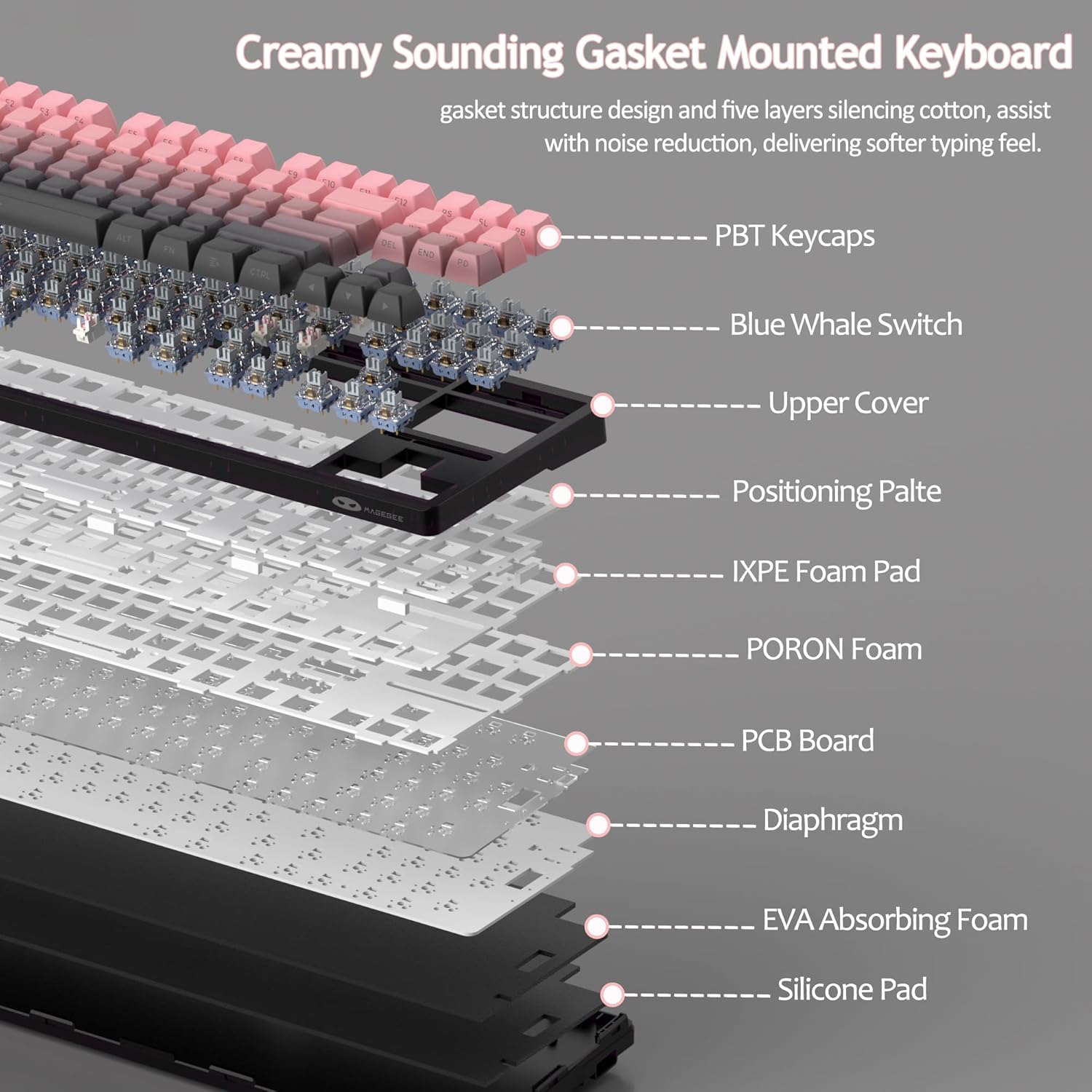
Figure 8: Visual guide to RGB backlight control key combinations.

Figure 9: Table summarizing RGB backlight functions and their corresponding Fn key combinations.
4.2 핫스왑 가능 스위치
The LIGHT87 keyboard features hot-swappable sockets, allowing you to change switches without soldering. It supports both 3-pin and 5-pin mechanical switches. The keyboard comes pre-installed with quiet linear Blue Whale switches.

Figure 10: Diagram illustrating the hot-swappable switch mechanism, showing compatibility with 3-pin and 5-pin switches and the pre-lubed Blue Whale switch.

Figure 11: Specifications of the Blue Whale Switch, including linear type, conduction stroke, total travel, operating force, material, and lifespan.
To Replace Switches:
- 제공된 키캡 제거 도구를 사용하여 키캡을 조심스럽게 제거하십시오.
- 스위치 분리 도구를 사용하여 스위치의 위쪽과 아래쪽 클립을 부드럽게 잡으세요.
- 스위치를 똑바로 위로 당겨 PCB에서 분리합니다.
- 새로운 스위치의 핀을 PCB의 구멍에 맞춥니다.
- Press the new switch firmly into place until it clicks. Ensure it is seated properly and not bent.
- 키캡을 교체하세요.
4.3 Gasket Structure and Sound Damp닝
The LIGHT87 utilizes a gasket-mounted design, which provides a softer, more flexible typing feel and contributes to a "creamy thock" sound profile. Additionally, it incorporates five layers of sound-absorbing foams to effectively reduce noise and improve typing comfort.

그림 12: 폭발 view of the keyboard's internal components, highlighting the gasket structure and various foam layers (IXPE Foam Pad, PORON Foam, EVA Absorbing Foam, Silicone Pad) for sound damp닝.
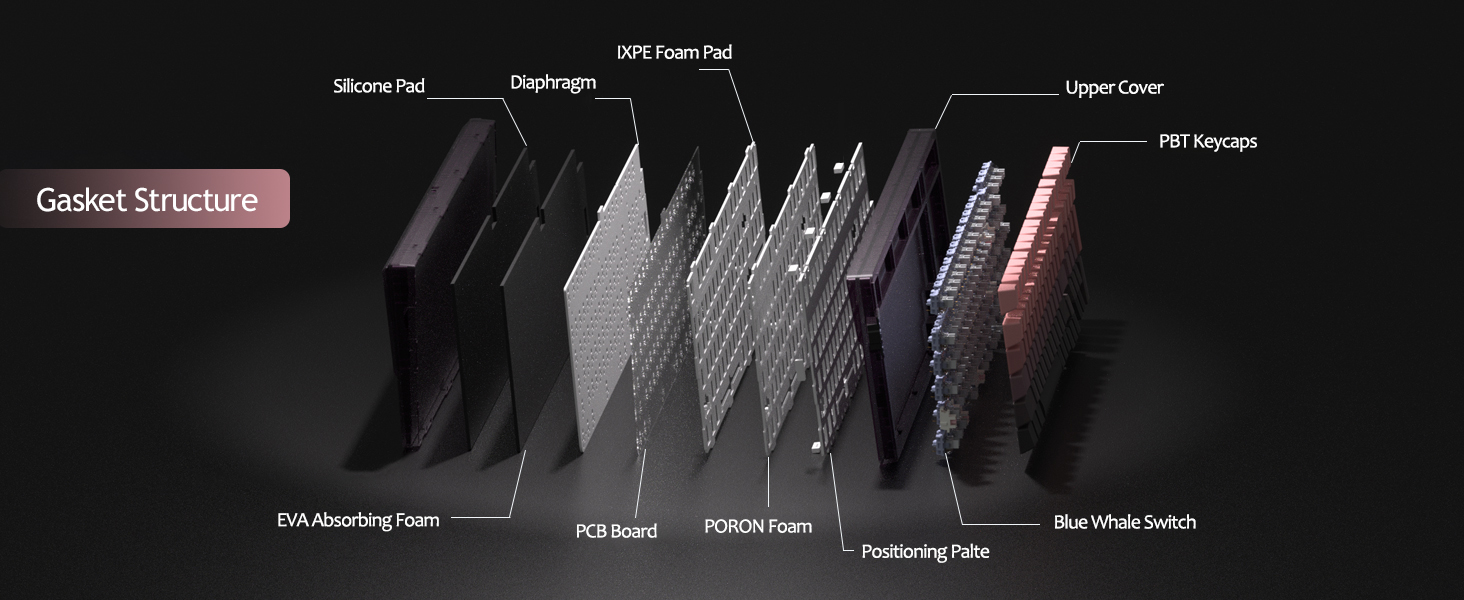
Figure 13: Detailed diagram of the gasket structure, showing how the plate is isolated from the case by gaskets, along with the various foam layers.
4.4 PBT 키캡
The keyboard is equipped with durable PBT keycaps, known for their resistance to shine and wear over time. The legends are side-printed for a clean top surface aesthetic.
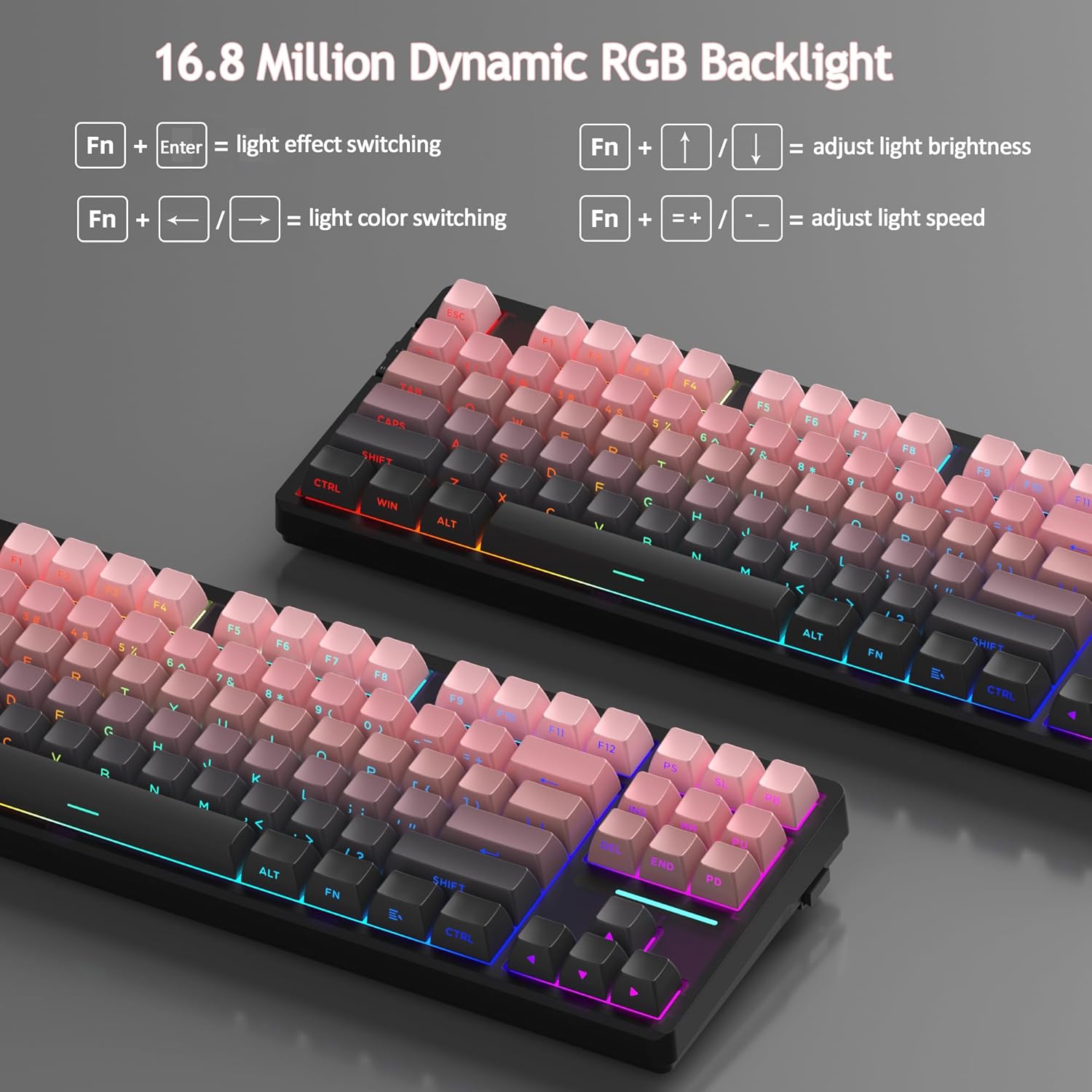
그림 14: 클로즈업 view of the keyboard's side-printed PBT keycaps.
4.5 레이아웃 및 호환성
The LIGHT87 features a compact 80% (TKL) layout with 87 keys, saving desktop space while retaining essential function and arrow keys. It supports both Windows and Mac operating systems, and all 87 keys feature 100% anti-ghosting for accurate input during intense gaming or typing sessions.
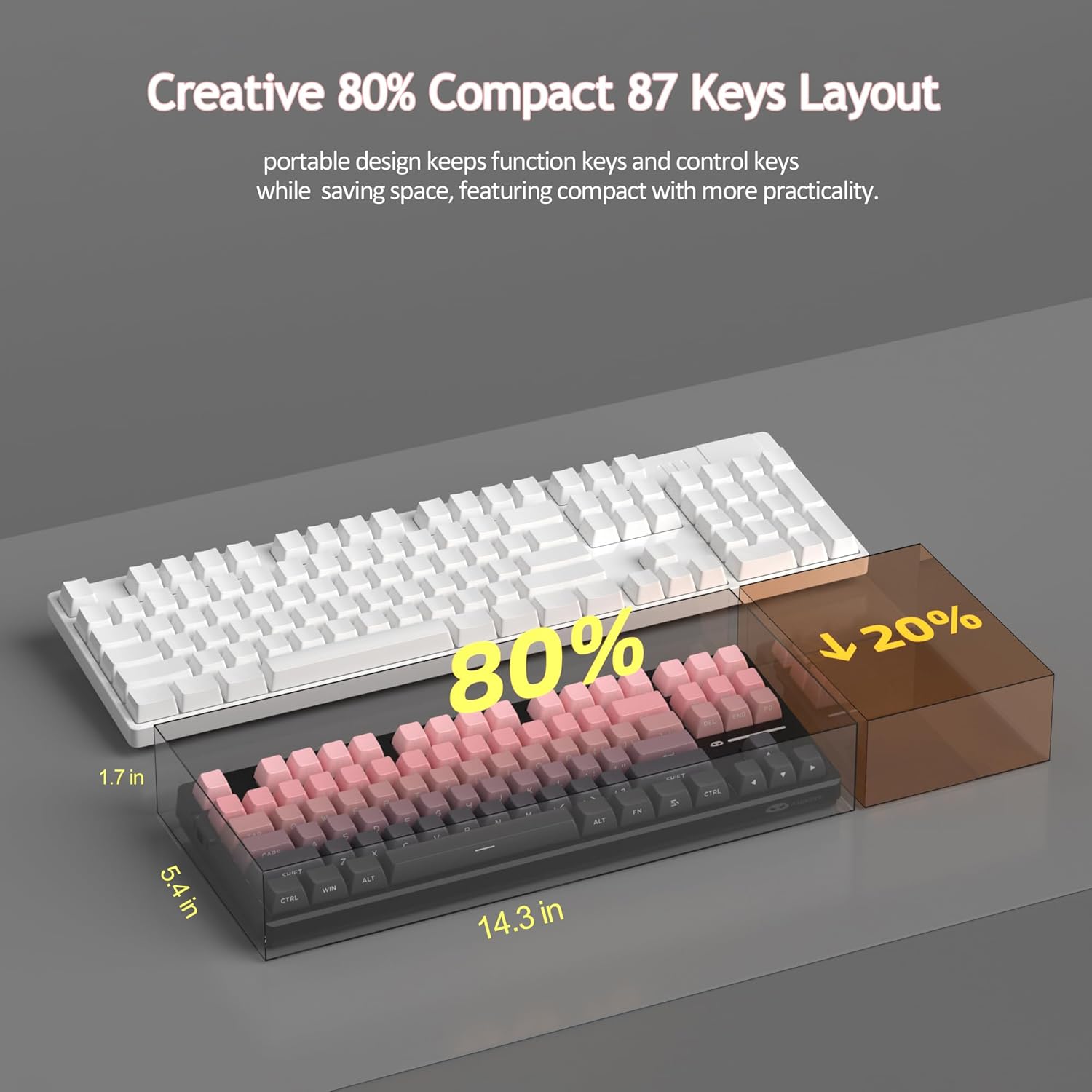
Figure 15: Comparison illustrating the compact 80% layout of the LIGHT87 keyboard compared to a full-size keyboard, highlighting space savings.

Figure 16: The MageGee LIGHT87 keyboard integrated into a desktop setup, demonstrating its use with a computer and monitor.
5. 유지관리
5.1 키보드 청소
To maintain the performance and appearance of your keyboard, regular cleaning is recommended.
- 청소하기 전에 키보드를 컴퓨터에서 분리하세요.
- 부드러운 브러시나 압축 공기를 사용하여 키캡 사이의 먼지와 이물질을 제거하세요.
- For stubborn dirt, you can carefully remove keycaps using the provided keycap puller and clean the surface underneath with a slightly damp, lint-free cloth. Ensure the cloth is not dripping wet.
- Wipe the keycaps and keyboard surface with a dry, soft cloth.
- 강한 화학 물질이나 연마성 세척제를 사용하거나 키보드를 액체에 담그지 마세요.

Figure 17: Image showing keycaps being removed from the keyboard, useful for cleaning or switch replacement.
5.2 키보드 각도 조정
The keyboard features adjustable feet to customize your typing angle for ergonomic comfort.

Figure 18: Image demonstrating the adjustable feet on the underside of the keyboard for tilt customization.

그림 19: 사이드 프로file of the keyboard illustrating its ergonomic keycap profile 편안한 타이핑을 위해.
6. 문제 해결
| 문제 | 가능한 원인 | 해결책 |
|---|---|---|
| 유선 모드에서 키보드가 응답하지 않습니다. | 케이블 연결이 느슨하거나, 모드가 잘못 선택되었거나, USB 포트에 결함이 있습니다. | Ensure USB-C cable is securely connected. Check if the keyboard switch is set to "2" (wired mode). Try a different USB port on your computer. |
| 2.4GHz wireless not connecting. | USB 수신기가 연결되지 않았거나, 모드가 잘못되었거나, 배터리가 부족합니다. | Ensure the 2.4GHz USB receiver is plugged in. Set the keyboard switch to "wifi" icon and press Fn + 4키보드를 충전하세요. |
| Bluetooth pairing failed or connection unstable. | Incorrect pairing procedure, interference, device Bluetooth issues, low battery. | Ensure keyboard switch is set to "BT". Press and hold Fn + 1/2/3 to re-enter pairing mode. Forget the device on your computer/device and re-pair. Move closer to the device. Charge the keyboard. Restart your device's Bluetooth. |
| 백라이트가 작동하지 않거나 멈춰 있습니다. | Backlight turned off, low battery, software glitch. | 누르다 Fn + ↑ to increase brightness. Charge the keyboard. Try cycling through backlight modes with Fn + 엔터. |
| Certain keys not responding. | 스위치가 느슨하거나 결함이 있음, 키캡 아래에 이물질이 있음. | Remove the keycap and check for debris. If hot-swappable, try reseating the switch or replacing it with a known working switch. |
7. 사양
| 특징 | 세부 사항 |
|---|---|
| 모델 | 라이트87 |
| 상표 | 메이지 |
| 연결성 | 2.4GHz 무선, 블루투스 5.0, USB-C 유선 |
| 공들여 나열한 것 | 87-key (80% TKL) |
| 스위치 | Hot-swappable (3-pin/5-pin compatible), Blue Whale Linear Switches |
| 키캡 | Side-printed PBT |
| 백라이트 | 16.8만 RGB |
| 배터리 용량 | 8000mAh |
| 배터리 수명 (RGB 켜짐) | 약 53시간 |
| 배터리 수명 (RGB 끔) | 약 400시간 |
| 호환 장치 | PC, Laptop, Tablet, Smartphone, Gaming Console |
| 운영 체제 지원 | 윈도우, 맥OS |
| 안티 고스팅 | 87개의 키 모두 |
| 치수(패키지) | 15.91 x 7.17 x 2.6 인치 |
| 품목 무게 | 2.72파운드 |
8. 보증 및 지원
MageGee products are designed for reliability and performance. For warranty information and customer support, please refer to the official MageGee web해당 사이트를 이용하거나 구매 플랫폼을 통해 판매자에게 직접 연락하세요.
You can visit the official MageGee store on Amazon for more information and product updates: MageGee 아마존 스토어


