소개
The Pyle PFA560BTEU is a compact and powerful 100W 5.1 channel stereo HiFi amplifier receiver designed to enhance your audio experience. Featuring Bluetooth connectivity for wireless music streaming, an FM radio, and multiple input options, this amplifier delivers acoustically accurate sound reproduction with low distortion. Its user-friendly design includes a digital LED display and intuitive front panel controls, making it an ideal choice for various audio setups.
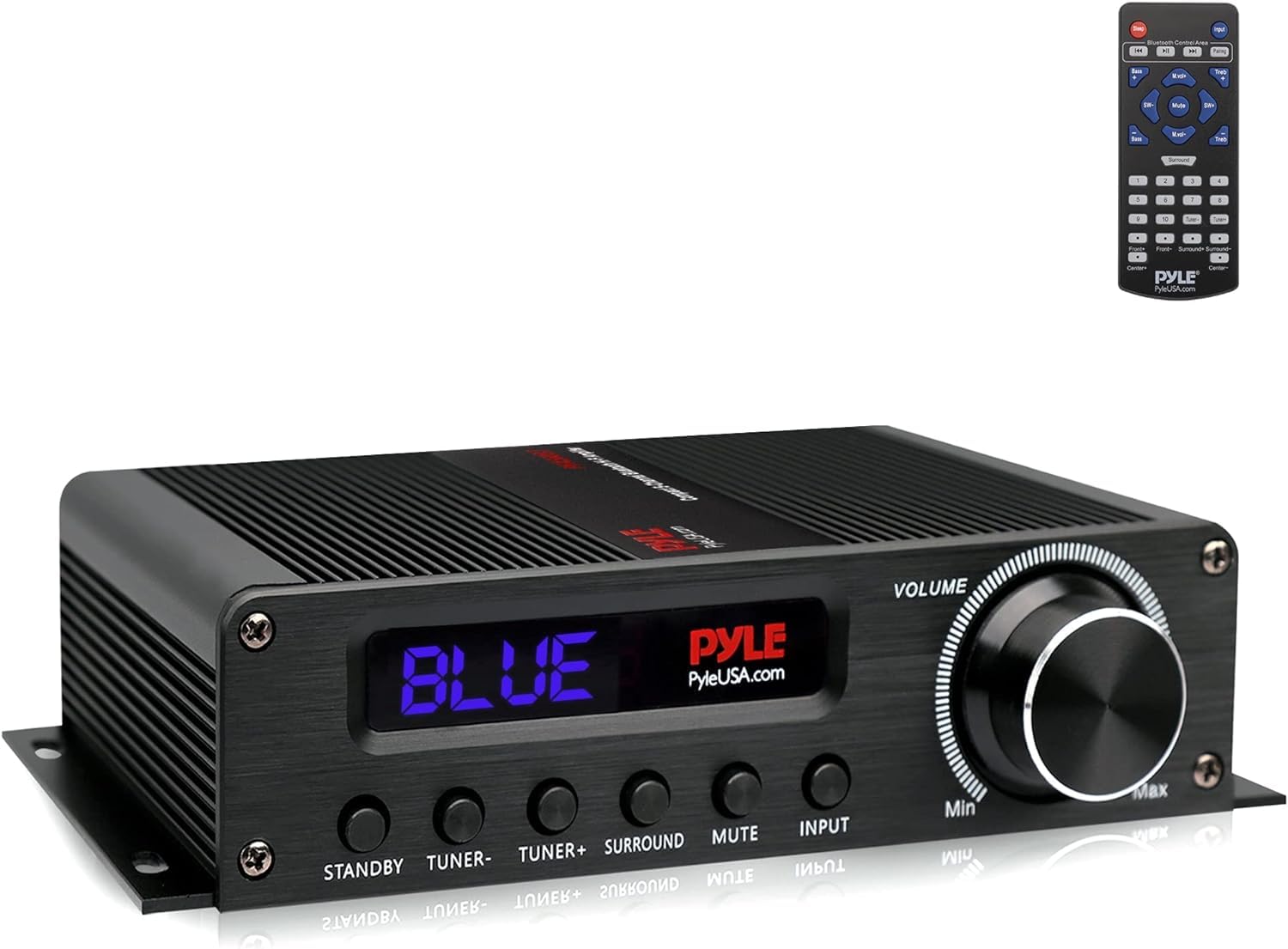
그림 1: 전면 view of the Pyle PFA560BTEU Amp증폭기 수신기.
설정
1. 풀기 및 배치
Carefully remove all components from the packaging. The package should include the Pyle PFA560BTEU amplifier, a remote control, and a 12V power adapter. Place the amplifier on a stable, flat surface, ensuring adequate ventilation around the unit to prevent overheating.
2. 물리적 연결
케이블을 연결하기 전에 다음 사항을 확인하십시오. amplifier is powered off. Refer to the rear panel for all connection ports.
- 스피커 연결: Connect your 5.1 channel speakers to the spring-loaded speaker terminals. Ensure correct polarity (positive to positive, negative to negative) for each speaker. The amplifier supports 5 sets of speaker terminals.
- 오디오 입력 : Connect your audio sources using the available inputs:
- AUX RCA L/R: For standard analog audio devices.
- USB: For digital audio playback from compatible devices.
- 광학(OPT): TV나 게임 콘솔과 같은 디지털 오디오 소스용입니다.
- 서브우퍼 출력: Connect an active subwoofer to the RCA subwoofer output for enhanced bass.
- FM 안테나: Connect the included FM antenna to the designated FM antenna input for radio reception.
- 전원 연결: 12V 전원 어댑터를 연결하세요. amplifier's power input, then plug the adapter into a wall outlet.
The following video demonstrates the physical connections on a similar amplifier model, providing a visual guide for connecting speakers and various audio sources.
비디오 1: 시연 amplifier connections and front panel operation.
3. 전원 켜기
Once all connections are secure, toggle the 'POWER' switch on the front panel to the 'ON' position. The LED display will illuminate, indicating the ampliifier가 작동할 준비가 되었습니다.
작동 지침
1. 입력 선택
Use the 'INPUT' button on the front panel or the remote control to cycle through the available audio sources: Bluetooth (BT), USB, Optical (OPT), Auxiliary (AUX), and FM Radio.
2. 블루투스 페어링
- Select 'BT' as the input source using the front panel button or remote. The Bluetooth indicator on the display will flash.
- 스마트폰, 태블릿 또는 기타 Bluetooth 지원 기기에서 Bluetooth 설정으로 이동합니다.
- 검색 available devices and select 'PyleUSA' from the list.
- Once connected, the Bluetooth indicator on the amplifier will stop flashing and remain solid. You can now stream audio wirelessly from your device.
The PFA560BTEU supports Bluetooth version 4.0 and AVRCP V1.4 protocol for stable and efficient wireless audio transmission.
3. 볼륨 및 톤 조절
- 용량: Adjust the overall sound level using the large 'VOLUME' rotary knob on the front panel or the 'VOL+' and 'VOL-' buttons on the remote control.
- 저음/고음: Use the 'BASS' and 'TREBLE' controls on the front panel or remote to fine-tune the low and high frequencies of your audio.
4. FM 라디오 작동
Select 'FM' as the input source. Use the 'TUNING' buttons on the front panel or remote to scan for radio stations. The digital LED display will show the current frequency.
유지
To ensure the longevity and optimal performance of your Pyle PFA560BTEU amplifier의 경우 다음 유지 관리 지침을 따르세요.
- 청소: 부드럽고 마른 천을 사용하여 외부를 청소하십시오. amplifier. Avoid using liquid cleaners, solvents, or abrasive materials, as these can damage the finish and internal components.
- 통풍: Always ensure that the ventilation openings on the amplifier are clear and unobstructed. Proper airflow is crucial to prevent overheating and maintain stable operation.
- 사용하지 않을 때 전원 끄기: 만약 amp앰프를 장기간 사용하지 않을 경우 전원을 끄고 벽면 콘센트에서 플러그를 뽑는 것이 좋습니다.
문제 해결
If you encounter any issues with your Pyle PFA560BTEU amplifier의 경우 다음의 일반적인 문제 해결 단계를 참조하세요.
- 전원 없음:
- Check if the 12V power adapter is securely connected to both the amp앰프와 작동하는 벽면 콘센트.
- Ensure the 'POWER' switch on the front panel is in the 'ON' position.
- 사운드 출력 없음:
- Verify that the correct input source (BT, USB, OPT, AUX, FM) is selected.
- 양쪽의 볼륨 레벨을 확인하세요 amp앰프와 오디오 소스 장치.
- Ensure all speaker cables are securely connected to the amplifier's speaker terminals and to the speakers, with correct polarity.
- Confirm that audio cables (RCA, Optical) are properly connected between the source and the amp리퍼.
- 블루투스 연결 문제:
- 확인하세요 amplifier's input is set to 'BT'.
- Ensure your Bluetooth device is within range (typically up to 30 meters without obstructions) and has Bluetooth enabled.
- If 'PyleUSA' does not appear in your device's Bluetooth list, try restarting both the amp앰프와 기기.
- 왜곡된 소리:
- 양쪽 모두의 볼륨 레벨을 낮추세요 amp앰프와 오디오 소스.
- Check speaker impedance compatibility (refer to speaker specifications).
- Ensure all audio cables are in good condition and properly connected.
명세서
| 특징 | 사양 |
|---|---|
| 모델 | PFA560BTEU |
| 전력 출력 | 100W (5 x 20W Max) |
| 채널 | 5.1채널 |
| 블루투스 버전 | 4.0 |
| 블루투스 프로토콜 | AVRCP V1.4 |
| 입력 | AUX RCA L/R, USB, Optical, FM Antenna |
| 출력 | Subwoofer RCA, Spring-loaded speaker terminals (5 sets) |
| HDMI Resolution Support | 2160p |
| 전원 공급 장치 | 110/220V (via 12V adapter) |
| 치수(길이 x 너비 x 높이) | 20.3 x 14.7 x 5cm |
| 재료 | Metal and Aluminum |
| 원격 제어 배터리 | (2) AAA batteries (not included) |
보증 및 지원
For detailed warranty information, technical assistance, or customer support regarding your Pyle PFA560BTEU amplifier, please refer to the warranty card or user manual included in your product packaging. You may also visit the official Pyle web최신 지원 자료 및 연락처 정보는 해당 사이트를 참조하십시오. 보증 청구를 위해서는 구매 영수증을 구매 증빙 자료로 보관해 주십시오.


