1. 서론
This manual provides essential information for the installation, operation, and maintenance of your ZOTAC GAMING GeForce RTX 4070 Ti SUPER SOLID OC 16GB graphics card. Please read this manual thoroughly before installation to ensure proper functionality and to prevent damage.

Image 1.1: ZOTAC GAMING GeForce RTX 4070 Ti SUPER SOLID OC 16GB Graphics Card and its retail packaging.
2. 패키지 내용
패키지에 모든 품목이 들어 있는지 확인하세요.
- ZOTAC GAMING GeForce RTX 4070 Ti SUPER SOLID OC 16GB Graphics Card
- GPU 지지대
- 사용자 가이드 (이 문서)
- Power Adapter Cable (if applicable, check your specific model)
3. 시스템 요구 사항
- 16개의 이중 너비 xXNUMX 그래픽 슬롯이 있는 PCI Express 호환 마더보드
- Minimum 750W power supply with three available 8-pin PCIe power connectors (or equivalent 12VHPWR connector)
- Minimum 16GB system memory
- Microsoft Windows 10/11 64-bit or Linux 64-bit operating system
- 드라이버 설치를 위한 인터넷 연결
4. 설치 가이드
4.1. 준비
- 컴퓨터를 끄고 전원 케이블을 분리하십시오.
- 컴퓨터 케이스를 엽니다.
- Ground yourself to discharge any static electricity.
4.2. 그래픽 카드 설치
- 마더보드에서 사용 가능한 PCI Express x16 슬롯을 찾으십시오.
- 컴퓨터 케이스에서 필요한 확장 슬롯 덮개를 제거하십시오.
- Carefully insert the graphics card into the PCIe x16 slot until it is fully seated. Ensure the retention clip locks into place.
- 그래픽 카드를 나사를 사용하여 케이스에 고정하십시오.
- Connect the required power cables from your power supply to the graphics card. This model typically requires three 8-pin PCIe power connectors or a single 12VHPWR connector. Ensure all connections are secure.
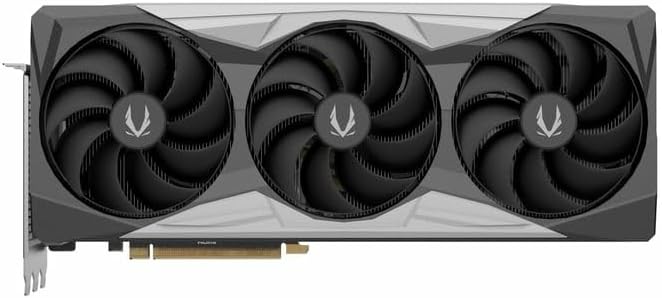
이미지 4.1: 앞면 view 그래픽 카드의 트리플 팬 디자인을 보여줍니다.
4.3. Installing the GPU Support Stand
The included GPU support stand helps prevent sag and provides additional stability for the graphics card. Follow the instructions provided with the stand for proper installation within your PC case.
4.4. Closing the Case and Connecting Peripherals
- 컴퓨터 케이스를 닫습니다.
- Connect your monitor(s) to the display outputs on the graphics card (DisplayPort or HDMI).
- Reconnect the power cable and other peripherals to your computer.

이미지 4.2: 후면 view of the graphics card, showing three DisplayPort outputs and one HDMI output.
5. 사용 설명서
5.1. 드라이버 설치
- 컴퓨터의 전원을 켭니다.
- Once the operating system loads, download the latest graphics drivers from the official NVIDIA web사이트 (www.nvidia.com/drivers) 또는 ZOTAC web사이트 (www.zotac.com/support).
- 화면의 지시에 따라 드라이버 설치를 완료하세요. 시스템을 다시 시작해야 할 수도 있습니다.
5.2. 소프트웨어 유틸리티
ZOTAC provides utilities such as FireStorm for monitoring and adjusting graphics card settings, including fan speed control (Active Fan Control, FREEZE Fan Stop) and performance profiles. These can be downloaded from the ZOTAC web대지.
6. 유지관리
- 먼지 제거: 주기적으로 압축 공기를 사용하여 그래픽 카드 팬과 방열판의 먼지를 청소하십시오. 청소하기 전에 컴퓨터 전원을 끄고 전원 케이블을 뽑으십시오.
- 드라이버 업데이트 : Keep your graphics drivers updated to ensure optimal performance and compatibility.
- 온도 모니터링: Use monitoring software to keep track of the graphics card's temperature during operation. Excessive temperatures can indicate poor airflow or dust buildup.

이미지 6.1: 각도 view of the graphics card, highlighting its robust cooling solution.
7. 문제 해결
- 디스플레이 출력 없음:
- 모니터 케이블이 그래픽 카드와 모니터에 제대로 연결되어 있는지 확인하십시오.
- 그래픽 카드가 PCIe 슬롯에 완전히 장착되었는지 확인하십시오.
- Check that all power cables are properly connected to the graphics card.
- 가능하다면 다른 모니터나 케이블로 테스트해보세요.
- 시스템 불안정 또는 충돌:
- Ensure graphics drivers are correctly installed and up to date.
- Check for adequate power supply capacity.
- 과열을 방지하려면 온도를 모니터링하세요.
- Verify system memory (RAM) stability.
- Fan Noise or Malfunction:
- 팬과 방열판의 먼지를 청소하세요.
- 케이블이 팬 회전을 방해하지 않는지 확인하십시오.
- Use ZOTAC FireStorm utility to check fan speed settings.
8. 사양
| 특징 | 세부 사항 |
|---|---|
| 모델 번호 | ZT-D40730R-10P |
| 그래픽 프로세서 | 엔비디아 지포스 RTX 4070 Ti 슈퍼 |
| 비디오 메모리 | 16GB GDDR6X |
| 메모리 인터페이스 | 256비트 |
| 메모리 클록 | 21000 MHz (Effective) |
| 엔진 시계 | 부스트: 2640MHz |
| 디스플레이 출력 | DisplayPort 1.4a 3개, HDMI 2.1a 1개 |
| HDCP 지원 | 예 |
| 최대 디지털 해상도 | Up to 4K (7680x4320 @60Hz) |
| PCI 익스프레스 | PCI 익스프레스 4.0 x16 |
| 추천 전원 | 750와트 |
| 전원 커넥터 | 1 x 12VHPWR (or 3 x 8-pin PCIe via adapter) |
| 치수(길이x너비x높이) | 16.73 x 11.54 x 3.94인치(대략) |
| 무게 | 2.2파운드(대략) |
| 냉각 시스템 | IceStorm 2.0 Advanced Cooling, Triple 100mm Fans, FREEZE Fan Stop, Active Fan Control |
| 특징 | NVIDIA DLSS 3.5, Ray Tracing, Metal Backplate, GPU Support Stand |
9. 보증 및 지원
자세한 보증 정보는 제품에 동봉된 보증 카드를 참조하거나 ZOTAC 공식 웹사이트를 방문하십시오. website's support section. ZOTAC provides technical support and resources for their products.
- ZOTAC 지원 Web대지: www.zotac.com/support
- 제품 등록 : ZOTAC에 제품을 등록하세요 web보증을 활성화하고 제품 업데이트를 받으려면 이 사이트를 이용하세요.


