1. 서론
The M5Stack M5StickC PLUS2 is a compact and versatile IoT development kit, featuring the ESP32-PICO-V3-02 chip. Designed for rapid prototyping and integration into various projects, it offers robust BLE and WiFi connectivity, making it ideal for applications in IIoT, home automation, smart retail, and STEM education. This manual provides essential information for setting up, operating, and maintaining your M5StickC PLUS2 device.

Figure 1.1: M5StickC PLUS2 Development Kit with Watch Accessories. The image displays the main M5StickC Plus2 unit, a USB-C cable, a watch strap, and two types of mounting brackets (Wall and Brick).
2. 패키지 내용
패키지에 모든 품목이 들어 있는지 확인하세요.
- 1 x M5StickC PLUS2 Unit
- 1 x Watch Strap
- 1 x USB-C Cable (50cm)
- 1 x WALL Mounting Bracket
- 1 x BRICK Mounting Bracket

Figure 2.1: Detailed breakdown of M5StickC PLUS2 Watch Kit components. Labels indicate M5StickC Plus2, USB-C 50CM cable, Watch Belt, BRICK mount, WALL mount, and key internal components like ESP32-PICO-V3-02, 8M FLASH, 2M PSRAM, CH9102, MPU6886, RTC BM8563, ST7789V2-1.14" display, built-in buzzer, IR transmitter, 200mAh battery, and SPM1423-PDM MIC.
3. 설정
3.1 초기 충전
Before first use, fully charge the M5StickC PLUS2 using the provided USB-C cable. Connect the cable to the device's USB-C port and the other end to a standard USB power adapter (5V @ 500mA recommended) or a computer's USB port. The device has a 200mAh battery.
3.2 컴퓨터에 연결하기
To program or configure the M5StickC PLUS2, connect it to your computer using the USB-C cable. You may need to install appropriate drivers (e.g., CP210X or CH9102 drivers, depending on the specific USB-to-serial chip) for your operating system to recognize the device.
3.3 소프트웨어 설정
The M5StickC PLUS2 supports various development environments, including Arduino IDE, MicroPython (UIFlow), and ESP-IDF. Refer to the official M5Stack documentation for detailed instructions on setting up your preferred development environment and flashing firmware.
- 아두이노 IDE: ESP32 보드 패키지와 M5Stack 라이브러리를 설치하세요.
- UIFlow (MicroPython): Use the M5Burner tool to flash the UIFlow firmware, then program via the UIFlow web IDE(개발환경).
- ESP-IDF: For advanced users, follow Espressif's ESP-IDF setup guide.
4. Operating the M5StickC PLUS2
4.1 기본 작업
The M5StickC PLUS2 features a 1.14-inch TFT screen and multiple buttons for interaction. The exact functionality of these buttons and the display will depend on the firmware loaded onto the device.
- 전원 켜기/끄기: Typically, a long press of the main button (usually the side button) will power the device on or off.
- 항해: Short presses of the buttons can be used for menu navigation or triggering specific functions as defined by your program.
4.2 연결성
The device supports Wi-Fi and Bluetooth Low Energy (BLE) for wireless communication.
- 와이파이: Connect to local Wi-Fi networks to access the internet, communicate with cloud services, or create a local web 섬기는 사람.
- 블루투스/BLE: Establish connections with other Bluetooth-enabled devices for data exchange or control.
4.3 Wearable Use
With the included watch accessories, the M5StickC PLUS2 can be worn as a wrist device, enabling portable IoT applications and data collection.

Figure 4.1: M5StickC PLUS2 configured as a wearable device. The image shows the device attached to the orange watch strap and worn on a person's wrist, demonstrating its compact size and portability.

Figure 4.2: Wearable Devices application. This image emphasizes the M5StickC PLUS2's small size and low power consumption, making it suitable for wearable technology.
4.4 응용 시나리오
The M5StickC PLUS2 is versatile and can be used in various applications:
- Sports Activity Monitoring: Utilize its sensors (e.g., MPU6886 6-axis IMU) for tracking movement.
- IoT 컨트롤러: Act as a central hub or node in smart home or industrial IoT systems.
- DIY 작품 만들기: A flexible platform for custom electronic projects and rapid prototyping.

Figure 4.3: Scope of Application for M5StickC PLUS2. The image illustrates three primary uses: Sports Activity Monitoring (person tying shoelaces), IoT Controller (smart building), and DIY Creation (electronic components on a breadboard).
5. 유지관리
To ensure the longevity and optimal performance of your M5StickC PLUS2, follow these maintenance guidelines:
- 청소: 부드럽고 마른 천을 사용하여 기기를 닦으세요. 액체나 연마성 세제는 사용하지 마세요.
- 저장: 본 기기는 직사광선과 극한의 온도를 피해 시원하고 건조한 곳에 보관하세요.
- 배터리 관리 : Do not expose the battery to high temperatures or puncture it. If the device will not be used for an extended period, charge it to about 50% before storing.
- 물리적 손상 방지: Protect the device from drops, impacts, and excessive force.
- 펌웨어 업데이트: M5Stack 공식 웹사이트를 정기적으로 확인하세요. web펌웨어 업데이트 사이트를 통해 최신 기능과 버그 수정 사항을 확인하세요.
6. 문제 해결
If you encounter issues with your M5StickC PLUS2, try the following troubleshooting steps:
- 장치 전원이 켜지지 않음:
- Ensure the battery is charged. Connect to a power source and wait a few minutes.
- 다른 USB-C 케이블이나 전원 어댑터를 사용해 보세요.
- 컴퓨터가 장치를 인식하지 못합니다:
- Install the necessary USB-to-serial drivers (e.g., CP210X or CH9102).
- 컴퓨터의 다른 USB 포트를 사용해 보십시오.
- Ensure the USB-C cable supports data transfer, not just charging.
- 펌웨어 업로드 실패:
- IDE에서 올바른 보드와 포트가 선택되었는지 확인하십시오.
- 다른 애플리케이션이 시리얼 포트를 사용하고 있지 않은지 확인하십시오.
- Try holding the boot button (if applicable) while initiating the upload.
- Wi-Fi/Bluetooth 연결 문제:
- Check your code for correct Wi-Fi credentials or Bluetooth pairing procedures.
- Ensure the device is within range of the Wi-Fi router or Bluetooth device.
- Restart the M5StickC PLUS2 and the target network/device.
- 화면이 표시되지 않음:
- 장치의 전원이 켜져 있는지 확인하십시오.
- Verify that your program is correctly initializing and writing to the display.
For more detailed troubleshooting or specific technical support, please visit the official M5Stack documentation or community forums.
7. 사양

Figure 7.1: M5StickC PLUS2 Technical Specifications. This image presents a table detailing the resources and parameters of the device, including MCU, Flash, PSRAM, Power input, Buttons, MEMS, Buzzer, and Battery.
| 특징 | 매개변수 |
|---|---|
| 상표 | M5스택 |
| 모델명 | M5StickC 플러스2 |
| MCU | ESP32-피코-V3-02 |
| 플래시 | 8메가바이트 |
| PSRAM | 2메가바이트 |
| 표시하다 | 1.14-inch TFT (ST7789V2) |
| 아이무 | MPU6886 (6-Axis) |
| 실시간 | BM8563 |
| 부저 | 내장형 |
| IR 송신기 | 예 |
| 마이크로폰 | SPM1423-PDM MIC |
| 배터리 | 200mAh @ 3.7V (Nonstandard Battery) |
| 전원 입력 | 5V @ 500mA (USB-C) |
| 연결성 | Wi-Fi, Bluetooth, BLE, HY2.0-4P, 8P@2.54mm |
| 품목 무게 | 2.39 온스 |
| 패키지 크기 | 4.88 x 2.6 x 0.91 인치 |
| 원산지 | 중국 |
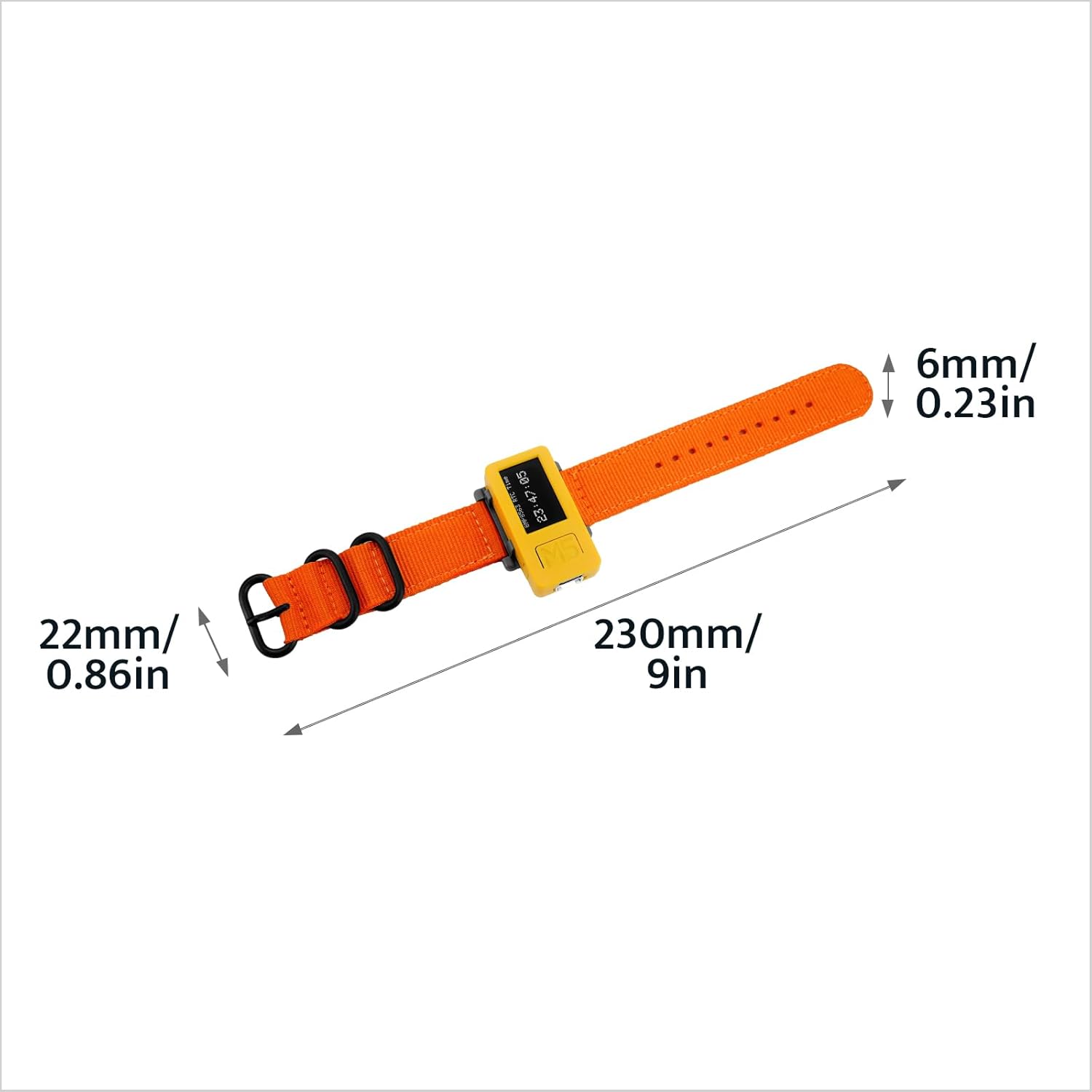
Figure 7.2: Watch Strap Dimensions. The image shows the watch strap with measurements: 6mm/0.23in width, 22mm/0.86in buckle width, and 230mm/9in total length.

Figure 7.3: M5StickC PLUS2 Weight. The device, attached to its watch strap, is shown on a digital scale displaying a weight of 28.8 grams.
8. 보증 및 지원
M5Stack products typically come with a standard manufacturer's warranty. For specific warranty terms and conditions, please refer to the official M5Stack web사이트를 방문하거나 고객 지원팀에 문의하세요.
For technical support, documentation, and community forums, please visit the official M5Stack resources:
- Official M5Stack Web대지: www.m5stack.com
- M5Stack Store on Amazon: Visit M5Stack Store
M5Stack is committed to providing modular, open-source IoT development solutions, empowering innovation and rapid prototyping.


